
页面布局 Wrap 组件 和 RaisedButton按钮
**

    Wrap({

    Key key,

    this.direction = Axis.horizontal,//主轴(mainAxis)的方向,默认为水平。

    this.alignment = WrapAlignment.start,//主轴方向上的对齐方式,默认为start。

    this.spacing = 0.0,//主轴方向上的间距。

    this.runAlignment = WrapAlignment.start,//run的对齐方式。run可以理解为新的行或者列,如果是水平方向布局的话,run可以理解为新的一行。

    this.runSpacing = 0.0,//run的间距。

    this.crossAxisAlignment = WrapCrossAlignment.start,//交叉轴(crossAxis)方向上的对齐方式。

    this.textDirection,//文本方向。

    this.verticalDirection = VerticalDirection.down,//定义了children摆放顺序,默认是down,见Flex相关属性介绍。

    List<Widget> children = const <Widget>[],//

    })

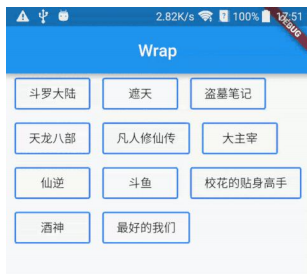
 */
案例代码一
return Container(
  child: Wrap(
    children: <Widget>[
      Container(margin: EdgeInsets.all(5), width: 100, height: 30, decoration: BoxDecoration(color: Colors.red),),
      Container(margin: EdgeInsets.all(5), width: 100, height: 30, decoration: BoxDecoration(color: Colors.red),),
      Container(margin: EdgeInsets.all(5), width: 100, height: 30, decoration: BoxDecoration(color: Colors.red),),
      Container(margin: EdgeInsets.all(5), width: 100, height: 30, decoration: BoxDecoration(color: Colors.red),),
      Container(margin: EdgeInsets.all(5), width: 100, height: 30, decoration: BoxDecoration(color: Colors.red),),
      Container(margin: EdgeInsets.all(5), width: 100, height: 30, decoration: BoxDecoration(color: Colors.red),)
    ],
  ),
);
案例代码 二
class HomenCenter extends StatelessWidget {
  Widget build(BuildContext context) {
    // TODO: implement build
    return Wrap(
      spacing: 5,
      children: <Widget>[
        MyButton('按钮1'),
        MyButton('按钮1'),
        MyButton('按钮1'),
        MyButton('按钮1'),
        MyButton('按钮1'),
        MyButton('按钮1'),
        MyButton('按钮1'),
      ],
    );
  }
}

class MyButton extends StatelessWidget {
  final text;
  MyButton(this.text);
  @override
  Widget build(BuildContext context) {
    // TODO: implement build
    return RaisedButton (
      child: Text(this.text),
      color: Colors.red,
      textColor: Colors.white,
      onPressed: () {},
    );
  }
}
页面布局 Wrap 组件 和 RaisedButton按钮的更多相关文章
- 13Flutter页面布局 Wrap组件
/* Flutter页面布局Wrap组件: Wrap可以实现流布局,单行的Wrap跟Row表现几乎一致,单列的Wrap则跟Row表现几乎一致. 但Row与Column都是单行单列的.Wrap则突破了这 ...
- 常用到的html页面布局和组件: 自己用
1. 用div当作圆 <div style="border: 1px solid blue;height: 100px; width: 100px; border-radius: 20 ...
- 【Flutter学习】页面布局之基础布局组件
一,概述 Flutter中拥有30多种预定义的布局widget,常用的有Container.Padding.Center.Flex.Row.Colum.ListView.GridView.按照< ...
- Flutter——Wrap组件(流式布局)
Wrap 可以实现流布局,单行的 Wrap 跟 Row 表现几乎一致,单列的 Wrap 则跟 Row 表现几乎一致.但 Row 与 Column 都是单行单列的,Wrap 则突破了这个限制,mainA ...
- 046——VUE中组件之使用动态组件灵活设置页面布局
<!DOCTYPE html> <html lang="en"> <head> <meta charset="UTF-8&quo ...
- 11Flutter页面布局 Stack层叠组件 Stack与Align Stack与Positioned实现定位布局
/* Flutter 页面布局 Stack层叠组件: Stack与Align Stack与Positioned实现定位布局: Flutter Stack组件: Stack表示堆得意思,我们可以用Sta ...
- 10Flutter页面布局 Padding Row Column Expanded组件详解:
Padding组件: main.dart import 'package:flutter/material.dart'; import 'res/listData.dart'; /* flutter页 ...
- 《React后台管理系统实战 :二》antd左导航:cmd批量创建子/目录、用antd进行页面布局、分离左导航为单独组件、子路由、动态写左导航、css样式相对陷阱
一.admin页面布局及路由创建 0)cmd批量创建目录及子目录 //创建各个目录,及charts和子目录bar md home category product role user charts\b ...
- Flutter 布局类组件:流式布局(Wrap和Flow)
前言 把超出屏幕显示范围会自动折行的布局称为流式布局.Flutter中通过Wrap和Flow来支持流式布局,将Row换成Wrap后溢出部分则会自动折行. Wrap 接口描述 Wrap({ Key ke ...
随机推荐
- javascript增强typeof 对复杂类型的判断
js中有六种数据类型,包括五种基本数据类型(Number,String,Boolean,Undefined,Null),和一种复杂数据类型(Object). typeof 由于js中的变量是松散类型的 ...
- JS 获取当天所在月的第一天的日期,最后一天日期,所在周的每天的日期,时间,所在每月日期,时间的计算
/** * 获取当天所在月的最后一天日期,和下一个月的第一天日期 * 调用getMonthDay(d), d默认值为01,d为要设置成的day: */ const getMonthMaxDay = ( ...
- Lombok(浅看,自用)
Lombok 首先是几个常用的注解(最常用到的方法,超简单的用) @Data @AllArgsConstructor @NoArgsConstructor public class Trial_Pro ...
- asp.net使用wsdl文件调用接口,以及调用SSL接口报错“根据验证过程 远程证书无效”的处理
1.调用wsdl接口,首先需要将wsdl文件转换为cs文件: 进入VS 开发人员命令提示行,输入如下命令: c:/Program Files/Microsoft Visual Studio 8/VC& ...
- S3C2440之存储控制器学习记录
/==========翻译S3C2440存储控制器部分================/ 5 存储控制器 概述 S3C2440内存控制器为外部存储访问提供内存控制信号. S3C2440A有如下特征: ...
- Android开发实战——记账本(2)
开发日志(2)——Bean目录以及数据库 首先编写一些自己生成的数据进行测试,看一下能否显示在模拟器上.那前提就是先写出bean目录,这和之前学的Javaweb步骤差不多.bean目录有三个变量事件. ...
- 516,base64的原理及优缺点
优点是可以加密,减少了http请求 缺点是需要消耗cpu进行编解码 适用于小图片 base的体积约为原图的4/3
- 【网易官方】极客战记(codecombat)攻略-地牢-轰轰
关卡连接: https://codecombat.163.com/play/level/pong-pong 挑战:使用迄今为止学到的所有编程技巧编写最短的解决方案! 简介: 单挑,这是特殊的挑战关卡! ...
- WIN10 设置WEB
Web服务器搭建步骤(Win10) 1.在“开始”菜单处打开“控制面板”. 2点击“程序”. 3.点击“启动或关闭Windows功能”. 4.对“Internet Information Servic ...
- openfeign 使用方法和执行流程
1.用法 1.1引入依赖 <!-- feign client --> <dependency> <groupId>org.springframework.cloud ...