
SpringBoot系列之自定义starter实践教程
SpringBoot系列之自定义starter实践教程
Springboot是有提供了很多starter的,starter翻译过来可以理解为场景启动器,所谓场景启动器配置了自动配置等等对应业务模块的一个工程,有需要时候直接引入项目就可以,比如需要使用rabbitMQ,直接引入spring-boot-starter-activemq既可,详细介绍可以参考Springboot官方文档关于starters的介绍
查看官方文档,可以找到如下的命名规范:
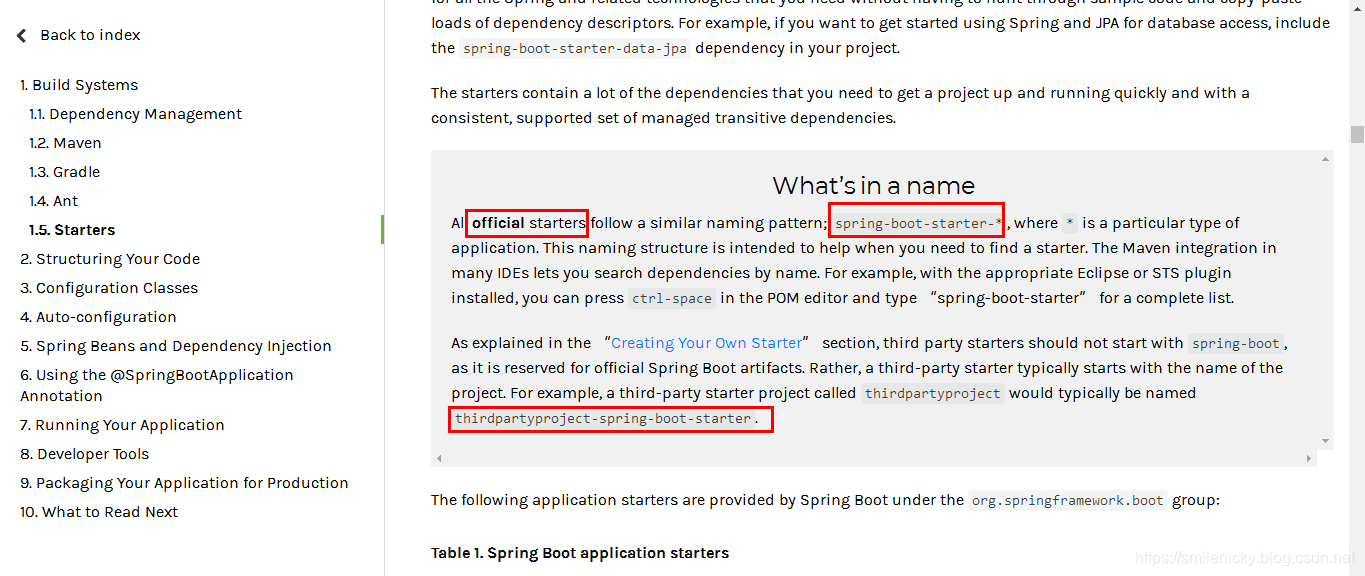
其意思是SpringBoot官方的starter命名要定义为spring-boot-starter-*,自定义或者说第三方的要命名为thirdpartyproject-spring-boot-starter
- 官方命名空间
- 前缀:“spring-boot-starter-”
- 模式:spring-boot-starter-模块名
- 举例:spring-boot-starter-web、spring-boot-starter-actuator、spring-boot-starter-jdbc
- 自定义命名空间
- 后缀:“-spring-boot-starter”
- 模式:模块-spring-boot-starter
- 举例:mybatis-spring-boot-starter
ok,SpringBoot是可以自定义一些starter来使用的,可以用于方便项目开发,本博客以例子的方式介绍:
新建一个没有过多依赖的SpringBoot工程,spring-boot-starter必须引入,其它的可以Junit可以去掉,application类等等都不用,建议先新建一个Empty project,再引入对应配置的方式进行工程创建
pom.xml参考:
<?xml version="1.0" encoding="UTF-8"?>

<project xmlns="http://maven.apache.org/POM/4.0.0" xmlns:xsi="http://www.w3.org/2001/XMLSchema-instance"

         xsi:schemaLocation="http://maven.apache.org/POM/4.0.0 https://maven.apache.org/xsd/maven-4.0.0.xsd">

    <modelVersion>4.0.0</modelVersion>

    <parent>

        <groupId>org.springframework.boot</groupId>

        <artifactId>spring-boot-starter-parent</artifactId>

        <version>2.2.1.RELEASE</version>

        <relativePath/> <!-- lookup parent from repository -->

    </parent>

    <groupId>com.example.springboot</groupId>

    <artifactId>custom-spring-boot-starter-autoconfigurer</artifactId>

    <version>0.0.1-SNAPSHOT</version>

    <name>custom-spring-boot-starter-autoconfigurer</name>

    <description>Demo project for Spring Boot</description>

    <properties>

        <java.version>1.8</java.version>

    </properties>

    <dependencies>

        <dependency>

            <groupId>org.springframework.boot</groupId>

            <artifactId>spring-boot-starter</artifactId>

        </dependency>

    </dependencies>

</project>
模仿其它starter,新建Properties配置类
package com.example.springboot.starter;

import org.springframework.boot.context.properties.ConfigurationProperties;

@ConfigurationProperties(prefix = "custom.hello")

public class HelloProperties {

    private String prefix;

    private String suffix;

    public String getPrefix() {

        return prefix;

    }

    public void setPrefix(String prefix) {

        this.prefix = prefix;

    }

    public String getSuffix() {

        return suffix;

    }

    public void setSuffix(String suffix) {

        this.suffix = suffix;

    }

}
编写业务测试类:
package com.example.springboot.starter.service;

import com.example.springboot.starter.HelloProperties;

public class HelloService {

    HelloProperties helloProperties;

    public HelloProperties getHelloProperties() {

        return helloProperties;

    }

    public void setHelloProperties(HelloProperties helloProperties) {

        this.helloProperties = helloProperties;

    }

    public String sayHello(String name){

        return helloProperties.getPrefix()+"-"+name+helloProperties.getSuffix();

    }

}
编写自定义的自动配置类:
package com.example.springboot.starter;

import com.example.springboot.starter.service.HelloService;

import org.springframework.beans.factory.annotation.Autowired;

import org.springframework.boot.autoconfigure.condition.ConditionalOnWebApplication;

import org.springframework.boot.context.properties.EnableConfigurationProperties;

import org.springframework.context.annotation.Bean;

import org.springframework.context.annotation.Configuration;

/**

 * <pre>

 *  自定义的自动配置类

 * </pre>

 *

 * <pre>

 * @author nicky.ma

 * 修改记录

 *    修改后版本:     修改人:  修改日期: 2020/01/02 14:31  修改内容:

 * </pre>

 */

@Configuration

@ConditionalOnWebApplication

@EnableConfigurationProperties(HelloProperties.class)

public class HelloServiceAutoConfiguration {

    @Autowired

    HelloProperties helloProperties;

    @Bean

    public HelloService helloService(){

        HelloService helloService = new HelloService();

        helloService.setHelloProperties(helloProperties);

        return helloService;

    }

}
必须新建META-INF/spring.factories,然后加入如下配置,自动配置类才可以被扫描到,具体原因可以参考我之前的源码学习笔记:Springboot源码学习专栏
org.springframework.boot.autoconfigure.EnableAutoConfiguration=\

  com.example.springboot.starter.HelloServiceAutoConfiguration
example比较简单,starter就创建好了,接着需要新建一个web工程来实践,如图maven配置,引入custom-spring-boot-starter-autoconfigurer依赖
<dependencies>

		<dependency>

			<groupId>org.springframework.boot</groupId>

			<artifactId>spring-boot-starter-web</artifactId>

		</dependency>

		<dependency>

			<groupId>com.example.springboot</groupId>

			<artifactId>custom-spring-boot-starter-autoconfigurer</artifactId>

			<version>0.0.1-SNAPSHOT</version>

		</dependency>

	</dependencies>
新建一个接口测试一下即可:
@Autowired

    HelloService helloService;

@GetMapping(value = {"/sayHello/{name}"})

    @ResponseBody

    public String sayHello(@PathVariable("name")String name){

        return helloService.sayHello(name);

    }
运行项目后,返回链接即可:http://localhost:8082/web/sayHello/testname
例子代码下载:github下载链接
SpringBoot系列之自定义starter实践教程的更多相关文章
- SpringBoot系列之RabbitMQ使用实用教程
SpringBoot系列之RabbitMQ使用实用教程 @ 目录 1. 消息队列概述 1.1 MQ的概述 1.2 MQ目的地形式 2. 消息队列实现方式 2.1 常见MQ框架 2.2 MQ实现方式 3 ...
- SpringBoot系列之日志框架使用教程
目录 1.SpringBoot日志级别 1).日志级别简介 2).默认日志级别 3).配置日志级别 4).日志分组设置 2.SpringBoot日志格式设置 1).默认格式原理简介 2).默认日志格式 ...
- Spring-Boot自定义Starter实践
此文已由作者王慎为授权网易云社区发布. 欢迎访问网易云社区,了解更多网易技术产品运营经验. disconf-spring-boot-starter 使用方法: 引入maven依赖: <depen ...
- SpringBoot系列之集成Dubbo示例教程
一.分布式基本理论 1.1.分布式基本定义 <分布式系统原理与范型>定义: "分布式系统是若干独立计算机的集合,这些计算机对于用户来说就像单个相关系统" 分布式系统(d ...
- SpringBoot 系列 - 自己写starter
原文地址: https://www.xncoding.com/2017/07/22/spring/sb-starter.html 前言: Spring Boot由众多Starter组成,随着版本的推移 ...
- SpringBoot学习(2) - 自定义starter
自己开发一个spring boot starter的步骤1.新建一个项目(全部都基于maven),比如新建一个spring-boot-starter-redis的maven项目 pom.xml: &l ...
- SpringBoot系列之快速创建项目教程
本博客简介一下SpringBoot快速创建工程的方法,主要介绍一下Spring Initializer,Spring Initializer是IntelliJ IDEA才集成的一种快速创建Spring ...
- SpringBoot使用AutoConfiguration自定义Starter
https://segmentfault.com/a/1190000011433487
- SpringBoot系列之从入门到精通系列教程
对应SpringBoot系列博客专栏,例子代码,本博客不定时更新 Spring框架:作为JavaEE框架领域的一款重要的开源框架,在企业应用开发中有着很重要的作用,同时Spring框架及其子框架很多, ...
随机推荐
- 11-1 css属性选择器
一 基础选择器 标签选择器:选择的标签的‘共性’,而不是特性 div{}.ul{}.ol{}.form{} 类选择器:.box{} id选择器:#box{} 只能选择器的特性,主要是为了js *通配符 ...
- java根据年月获取当前月的每一天日期
public static List<String> getDayByMonth(int yearParam,int monthParam){ List list = ne ...
- @topcoder - SRM697D1L3@ ConnectedStates
目录 @description@ @solution@ @accepted code@ @details@ @description@ 有n个城市,每个城市有个权值wi,任意两个城市i,j之间的道路数 ...
- Getting started with the basics of programming exercises_3
1.编写一个程序删除每个输入行末尾的空格及制表符并删除完全是空白符的行 #include<stdio.h> #define MAXLINE 1000 // maximum input li ...
- python -- 类中--内置方法
isinstance 和 issubclass isinstance(obj,b) 检查是否obj是否是类b的对象 class A(object):pass class B(A):pass b=B ...
- hdu 3805 Triangle Conjecture
Problem - 3805 题意是给出边的长度的,求出边长相等的三角形,输出任意一种答案.边长是1~n的数,每个只能用一次. 其实比较容易可以看出,无论我们怎么操作,只要保持边长总和都是相邻整数就是 ...
- JS iFrame 加载慢怎么解决
在项目中经常要动态添加iframe,然后再对添加的iframe进行相关操作,有时候会遇到iframe加载很慢什么原因呢,该如何解决呢?带着这个问题一起通过本文学习,寻找答案吧! aaa.html &l ...
- Error: Cannot find module 'webpack/bin/config-yargs' 报错原因, webpack@4.X踩的坑~
1 .使用webpack@4.32.2时, 当我通过package.json的script去执行webpack-dev-server时, 报以下错误: Error: Cannot find modu ...
- python命令之m参数
在命令行中使用python时,python支持在其后面添加可选参数. python命令的可选参数有很多,例如:使用可选参数h可以查询python的帮助信息: 可选参数m 下面我们来说说python命令 ...
- uni-app学习记录03-路由跳转
<template> <view class="content"> <!-- v-show是相对于display: none --> <v ...