
Cisco Umbrella WLAN
Cisco Umbrella WLAN在域名系统(DNS)级别提供云交付网络安全服务,可自动检测已知和紧急威胁。
此功能允许您在实际恶意攻击之前阻止托管恶意软件,僵尸网络和网络钓鱼的站点。
Cisco Umbrella WLAN提供:
- 单点的每用户组策略配置。
- 对每个网络,每个组,用户,设备或IP地址的策略配置。
策略优先级顺序:
1、Local policy
2、AP group
3、WLAN
- 可视化安全活动仪表板,实时汇总报告。
- 安排并通过电子邮件发送报告。
- 最多支持60个内容类别,并提供添加自定义白名单和黑名单条目的功能。
此功能在以下方案中不起作用:
1、如果应用程序或主机直接使用IP地址,而不是使用DNS来查询域名。
2、如果客户端连接到Web代理,但未发送DNS查询以解析服务器地址。
配置准备:
你需要拥有Cisco Umbrella的账户。
你应该有Cisco Umbrella 的API token 。
配置步骤:
GUI配置:


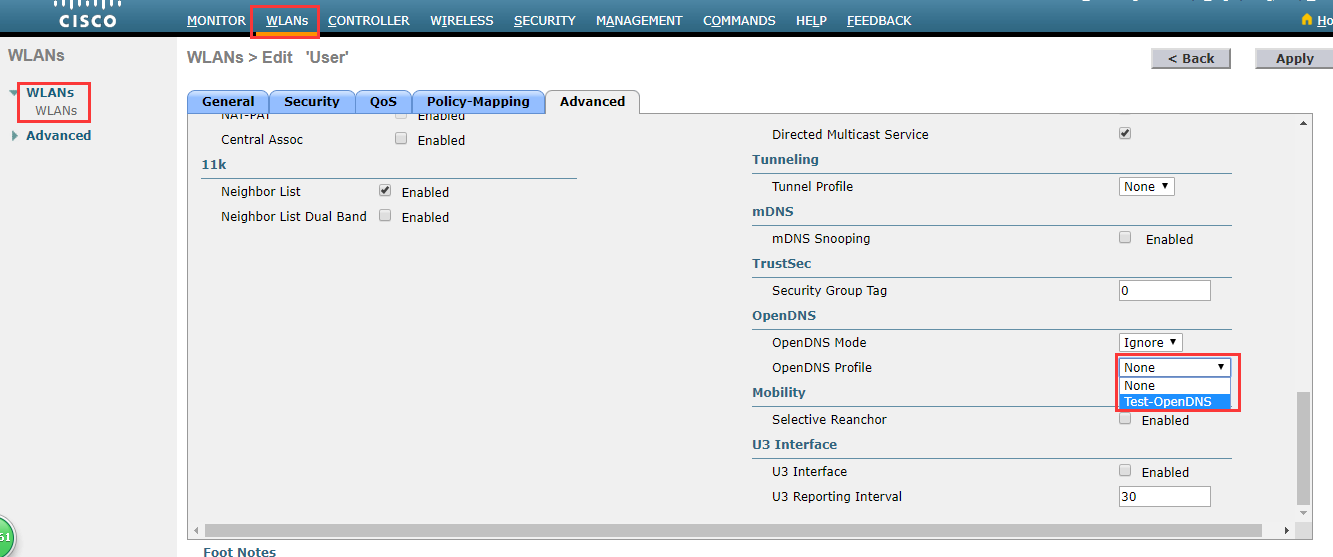
上面是关联WLAN,也可以关联AP-Group
To map the profile to an AP group, choose WLANs > Advanced > AP Groups, select the corresponding AP group, click the WLAN tab, and mouse over the blue button and select OpenDNS Profile.
To view OpenDNS mapping, choose Security > OpenDNS > General and click the Profile Mapped Summary hyperlink.
| Note |
Each Cisco Umbrella profile will have a unique openDNS-Identity generated on the controller (in the format WLC name _profile name). This will be pushed to the associated Cisco Umbrella account in the cloud. |
What to do next
From Cisco Umbrella Dashboard, verify that your Cisco WLC shows up under Device Name, along with their identities
Create classification rules for the user roles, for example, rules for employees and nonemployees.
Configure policies on the Cisco Umbrella server.
CLI配置:
| Step 1 |
config network dns serverip server-ip Example:Configures the DNS server IP address of the network. |
| Step 2 |
config opendns enable Example:Enables the Cisco Umbrella global configuration. |
| Step 3 |
config opendns api-token api-token Example:Registers the Cisco Umbrella API token on the network. |
| Step 4 |
config opendns profile create profilename Example:Creates an Cisco Umbrella profile that can be applied over a WLAN. |
| Step 5 |
config wlan opendns-profile wlan-id profile-name enable Example:Applies the Cisco Umbrella profile to a WLAN. |
| Step 6 |
config wlan apgroup opendns-profile wlan-id site-name profile-name enable Example:(Optional) Applies the Cisco Umbrella profile to an AP group with the WLAN. |
| Step 7 |
config policy policy-name create Example:Creates a policy name. In Cisco WLC, policy is generic term that specifies a rule and the associated action when that rule criteria is met for given client. You can create policy and have rule on that by saying if the rolename from AAA server comes as employee take an action to apply Cisco Umbrella profile associated to that policy. Cisco Umbrella profile is applied to the client if the WLAN of that client is mapped for this policy. |
| Step 8 |
config policy policy-name action opendns-profile-name enable Example:Attaches the policy name to the Cisco Umbrella profile. |
接下来:
在opendns.com中配置策略。
根据每个配置文件的类别配置粒度策略以阻止站点(配置文件列为标识)。
为每个配置文件添加白名单和黑名单规则
Configuring Local Policies for Cisco Umbrella (GUI)
When mapped to local policy, the Cisco Umbrella allows for a granular differentiated user browsing experience based on dynamic evaluation of attributes (user role, device type, and so on).
Use this procedure to configure user role based local policy and tie the corresponding Cisco Umbrella profile to it. This procedure also provides information about how to map a local policy to a WLAN.
Procedure
| Step 1 |
Choose Security > Local Policies > New. This opens the new policy creation page.
|
| Step 2 |
From the policies listed under Policy List, choose a Policy Name to configure the Cisco Umbrella profile.
|
| Step 3 |
Choose WLAN > WLAN ID > Policy Mapping.
|
Cisco Umbrella WLAN的更多相关文章
- http://www.secrepo.com 安全相关的数据获取源
来自:http://www.secrepo.com Network MACCDC2012 - Generated with Bro from the 2012 dataset A nice datas ...
- Cisco 的基本配置实例之六----常排错命令--关闭提示
TEST#terminal monitor # 排除网络故障以前,请打开这一命令以便实时的接收到交换机的提示信息. TEST# TEST#sh run #显示所有的配置清单,可将这些配置保存成文本作为 ...
- 计算机网络实验八实验报告——应用Packet Tracer 5.0模拟器工具对WLAN进行配置
计算机网络实验八实验报告 一.实验目的 1.熟练使用Packet Tracer 5.0模拟器: 2.应用Packet Tracer 5.0模拟器工具对WLAN进行配置. 二.实验环境 一台PC机. 模 ...
- Cisco无线控制器配置Radius
使用Cisco无线控制器管理AP,配置Radius服务器,用于企业加密wifi的认证. 结合上一篇文档进行操作: http://www.cnblogs.com/helloworldtoyou/p/80 ...
- WLAN 802.11 a/b/g PHY Specification and EDVT Measurement V
Receive Minimum Input Level (Sensitivity) 测试方法: Receiver Adjacent Channel Rejection (ACR) -For IEEE8 ...
- Cisco路由技术基础知识详解
第一部分 请写出568A的线序(接触网络第一天就应该会的,只要你掐过,想都能想出来) .网卡MAC地址长度是( )个二进制位(16进制与2进制的换算关系,只是换种方式问,不用你拿笔去算) A.12 ...
- 802.1X与Cisco基于身份的网络服务(IBNS)
Cisco基于身份的网络服务(Identity-Based Networking Services,IBNS)是一种以IEEE802.1X标准为基础的安全架构,具有认证.用户策略.访问控制等多种功能, ...
- Cisco AP-Flexconnect配置结果
一个部署Flexconnect AP(印度)注册到远端WLC(上海)的例子:1.连接AP的交换机接口的配置: nterface GigabitEthernet0/4switchport access ...
- CISCO VLAN ACL
对于cisco VLAN ACL 首先得定义 standard ACL或 extented ACL用于抓取流量 注意这里的抓取流量不是最终的对流量的操作,而是决定什么样的流量用VLAN ACL 来处理 ...
随机推荐
- EAC3 enhanced channel coupling
Enhanced channel coupling是一种spatial coding 技术,在传统的channel coupling的基础上添加了phase compensation, de-corr ...
- SRAM速度提升思路及方法
SRAM总体分为两大部分,一部分是存储阵列,另一部分是外围辅助电路.提高SRAM工作速度从这两大方面着手. ·存储阵列 对于存储阵列,首先可以通过降低工艺节点,以达到提高器件本身速度,从而提高整体SR ...
- Maven安装与学习
一.安装 1.下载http://maven.apache.org/download.cgi 2.选择zip格式 安装完后解压到某一位置(E:\xitong\major\apache-maven-3.6 ...
- Bugku-CTF之本地包含( 60)
Day36
- python 实现 md文档自动编号
目录 1. 原理 2. 运行方法 3. 效果 4. 代码 1. 原理 正则匹配对相应字符串进行替换 2. 运行方法 python md_convert.py [a.md, b.md,...] # 转换 ...
- 2019南昌网络赛 hello 2019
这道题和一道2017,2016的类似. A string t is called nice if a string “2017” occurs in t as a subsequence but a ...
- VS2015生成代码图
熟悉代码调用流程,可以在调试结束前显示代码图,操作位置: 比如开源的caffe_ocr的代码图:
- IDE - IDEA - tab - 方法相关的移动
1. 概述 标题可能会改 一个 tab 里方法相关的操作 2. 前提 以默认的模式编辑 tab 对我来说, 就关掉 vim 插件 3. 操作 1. 查看文件结构 概述 唤出当前文件的 结构 唤出后可以 ...
- 红帽RHCE培训-课程3笔记内容2
9 NFS 9.1 NFS基础 目标 .使用NFS将文件系统连接到客户端,并使用IP 地址控制访问 .使用NFS将文件系统连接到客户端,并使用kerberos 来控制访问 .配置用户名和密码控制访问的 ...
- word写文档体会
1.找一个文档规范要求. 2.根据文档的规范要求调整正文的格式,标题1的格式,标题2的格式,标题3的格式,图表的格式,把没用的那些格式都删除掉. 3.图注表注后空格一行. 4.设置页眉页脚. 5.生成 ...