
Importing data in R 1
Importing data in R 学习笔记1
flat files:CSV
# Import swimming_pools.csv correctly: pools

pools<-read.csv("swimming_pools.csv",stringsAsFactors=FALSE)
txt文件
read.delim("name.txt",header=TRUE)

转化为table

# Path to the hotdogs.txt file: path

> path <- file.path("data", "hotdogs.txt")

>

> # Import the hotdogs.txt file: hotdogs

> hotdogs <- read.table(path,

                        sep = "\t",

                        col.names = c("type", "calories", "sodium"))

>

> # Call head() on hotdogs

> head(hotdogs)

  type calories sodium

1 Beef      186    495

2 Beef      181    477

3 Beef      176    425

4 Beef      149    322

5 Beef      184    482

6 Beef      190    587
tibble:简单数据框
read_对比read.
前者产生一个简单的数据框,并且会展示每一列的数据类型
packages:readr
read_csv()
读入csv格式
read_csv and read_tsv are special cases of the general read_delim. They're useful for reading the most common types of flat file data, comma separated values and tab separated values, respectively. read_csv2 uses ; for separators, instead of ,. This is common in European countries which use , as the decimal separator
read_tsv
读入txt格式
> # readr is already loaded

>

> # Column names

> properties <- c("area", "temp", "size", "storage", "method",

                  "texture", "flavor", "moistness")

>

> # Import potatoes.txt: potatoes

读入数据并指定行名

> potatoes<-read_tsv("potatoes.txt",col_names=properties)

Parsed with column specification:

cols(

  area = col_integer(),

  temp = col_integer(),

  size = col_integer(),

  storage = col_integer(),

  method = col_integer(),

  texture = col_double(),

  flavor = col_double(),

  moistness = col_double()

)

> col_names=properties

>

> # Call head() on potatoes

> head(potatoes)

# A tibble: 6 x 8

   area  temp  size storage method texture flavor moistness

  <int> <int> <int>   <int>  <int>   <dbl>  <dbl>     <dbl>

1     1     1     1       1      1     2.9    3.2       3

2     1     1     1       1      2     2.3    2.5       2.6

3     1     1     1       1      3     2.5    2.8       2.8

4     1     1     1       1      4     2.1    2.9       2.4

5     1     1     1       1      5     1.9    2.8       2.2

6     1     1     1       2      1     1.8    3         1.7
read_delim()
# Column names

> properties <- c("area", "temp", "size", "storage", "method",

                  "texture", "flavor", "moistness")

>

> # Import potatoes.txt using read_delim(): potatoes

> potatoes <- read_delim("potatoes.txt", delim = "\t", col_names = properties)

Parsed with column specification:

cols(

  area = col_integer(),

  temp = col_integer(),

  size = col_integer(),

  storage = col_integer(),

  method = col_integer(),

  texture = col_double(),

  flavor = col_double(),

  moistness = col_double()

)

>

> # Print out potatoes

> potatoes

# A tibble: 160 x 8

    area  temp  size storage method texture flavor moistness

   <int> <int> <int>   <int>  <int>   <dbl>  <dbl>     <dbl>

 1     1     1     1       1      1     2.9    3.2       3

 2     1     1     1       1      2     2.3    2.5       2.6

 3     1     1     1       1      3     2.5    2.8       2.8

 4     1     1     1       1      4     2.1    2.9       2.4

 5     1     1     1       1      5     1.9    2.8       2.2

 6     1     1     1       2      1     1.8    3         1.7

 7     1     1     1       2      2     2.6    3.1       2.4

 8     1     1     1       2      3     3      3         2.9

 9     1     1     1       2      4     2.2    3.2       2.5

10     1     1     1       2      5     2      2.8       1.9

# ... with 150 more rows
data.table()
fread
make up some column names itself
more convenience
 # Import columns 6 and 8 of potatoes.csv: potatoes

> potatoes<-fread("potatoes.csv",select=c(6,8))

>

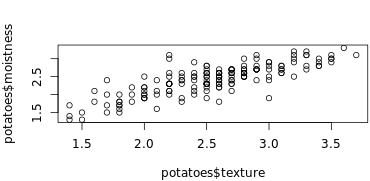
> # Plot texture (x) and moistness (y) of potatoes

> plot(potatoes$texture,potatoes$moistness)
readxl
excel_sheets()
library(readxl)

# Print the names of all worksheets

excel_sheets("urbanpop.xlsx")
# Read all Excel sheets with lapply(): pop_list

pop_list<- lapply(excel_sheets("urbanpop.xlsx"),

                      read_excel,

                      path = "urbanpop.xlsx")

# Display the structure of pop_list

str(pop_list)
read_excel()
# Import the second sheet of urbanpop.xlsx, skipping the first 21 rows: urbanpop_sel

urbanpop_sel <- read_excel("urbanpop.xlsx", sheet = 2, col_names = FALSE, skip = 21)

# Print out the first observation from urbanpop_sel

urbanpop_sel[1,]
gdata
read.xls()
读入xls格式的数据
# Column names for urban_pop

> columns <- c("country", paste0("year_", 1967:1974))

>

> # Finish the read.xls call

> urban_pop <- read.xls("urbanpop.xls", sheet = 2,

                        skip = 50, header = FALSE, stringsAsFactors = FALSE,

                        col.names = columns)

>

> # Print first 10 observation of urban_pop

> head(urban_pop,n=10)

              country   year_1967   year_1968   year_1969   year_1970

1              Cyprus   231929.74   237831.38   243983.34   250164.52

2      Czech Republic  6204409.91  6266304.50  6326368.97  6348794.89

3             Denmark  3777552.62  3826785.08  3874313.99  3930042.97

4            Djibouti    77788.04    84694.35    92045.77    99845.22

5            Dominica    27550.36    29527.32    31475.62    33328.25

6  Dominican Republic  1535485.43  1625455.76  1718315.40  1814060.00

7             Ecuador  2059355.12  2151395.14  2246890.79  2345864.41

8               Egypt 13798171.00 14248342.19 14703858.22 15162858.52

9         El Salvador  1345528.98  1387218.33  1429378.98  1472181.26

10  Equatorial Guinea    75364.50    77295.03    78445.74    78411.07

     year_1971   year_1972   year_1973   year_1974

1    261213.21   272407.99   283774.90   295379.83

2   6437055.17  6572632.32  6718465.53  6873458.18

3   3981360.12  4028247.92  4076867.28  4120201.43

4    107799.69   116098.23   125391.58   136606.25

5     34761.52    36049.99    37260.05    38501.47

6   1915590.38  2020157.01  2127714.45  2238203.87

7   2453817.78  2565644.81  2681525.25  2801692.62

8  15603661.36 16047814.69 16498633.27 16960827.93

9   1527985.34  1584758.18  1642098.95  1699470.87

10    77055.29    74596.06    71438.96    68179.26
getSheets()
查看一个excel文件有多少的sheet,输出每个sheet的名字
XLConnect
loadWorkbook()
主要是加载excel文件
When working with XLConnect, the first step will be to load a workbook in your R session with loadWorkbook(); this function will build a "bridge" between your Excel file and your R session.
library("XLConnect")

>

> # Build connection to urbanpop.xlsx: my_book

> my_book<-loadWorkbook("urbanpop.xlsx")

>

> # Print out the class of my_book

> class(my_book)

[1] "workbook"

attr(,"package")

[1] "XLConnect"
readWorksheet()
读取excel文件
所以顺序肯定是先加载再读取啊。
# Import columns 3, 4, and 5 from second sheet in my_book: urbanpop_sel

urbanpop_sel <- readWorksheet(my_book, sheet = 2,startCol=3,endCol=5)

# Import first column from second sheet in my_book: countries

countries<-readWorksheet(my_book, sheet = 2,startCol=1,endCol=1)

# cbind() urbanpop_sel and countries together: selection

selection<-cbind(countries,urbanpop_sel)
createSheet()
在已经有的excel中创建一个sheet,创建一个空的sheet
# Build connection to urbanpop.xlsx

> my_book <- loadWorkbook("urbanpop.xlsx")

>

> # Add a worksheet to my_book, named "data_summary"

> createSheet(my_book,"data_summary")

>

> # Use getSheets() on my_book

> getSheets(my_book)

[1] "1960-1966"    "1967-1974"    "1975-2011"    "data_summary"
writeWorksheet()
Writes data to worksheets of a '>workbook.
saveWorkbook
保存工作表,就是存到磁盘上
# Build connection to urbanpop.xlsx

my_book <- loadWorkbook("urbanpop.xlsx")

# Add a worksheet to my_book, named "data_summary"

createSheet(my_book, "data_summary")

# Create data frame: summ

sheets <- getSheets(my_book)[1:3]

dims <- sapply(sheets, function(x) dim(readWorksheet(my_book, sheet = x)), USE.NAMES = FALSE)

summ <- data.frame(sheets = sheets,

                   nrows = dims[1, ],

                   ncols = dims[2, ])

# Add data in summ to "data_summary" sheet

writeWorksheet(my_book,summ,"data_summary")

# Save workbook as summary.xlsx

 saveWorkbook(my_book,"summary.xlsx")
renameSheet()
给sheet表重命名
# Rename "data_summary" sheet to "summary"

renameSheet(my_book, "data_summary", "summary")

# Print out sheets of my_book

getSheets(my_book)

# Save workbook to "renamed.xlsx"

saveWorkbook(my_book, file = "renamed.xlsx")
我发现我自己真的很容易丢参数哦,然后死活调不出来。。。===。。。苦恼的人儿
removeSheet()
删除指定sheet
library(XLConnect)

# Build connection to renamed.xlsx: my_book

my_book<-loadWorkbook("renamed.xlsx")

# Remove the fourth sheet

removeSheet(my_book,sheet="summary")

# Save workbook to "clean.xlsx"

saveWorkbook(my_book,"clean.xlsx")
Importing data in R 1的更多相关文章
- (转) 6 ways of mean-centering data in R
6 ways of mean-centering data in R 怎么scale我们的数据? 还是要看我们自己数据的特征. 如何找到我们数据的中心? Cluster analysis with K ...
- Analyzing Microarray Data with R
1) 熟悉CEL file 从 NCBI GEO (http://www.ncbi.nlm.nih.gov/geo/query/acc.cgi?acc=GSE24460)下载GSE24460. 将得到 ...
- R0—New packages for reading data into R — fast
小伙伴儿们有福啦,2015年4月10日,Hadley Wickham大牛(开发了著名的ggplots包和plyr包等)和RStudio小组又出新作啦,新作品readr包和readxl包分别用于R读取t ...
- 扩增子分析QIIME2-2数据导入Importing data
# 激活工作环境 source activate qiime2-2017.8 # 建立工作目录 mkdir -p qiime2-importing-tutorial cd qiime2-importi ...
- Cleaning Data in R
目录 R 中清洗数据 常见三种查看数据的函数 Exploring raw data 使用dplyr包里面的glimpse函数查看数据结构 \(提取指定元素 ```{r} # Histogram of ...
- tensorflow Importing Data
tf.data API可以建立复杂的输入管道.它可以从分布式文件系统中汇总数据,对每个图像数据施加随机扰动,随机选择图像组成一个批次训练.一个文本模型的管道可能涉及提取原始文本数据的符号,使用查询表将 ...
- Visualization data using R and bioconductor.--NCBI
- csharp:asp.net Importing or Exporting Data from Worksheets using aspose cell
using System; using System.Data; using System.Configuration; using System.Collections; using System. ...
- Tutorial: Importing and analyzing data from a Web Page using Power BI Desktop
In this tutorial, you will learn how to import a table of data from a Web page and create a report t ...
随机推荐
- 如何阻止a标签跳转
<a href="www.baidu.com">百度</a> 上面为我们的a标签,要想阻止它进行跳转我们该怎么办呢? 当然我们有以下的几种办法_______ ...
- Redis的启动和关闭(前台启动和后台启动)
场景 Centos中Redis的下载编译与安装(超详细): https://blog.csdn.net/BADAO_LIUMANG_QIZHI/article/details/103967334 在上 ...
- git rebase -- 能够将分叉的分支重新合并.
git rebase
- [IOI2018] werewolf 狼人 [kruskal重构树+主席树]
题意: 当你是人形的时候你只能走 \([L,N-1]\) 的编号的点(即大于等于L的点) 当你是狼形的时候你只能走 \([1,R]\) 的编号的点(即小于等于R的点) 然后问题转化成人形和狼形能到的点 ...
- es的分布式架构原理是什么?
es的分布式架构原理是什么? 1.首先说一些分片(shard)是什么? ES中所有数据均衡的存储在集群中各个节点的分片中,会影响ES的性能.安全和稳定性 每个shard都是一个最小工作单元,承载部分数 ...
- java多线程技能-使用多线程-继承Thread类
/* 使用多线程可通过继承Thread类或实现Runnable接口. Thread和Runnable的关系:public class Thread implements Runnable. 使用thr ...
- Linux进程间通信-管道深入理解(转)
原文地址:https://www.linuxidc.com/Linux/2018-04/151680.htm Linux进程通信系列文章将详细介绍各种通信方式的机制和区别 1.进程间通信 每个进程各自 ...
- 数据库设计工具-powerdesigner
一.PowerDesigner导出SQL,注释为空时以name代替 操作步骤 1. 2. 3.将Value中的内容全部替换为如下 %:COLUMN% [%National%?national ]%DA ...
- 《趣谈 Linux 操作系统》学习笔记(二):对 Linux 操作系统的理解
首先,我们知道操作系统是管理和控制计算机硬件与软件资源的计算机程序.这里把操作系统想象为一个软件外包公司,其内核就相当于这家外包公司的老板,那么我们可以把自己的角色切换成这家外包公司的老板,设身处地的 ...
- 基于TCP协议Socket通信
服务器线程处理类 package demo4; import java.io.*; import java.net.Socket; /** * 服务器线程处理类 * @ClassName Server ...