
解决1130-host'192.168.2.137'is not allowed to connect to this mysql server报错问题
连接数据库服务器出现1130-host'192.168.2.137'is not allowed to connect to this mysql server错误,
这个问题是因为在数据库服务器中的mysql数据库中的user的表中没有记录权限
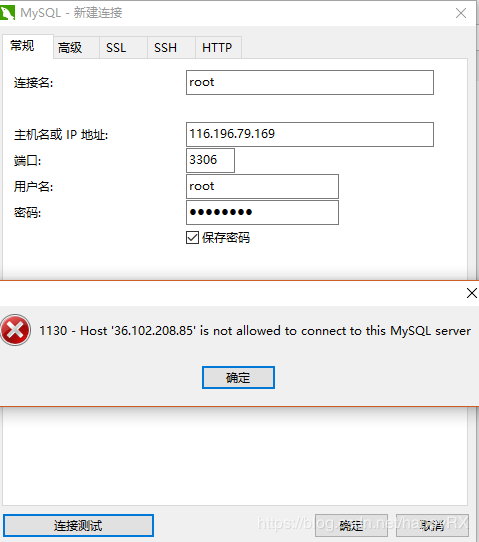
遇到这个问题首先到mysql所在的服务器上用连接进行处理
主要分为以下几步:
1、连接mysql服务器
2、看当前所有数据库:show databases;
3、进入mysql数据库:use mysql;
4、查看mysql数据库中所有的表:show tables;
5、查看user表中的数据:select Host, User,Password from user;
6、修改user表中的Host:update user set Host='%' where User='root';
7、刷新授权列表:flush privileges;
8:关闭防火墙:systemctl stop firewalld、iptables -F、 setenforce 0
#重新连接一下
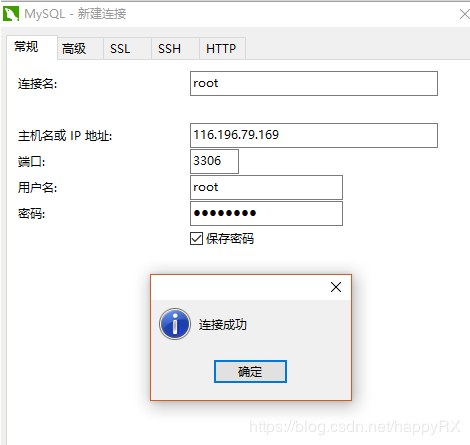
解决1130-host'192.168.2.137'is not allowed to connect to this mysql server报错问题的更多相关文章
- SQL Error (1130): Host '192.168.1.126' is not allowed to connect to this MySQL server
通过HeidiSQL连接MYSQL数据库报错: SQL Error (1130): Host '192.168.1.126' is not allowed to connect to this MyS ...
- 通过navicat连接mysql服务器提示SQL Error (1130): Host '192.168.1.100' is not allowed to connect to this MySQL server
新装一个mysql,尝试用通过navicat连接mysql服务器的时候提示: SQL Error (1130): Host '192.168.1.100' is not allowed to conn ...
- Mysql远程连接报错:SQL Error (1130): Host '192.168.61.128' is not allowed to connect to this MySQL server
Mysql远程连接报错:SQL Error (1130): Host '192.168.0.18' is not allowed to connect to this MySQL server ...
- Mysql远程连接报错:SQL Error (1130): Host '192.168.6.128' is not allowed to connect to this MySQL server
通过SQLyog连接linux中的MySQL报错问题:SQL Error (1130): Host '192.168.6.128' is not allowed to connect to this ...
- 解决ERROR 1130: Host '192.168.11.1' is not allowed to connect to this MySQL
使用navicat进行远程登录MySQL时,报出 ERROR 1130: Host '192.168.11.1' is not allowed to connect to this MySQL se ...
- ERROR 1130 (HY000): Host '192.168.20.165' is not allowed to connect to this MySQL server
问题 远程连接mysql时遇到如下问题: ERROR 1130 (HY000): Host '192.168.20.165' is not allowed to connect to this MyS ...
- 报错 "Host '192.168.209.1' is not allowed to connect to this MySQL server"
版权声明:本文为博主原创文章,遵循 CC 4.0 BY-SA 版权协议,转载请附上原文出处链接和本声明.本文链接:https://blog.csdn.net/weixin_37632381/artic ...
- MySQL ERROR 1130 (HY000): Host '192.168.1.8' is not allowed to connect to this MySQL server
GRANT ALL PRIVILEGES ON *.* TO 'root'@'192.168.1.8' IDENTIFIED BY 'www.linuxidc.com' WITH GRANT OPTI ...
- ERROR 1130: Host '192.168.1.3' is not allowed to connect to this MySQL ERROR 1062 (23000): Duplicate entry '%-root' for key 'PRIMARY'
use mysql mysql> select host, user from user; 将相应用户数据表中的host字段改成'%': update user set host='%' whe ...
随机推荐
- LitElement(三)Styles样式
1.为组件添加样式 import { LitElement, css, html } from 'lit-element'; class MyElement extends LitElement { ...
- 微信小程序图片设置圆角进入页面闪动
transform变形 当我们通过某些行为触发页面进行大面积绘制的时候,浏览器由于没有事先准备,应付渲染够呛,于是掉帧,于是卡顿.而will-change则是真正的行为触发之前告诉浏览器:“我待会儿就 ...
- layui表单之单选框提交
<div class="layui-form-item"> <label class="layui-form-label">状态< ...
- Asp.net的WebForm的落后技术
本文链接:https://bbs.csdn.net/topics/392077893 因为webform确实,企图通过在html标签中的runat="server",在iis接受请 ...
- 【译】PHP 内核 — 字符串管理
[译]PHP 内核 - 字符串管理 (Strings management: zend_string 译文) 原文地址:http://www.phpinternalsbook.com/php7/int ...
- 【转】Git常用命令指南
1.git init 初始化一个Git仓库,git init –bare example.git创建一个裸仓,即没有工作区的git仓库.2.添加文件到Git仓库,分两步:git add <fil ...
- C语言 puts
C语言 puts #include <stdio.h> int puts(const char *s); 功能:标准设备输出s字符串,在输出完成后自动输出一个'\n'. 参数: s:字符串 ...
- python基于百度AI开发文字识别
很多场景都会用到文字识别,比如app或者网站里都会上传身份证等证件以及财务系统识别报销证件等等 第一步,你需要去百度AI里去注册一个账号,然后新建一个文字识别的应用 然后你将得到一个API Key 和 ...
- gerp 查找, sed 编辑, awk 根据内容分析并处理.的作用
awk(关键字:分析&处理) 一行一行的分析处理 awk '条件类型1{动作1}条件类型2{动作2}' filename, awk 也可以读取来自前一个指令的 standard input相对 ...
- 使用Eclipse远程调试云服务器上的微信公众项目
云服务器系统:centos 7.3 如何在Eclipse上调试我们在云服务器上的项目呢,下面介绍一下步骤: 1.因为root账号不支持远程调试,首先需要在linux上创建一个新的用户,然后用该用户 ...