
IOS开发基础知识--碎片38
1:FCUUID获取设备标识的运用
a:作者 githun地址 https://github.com/fabiocaccamo/FCUUID
因为里面还用到作者的另外一个类UICKeyChainStore地址:https://github.com/kishikawakatsumi/UICKeyChainStore
b:在项目中添加 Security.framework
c:导入头文件 #import “FCUUID.h"
// 每次运行应用都会变

+(NSString *)uuid;

//changes each time (no persistent), but allows to keep in memory more temporary uuids

+(NSString *)uuidForKey:(id<NSCopying>)key;

// 每次运行应用都会变

+(NSString *)uuidForSession;

// 重新安装的时候会变

+(NSString *)uuidForInstallation;

// 卸载后重装会变

+(NSString *)uuidForVendor;

// 抹掉iPhone的时候才会变,适合做唯一标识

+(NSString *)uuidForDevice;

2:在图片增加一个外围的白色边框
-(UIImage*) circleImage:(UIImage*) image withParam:(CGFloat) inset {

    //UIGraphicsBeginImageContext(image.size);

    //解决失真 模糊的问题

    UIGraphicsBeginImageContextWithOptions(image.size, NO, [[UIScreen mainScreen] scale]);

    CGContextRef context =UIGraphicsGetCurrentContext();

    //圆的边框宽度为2,颜色为红色

    CGContextSetLineWidth(context,);

    CGContextSetStrokeColorWithColor(context, [UIColor whiteColor].CGColor);

    CGRect rect = CGRectMake(inset, inset, image.size.width - inset *2.0f, image.size.height - inset *2.0f);

    CGContextAddEllipseInRect(context, rect);

    CGContextClip(context);

    //在圆区域内画出image原图

    [image drawInRect:rect];

    CGContextAddEllipseInRect(context, rect);

    CGContextStrokePath(context);

    //生成新的image

    UIImage *newimg = UIGraphicsGetImageFromCurrentImageContext();

    UIGraphicsEndImageContext();

    return newimg;

}
注意:如果使用UIGraphicsBeginImageContext(image.size);会导致图片有点失真模糊,可以采用 UIGraphicsBeginImageContextWithOptions(image.size, NO, [[UIScreen mainScreen] scale]);还有如果在视图上进行画圆,只有在视图没有其它盖住时才看得到,比如如果有个背景图片,那么它就没盖住了;
3:在普通视图控制器包一个UINavigation
#pragma mark 添加导航栏

-(void)addNavigationBar{

    //创建一个导航栏

    UINavigationBar *navigationBar=[[UINavigationBar alloc]initWithFrame:CGRectMake(, , , +)];

    //navigationBar.tintColor=[UIColor whiteColor];

    [self.view addSubview:navigationBar];

    //创建导航控件内容

    UINavigationItem *navigationItem=[[UINavigationItem alloc]initWithTitle:@"Web Chat"];

    //左侧添加登录按钮

    UIBarButtonItem *loginButton=[[UIBarButtonItem alloc]initWithTitle:@"登录" style:UIBarButtonItemStyleDone target:self action:@selector(login)];

    navigationItem.leftBarButtonItem=loginButton;

    //添加内容到导航栏

    [navigationBar pushNavigationItem:navigationItem animated:NO];

}
4:系统自带定位坐标转为城市名
    //系统自带定位

    [[MPLocationManager shareInstance] startSystemLocationWithRes:^(CLLocation *loction, NSError *error) {

        if (!error) {

            CLGeocoder *geocoder=[[CLGeocoder alloc]init];

            [geocoder reverseGeocodeLocation:loction completionHandler:^(NSArray<CLPlacemark *> * _Nullable placemarks, NSError * _Nullable error) {

                if (placemarks.count>) {

                    CLPlacemark *placemark=[placemarks objectAtIndex:];

                    //获取城市

                    NSString *city = placemark.locality;

                    if (!city) {

                        //四大直辖市的城市信息无法通过locality获得,只能通过获取省份的方法来获得(如果city为空,则可知为直辖市)

                        city = placemark.administrativeArea;

                    }

                    //有差异才改变

                    if(![BBUserDefault.LocationCity isEqualToString:city])

                    {

                        BBUserDefault.LocationCity=city;

                    }

                    NSLog(@"当前城市:[%@]",city);

                }

            }];

        }

        BBUserDefault.latiude=[NSString stringWithFormat:@"%f",loction.coordinate.latitude];

        BBUserDefault.longitude=[NSString stringWithFormat:@"%f",loction.coordinate.longitude];

        NSLog(@"定位信息:[%f,%f]",loction.coordinate.latitude,loction.coordinate.longitude);

    }];
注意:MPLocationManager.h类的代码如下:
#import <Foundation/Foundation.h>

typedef void(^KSystemLocationBlock)(CLLocation *loction, NSError *error);

@interface MPLocationManager : NSObject

+ (id)shareInstance;

/**

 *  启动系统定位

 *

 *  @param systemLocationBlock 系统定位成功或失败回调成功

 */

- (void)startSystemLocationWithRes:(KSystemLocationBlock)systemLocationBlock;

@end
//

//  MPLocationManager.m

//  MobileProject

//

//  Created by wujunyang on 16/1/15.

//  Copyright © 2016年 wujunyang. All rights reserved.

//

#import "MPLocationManager.h"

@interface MPLocationManager()<CLLocationManagerDelegate>

@property (nonatomic, readwrite, strong) CLLocationManager *locationManager;

@property (nonatomic, readwrite, copy) KSystemLocationBlock kSystemLocationBlock;

@end

@implementation MPLocationManager

+ (id)shareInstance{

    static id helper = nil;

    static dispatch_once_t onceToken;

    dispatch_once(&onceToken, ^{

        helper = [[MPLocationManager alloc]  init];

    });

    return helper;

}

#pragma mark - 苹果

/**

 *  苹果系统自带地图定位

 */

- (void)startSystemLocationWithRes:(KSystemLocationBlock)systemLocationBlock{

    self.kSystemLocationBlock = systemLocationBlock;

    if(!self.locationManager){

        self.locationManager =[[CLLocationManager alloc] init];

        self.locationManager.desiredAccuracy=kCLLocationAccuracyBest;

        //        self.locationManager.distanceFilter=10;

        if ([UIDevice currentDevice].systemVersion.floatValue >=) {

            [self.locationManager requestWhenInUseAuthorization];//使用程序其间允许访问位置数据(iOS8定位需要)

        }

    }

    self.locationManager.delegate=self;

    [self.locationManager startUpdatingLocation];//开启定位

}

-(void)locationManager:(CLLocationManager *)manager didUpdateLocations:(NSArray *)locations{

    CLLocation *currLocation=[locations lastObject];

    self.locationManager.delegate = nil;

    [self.locationManager stopUpdatingLocation];

    self.kSystemLocationBlock(currLocation, nil);

}

/**

 *定位失败,回调此方法

 */

-(void)locationManager:(CLLocationManager *)manager didFailWithError:(NSError *)error{

    if ([error code]==kCLErrorDenied) {

        NSLog(@"访问被拒绝");

    }

    if ([error code]==kCLErrorLocationUnknown) {

        NSLog(@"无法获取位置信息");

    }

    self.locationManager.delegate = nil;

    [self.locationManager stopUpdatingLocation];

    self.kSystemLocationBlock(nil, error);

}

@end
5:初始化init传参的一些样例
@implementation ZOCEvent

- (instancetype)initWithTitle:(NSString *)title

                         date:(NSDate *)date

                     location:(CLLocation *)location

{

    self = [super init];

    if (self) {

        _title    = title;

        _date     = date;

        _location = location;

    }

    return self;

}

- (instancetype)initWithTitle:(NSString *)title

                         date:(NSDate *)date

{

    return [self initWithTitle:title date:date location:nil];

}

- (instancetype)initWithTitle:(NSString *)title

{

    return [self initWithTitle:title date:[NSDate date] location:nil];

}

@end
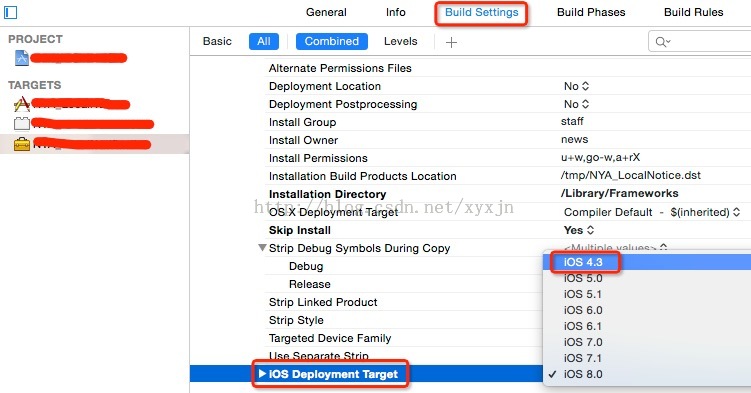
6:embedded dylibs/frameworks are only supported on iOS 8.0 and later 错误解决
ld: warning: embedded dylibs/frameworks only run on iOS 8 or later
ld: embedded dylibs/frameworks are only supported on iOS 8.0 and later (@rpath/XXX.framework/XXX) for architecture armv7
clang: error: linker command failed with exit code 1 (use -v to see invocation)
原因:主要是因为XXX的framework支持的最低开发环境为8.0,而使用该framework的工程支持版本为8.0以下(我这里的环境为4.3)
解决方法:选择低版本的开发环境,重新编译XXX的framework
7:图片左右上下拉伸不变形stretchableImageWithLeftCapWidth
- (UIImage *)stretchableImageWithLeftCapWidth:(NSInteger)leftCapWidth topCapHeight:
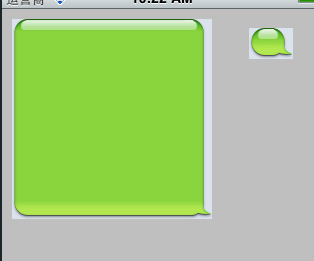
(NSInteger)topCapHeight 这个函数是UIImage的一个实例函数,它的功能是创建一个内容可拉伸,而边角不拉伸的图片,需要两个参数,第一个是左边不拉伸区域的宽度,第二个参数是上面不拉伸的高度。
根据设置的宽度和高度,将接下来的一个像素进行左右扩展和上下拉伸。
注意:可拉伸的范围都是距离leftCapWidth后的1竖排像素,和距离topCapHeight后的1横排像素。
参数的意义是,如果参数指定10,5。那么,图片左边10个像素,上边5个像素。不会被拉伸,x坐标为11和一个像素会被横向复制,y坐标为6的一个像素会被纵向复制。
注意:只是对一个像素进行复制到一定宽度。而图像后面的剩余像素也不会被拉伸。
    UIImage *img=[UIImage imageNamed:@"bubbleSelf.png"];

    img=[img stretchableImageWithLeftCapWidth: topCapHeight:];

    UIImageView *imgView=[[UIImageView alloc]initWithImage:img];

    [imgView setFrame:CGRectMake(, , , )];

    [self. view addSubview:imgView];
IOS开发基础知识--碎片38的更多相关文章
- IOS开发基础知识碎片-导航
1:IOS开发基础知识--碎片1 a:NSString与NSInteger的互换 b:Objective-c中集合里面不能存放基础类型,比如int string float等,只能把它们转化成对象才可 ...
- IOS开发基础知识--碎片33
1:AFNetworking状态栏网络请求效果 直接在AppDelegate里面didFinishLaunchingWithOptions进行设置 [[AFNetworkActivityIndicat ...
- IOS开发基础知识--碎片42
1:报thread 1:exc_bad_access(code=1,address=0x70********) 闪退 这种错误通常是内存管理的问题,一般是访问了已经释放的对象导致的,可以开启僵尸对象( ...
- IOS开发基础知识--碎片50
1:Masonry 2个或2个以上的控件等间隔排序 /** * 多个控件固定间隔的等间隔排列,变化的是控件的长度或者宽度值 * * @param axisType 轴线方向 * @param fi ...
- IOS开发基础知识--碎片3
十二:判断设备 //设备名称 return [UIDevice currentDevice].name; //设备型号,只可得到是何设备,无法得到是第几代设备 return [UIDevice cur ...
- IOS开发基础知识--碎片11
1:AFNetwork判断网络状态 #import “AFNetworkActivityIndicatorManager.h" - (BOOL)application:(UIApplicat ...
- IOS开发基础知识--碎片14
1:ZIP文件压缩跟解压,使用ZipArchive 创建/添加一个zip包 ZipArchive* zipFile = [[ZipArchive alloc] init]; //次数得zipfilen ...
- IOS开发基础知识--碎片16
1:Objective-C语法之动态类型(isKindOfClass, isMemberOfClass,id) 对象在运行时获取其类型的能力称为内省.内省可以有多种方法实现. 判断对象类型 -(BOO ...
- IOS开发基础知识--碎片19
1:键盘事件顺序 UIKeyboardWillShowNotification // 键盘显示之前 UIKeyboardDidShowNotification // 键盘显示完成后 UIKeyboar ...
随机推荐
- Android动画学习(一)——Android动画系统框架简介
2015-11-09补充:Drawable Animation极有可能是Frame Animation 这几天在找工作,面试的时候被问到了Android动画,之前完全没接触过这部分,直接给懵了,当然其 ...
- GROUP BY的扩展
GROUP BY的扩展主要包括ROLLUP,CUBE,GROUPING SETS三种形式. ROLLUP rollup相对于简单的分组合计增加了小计和合计,解释起来会比较抽象,下面我们来看看具体事例. ...
- 实用的SQL语句
行列互转 ) select * from test2 --列转行 select id,name,quarter,profile from test2 unpivot ( profile for qua ...
- 使用phpize安装php扩展
环境: CentOs 6.3 php 7 nginx 举例: 安装ssh2扩展 1.登陆http://pecl.php.net,搜索ssh2,如下图所示,注意版本的选择要根据php的版本来 2.下载s ...
- 《HelloGitHub月刊》第08期
<HelloGitHub>第08期 兴趣是最好的老师,<HelloGitHub>就是帮你找到兴趣! 简介 最开始我只是想把自己在浏览GitHub过程中,发现的有意思.高质量.容 ...
- 利用AE编写切图工具的一些探讨
文章版权由作者李晓晖和博客园共有,若转载请于明显处标明出处:http://www.cnblogs.com/naaoveGIS/. 1.前言 这周利用晚上在家时间研究了下如何使用AE来开发切图工具.最初 ...
- WebLogic12.1.1中跨域问题的探讨以及几种常见中间件中跨域问题的解决方法
文章版权由作者李晓晖和博客园共有,若转载请于明显处标明出处:http://www.cnblogs.com/naaoveGIS/. 1.问题描述 扬州现场中最开始安装了中间件WebLogic12.1.1 ...
- FusionChart 水印破解方法(代码版)
网上一直找不到有关去除水印的方法! 正好做项目要用到这个鬼东西,折腾了一天,总算破解成功,把方法告诉大家. 先看下破解前的效果. 这是个很烦人的东西,而且有一个更加让人烦人的地方, 就是根本无法买!为 ...
- 【JavaScript】又一神器框架:linq.js
引言 前几天针对一个js数组交集的问题请教了下同事,他第一反应就是循环,这也是常规思路,因为我个人更倾向于js些,我便开玩笑,不知道js能不能像linq那样实现这些操作呢?果断百度了一把,果然有现成框 ...
- Windows 10 内置管理员无法打开Metro应用方法
前言 在windows 10中,由于权限原因,使用了内置管理员账户.虽然这样权限获取了,但是不能打开Metro应用,Microsoft Edge浏览器等,有点不太好.那有没有方法可以修改呢?这是本文要 ...