
CKEditor配置,最适合新手两种方式详解。
CKEditor.js的配置,大概有两种方式,这里有基础版和全面的版本可以试验
 https://cdn.ckeditor.com/4.8.0/full-all/ckeditor.js

 http://cdn.bootcss.com/ckeditor/4.8.0/ckeditor.js
1.直接上代码,工具栏的配置修改 toolbar 中的属性查看
<!DOCTYPE html>
<html lang="en">
<head>
<meta charset="UTF-8">
<!-- <script src="https://cdn.ckeditor.com/4.8.0/full-all/ckeditor.js"></script> -->
<script src="http://cdn.bootcss.com/ckeditor/4.8.0/ckeditor.js"></script>
<title>Document Editor</title>
<style type="text/css">
/* Minimal styling to center the editor in this sample */
body {
padding: 30px;
display: flex;
align-items: center;
text-align: center;
}
.container {
margin: 0 auto;
}
</style>
</head>
<body>
<div class="container">
<h2><label for="editor1">Document Editor</label></h2>
<textarea id="editor1">
<h2 style="text-align: center;">The Flavorful Tuscany Meetup</h2>
<p style="text-align: center;"><span style="color: #007ac9;"><strong>Welcome letter</strong></span></p>
<p>Dear Guest,</p>
<p>We are delighted to welcome you to the annual <em>Flavorful Tuscany Meetup</em> and hope you will enjoy the programme as well as your stay at the Bilancino Hotel.</p>
<p>Please find below the full schedule of the event.</p>
<table class="schedule" cellpadding="15" cellspacing="0" style="border-collapse:collapse;width:100%;">
<thead>
<tr>
<th colspan="2" scope="col" style="background-color: #F2F9FF; text-align: center; font-size: 21px;"><span>Saturday, July 14</span></th>
</tr>
</thead>
<tbody>
<tr>
<td style="white-space:nowrap;"><span>9:30 AM - 11:30 AM</span></td>
<td><span>Americano vs. Brewed - “know your coffee” session with <strong>Stefano Garau</strong></span></td>
</tr>
<tr>
<td style="white-space:nowrap;"><span>1:00 PM - 3:00 PM</span></td>
<td><span>Pappardelle al pomodoro - live cooking session with <strong>Rita Fresco</strong></span></td>
</tr>
<tr>
<td style="white-space:nowrap;"><span>5:00 PM - 8:00 PM</span></td>
<td><span>Tuscan vineyards at a glance - wine-tasting session with <strong>Frederico Riscoli</strong></span></td>
</tr>
</tbody>
</table>
<blockquote>
<p>The annual Flavorful Tuscany meetups are always a culinary discovery. You get the best of Tuscan flavors during an intense one-day stay at one of the top hotels of the region. All the sessions are lead by top chefs passionate about their profession. I would certainly recommend to save the date in your calendar for this one!</p>
<p>Angelina Calvino, food journalist</p>
</blockquote>
<p>Please arrive at the Bilancino Hotel reception desk at least <strong>half an hour earlier</strong> to make sure that the registration process goes as smoothly as possible.</p>
<p>We look forward to welcoming you to the event.</p>
<p></p>
<p><strong>Victoria Valc</strong></p>
<p><strong>Event Manager</strong></p>
<p><strong>Bilancino Hotel</strong></p>
</textarea>
</div>
<script>
CKEDITOR.replace( 'editor1', {
// Define the toolbar: http://docs.ckeditor.com/ckeditor4/docs/#!/guide/dev_toolbar
// The full preset from CDN which we used as a base provides more features than we need.
// Also by default it comes with a 3-line toolbar. Here we put all buttons in a single row.
toolbar: [
{ name: 'document', items: [ 'Source' ] },
{ name: 'clipboard', items: [ 'Undo', 'Redo' ] },
{ name: 'styles', items: [ 'Format', 'Font', 'FontSize' ] },
{ name: 'basicstyles', items: [ 'Bold', 'Italic', 'Underline', 'Strike', 'RemoveFormat', 'CopyFormatting' ] },
{ name: 'colors', items: [ 'TextColor', 'BGColor' ] },
'/',
{ name: 'align', items: [ 'JustifyLeft', 'JustifyCenter', 'JustifyRight', 'JustifyBlock' ] },
{ name: 'links', items: [ 'Link', 'Unlink' ] },
{ name: 'paragraph', items: [ 'NumberedList', 'BulletedList', '-', 'Outdent', 'Indent', '-', 'Blockquote' ] },
{ name: 'insert', items: [ 'Image', 'Table' ] },
{ name: 'tools', items: [ 'Maximize' ] },
{ name: 'editing', items: [ 'Scayt' ] }
],
// Since we define all configuration options here, let's instruct CKEditor to not load config.js which it does by default.
// One HTTP request less will result in a faster startup time.
// For more information check http://docs.ckeditor.com/ckeditor4/docs/#!/api/CKEDITOR.config-cfg-customConfig
customConfig: '',
// Sometimes applications that convert HTML to PDF prefer setting image width through attributes instead of CSS styles.
// For more information check:
// - About Advanced Content Filter: http://docs.ckeditor.com/ckeditor4/docs/#!/guide/dev_advanced_content_filter
// - About Disallowed Content: http://docs.ckeditor.com/ckeditor4/docs/#!/guide/dev_disallowed_content
// - About Allowed Content: http://docs.ckeditor.com/ckeditor4/docs/#!/guide/dev_allowed_content_rules
disallowedContent: 'img{width,height,float}',
extraAllowedContent: 'img[width,height,align]',
// Enabling extra plugins, available in the full-all preset: http://ckeditor.com/presets-all
extraPlugins: 'tableresize,uploadimage,uploadfile',
/*********************** File management support ***********************/
// In order to turn on support for file uploads, CKEditor has to be configured to use some server side
// solution with file upload/management capabilities, like for example CKFinder.
// For more information see http://docs.ckeditor.com/ckeditor4/docs/#!/guide/dev_ckfinder_integration
// Uncomment and correct these lines after you setup your local CKFinder instance.
// filebrowserBrowseUrl: 'http://example.com/ckfinder/ckfinder.html',
// filebrowserUploadUrl: 'http://example.com/ckfinder/core/connector/php/connector.php?command=QuickUpload&type=Files',
/*********************** File management support ***********************/
// Make the editing area bigger than default.
height: 800,
// An array of stylesheets to style the WYSIWYG area.
// Note: it is recommended to keep your own styles in a separate file in order to make future updates painless.
contentsCss: [ 'https://cdn.ckeditor.com/4.8.0/full-all/contents.css', 'mystyles.css' ],
// This is optional, but will let us define multiple different styles for multiple editors using the same CSS file.
bodyClass: 'document-editor',
// Reduce the list of block elements listed in the Format dropdown to the most commonly used.
format_tags: 'p;h1;h2;h3;pre',
// Simplify the Image and Link dialog windows. The "Advanced" tab is not needed in most cases.
removeDialogTabs: 'image:advanced;link:advanced',
// Define the list of styles which should be available in the Styles dropdown list.
// If the "class" attribute is used to style an element, make sure to define the style for the class in "mystyles.css"
// (and on your website so that it rendered in the same way).
// Note: by default CKEditor looks for styles.js file. Defining stylesSet inline (as below) stops CKEditor from loading
// that file, which means one HTTP request less (and a faster startup).
// For more information see http://docs.ckeditor.com/ckeditor4/docs/#!/guide/dev_styles
stylesSet: [
/* Inline Styles */
{ name: 'Marker', element: 'span', attributes: { 'class': 'marker' } },
{ name: 'Cited Work', element: 'cite' },
{ name: 'Inline Quotation', element: 'q' },
/* Object Styles */
{
name: 'Special Container',
element: 'div',
styles: {
padding: '5px 10px',
background: '#eee',
border: '1px solid #ccc'
}
},
{
name: 'Compact table',
element: 'table',
attributes: {
cellpadding: '5',
cellspacing: '0',
border: '1',
bordercolor: '#ccc'
},
styles: {
'border-collapse': 'collapse'
}
},
{ name: 'Borderless Table', element: 'table', styles: { 'border-style': 'hidden', 'background-color': '#E6E6FA' } },
{ name: 'Square Bulleted List', element: 'ul', styles: { 'list-style-type': 'square' } }
]
} );
</script>
</body>
</html>
2.直接上图片,在vue-cli项目中使用
下载下来放入static目录下,在main.js内引入(全局)
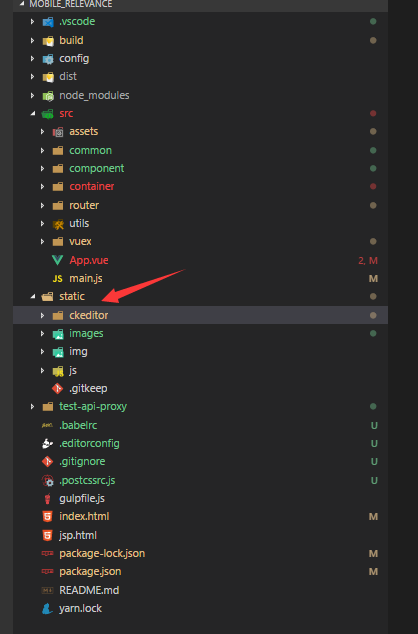
进入配置文件
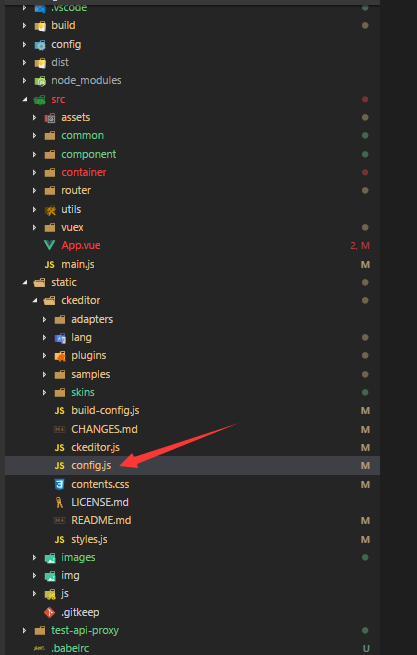
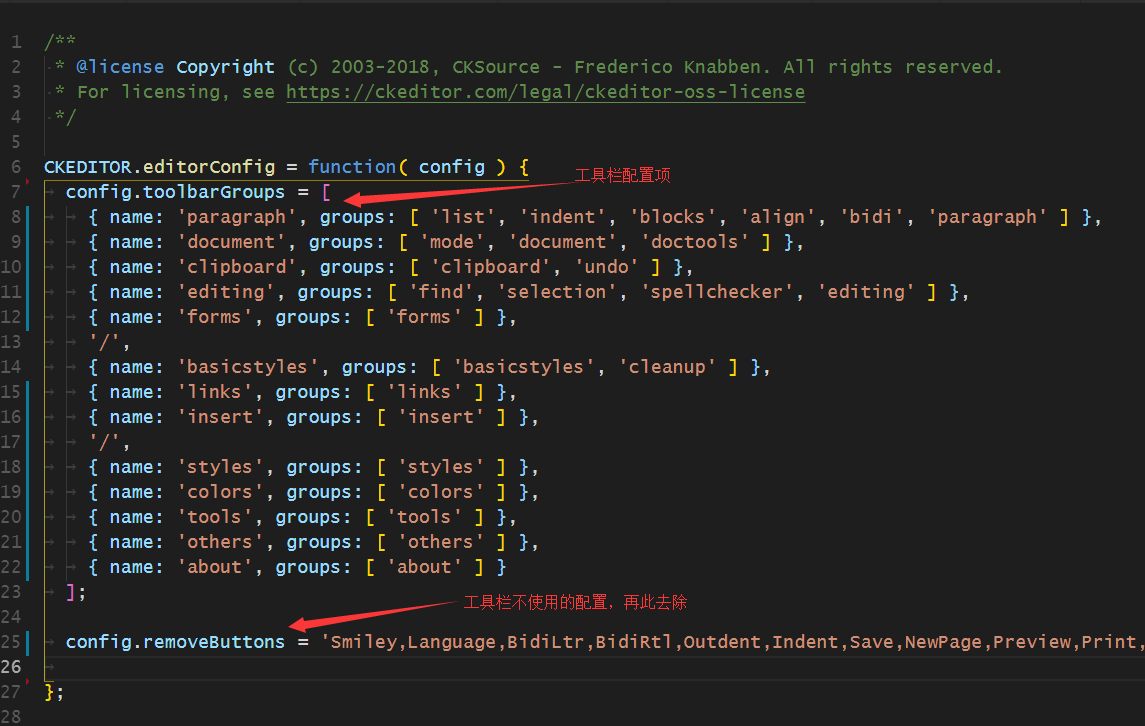
最后说明一下引入的ckeditor.js不一样,配置可能会不一样。
CKEditor配置,最适合新手两种方式详解。的更多相关文章
- java中调用本地动态链接库(*.DLL)的两种方式详解和not found library、打包成jar,war包dll无法加载等等问题解决办法
我们经常会遇到需要java调用c++的案例,这里就java调用DLL本地动态链接库两种方式,和加载过程中遇到的问题进行详细介绍 1.通过System.loadLibrary("dll名称,不 ...
- 多表连接的三种方式详解 hash join、merge join、 nested loop
在多表联合查询的时候,如果我们查看它的执行计划,就会发现里面有多表之间的连接方式.多表之间的连接有三种方式:Nested Loops,Hash Join 和 Sort Merge Join.具体适用哪 ...
- Java构造和解析Json数据的两种方法详解二
在www.json.org上公布了很多JAVA下的json构造和解析工具,其中org.json和json-lib比较简单,两者使用上差不多但还是有些区别.下面接着介绍用org.json构造和解析Jso ...
- android emulator启动的两种方法详解
android emulator启动的两种方法详解 转https://blog.csdn.net/TTS_Kevin/article/details/7452237 对于android学习者,模 ...
- Java构造和解析Json数据的两种方法详解二——org.json
转自:http://www.cnblogs.com/lanxuezaipiao/archive/2013/05/24/3096437.html 在www.json.org上公布了很多JAVA下的jso ...
- Java构造和解析Json数据的两种方法详解一——json-lib
转自:http://www.cnblogs.com/lanxuezaipiao/archive/2013/05/23/3096001.html 在www.json.org上公布了很多JAVA下的jso ...
- SpringMVC配置字符过滤器的两种方式
有时候使用SpringMVC框架提交表单时会出现中文乱码,以下是我亲自试验过的配置字符过滤器的两种: 1.在web.xml中配置 <filter> <filter-name>c ...
- 转载Javascript继承两种形式详解
一直想对Javascript再次做一些总结,正好最近自己写了一个小型Js UI库,总结了一下Js的继承机制,在网上也看了一些前辈们博客里的总结,感觉分析不是特别全面.这里仅仅是把自己的学习体会拿出来分 ...
- 转载 Javascript继承两种形式详解
一直想对Javascript再次做一些总结,正好最近自己写了一个小型Js UI库,总结了一下Js的继承机制,在网上也看了一些前辈们博客里的总结,感觉分析不是特别全面.这里仅仅是把自己的学习体会拿出来分 ...
随机推荐
- 用Java来获取访问者真实的IP地址
用Java来获取访问者真实的IP地址 转载 2016年06月07日 14:36:02 标签: 16497 编辑 删除 在JSP里,获取客户端的IP地址的方法是:request.getRemoteAdd ...
- Nginx 外的另一选择,轻量级开源 Web 服务器 Tengine 发布新版本
新版发布 近日,轻量级开源 Web 服务器 Tengine 发布了2.3.0版本,新增如下特性: ngx_http_proxy_connect_module,该模块让 Tengine 可以用于正向代理 ...
- qbao
# -*- coding: utf-8 -*- import Image, cStringIO, webbrowser, re, time, math import urllib, urllib2, ...
- Git同步Python代码
之前我们都是将代码保存到本地目录, 然后再上传到Git中,但如果针对在pycharm中的代码,就要换另一种方式了,下面简单介绍一下. 1.打开pycharm主界面,选择菜单栏VCS---checkou ...
- TIJ——Chapter Ten:Inner Classes
先提纲挈领地来个总结: 内部类(Inner Class)有四种: member inner class,即成员内部类.可以访问外部类所有方法与成员变量.生成成员内部类对象的方法:OuterClass. ...
- 微服务开源生态报告 No.2
通常,我们都会通过在 GitHub 上订阅邮件列表,来了解社区动态.这一次,我们联合以上各开源项目的负责人,发布「微服务开源生态报告」,汇集各个开源项目近期的社区动态,帮助开发者们更高效的了解到各开源 ...
- Java成员方法,构造方法
//作者:qingfeng//2017/2/17//功能:理解类的成员方法和构造方法class CreatWays{ public static void main(String args[]){ ...
- Flask学习之十 全文搜索
英文博客地址:blog.miguelgrinberg.com/post/the-flask-mega-tutorial-part-x-full-text-search 中文翻译地址:http://ww ...
- Python基础:24with语句
一:with语句 在Python 2.6 中正式引入的with语句,是用来简化代码的.这与用try-except 和try-finally所想达到的目的前后呼应.try-except 和try-fin ...
- @atcoder - Japanese Student Championship 2019 Qualification - E@ Card Collector
目录 @description@ @solution@ @accepted code@ @details@ @description@ N 个卡片放在 H*W 的方格图上,第 i 张卡片的权值为 Ai ...