
winfrom 中 label 文字随着窗体大小变化
在进行winfrom 开发过程中,窗体中的文字需要随着窗体大小变化,否则会影响窗体的美观和客户的体验。
之前曾经试过几种方法效果都不满意,例如将label的Dock 属性设置为fill.这样的设置对解决问题没有帮助,文字并没有随着窗体变化。
也尝试获取窗体大小让label文字的大小按比例随着窗体变化,这种方法倒是能实现效果,但会影响窗体原始对label 文字大小的设置。
最后找到了下面的方法很好的解决了这个问题,现在分享出来。
首先用VS创建FORM工程,然后再窗体中添加label,按照下面的代码执行。
using System;

using System.Collections.Generic;

using System.ComponentModel;

using System.Data;

using System.Drawing;

using System.Linq;

using System.Text;

using System.Threading.Tasks;

using System.Windows.Forms;

namespace WindowsFormsApplication1

{

    public partial class Form1 : Form

    {

        Single X;

        Single Y;

        public Form1()

        {

            InitializeComponent();

            this.Resize += new EventHandler(Form1_Resize);

            X = this.Width;

            Y = this.Height;

           // y = this.statusStrip1.Height;

            setTag(this);

        }

        private void setTag(Control cons)

        {

            foreach (Control con in cons.Controls)

            {

                con.Tag = con.Width + ":" + con.Height + ":" + con.Left + ":" + con.Top + ":" + con.Font.Size;

                if (con.Controls.Count > )

                    setTag(con);

            }

        }

        private void setControls(float newx, float newy, Control cons)

        {

            foreach (Control con in cons.Controls)

            {

               Single aa= label1.Font.Size;

                string[] mytag = con.Tag.ToString().Split(new char[] { ':' });

                float a = Convert.ToSingle(mytag[]) * newx;

                con.Width = (int)a;

                a = Convert.ToSingle(mytag[]) * newy;

                con.Height = (int)(a);

                a = Convert.ToSingle(mytag[]) * newx;

                con.Left = (int)(a);

                a = Convert.ToSingle(mytag[]) * newy;

                con.Top = (int)(a);

                Single currentSize = Convert.ToSingle(mytag[]) * newy;

                con.Font = new Font(con.Font.Name, currentSize, con.Font.Style, con.Font.Unit);

                if (con.Controls.Count > )

                {

                    setControls(newx, newy, con);

                }

            }

        }

        void Form1_Resize(object sender, EventArgs e)

        {

            // throw new Exception("The method or operation is not implemented.");

            float newx = (this.Width) / X;

            //  float newy = (this.Height - this.statusStrip1.Height) / (Y - y);

            float newy = this.Height / Y;

            setControls(newx, newy, this);

            //this.Text = this.Width.ToString() +" "+ this.Height.ToString();

        }

    }

}
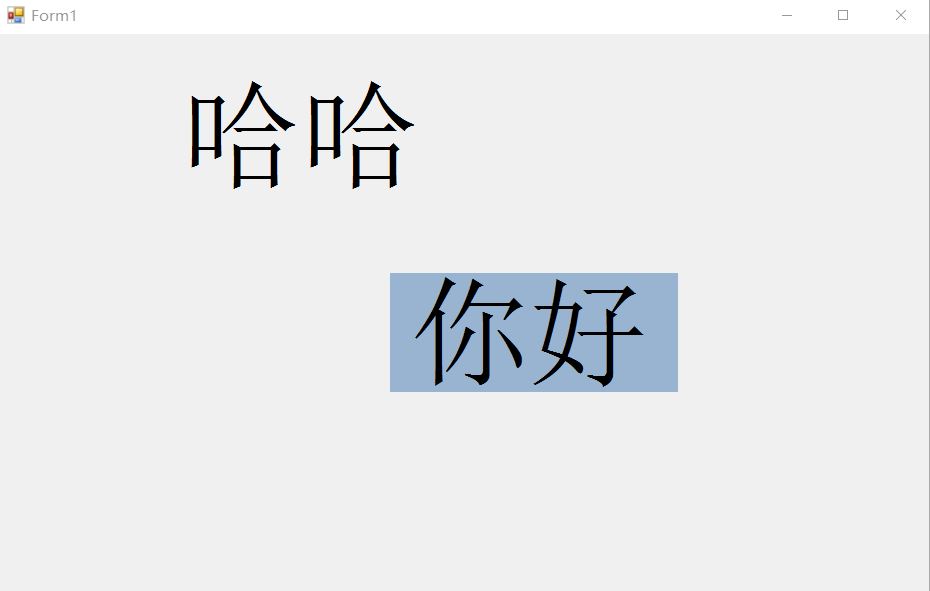
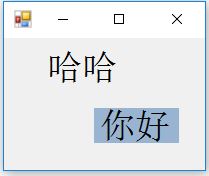
效果不错:
winfrom 中 label 文字随着窗体大小变化的更多相关文章
- MFC 无边框窗体实现用鼠标拖动窗体边缘实现窗体大小变化
无边框窗体如何实现用鼠标拖动窗体边缘实现窗体大小变动呢?下面介绍一种方法,通过以下几个步骤即可实现: 1.实现WM_NCHITTEST消息,实现四条边框的模拟 2.实现WM_NCLBUTTONDOWN ...
- MFC窗体大小变化
对话框的大小变化后,假若对话框上的控件大小不变化,看起来会比较难看.下面就介绍怎么让对话框上的控件随着对话框的大小的变化自动调整. 首先明确的是Windows有一个WM_SIZE消息响应函数,这个函数 ...
- C#设置窗体中的窗体随主窗体大小变化而变化
form2 f=new form2(); f.Size=this.Size; f.Location=this.Location; f.showdialog(); 作者:耑新新,发布于 博客园 转载请 ...
- WinFrom中使用WPF的窗体
步骤 1.添加WindowsFormsIntegration.dll .System.Windows.Forms.和System.Xaml,PresentationCore.PresentationF ...
- winform 窗体大小变化时,如何设置使控件一起按照比例变大
public Form() { InitializeComponent(); + ; float[] factor = new float[count]; ; factor[i++] = Size.W ...
- C#控件大小随窗体大小等比例变化
相信很多博友在开发初次接触学习C# winForm时,当窗体大小变化时,窗体内的控件并没有随着窗体的变化而变化,最近因为一个项目工程的原因,也需要解决这个问题.通过查阅和学习,这个问题得到了解决,或许 ...
- WinForm中控件位置不随窗体大小的变化而改变
背景:在窗体开发中使控件的位置不随窗体的大小改变而变化的问题?这是一个同事在开发时遇到的问题,在思考试错之后,写出如下代码. 声明成员: Point m_InitLocation; Size m_In ...
- iOS开发小技巧 - label中的文字添加点击事件
Label中的文字添加点击事件 GitHub地址:https://github.com/lyb5834/YBAttributeTextTapAction 以前老师讲过类似的功能,自己懒得回头看了,找了 ...
- [Xcode 实际操作]九、实用进阶-(26)对Storyboard(故事版)中的文字标签(Label)进行本地化处理
目录:[Swift]Xcode实际操作 对Storyboard(故事版)中的文字标签(Label)进行本地化处理. 点击项目名称[DemoApp]进入项目信息面板. [Build Setting]-& ...
随机推荐
- ubuntu 安装 go 编译环境
参考: http://wiki.ubuntu.org.cn/Golang 从仓库安装(apt-get) sudo apt-get install golang 修改环境变量: vim /etc/env ...
- java opencv 4.0.1安装配置
如果没有把dll扔到jdk会报错 Exception in thread "AWT-EventQueue-0" java.lang.UnsatisfiedLinkError: no ...
- 关于python的列表操作(二):排序,统计
# 列表操作 num_list = [2, 5, 8, 6, 7, 9, 5, 7] # 升序 num_list.sort() print(num_list) # 降序 num_list.sort(r ...
- jenkins自动部署
最近在使用公司的jenkins进行自动部署项目,由于之前没有用过,一直半生不熟,因此特意写个随机记录. 1.登录jenkins服务 jenkins安装好后,我们通过浏览器访问它的主页(如下),输入用户 ...
- vagrant简介
什么是vagrant? 简单理解,就是可以通过Vagrant这个工具管理虚拟机,比如说想创建一个centos环境的虚拟机,不需要安装系统这么麻烦,通过vagrant可以快速创建 官网地址:https: ...
- 怎么去掉select的下拉箭头和输入框input类型为number时的上下箭头
一.去掉select的下拉箭头 方法一:在select外面加一个div,设置select宽度大于div的宽度,并加一个超出隐藏属性overflow:hidden,小三角会隐藏掉: 方法二:给selec ...
- js实现翻转一个字符串
字符串作在程序中是非常常见的,因为程序中绝大部分的数据都可以当作字符串来处理.在这里介绍几种翻转字符串的方法. (1)使用字符串函数 //使用数组翻转函数 function reverseString ...
- JS DOM节点的增删改查
合并拆分 行内样式 script写在html里面
- mysql存储过程小解
mysql 存储过程 1.创建语法 delimiter $$ --$$表示改变默认的分隔符,代表以下为存储过程,不然会以SQL的方式执行 drop procedure if exists pro_na ...
- 【Django入坑之路】Django后台上传图片,以及前端的显示
#setting配置: MEDIA_URL = "/media/" MEDIA_ROOT = os.path.join(BASE_DIR, "media") # ...