
react入门:todo应用
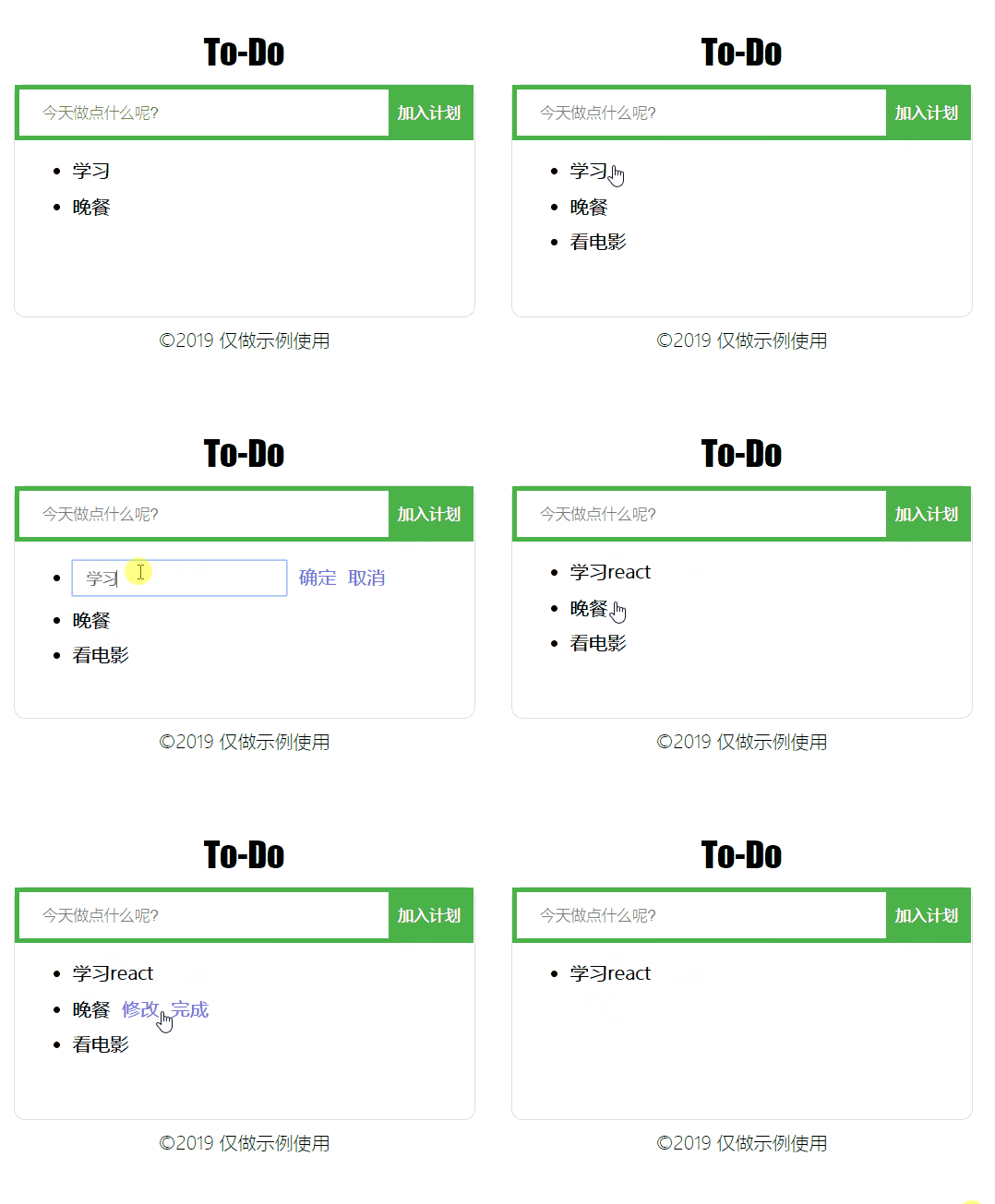
<!DOCTYPE html>

<html lang="en">

  <head>

    <meta charset="UTF-8" />

    <meta name="viewport" content="width=device-width, initial-scale=1.0" />

    <meta http-equiv="X-UA-Compatible" content="ie=edge" />

    <title>To-Do</title>

    <style>

      .to-do-page {

        position: absolute;

        top: 0;

        right: 0;

        left: 0;

        bottom: 0;

        margin: auto;

        width: 400px;

        height: 400px;

      }

      header {

        font-size: 30px;

        font-weight: 200;

        font-family: fantasy;

        text-align: center;

        margin-bottom: 10px;

      }

      main {

        border: 1px solid #dedede;

        border-radius: 10px;

        min-height: 200px;

      }

      footer {

        text-align: center;

        margin-top: 10px;

      }

      .add-form {

        height: 40px;

        background: #fff;

        border: 4px solid rgb(74, 179, 74);

      }

      .add-ipt {

        height: 36px;

        width: 300px;

        border: none;

        outline: medium;

        padding-left: 20px;

      }

      .add-btn {

        height: 40px;

        width: 70px;

        background: rgb(74, 179, 74);

        color: white;

        border: none;

        font-weight: bold;

        outline: medium;

      }

      .list-item {

        margin: 10px;

        font-size: 16px;

        font-weight: bold;

      }

      .list-item input {

        height: 25px;

        font-weight: bold;

        opacity: 0.6;

        padding-left: 10px;

      }

      .list-item:hover {

        cursor: pointer;

      }

      .operate-area span {

        display: inline-block;

        color: #7676d9;

        margin-left: 10px;

      }

      .operate-area span:hover {

        cursor: pointer;

      }

    </style>

  </head>

  <body>

    <div id="app"></div>

    <script src="https://cdn.staticfile.org/react/16.4.0/umd/react.development.js"></script>

    <script src="https://cdn.staticfile.org/react-dom/16.4.0/umd/react-dom.development.js"></script>

    <script src="https://cdn.staticfile.org/babel-standalone/6.26.0/babel.min.js"></script>

    <script type="text/babel">

      //  总页面

      class ToDoPage extends React.Component {

        render() {

          return (

            <div className='to-do-page'>

              <Header />

              <Main />

              <Footer />

            </div>

          );

        }

      }

      //  页头

      class Header extends React.Component {

        render() {

          return <header>To-Do</header>;

        }

      }

      // 内容

      class Main extends React.Component {

        render() {

          return (

            <main>

              <ToDoBox />

            </main>

          );

        }

      }

      //  页脚

      class Footer extends React.Component {

        render() {

          return <footer> ©2019 仅做示例使用</footer>;

        }

      }

      class ToDoBox extends React.Component {

        constructor(props) {

          super(props);

          this.state = {

            toDoList: [

              {

                id: 0,

                content: '学习'

              },

              {

                id: 1,

                content: '晚餐'

              }

            ]

          };

          this.update = this.update.bind(this);

        }

        //  更新toDoList对象

        update(data) {

          this.setState({

            toDoList: data

          });

        }

        render() {

          return (

            <div>

              <AddAffairForm toDoList={this.state.toDoList} update={this.update} />

              <ToDoList toDoList={this.state.toDoList} update={this.update} />

            </div>

          );

        }

      }

      // 添加表单

      class AddAffairForm extends React.Component {

        constructor(props) {

          super(props);

          this.state = {

            affair: ''

          };

          this.toDoList = this.props.toDoList;

          this.handleChange = this.handleChange.bind(this);

          this.addToDoList = this.addToDoList.bind(this);

        }

        handleChange(e) {

          this.setState({

            affair: e.target.value

          });

        }

        addToDoList(e) {

          e.preventDefault();

          if (this.state.affair.trim().length < 1) {

            alert('不能不输入哦!');

          } else {

            this.toDoList = [...this.toDoList, { id: this.toDoList.length, content: this.state.affair }];

            this.props.update && this.props.update(this.toDoList);

            this.setState({

              affair: ''

            });

          }

        }

        render() {

          let addAffairForm = (

            <form onSubmit={this.addToDoList} className='add-form'>

              <input

                className='add-ipt'

                type='text'

                placeholder='今天做点什么呢?'

                value={this.state.affair}

                onChange={this.handleChange}

                required

              />

              <input type='submit' value='加入计划' onSubmit={this.addToDoList} className='add-btn' />

            </form>

          );

          return addAffairForm;

        }

      }

      //  列表

      class ToDoList extends React.Component {

        constructor(props) {

          super(props);

          this.delete = this.delete.bind(this);

          this.update = this.update.bind(this);

        }

        delete(id) {

          let toDoList = [...this.props.toDoList];

          toDoList = toDoList.filter(item => item.id !== id);

          this.props.update && this.props.update(toDoList);

        }

        update(data) {

          let toDoList = [...this.props.toDoList];

          toDoList.map(item => {

            if (item.id === data.id) {

              item.content = data.content;

            }

          });

          this.props.update && this.props.update(toDoList);

        }

        render() {

          return (

            <ul className='list'>

              {this.props.toDoList.map((item, index) => {

                return <ToDoListItem toDoListItem={item} key={item.id} delete={this.delete} update={this.update} />;

              })}

            </ul>

          );

        }

      }

      //  列表项

      class ToDoListItem extends React.Component {

        constructor(props) {

          super(props);

          this.state = {

            item: Object.assign({}, this.props.toDoListItem),

            isDisplay: false,

            isEdit: false

          };

          this.toggleDisplay = this.toggleDisplay.bind(this);

          this.handleChange = this.handleChange.bind(this);

          this.cancelEdit = this.cancelEdit.bind(this);

          this.handleEdit = this.handleEdit.bind(this);

          this.finishAffair = this.finishAffair.bind(this);

          this.confirmEdit = this.confirmEdit.bind(this);

        }

        toggleDisplay(e) {

          this.setState({

            isDisplay: !this.state.isDisplay

          });

        }

        handleChange(e) {

          const item = this.state.item;

          item.content = e.target.value;

          this.setState({

            item: item

          });

        }

        cancelEdit() {

          const item = Object.assign({}, this.props.toDoListItem);

          this.setState({

            item: item,

            isEdit: !this.state.isEdit

          });

        }

        handleEdit() {

          this.setState({

            isEdit: !this.state.isEdit

          });

        }

        finishAffair(e) {

          e.stopPropagation();

          this.props.delete && this.props.delete(this.state.item.id);

        }

        confirmEdit(e) {

          this.props.update && this.props.update(this.state.item);

          this.handleEdit();

        }

        render() {

          let todoListItem = null;

          if (this.state.isEdit) {

            todoListItem = (

              <li className='list-item'>

                <input value={this.state.item.content} placeholder='请输入' onChange={this.handleChange} />

                <span className='operate-area'>

                  <span onClick={this.confirmEdit}>确定</span>

                  <span onClick={this.cancelEdit}>取消</span>

                </span>

              </li>

            );

          } else {

            todoListItem = (

              <li className='list-item' onClick={this.toggleDisplay}>

                {this.props.toDoListItem.content}

                <span

                  style={this.state.isDisplay ? { display: 'inline-block' } : { display: 'none' }}

                  className='operate-area'

                >

                  <span onClick={this.handleEdit}>修改</span>

                  <span onClick={this.finishAffair}>完成</span>

                </span>

              </li>

            );

          }

          return todoListItem;

        }

      }

      const app = document.getElementById('app');

      ReactDOM.render(<ToDoPage />, app);

    </script>

  </body>

</html>
react入门:todo应用的更多相关文章
- React入门2
React 入门实例教程 最简单开始学习 JSX 的方法就是使用浏览器端的 JSXTransformer.我们强烈建议你不要在生产环境中使用它.你可以通过我们的命令行工具 react-tools 包来 ...
- react入门学习及总结
前言 不知不觉一年又过去了,新的一年又到来,2019应该要好好思考,好好学点有用的东西,规划下自己今后的学习方向,不要再像以前那样感觉很迷茫. react简单介绍 官网及中文文档 https://re ...
- React入门看这篇就够了
摘要: 很多值得了解的细节. 原文:React入门看这篇就够了 作者:Random Fundebug经授权转载,版权归原作者所有. React 背景介绍 React 入门实例教程 React 起源于 ...
- [转]React入门看这篇就够了
摘要: 很多值得了解的细节. 原文:React入门看这篇就够了 作者:Random Fundebug经授权转载,版权归原作者所有. React 背景介绍 React 入门实例教程 React 起源于 ...
- react入门(3)
在第一篇文章里我们介绍了jsx.组件.css写法 点击查看react入门(1) 第二篇文章里我们介绍了事件.this.props.children.props....other.map循环 点击查 ...
- react入门(1)
这篇文章也不能算教程咯,就算是自己学习整理的笔记把. 关于react一些相关的简介.优势之类的,随便百度一下一大堆,我就不多说了,可以去官网(http://reactjs.cn/)看一下. 这片主要讲 ...
- react入门(2)
接着上一次的讲,如果没有看过上一篇文章的小伙伴可以先看一下http://www.cnblogs.com/sakurayeah/p/5807821.html React事件 可以先看一下官网讲解的内容h ...
- react入门(4)
首先还是来回顾一下前三篇讲的内容 react入门(1): jsx,组件,css写法 react入门(2):事件,this.props.children,props,...other react入门(3 ...
- React 入门实例教程(转载)
本人转载自: React 入门实例教程
随机推荐
- go语言第一问:在其他地方执行编译go语言程序,结果会在哪个地方产生?
1.我们看执行编译go语言程序中命令,没有找到exe文件.
- C++学习笔记----2.4 C++对象的内存模型
转载自:http://c.biancheng.NET/cpp/biancheng/view/2995.html点击打开链接 当对象被创建时,编译器会为每个对象分配内存空间,包括成员变量和成员函数. 直 ...
- kubernetes1.5新特性跟踪
Kubernetes发布历史回顾 Kubernetes 1.0 - 2015年7月发布 Kubernetes 1.1 - 2015年11月发布 Kubernetes 1.2 - 2016年3月发布 K ...
- GeoServer手动发布本地Shapefile地图
首先,本文实现的结果图给大家展现一下: 放大的样子: 颜色是通过属性中某个字段值来分级的,可以自定义. 上面功能是用ArcGIS切片好数据,在Geoserver 中发布,并用google地图作为底图展 ...
- KiCad EDA 如何修改 Pcbnew 线路板的背景色?
KiCad EDA 如何修改 Pcbnew 线路板的背景色? 关于背景色,传统的原理图是白色,线路板是黑色. EDA 软件 类型 颜色 Protel 原理图 浅黄色 Protel PCB 黑色 Orc ...
- oracle如何加固你的数据库
要注意以下方面 1. 修改sys, system的口令. 2. Lock,修改,删除默认用户: dbsnmp,ctxsys等. 3. 把REMOTE_OS_AUTHENT改成False,防止远程机器直 ...
- Precision和Recall
学习自: http://blog.csdn.net/wangran51/article/details/7579100
- POJ-3615_Cow Hurdles
Cow Hurdles Time Limit: 1000MS Memory Limit: 65536K Description Farmer John wants the cows to prepar ...
- @loj - 2092@ 「ZJOI2016」大森林
目录 @description@ @solution@ @accepted code@ @details@ @description@ 小 Y 家里有一个大森林,里面有 n 棵树,编号从 1 到 n. ...
- 1176. Two Ends
题目链接地址:http://soj.me/1176 题目大意:两头取数.第一个人随机取,第二个人用贪婪算法(每次都取大的),求两人取数在第一个人赢的情况下的最大分差.使用贪婪算法时,如果左右两边相等, ...