
Android获取服务器Json字符串并显示在ListView上面
已经好久没有更新博客,今天终于有新的东西可以记录了。
通过这次的任务学习到了以前没有注意到的知识点,真的有种书读百遍,其义自见的感觉。这次又重新认识了《Handler消息机制原理》。这次的任务中有更新UI。但是忘记了在Android4.0以后不能在UI线程访问网络,子线程也不能更新UI界面。下面我来展示一下这次的效果图。

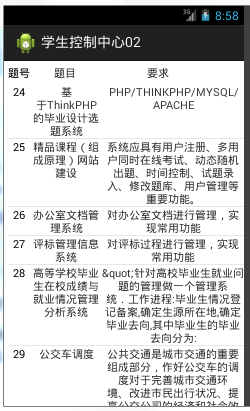
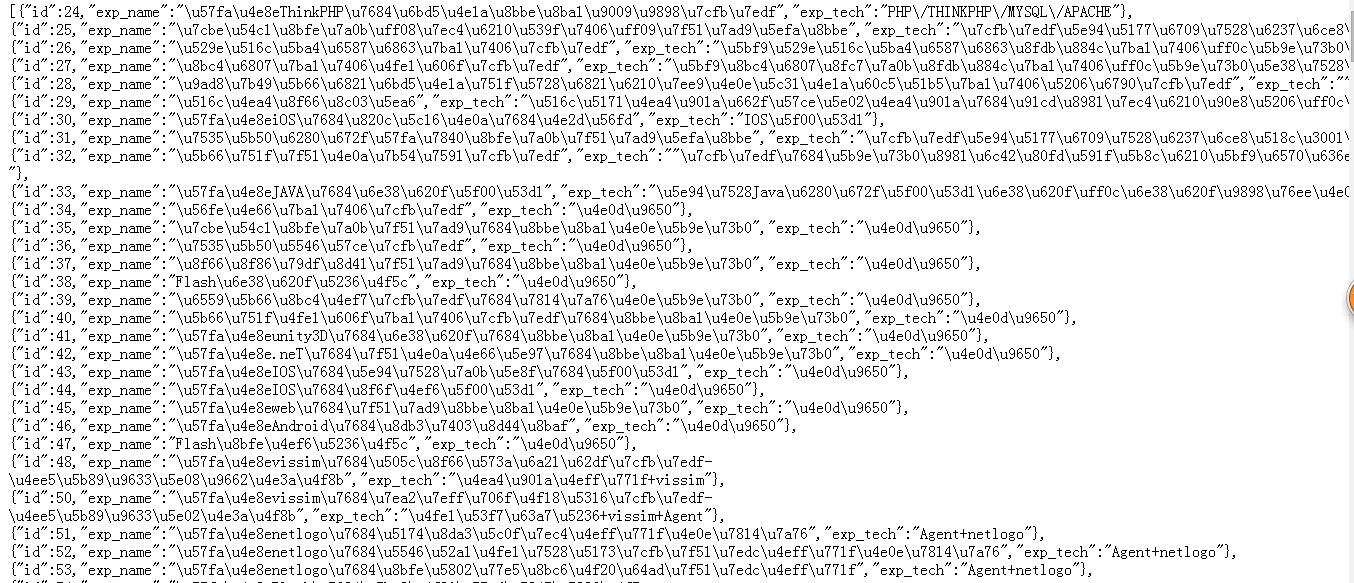
这次的任务是:获取服务器端的json字符串,并解析显示在Android界面上。
当我接到这个任务的时候,首先想到的是利用Fragment布局加上ListView布局。但是因为没有完全掌握,所以失败了。这是就想到了现在的方案。利用GridView加上ListView来实现。布局是没有问题。但是写代码的时候却出现了问题。当我获取到数据并顺利解析的时候。却怎么也传不到ListView。总是显示它的size为0.但是通过打印确实获取到了。这个时候老师让我利用Handler,便能顺利解决问题了。原因就是一开始,我写到的不能在子线程更新UI。
下面我来粘出我的代码以供大家参考:
activity_main.xml
<RelativeLayout xmlns:android="http://schemas.android.com/apk/res/android"

    android:layout_width="fill_parent"

    android:layout_height="fill_parent"

    android:background="@drawable/set_bj">

 <GridView

        android:id="@+id/gv_icons"

        android:layout_width="wrap_content"

        android:layout_height="wrap_content"

        android:numColumns="4"

        android:layout_alignParentBottom="true">

    </GridView>

</RelativeLayout>
item_gridview.xml
<?xml version="1.0" encoding="utf-8"?>

<RelativeLayout xmlns:android="http://schemas.android.com/apk/res/android"

    android:layout_width="match_parent"

    android:layout_height="match_parent"

    android:padding="10dp">

<TextView

    android:id="@+id/tv_icons"

    android:layout_width="wrap_content"

    android:layout_height="wrap_content"

    android:hint="功能"

    android:layout_centerInParent="true"

    android:textSize="13sp"

    android:textColor="#000000"/>

</RelativeLayout>
activity_select.xml
<?xml version="1.0" encoding="utf-8"?>

<LinearLayout xmlns:android="http://schemas.android.com/apk/res/android"

    android:layout_width="match_parent"

    android:layout_height="match_parent"

    android:orientation="vertical" >

 <LinearLayout

     android:layout_width="match_parent"

    android:layout_height="wrap_content"

    android:padding="5dp"

    android:orientation="horizontal">

         <TextView

      android:id="@+id/tv_id"

      android:layout_width="0dp"

      android:layout_weight="2"

      android:textColor="@android:color/black"

      android:layout_height="wrap_content"

      android:textSize="15sp"

      android:text="题号"/>

        <TextView

      android:id="@+id/tv_name"

       android:layout_width="0dp"

      android:layout_weight="1"

      android:layout_height="wrap_content"

      android:textSize="15sp"

      android:text="题目"/>

        <TextView

      android:id="@+id/tv_tech"

       android:layout_width="0dp"

      android:layout_weight="7"

      android:gravity="center"

      android:layout_height="wrap_content"

      android:textSize="15sp"

      android:text="要求"/>

 </LinearLayout>

     <ListView

         android:id="@+id/lv"

         android:layout_width="match_parent"

         android:layout_height="wrap_content"

         android:layout_marginLeft="5dp">

     </ListView>

</LinearLayout>
item_listview.xml
<?xml version="1.0" encoding="utf-8"?>

<LinearLayout xmlns:android="http://schemas.android.com/apk/res/android"

    android:layout_width="match_parent"

    android:layout_height="match_parent"

    android:orientation="horizontal" >

              <TextView

      android:id="@+id/tv_id"

      android:layout_width="0dp"

      android:layout_weight="1"

      android:textColor="@android:color/black"

      android:layout_height="wrap_content"

      android:gravity="center"

      android:text="题号"/>

        <TextView

      android:id="@+id/tv_name"

       android:layout_width="0dp"

      android:layout_weight="3"

      android:gravity="center"

      android:layout_height="wrap_content"

      android:text="题目"/>

        <TextView

      android:id="@+id/tv_tech"

       android:layout_width="0dp"

      android:layout_weight="6"

      android:gravity="center"

      android:layout_height="wrap_content"

      android:text="要求"/>

</LinearLayout>
MainActivity.java
package com.rjxy.student;

import android.os.Bundle;

import android.app.Activity;

import android.content.Intent;

import android.view.Menu;

import android.view.View;

import android.view.ViewGroup;

import android.widget.AdapterView;

import android.widget.AdapterView.OnItemClickListener;

import android.widget.BaseAdapter;

import android.widget.GridView;

import android.widget.TextView;

public class MainActivity extends Activity {

    private GridView gv_Home;

    private String[] settingText = {"全部题目","我的选题","个人信息","我的密码"};

    @Override

    protected void onCreate(Bundle savedInstanceState) {

        super.onCreate(savedInstanceState);

        setContentView(R.layout.activity_main);

        gv_Home = (GridView) findViewById(R.id.gv_icons);

        gv_Home.setAdapter(new MyAdapter());

        gv_Home.setOnItemClickListener(new OnItemClickListener() {

            @Override

            public void onItemClick(AdapterView<?> adapter, View view, int position,

                    long id) {

                System.out.println(position);

                switch (position) {

                case 0:

                    //查看全部题目

                    Intent intent = new Intent(MainActivity.this,SetlectActivity.class);

                    startActivity(intent);

                    break;

                case 1:

                    //我的选题

                    break;

                case 2:

                    //个人信息

                    break;

                case 3:

                    //修改密码

                    break;

                default:

                    break;

                }

            }

        });

    }

class MyAdapter extends BaseAdapter{

    @Override

    public int getCount() {

        return settingText.length;

    }

    @Override

    public Object getItem(int position) {

        return settingText[position];

    }

    @Override

    public long getItemId(int position) {

        return position;

    }

    @Override

    public View getView(int position, View convertView, ViewGroup parent) {

        View view = View.inflate(getApplicationContext(), R.layout.item_gridview, null);

        TextView tv_Home = (TextView) view.findViewById(R.id.tv_icons);

        tv_Home.setText(settingText[position]);

        return view;

    }

}

}
SetlectActivity.java
package com.rjxy.student;

import java.io.BufferedReader;

import java.io.IOException;

import java.io.InputStreamReader;

import java.util.ArrayList;

import java.util.List;

import org.apache.http.HttpResponse;

import org.apache.http.StatusLine;

import org.apache.http.client.ClientProtocolException;

import org.apache.http.client.HttpClient;

import org.apache.http.client.methods.HttpGet;

import org.apache.http.impl.client.DefaultHttpClient;

import org.json.JSONArray;

import org.json.JSONException;

import org.json.JSONObject;

import android.app.Activity;

import android.os.Bundle;

import android.os.Handler;

import android.os.Message;

import android.util.Log;

import android.view.View;

import android.view.ViewGroup;

import android.widget.BaseAdapter;

import android.widget.ListView;

import android.widget.TextView;

public class SetlectActivity extends Activity {

    private static final int CHANGE_UI = 1;

    private static final int ERROR = 2;

    private ListView lv;

    private List<Data> datas = new ArrayList<Data>();

    //主线程创建消息处理器

    private Handler handler = new Handler(){

        public void handleMessage(android.os.Message msg) {

            if (msg.what == CHANGE_UI) {

                try {

                    JSONArray arr = new JSONArray((String)msg.obj);

                      for (int i = 0; i < arr.length(); i++) {

                          JSONObject temp = (JSONObject) arr.get(i);

                         // Log.d("json", temp.getInt("id")+temp.getString("exp_name")+temp.getString("exp_tech"));

                          Data data = new Data();

                          data.setId(temp.getInt("id"));

                          data.setExp_name(temp.getString("exp_name"));

                          data.setExp_tech(temp.getString("exp_tech"));

                         //这个地方可以获取到值但是适配器那位0

                          datas.add(data);

                      }

                      lv.setAdapter(new MyAdapter());

                } catch (JSONException e) {

                    // TODO Auto-generated catch block

                    e.printStackTrace();

                }

            }

        };

    };

    @Override

    protected void onCreate(Bundle savedInstanceState) {

        super.onCreate(savedInstanceState);

        setContentView(R.layout.activity_select);

        lv = (ListView) findViewById(R.id.lv);

        select();

    }

    private void select(){

        //子线程更新UI

         new Thread(){

                public void run(){

                    StringBuilder builder = new StringBuilder();

                    HttpClient client = new DefaultHttpClient();

                    String path = "http://10.6.78.254:2016/xampp/graduate/index.php/home/Student/test_android";

                    HttpGet httpGet = new HttpGet(path);

                    try {

                    HttpResponse response = client.execute(httpGet);

                    StatusLine statusLine = response.getStatusLine();

                    int statusCode = statusLine.getStatusCode();

                    if (statusCode == 200) {

                      BufferedReader reader = new BufferedReader

                                  (new InputStreamReader(response.getEntity().getContent(),"UTF-8"));

                          for(String s=reader.readLine();s!=null;s=reader.readLine())

                          {

                              builder.append(s);

                          }

                          String content = builder.toString();

                        //通知主线程更新UI

                          Message message = new Message();

                          message.what = CHANGE_UI;

                          message.obj = content;

                          handler.sendMessage(message);

                    }else{

                        Log.e(MainActivity.class.toString(), "Failed");

                    }

                } catch (ClientProtocolException e) {

                    e.printStackTrace();

                } catch (IOException e) {

                    e.printStackTrace();

                }

                };

            }.start();

    }

     class MyAdapter extends BaseAdapter{

            @Override

            public int getCount() {

                Log.d("AAA", ""+datas.size());

                return datas.size();

            }

            @Override

            public Object getItem(int position) {

                return datas.get(position);

            }

            @Override

            public long getItemId(int position) {

                return position;

            }

            @Override

            public View getView(int position, View convertView, ViewGroup parent) {

                View view = View.inflate(SetlectActivity.this, R.layout.item_listview, null);

                TextView id = (TextView) view.findViewById(R.id.tv_id);

                TextView exp_name = (TextView) view.findViewById(R.id.tv_name);

                TextView exp_tech = (TextView) view.findViewById(R.id.tv_tech);

                Data data = datas.get(position);

                Log.d("aaaaa",datas.get(position).getExp_name() );

                id.setText(String.valueOf(datas.get(position).getId()));

                exp_name.setText(datas.get(position).getExp_name());

                //Log.i("exp_name", datas.get(position).getExp_name());

                exp_tech.setText(datas.get(position).getExp_tech());

                return view;

            }

     }

}
Data.java
package com.rjxy.student;

public class Data {

    private int id;

    private String exp_name;

    private String exp_tech;

    public int getId() {

        return id;

    }

    public void setId(int id) {

        this.id = id;

    }

    public String getExp_name() {

        return exp_name;

    }

    public void setExp_name(String exp_name) {

        this.exp_name = exp_name;

    }

    public String getExp_tech() {

        return exp_tech;

    }

    public void setExp_tech(String exp_tech) {

        this.exp_tech = exp_tech;

    }

    @Override

    public String toString() {

        return "Data [id=" + id + ", exp_name=" + exp_name + ", exp_tech="

                + exp_tech + "]";

    }

}
添加权限:
<uses-permission android:name="android.permission.INTERNET"/>
服务器端的代码:ThinkPHP代码为:
public function test_android(){

        $myModel = new \Think\Model();

        $result=$myModel->query("select id,exp_name,exp_tech from g_experiment ;");

        echo json_encode($result);

    }
Android获取服务器Json字符串并显示在ListView上面的更多相关文章
- 识别Json字符串并分隔成Map集合
识别Json字符串并分隔成Map集合 前言: 最近又看了点Java的知识,于是想着把CYQ.Data V5迁移到Java版本. 过程发现坑很多,理论上看大部分很相似,实践上代码写起来发现大部分都要重新 ...
- wemall app商城源码Android 获取XML网络数据并绑定到ListView
wemall-mobile是基于WeMall的android app商城,只需要在原商城目录下上传接口文件即可完成服务端的配置,客户端可定制修改.本文分享Android 获取XML网络数据并绑定到Li ...
- android 读取本地json文件 解决显示乱码显示
1.读取本地JSON ,但是显示汉字乱码 public static String readLocalJson(Context context, String fileName){ ...
- 菜鸟学习Spring——SpringMVC注解版在服务器端获取Json字符串并解析
一.概述. SpringMVC在服务端把客户端传过来的JSON字符串,并把JSON字符串转成 JSON对象并取得其中的属性值,这个在项目中经常用到. 二.代码演示. 需要添加的jar包. 2.1 we ...
- Java版本:识别Json字符串并分隔成Map集合
前言: 最近又看了点Java的知识,于是想着把CYQ.Data V5迁移到Java版本. 过程发现坑很多,理论上看大部分很相似,实践上代码写起来发现大部分都要重新思考方案. 遇到的C#转Java的一些 ...
- java对象转化为json字符串并传到前台
package cc.util; import java.util.ArrayList; import java.util.Date; import java.util.HashMap; import ...
- Android获取屏幕实际高度跟显示高度,判断Android设备是否拥有虚拟功能键
//获取屏幕尺寸,不包括虚拟功能高度 getWindowManager().getDefaultDisplay().getHeight(); 获取屏幕原始尺寸高度,包括虚拟功能键高度, private ...
- Android解析服务器Json数据实例
Json数据信息如下: { "movies": [ { "movie": "Avengers", "year": 201 ...
- asp.net用sql数据库生成json字符串并显示出来
use Shop ,) )) insert into DictBase select '包装' UNION ALL select '价格' UNION ALL select '品牌' 工厂方法模式 I ...
随机推荐
- MVVM框架下,WPF实现Datagrid里的全选和选择
最近的一个项目是用MVVM实现,在实现功能的时候,就会有一些东西,和以前有很大的区别,项目中就用到了常用的序号,就是在Datagrid里的一个字段,用checkbox来实现. 既然是MVVM,就要用到 ...
- nodejs 使用fs实现多级联动
aaarticlea/png;base64,iVBORw0KGgoAAAANSUhEUgAAA0gAAAEdCAIAAAC5WdDhAAAgAElEQVR4nO3da3Mc153f8X4feq5lFR
- 前端学PHP之变量
× 目录 [1]变量定义 [2]关键字 [3]变量赋值[4]可变变量[5]变量函数 前面的话 变量是用于临时存储值的容器.这些值可以是数字.文本,或者复杂得多的排列组合.变量在任何编程语言中都居于核心 ...
- HttpUrlConnection发送url请求(后台springmvc)
1.HttpURLConnection发送url请求 public class JavaRequest { private static final String BASE_URL = "h ...
- [备忘] Automatically reset Windows Update components
这两天遇到Windows 10的更新问题,官方有一个小工具,可以用来修复Windows Update的问题,备忘如下 https://support.microsoft.com/en-us/kb/97 ...
- MapReduce的理解
1 什么是MapReduce? Map本意可以理解为地图,映射(面向对象语言都有Map集合),这里我们可以理解为从现实世界获得或产生映射.Reduce本意是减少的意思,这里我们可以理解为归并前面Map ...
- 网络通信简单实例BIO,NIO,AIO
这里,我将做一个简单的通信程序,分别使用三种原始的通信工具:BIO,NIO,AIO. 功能就是一个服务器,一个客户端.服务器就是处理请求,返回响应.而客户端就是连接服务器,发送请求,接收响应. 第一步 ...
- iOS - 类扩展与分类的区别
类扩展 (Class Extension也有人称为匿名分类) 作用: 能为某个类附加额外的属性,成员变量,方法声明 一般的类扩展写到.m文件中 一般的私有属性写到类扩展 使用格式: @interfac ...
- Android测试提升效率批处理脚本
前言: APP测试过程中,经常需要用的一些命令,如adb,每次敲命令,虽可以加深印象,但个人认为那即繁琐又浪费时间.本文贴出一些我使用的批处理,以及一点点小小技巧. 目录 1.[查看APK文件信息.b ...
- 机器学习 1 regression
Linear regerssion 线性回归 回归: stock market forecast f(过去10年股票起伏的资料) = 明天道琼指数点数 self driving car f(获取的道路 ...