
笔记41 Spring Web Flow——Demo
订购披萨的应用整体比较比较复杂,现拿出其中一个简化版的流程:即用户访问首页,然后输入电话号(假定未注册)后跳转到注册页面,注册完成后跳转到配送区域检查页面,最后再跳转回首页。通过这个简单的Demo用来说明Spring Web Flow的具体工作流程,方便以后细化整个订购披萨应用。
基于Maven的项目,目录结构如下:

1.首先建立依赖,pom.xml文件
 <project xmlns="http://maven.apache.org/POM/4.0.0" xmlns:xsi="http://www.w3.org/2001/XMLSchema-instance"

     xsi:schemaLocation="http://maven.apache.org/POM/4.0.0 http://maven.apache.org/maven-v4_0_0.xsd">

     <modelVersion>4.0.0</modelVersion>

     <groupId>com.li</groupId>

     <artifactId>SpringWebFlow</artifactId>

     <packaging>war</packaging>

     <version>0.0.1-SNAPSHOT</version>

     <name>SpringWebFlow Maven Webapp</name>

     <url>http://maven.apache.org</url>

     <dependencies>

         <dependency>

             <groupId>junit</groupId>

             <artifactId>junit</artifactId>

             <version>3.8.1</version>

             <scope>test</scope>

         </dependency>

         <!--SpringMVC所需要的依赖 -->

         <dependency>

             <groupId>org.springframework</groupId>

             <artifactId>spring-beans</artifactId>

             <version>4.3.7.RELEASE</version>

         </dependency>

         <dependency>

             <groupId>org.springframework</groupId>

             <artifactId>spring-context</artifactId>

             <version>4.3.7.RELEASE</version>

         </dependency>

         <dependency>

             <groupId>org.springframework</groupId>

             <artifactId>spring-core</artifactId>

             <version>4.3.7.RELEASE</version>

         </dependency>

         <dependency>

             <groupId>org.springframework</groupId>

             <artifactId>spring-web</artifactId>

             <version>4.3.7.RELEASE</version>

         </dependency>

         <dependency>

             <groupId>org.springframework</groupId>

             <artifactId>spring-webmvc</artifactId>

             <version>4.3.7.RELEASE</version>

         </dependency>

         <dependency>

             <groupId>org.springframework</groupId>

             <artifactId>spring-expression</artifactId>

             <version>4.3.7.RELEASE</version>

         </dependency>

         <!--Spring Web Flow所需要的依赖 -->

         <dependency>

             <groupId>org.springframework.webflow</groupId>

             <artifactId>spring-binding</artifactId>

             <version>2.4.4.RELEASE</version>

         </dependency>

         <dependency>

             <groupId>org.springframework.webflow</groupId>

             <artifactId>spring-faces</artifactId>

             <version>2.4.4.RELEASE</version>

         </dependency>

         <dependency>

             <groupId>org.springframework.webflow</groupId>

             <artifactId>spring-js</artifactId>

             <version>2.4.4.RELEASE</version>

         </dependency>

         <dependency>

             <groupId>org.springframework.webflow</groupId>

             <artifactId>spring-js-resources</artifactId>

             <version>2.4.4.RELEASE</version>

         </dependency>

         <dependency>

             <groupId>org.springframework.webflow</groupId>

             <artifactId>spring-webflow</artifactId>

             <version>2.4.4.RELEASE</version>

         </dependency>

         <dependency>

             <groupId>javax.servlet</groupId>

             <artifactId>servlet-api</artifactId>

             <version>2.5</version>

         </dependency>

         <dependency>

             <groupId>javax.servlet</groupId>

             <artifactId>jstl</artifactId>

             <version>1.2</version>

         </dependency>

     </dependencies>

     <build>

         <finalName>SpringWebFlow</finalName>

         <plugins>

             <plugin>

                 <groupId>org.apache.maven.plugins</groupId>

                 <artifactId>maven-war-plugin</artifactId>

                 <version>3.0.0</version>

             </plugin>

         </plugins>

     </build>

 </project>
2.Spring Web Flow配置文件spring-wf.xml
 <?xml version="1.0" encoding="UTF-8"?>

 <beans xmlns="http://www.springframework.org/schema/beans"

     xmlns:xsi="http://www.w3.org/2001/XMLSchema-instance" xmlns:webflow="http://www.springframework.org/schema/webflow-config"

     xsi:schemaLocation=" http://www.springframework.org/schema/beans

     http://www.springframework.org/schema/beans/spring-beans-2.5.xsd

     http://www.springframework.org/schema/webflow-config

     http://www.springframework.org/schema/webflow-config/spring-webflow-config.xsd">

     <!-- 流程注册器 隐含一句 flow-registry="flowRegistry"

         默认表示引用bean id为 'flowRegistry'的流程注册表-->

     <webflow:flow-executor id="flowExecutor" />

     <!-- 流程注册表 -->

     <webflow:flow-registry id="flowRegistry" flow-builder-services="flowBuilderServices">

        <!--   <webflow:flow-location path="/WEB-INF/flows/hello.xml" id="hello" />-->

         <webflow:flow-location path="/WEB-INF/customer/customer-flow.xml" id="customer" />

     </webflow:flow-registry>

     <!-- WebFlow 视图解析器 -->

     <bean id="flowViewResolver"

         class="org.springframework.web.servlet.view.InternalResourceViewResolver">

          <property name="viewClass"

             value="org.springframework.web.servlet.view.JstlView">

         </property>

         <property name="prefix" value="/WEB-INF/customer/">

         </property>

         <property name="suffix" value=".jsp">

         </property>

     </bean>

     <!-- WebFlow 视图工厂构建服务 -->

     <webflow:flow-builder-services id="flowBuilderServices" view-factory-creator="mvcViewFactoryCreator" />

     <!-- WebFlow 视图工厂创建器,表示使用视图解析器将流程配置(xml)中的逻辑视图交给视图解析器解析 → jsp -->

     <bean id="mvcViewFactoryCreator" class="org.springframework.webflow.mvc.builder.MvcViewFactoryCreator">

         <property name="viewResolvers" ref="flowViewResolver" />

     </bean>

     <!-- 配置WebFlow 处理器映射器-->

     <bean class="org.springframework.web.servlet.handler.SimpleUrlHandlerMapping">

         <property name="mappings">

             <props>

                 <!-- 这个逻辑视图名的 前缀 必须与流程注册表中的

                     webflow:flow-location 的 id一致,

                     而 后缀 必须是当前DispatcherServlet匹配的地址,也就是

                     必须以.flow结束,否则不被前端控制器处理(视图名必须匹配*.flow)

                  -->

                 <!-- 这里代表将请求路径为hello.flow的url交给flowController处理 -->

                 <prop key="customer.flow">flowController</prop>

             </props>

         </property>

     </bean>

     <!--WebFlow 处理器,根据逻辑视图名到流程执行器中找到对应的注册表,进而找到流程配置文件,转到不同的物理视图-->

     <!--主要工作就是负责将url转化成逻辑视图交给视图解析器解析 → jsp-->

     <bean id="flowController" class="org.springframework.webflow.mvc.servlet.FlowController">

         <property name="flowExecutor" ref="flowExecutor" />

     </bean>

 </beans>
3.web.xml文件
 <?xml version="1.0" encoding="UTF-8"?>

 <web-app xmlns:xsi="http://www.w3.org/2001/XMLSchema-instance"

     xmlns="http://xmlns.jcp.org/xml/ns/javaee"

     xsi:schemaLocation="http://xmlns.jcp.org/xml/ns/javaee http://xmlns.jcp.org/xml/ns/javaee/web-app_3_1.xsd"

     id="WebApp_ID" version="3.1">

     <servlet>

         <servlet-name>FlowServlet</servlet-name>

         <servlet-class>org.springframework.web.servlet.DispatcherServlet</servlet-class>

         <init-param>

             <param-name>contextConfigLocation</param-name>

             <param-value>

         classpath:spring-wf.xml

       </param-value>

         </init-param>

         <load-on-startup>1</load-on-startup>

     </servlet>

     <servlet-mapping>

         <servlet-name>FlowServlet</servlet-name>

         <url-pattern>*.flow</url-pattern>

     </servlet-mapping>

 </web-app>
4.流程注册文件,customer-flow.xml
 <?xml version="1.0" encoding="UTF-8"?>

 <flow xmlns="http://www.springframework.org/schema/webflow"

   xmlns:xsi="http://www.w3.org/2001/XMLSchema-instance"

   xsi:schemaLocation="http://www.springframework.org/schema/webflow

   http://www.springframework.org/schema/webflow/spring-webflow-2.0.xsd">

     <!-- Customer -->

     <view-state id="welcome">

         <transition on="phoneEntered" to="registrationForm"/>

         <transition on="cancel" to="cancel"/>

     </view-state>

     <view-state id="registrationForm">

         <transition on="submit" to="deliveryWarning" />

         <transition on="cancel" to="cancel" />

     </view-state>

     <view-state id="deliveryWarning">

         <transition on="accept" to="success" />

         <transition on="cancel" to="cancel" />

     </view-state>

     <view-state id="success">

         <transition on="back" to="cancel"></transition>

     </view-state>

     <!-- End state -->

     <end-state id="cancel" view="externalRedirect:index.jsp"/>

     <end-state id="customerReady" />

 </flow>
5.index.jsp(首页)
 <%@ page language="java" import="java.util.*" pageEncoding="UTF-8"%>

 <%

 String path = request.getContextPath();

 String basePath = request.getScheme()+"://"+request.getServerName()+":"+request.getServerPort()+path+"/";

 %>

 <!DOCTYPE HTML PUBLIC "-//W3C//DTD HTML 4.01 Transitional//EN">

 <html>

   <head>

     <base href="<%=basePath%>">

     <title>My JSP 'cart.jsp' starting page</title>

     <meta http-equiv="pragma" content="no-cache">

     <meta http-equiv="cache-control" content="no-cache">

     <meta http-equiv="expires" content="0">

     <meta http-equiv="keywords" content="keyword1,keyword2,keyword3">

     <meta http-equiv="description" content="This is my page">

     <!--

     <link rel="stylesheet" type="text/css" href="styles.css">

     -->

   </head>

   <body>

    <h2 align="center">Hello,WebFlow</h2><br/>

       Spizza:<a href="customer.flow">进入Spizza应用</a><br/>

   </body>

 </html>
6.welcome.jsp(输入电话的页面)
<%@ page language="java" import="java.util.*" pageEncoding="UTF-8"%>
<%@ taglib prefix="c" uri="http://java.sun.com/jsp/jstl/core"%>
<%@ taglib prefix="form" uri="http://www.springframework.org/tags/form"%>
<%
String path = request.getContextPath();
String basePath = request.getScheme()+"://"+request.getServerName()+":"+request.getServerPort()+path+"/";
%> <!DOCTYPE HTML PUBLIC "-//W3C//DTD HTML 4.01 Transitional//EN">
<html>
<head>
<base href="<%=basePath%>"> <title>My JSP 'welcome.jsp' starting page</title> <meta http-equiv="pragma" content="no-cache">
<meta http-equiv="cache-control" content="no-cache">
<meta http-equiv="expires" content="0">
<meta http-equiv="keywords" content="keyword1,keyword2,keyword3">
<meta http-equiv="description" content="This is my page">
<!--
<link rel="stylesheet" type="text/css" href="styles.css">
--> </head> <body>
<h2>Welcome to Spizza!!!</h2>
<form:form>
<!-- 流程执行的key -->
<input type="hidden" name="_flowExecutionKey"
value="${flowExecutionKey}" /> <input type="text" name="phoneNumber" />
<br />
<!-- 触发phoneEntered事件 -->
<a href="${flowExecutionUrl}&_eventId=phoneEntered">Lookup
Customer</a>
<a href="${flowExecutionUrl}&_eventId=cancel">Cancel</a>
<br />
</form:form>
</body>
</html>
7.registrationForm.jsp(注册界面)
<%@ taglib prefix="c" uri="http://java.sun.com/jsp/jstl/core" %>
<%@ taglib prefix="form" uri="http://www.springframework.org/tags/form" %>
<html> <head><title>Spring Pizza</title></head> <body>
<h2>Customer Registration</h2>
<form>
<input type="hidden" name="_flowExecutionKey"
value="${flowExecutionKey}"/>
<b>Phone number: </b><input type='text'><br/>
<b>Name: </b><input type='text'><br/>
<b>Address: </b><input type='text'><br/>
<b>City: </b><input type='text'><br/>
<b>State: </b><input type='text'><br/>
<b>Zip Code: </b><input type='text'><br/>
</form>
<a href="${flowExecutionUrl}&_eventId=submit">Submit</a>
<a href="${flowExecutionUrl}&_eventId=cancel">Cancel</a>
</body>
</html>
8.deliveryWarning.jsp(配送区域检查页面)
 <%@ taglib prefix="c" uri="http://java.sun.com/jsp/jstl/core" %>

 <html>

   <head><title>Spring Pizza</title></head>

   <body>

         <h2>Delivery Unavailable</h2>

         <p>The address is outside of our delivery area. The order

         may still be taken for carry-out.</p>

         <a href="${flowExecutionUrl}&_eventId=accept">Accept</a> |

         <a href="${flowExecutionUrl}&_eventId=cancel">Cancel</a>

   </body>

 </html>
9.success.jsp(用户添加成功页面)
 <%@ page language="java" import="java.util.*" pageEncoding="UTF-8"%>

 <%

 String path = request.getContextPath();

 String basePath = request.getScheme()+"://"+request.getServerName()+":"+request.getServerPort()+path+"/";

 %>

 <!DOCTYPE HTML PUBLIC "-//W3C//DTD HTML 4.01 Transitional//EN">

 <html>

   <head>

     <base href="<%=basePath%>">

     <title>My JSP 'success.jsp' starting page</title>

     <meta http-equiv="pragma" content="no-cache">

     <meta http-equiv="cache-control" content="no-cache">

     <meta http-equiv="expires" content="0">

     <meta http-equiv="keywords" content="keyword1,keyword2,keyword3">

     <meta http-equiv="description" content="This is my page">

     <!--

     <link rel="stylesheet" type="text/css" href="styles.css">

     -->

   </head>

   <body>

     <h1>用户注册成功</h1>

     <a href="${flowExecutionUrl}&_eventId=back">Home</a> |

   </body>

 </html>
9.运行结果


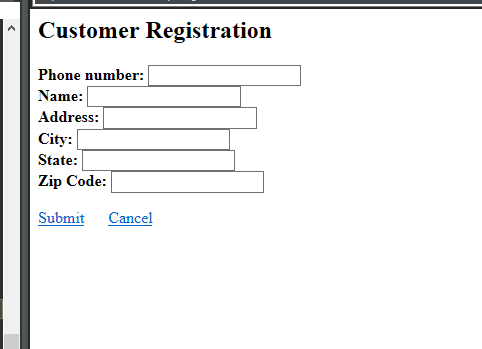
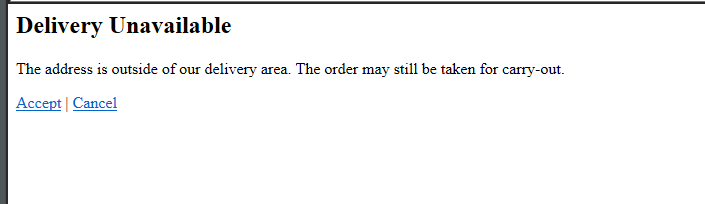
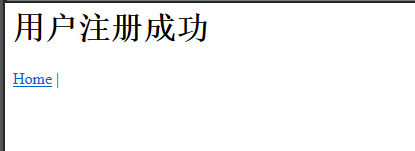
10.总结
相同点:SpringMVC和Spring Web Flow都实现了mvc设计模式
不同点:在mvc设计模式的实现方面不同
SpringMVC通过编写controller,service类来实现
而流程则通过bean来实现,底层已经帮你实现了,帮你来处理请求跳转到对应的视图界面
笔记41 Spring Web Flow——Demo的更多相关文章
- 笔记42 Spring Web Flow——Demo(2)
转自:https://www.cnblogs.com/lyj-gyq/p/9117339.html 为了更好的理解披萨订购应用,再做一个小的Demo. 一.Spring Web Flow 2.0新特性 ...
- Spring实战第八章学习笔记————使用Spring Web Flow
Spring实战第八章学习笔记----使用Spring Web Flow Spring Web Flow是一个Web框架,它适用于元素按规定流程运行的程序. 其实我们可以使用任何WEB框架写流程化的应 ...
- 笔记43 Spring Web Flow——订购披萨应用详解
一.项目的目录结构 二.订购流程总体设计 三.订购流程的详细设计 1.定义基本流程pizza-flow.xml <?xml version="1.0" encoding=&q ...
- 笔记39 Spring Web Flow——订单流程(收集顾客信息)
如果你曾经订购过披萨,你可能会知道流程.他们首先会询问你的电 话号码.电话号码除了能够让送货司机在找不到你家的时候打电话给 你,还可以作为你在这个披萨店的标识.如果你是回头客,他们可以 使用这个电话号 ...
- 笔记38 Spring Web Flow——订单流程(定义基本流程)
做一个在线的披萨订购应用 实际上,订购披萨的过程可以很好地定义在一个流程中.我们首先从 构建一个高层次的流程开始,它定义了订购披萨的整体过程.接下 来,我们会将这个流程拆分成子流程,这些子流程在较低的 ...
- 笔记37 Spring Web Flow——流程的组件
在Spring Web Flow中,流程是由三个主要元素定义的:状态.转移和 流程数据. 一.状态 Spring Web Flow定义了五种不同类型的状态.通过选择Spring Web Flow的状态 ...
- 笔记36 Spring Web Flow——配置
Spring Web Flow是一个Web框架,它适用于元素按规定流程运行的程序.Spring Web Flow是Spring MVC的扩展,它支持开发基于流程的应用程 序.它将流程的定义与实现流程行 ...
- 笔记40 Spring Web Flow——订单流程(构建订单)
二.订单子流程 在识别完顾客之后,主流程的下一件事情就是确定他们想要什么类型 的披萨.订单子流程就是用于提示用户创建披萨并将其放入订单中 的,如下图所示. showOrder状态位于订单子流程的中心位 ...
- Spring Web Flow 入门demo(三)嵌套流程与业务结合 附源代码
上篇博客我们说Spring web Flow与业务结合的方式主要有三种,以下我们主要介绍一下第三种的应用方式 3,运行到<action-state> 元素 SpringWeb Flow 中 ...
随机推荐
- miaosha
1:跨域请求配置 后端Controller 添加注解 @CrossOrigin(origins = {"*"},allowCredentials = "true" ...
- OK。第一个shell script 脚本
很简单吧.也很容易理解.读取两个字符放到变量firstname和lastname中,然后输出 编辑日期格式 上面是编辑日期格式.下面的例题是按照日期格式来分类创建文件
- Codeforces 348C Subset Sums 分块思想
题意思路:https://www.cnblogs.com/jianrenfang/p/6502858.html 第一次见这种思路,对于集合大小分为两种类型,一种是重集合,一种是轻集合,对于重集合,我们 ...
- .babelrc配置例子
{ "presets":[ ["es2015",{"modlues":false}], "react", ], &quo ...
- macOS免费的NTFS读写软件
Mounty for Mac brew cask install mounty
- Java中static关键字的定义
1.static存在的主要意义 static的主要意义是在于创建独立于具体对象的域变量或者方法.以致于即使没有创建对象,也能使用属性和调用方法! static关键字还有一个比较关键的作用就是 用来形成 ...
- asp.net Mvc 增删改查
1.创建项目 已经创建好项目了 2.创建数据库 使用这个数据库或者自己创建一个数据库,一个表就好,简单 USE [LearnAdminlte] GO /****** Object: Table [db ...
- LInux文件基础知识和文件目录操作(系统调用函数方式)
1.进程是处于活动状态的程序,某个用户通过操作系统运行程序所产生的进程代表着该用户的行为.如果用户不具备访问某个目录和文件的权限,那么该用户的进程也不能访问. 2.Linux系统中文件安全机制是通过给 ...
- AutoCAD2016简体中文破解版32位64位下载
AutoCAD2016序列号:666-69696969 667-98989898 400-45454545 066-66666666(任意一个) AutoCAD2016产品密钥:001H1 AutoC ...
- 炼数成金数据分析课程---10、python中如何画图
炼数成金数据分析课程---10.python中如何画图 一.总结 一句话总结: 主要matplotlib库,pandas中也可以画一些基础图 大纲+实例快速学习法 1.matplotlib的最简单画图 ...