
jeecg /ant-design-vuepro 前端使用
1、原生axios使用
<script>

  import Vue from 'vue';

  import axios from 'axios';

  axios.defaults.baseURL = 'http://127.0.0.1:3000/jeecg-boot/sys/annountCement';

  // Vue.prototype.$http = axios;

  import { ACCESS_TOKEN } from "@/store/mutation-types"

  axios.interceptors.request.use(config =>{

    console.log("enter into axios.interceptors");

    const token = Vue.ls.get(ACCESS_TOKEN);

    // this.headers = { authorization: 'authorization-text',"X-Access-Token":token }

    // config.headers.Authorization = window.sessionStorage.getItem('X-Access-Token');

    config.headers['X-Access-Token'] = token;

   return config;

  })

  const columns = [

    { title: 'Full Name', width: 100, dataIndex: 'name', key: 'name', fixed: 'left' },

    { title: 'Age', width: 100, dataIndex: 'age', key: 'age', fixed: 'left' },

    { title: 'Column 1', dataIndex: 'address', key: '1', width: 150 },

    { title: 'Column 2', dataIndex: 'address', key: '2', width: 150 },

    { title: 'Column 3', dataIndex: 'address', key: '3', width: 150 },

    { title: 'Column 4', dataIndex: 'address', key: '4', width: 150 },

    { title: 'Column 5', dataIndex: 'address', key: '5', width: 150 },

    { title: 'Column 6', dataIndex: 'address', key: '6', width: 150 },

    { title: 'Column 7', dataIndex: 'address', key: '7', width: 150 },

    { title: 'Column 8', dataIndex: 'address', key: '8' },

    {

      title: 'Action',

      key: 'operation',

      fixed: 'right',

      width: 100,

      scopedSlots: { customRender: 'action' },

    },

  ];

  const data = [];

  for (let i = 0; i < 100; i++) {

    data.push({

      key: i,

      name: `Edrward ${i}`,

      age: 32,

      address: `London Park no. ${i}`,

    });

  }

  export default {

    name: 'antdesignvue',

    data() {

      return {

        data,

        columns,

        visible: false,

        headers: { },

        token:{ }

      }

    },

    methods: {

      showModal() {

        this.visible = true

      },

      handleOk(e) {

        console.log(e);

        this.visible = false

      },

      async getlist() {

        //const result = await axios.get('list?_t=1582775652&column=createTime&order=desc&field=id,,,titile,msgCategory,sender,priority,msgType,sendStatus,sendTime,cancelTime,action&pageNo=1&pageSize=10');

        const result = await axios.get('list');

        console.log(result);

        console.log(result.data);

        console.log(result.data.result.records);

      },

    },

    created(){

      console.log("created!");

      this.getlist();

    }

  }
2、getAction封装get请求
api/manage.js
//get

export function getAction(url,parameter) {

  return axios({

    url: url,

    method: 'get',

    params: parameter

  })

}
......
import { getAction } from '@/api/manage';
......
created(){

      console.log("created!");

      //this.getlist();

      getAction('http://127.0.0.1:3000/jeecg-boot/sys/annountCement/list').then((res) => {console.log(res)});

    }
3、httpAction封装post请求
api/manage.js
//post method= {post | put}

export function httpAction(url,parameter,method) {

  return axios({

    url: url,

    method:method ,

    data: parameter

  })

}
......
import { getAction,httpAction } from '@/api/manage';
......
created(){

      console.log("created!");

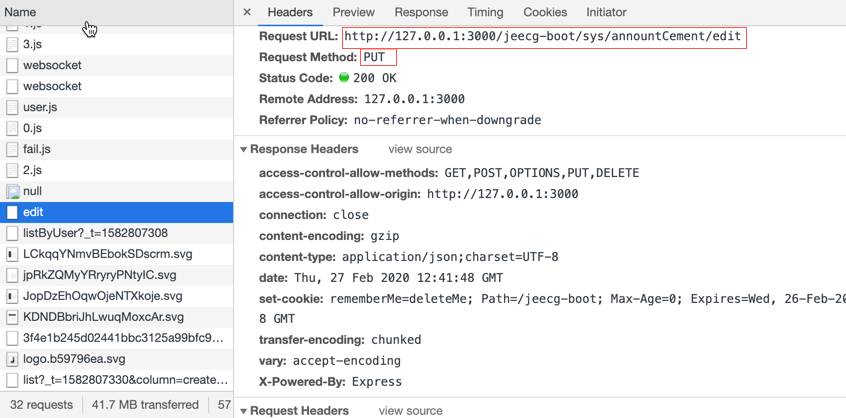
    httpAction('http://127.0.0.1:3000/jeecg-boot/sys/annountCement/edit',this.formData,'put').then((res)=>{console.log(res)});

}

4、X-Access-Token
jeecg请求时附加token
1)引入token依赖
  import { ACCESS_TOKEN } from "@/store/mutation-types"

  import Vue from 'vue'
2)在data的return中声明headers和token字段
  headers: { },

  token:{ }
3)在created(){ }中给this.header赋值
  created(){//加载事件

    const token=Vue.ls.get(ACCESS_TOKEN);

    this.headers={ authorization: 'authorization-text',"X-Access-Token":token }

  }
4)引用示例:
<a-upload :action="请求地址" :data="token" :headers="headers"></a-upload>
jeecg /ant-design-vuepro 前端使用的更多相关文章
- ant design pro/前端/JS:实现本地运行https
工具:github---mkcert 用于生成本地证书 ant p版本:1.0.0 这里我只说如何给antp部署https,以及会遇到的问题解决,其他请看原文参考 1.用mkcert生成证书,去git ...
- jeecg ant design vue 一些收藏
1关于 进来清除上次记录 找到src/permission.js下的
- jeecg ant design vue一级菜单跳到外部页面——例如跳到百度
需求:点击首页跳到百度新打开的页面 找到SideMenu.vue 对应的inde.js找到renderMenuItem 函数.加一个判断 if(menu.meta.url=='https://ww ...
- 使用Vue-Cli搭建Ant Design Vue前端开发环境
如果文章有帮助到你,还请点个赞或留下评论 搭建脚手架 环境准备 nodeJS vue-cli 如果没有安装点击此处查看安装方法 进入 vue ui 1.打开终端,输入命令 vue ui 2.选择项目存 ...
- Ant design在vue,react的引入
文章地址: https://www.cnblogs.com/sandraryan/ 最近由于 一些不可描述的原因 要研究一下Ant design这个前端框架. 祭上官网: https://ant.de ...
- (二)React Ant Design Pro + .Net5 WebApi:前端环境搭建
首先,你需要先装一个Nodejs,这是基础哦.如果没有这方面知识的小伙伴可以在园子里搜索cnpm yarn等关键字,内容繁多,此不赘述,参考链接 一. 简介 1. Ant Design Pro v5 ...
- 使用selenium操作ant design前端的页面,感觉页面没加载完
因需要收集页面数据,遂准备使用selenium爬取瓦斯阅读页面, 瓦斯网站使用的是ant design,元素定位非常困难,页面元素都没有ID,现在还只是能做到操作登录,不能自动打开订阅,查询某公众号, ...
- 前端自动分环境打包(vue和ant design)
现实中的问题:有时候版本上线的时候,打包时忘记切换环境,将测试包推上正式服务器,那你就会被批了. 期望:在写打包的命令行的时候就觉得自己在打包正式版本,避免推包时候的,不确信自己的包是否正确. 既然有 ...
- Vue.js高效前端开发 • 【Ant Design of Vue框架进阶】
全部章节 >>>> 文章目录 一.栅格组件 1.栅格组件介绍 2.栅格组件使用 3.实践练习 二.输入组件 1.输入框组件使用 2.选择器组件使用 3.单选框组件使用 4.实践 ...
- Vue.js高效前端开发 • 【Ant Design of Vue框架基础】
全部章节 >>>> 文章目录 一.Ant Design of Vue框架 1.Ant Design介绍 2.Ant Design of Vue安装 3.Ant Design o ...
随机推荐
- oracle 处理Session不够用
1.执行语句 scope=spfile; scope=spfile; 2.查看现在的链接数 select count(*) from v$process --当前正在使用的 select value ...
- 0004 继承django系统用户表
1 创建基础模型 在本项目中,所有表都有两个自动产生的完全相同的字段,即创建时间和更新时间,因此,可以创建一个基础模型,让所有的表都来继承这个模型. 找到工程目录下的PublicMethod目录,创建 ...
- 继 “多闪”后“飞聊”再被diss?其实社交还能这么玩
近日头条低调上线了新的社交APP——飞聊,目前在AppStore社交排行榜第7位.但很多人使用了之后都觉得新产品的各个功能都让人想起其他的产品.兴趣小组让人想到豆瓣的兴趣小组,生活动态让人想到微博动态 ...
- 小匠第二周期打卡笔记-Task05
一.卷积神经网络基础 知识点记录: 神经网络的基础概念主要是:卷积层.池化层,并解释填充.步幅.输入通道和输出通道之含义. 二维卷积层: 常用于处理图像数据,将输入和卷积核做互相关运算,并加上一个标量 ...
- 一看就会一做就废系列:说说 RECOVER UNTIL CANCEL
这里是:一看就会,一做就废系列 数据库演示版本为 19.3 (12.2.0.3) 该系列涉及恢复过程中使用的 5 个语句: 1. recover database 2. recover databas ...
- Codeforces Round #611 (Div. 3) A-F简要题解
contest链接:https://codeforces.com/contest/1283 A. Minutes Before the New Year 题意:给一个当前时间,输出离第二天差多少分钟 ...
- JS 抖动函数封装
原生JS实现封装的抖动函数框架 <style> ul{ margin-top: 100px; } li { float: left; margin-left: 20px; position ...
- 用eclipse的同一个tomcat启动两个javaweb项目
1.右键选择 Add and Remove 2.把左边两个项目add到右边 3.完成之后查看eclipse左边的Servers下的server.xml文件,会自动生成两个Context标签,当然你到第 ...
- layui之表单验证
这篇文章的表单验证我只是随便记录下,望各位看官理解 1.排序 验证 html代码 <div class="layui-form-item"> <label cla ...
- Android 的UI基础布局的学习
一. 今天学习了Android 的UI基础布局的部分,绝大多数的布局都在Androidstudio的这个界面里,如下: 在左边的框里的palette的内部,包含了的大多数的布局所要用的button按钮 ...