
arch/manjaro linux configuration
0. Installation
SystemConfiguration:
# 启动时选择第二项boot(non-free),Manjaro自带的驱动精灵会帮你安装好所需驱动,笔记本双显卡则会帮你安装bumblebee
driver boot(non-free)
#查看系统信息: inxi -Fx
#排列源:
sudo pacman-mirrors -i -c China -m rank #只留下清华源能令带宽跑满
sudo pacman-optimize && sync #同步并优化(类似磁盘整理,固态硬盘无需操作)
#增加archlinuxcn库和antergos库: vi /etc/pacman.conf
[archlinuxcn]
SigLevel = TrustAll
Server = https://mirrors.tuna.tsinghua.edu.cn/archlinuxcn/$arch
[antergos]
SigLevel = TrustAll
Server = https://mirrors.tuna.tsinghua.edu.cn/antergos/$repo/$arch
#升级系统:
sudo pacman -Syyu
#安装archlinuxcn签名钥匙&antergos签名钥匙
sudo pacman -S --noconfirm archlinuxcn-keyring antergos-keyring
MacBook Air WiFi:
lspci -vnn | grep 0280
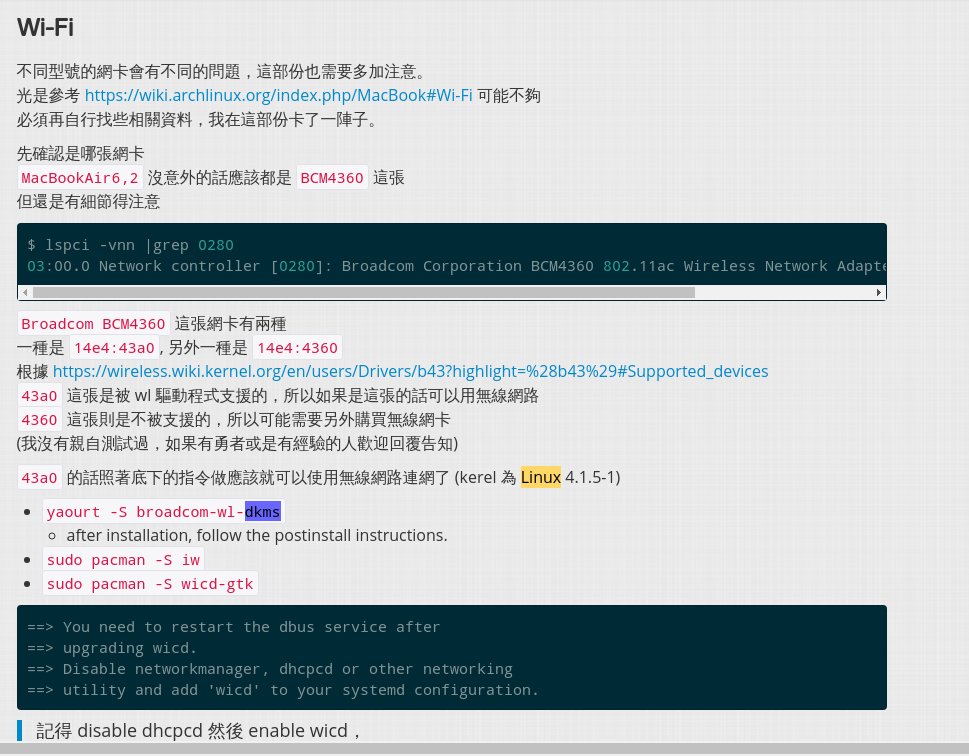
sudo pacman -S yaourt linux414-headers
yaourt -S broadcom-wl-dkms && reboot (optional)
#安装搜狗输入法#xfce桌面
sudo pacman -S --noconfirm fcitx-im fcitx-configtool fcitx-sogoupinyin #安装搜狗输入法#kde桌面
sudo pacman -S --noconfirm fcitx-im kcm-fcitx fcitx-sogoupinyin #配置fcitx
sudo echo -e "export GTK_IM_MODULE=fcitx\nexport QT_IM_MODULE=fcitx\nexport XMODIFIERS=@im=fcitx">>~/.xprofile#AUR助手yaourt:
sudo pacman -S --noconfirm yaourt
#common software:
sudo yaourt -S --noconfirm google-chrome masterpdfeditor screenfetch cmatrix goldendict xmind virtualbox linux414-virtualbox-host-modules virtualbox-ext-oracle tmux vim
Download---> http://chromecj.com/downloadstart.html#899
https://www.switchyomega.com/download.html
Editors:
tmux:
$ cd
$ git clone https://github.com/askDing/.tmux_conf.git
$ ln -s -f .tmux/tmux.conf
vim-spf13:
chsh -s /bin/zsh
sh -c "$(wget https://raw.github.com/robbyrussell/oh-my-zsh/master/tools/install.sh -O -)" # oh -my-zsh
sh <(curl https://j.mp/spf13-vim3 -L)
emacs-spacemacs:
sudo pacman -S adobe-source-code-pro-fonts
git clone https://github.com/syl20bnr/spacemacs ~/.emacs.d
Shadowsocksr:
<optjion 1>
git clone -b manyuser https://github.com/qcgzxw/ssr.git
sudo vi /etc/shadowsocks.json:
{

    "server":"12.34.56.78",

    "server_ipv6":"::",

    "server_port":8388,

    "local_address":"127.0.0.1",

    "local_port":1080,

    "password":"www.qcgzxw.cn",

    "timeout":300,

    "udp_timeout":60,

    "method": "chacha20",

    "protocol": "auth_sha1_v4",

    "protocol_param":"",

    "obfs":"tls1.2_ticket_auth",

    "obfs_param":"https://www.qcgzxw.cn/",

    "fast_open":false,

    "workers":1

}
cd shadowsocksr/shadowsocks
sudo python local.py -c /etc/shadowsocks.json -d start
<option 2>
git clone https://github.com/the0demiurge/CharlesScripts/blob/master/charles/bin/ssr
#sudo mv ssr /usr/local/bin
#sudo chmod 766 /usr/local/bin/ssr
#ssr install (安装)
#ssr config (配置文件)
#ssr start

启动!

**************************************************************

说明:

$ ssr help

ShadowSocksR python client tool

if you have not install ssr, please run "ssr install"

Usage:

  ssr help

  ssr config : edit config.json

  ssr install : install shadowsocksr client

  ssr uninstall : uninstall shadowsocksr client

  ssr start : start the shadowsocks service

  ssr stop : stop the shadowsocks service

  ssr log : cat the log of shadowsocks

**************************************************************

开机自启动:

debian:

$ sudo nano /etc/rc.local

添加

sudo ssr start

debian9+:

$nano /etc/rc.local

****************************************

#!/bin/bash

sudo ssr start

exit 0

****************************************

# chmod +x /etc/rc.local

# systemctl start rc-local

arch-linux:

$ sudo nano /usr/lib/systemd/system/rc-local.service

****************************************

[Unit]

Description=/etc/rc.local Compatibility

ConditionPathExists=/etc/rc.local

[Service]

Type=forking

ExecStart=/etc/rc.local

TimeoutSec=0

StandardOutput=tty

RemainAfterExit=yes

SysVStartPriority=99

[Install]

WantedBy=multi-user.target

****************************************

$ sudo systemctl enable rc-local.service

$ sudo nano /etc/rc.local

****************************************

#!/bin/bash

sudo ssr start

****************************************

$ sudo chmod +x /etc/rc.local
Swap CTRL and Caps_Lock:
<optional 1> setxkbmap -option ctrl:swapcaps
<optional 2>
查看默认键盘布局为美式 : /etc/default/keyboard
修改键盘映射文件:/usr/share/kbd/keymaps/i386/qwerty/us.map.gz
sudo gunzip us.map.gz
sudo vi us.map /Caps_Lock keycode = 58
sudo gzip us.map.gz us.map
Offices:
sudo pacman -S wps-office ttf-wps-fonts
备份/还原系统:
<optional 1>sudo dd if =/dev/sda1 of=/dev/sdb1
sudo dd if=/deb/sdb1 of=/dev/sda1
<optional 2>cd / && sudo tar cvzpf backup.tgz --exclude=/proc --exclude=/mnt --exclude=/sys --exclude=/backup.tgz /
tar xvzpf backup.tgz -C /
<optional 3>rsync -Pa
references: https://my.oschina.net/langxSpirit/blog/1647000
https://www.jianshu.com/p/47f315a408b6
https://www.qcgzxw.cn/301.html
https://www.likeu.info/2018/01/ssr-for-linux.html
arch/manjaro linux configuration的更多相关文章
- 修复Arch Linux和Manjaro Linux无法显示emoji的问题
安装好Arch Linux或Manjaro Linux系统后默认没办法正常显示emoji,通常会变成方框或者带有unicode码的方块: 这是因为缺失字体以及相关的字体配置导致的. 当然也有一小部分应 ...
- Manjaro Linux安装singularity-container
技术背景 容器化技术在各种生产领域已经得到了广泛的应用,这得益于容器的轻量化(相比于虚拟机而言),安全性(隔离弱于虚拟机,但是权限控制得当的情况下也可以认为是安全隔离的)以及系统级虚拟化带来的高可用性 ...
- 好消息,Manjaro Linux 18 已正式发布!
导读 Manjaro Linux 18 已正式发布!Xfce 版本仍然是旗舰,Manjaro 为其提供了优雅且领先的集成体验.这一版本搭载 Xfce 4.13. 这一版本主要专注于在桌面和窗口管理器上 ...
- U盘安装Debian KDE 输入法 Manjaro Linux WPS 字体
Manjaro: 首先下载Manjaro Linux,然后用USBWriter(https://pan.baidu.com/s/1bZGb5k)写入,重启选择USB启动. 更改软件仓库(Debian称 ...
- 为科学计算而生的Julia——基于Manjaro Linux的安装与入门
技术背景 Julia是一门为科学计算而生的编程语言,其着重强调了开源.生态与性能.从开源角度来说,相比于Matlab就要友好很多,用户可以免费使用,而且MIT协议应该是最宽松的开源协议之一(截图来自于 ...
- 修复UEFI模式下Manjaro Linux启动问题
上周在更新Manjaro Linux的时候误触了电源键,导致内核更新了一半系统强制关机,重启时正常进入grub但无法正常引导进入系统. 由于不想重装系统(一大堆环境和工具的配置还是相当繁琐的),加上初 ...
- Arch系Linux中安装Docker
Arch系Linux中安装Docker 1. 下载最新版docker $ sudo pacman -Syu docker 2. 免sudo执行docker $ sudo gpasswd -a ${US ...
- Manjaro Linux 5.9.11-3安装和配置全局截图工具FlameShot教程
背景说明 截图工具是日常适用频率较高的一种系统工具,在Linux下也有不少常用截图工具,如deepin-screenshot等,但是今天我们要介绍的是FlameShot--一款更加精致的Linux全局 ...
- Manjaro Linux KDE个人的一些安装配置
安装manjaro kde linux的个人步骤 1 换源 1.1 自动寻找最快的源 sudo pacman-mirrors -i -c China -m rank 1.2 修改源文件 sudo ge ...
随机推荐
- 解决UITableView分割线距左边有距离的办法
首先在viewDidLoad方法中加上如下代码: if ([self.tableView respondsToSelector:@selector(setSeparatorInset:)]) { ...
- 【Git 使用笔记】第四部分:git在公司中的开发流程
先声明几个变量 仓管A:主分支,只有master分支仓管B:开发分支,只有各个业务开发分支 仓管B fork 于 A 如下图 为了保证 代码的稳定性,只有 仓管B中的某个分支测试完毕并进行了代码r ...
- python基础班-淘宝-目录.txt
卷 TOSHIBA EXT 的文件夹 PATH 列表卷序列号为 AE86-8E8DF:.│ python基础班-淘宝-目录.txt│ ├─1-1 Linux基础│ ├─01-课程简介│ │ 01-课程 ...
- js-jquery-数组遍历
一.原生方法支持 1.普通for循环 for(j = 0; j < arr.length; j++) { } 说明:性能很高,但是仍可以优化. 2.优化版for循环[推荐] for(j = 0, ...
- vue学习之node.js
Node.js是一个Javascript运行环境(runtime environment),发布于2009年5月,由Ryan Dahl开发,实质是对Chrome V8引擎进行了封装.本文详细介绍了No ...
- abap关键字
1:abap将提升的关键字快捷输入 按tab键,提示的关键字将会自动输入. 2:shift tab 用于对其格式 3:ctrl+d 将改行复制到下一行.
- SqlAlchemy个人学习笔记完整汇总-转载
使用 sqlalchemy 有3种方式: 方式1, 使用raw sql; 方式2, 使用SqlAlchemy的sql expression; 方式3, 使用ORM. 前两种方式可以统称为 core ...
- PAT 1020 Tree Traversals[二叉树遍历]
1020 Tree Traversals (25)(25 分) Suppose that all the keys in a binary tree are distinct positive int ...
- Leetcode: Repeated DNA Sequence
All DNA is composed of a series of nucleotides abbreviated as A, C, G, and T, for example: "ACG ...
- Summary: Java中函数参数的传递
函数调用参数传递类型(java)的用法介绍. java方法中传值和传引用的问题是个基本问题,但是也有很多人一时弄不清. (一)基本数据类型:传值,方法不会改变实参的值. public class Te ...