
SpringBoot应用配置常用相关视图解析器
SpringBoot的自动装配装配了视图解析器了吗?
我们可以看到SpringBoot自动装配的WebMvcAutoConfiguration类中,装配了以下关于ViewResolver(视图解析器)的类。可以看到SpringBoot已经自动装配了InternalResourceViewResolver类,又是通过外部资源配置的方式来配置此视图解析器this.mvcProperties.getView().getPrefix(),所以我们可以在application.properties文件配置此视图解析器用于解析JSP。
	@Bean

		@ConditionalOnMissingBean

		public InternalResourceViewResolver defaultViewResolver() {

			InternalResourceViewResolver resolver = new InternalResourceViewResolver();

			resolver.setPrefix(this.mvcProperties.getView().getPrefix());

			resolver.setSuffix(this.mvcProperties.getView().getSuffix());

			return resolver;

		}
SpringBoot使用JSP
SpringBoot在自动装配的时候默认就已经将JSP的视图解析器InternalResourceViewResolver装配。所以我们只需要进行配置使用即可。在SpringBoot中使用JSP比较麻烦一点,或许是我的个人理解存在什么误区,如果有朋友知道更好的配置方法,请留言给我。
第一步:创建自定义webapp目录,如下所示

第二步:将此文件夹配置成项目的WEB模块
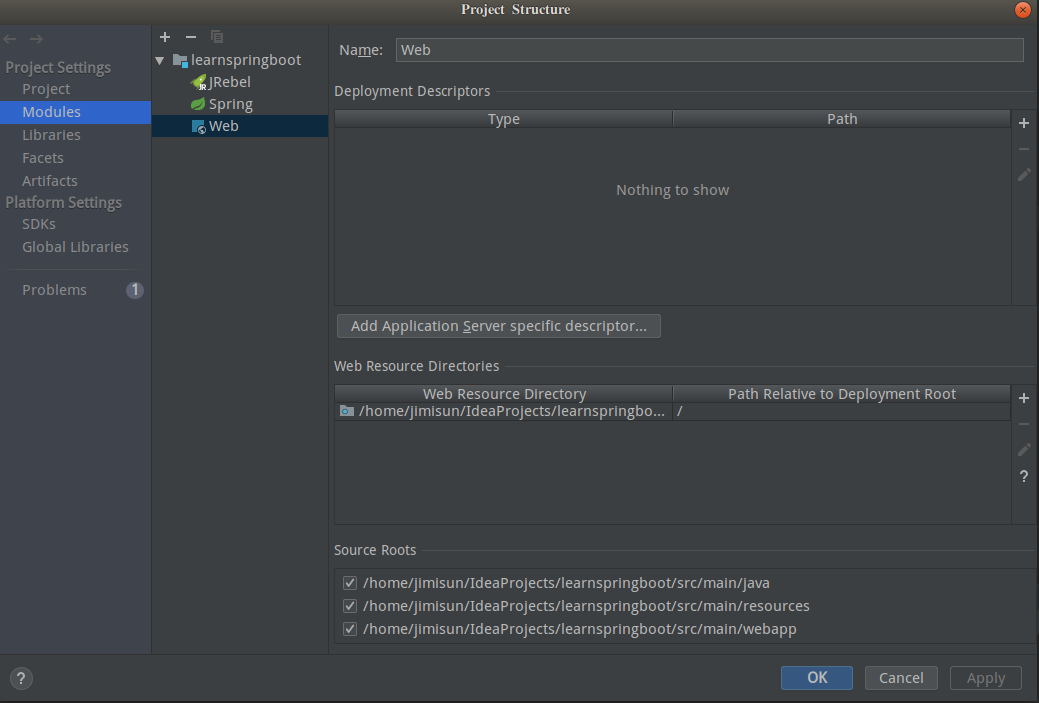
第三步:导入JSP相关依赖
  <dependency>

            <groupId>org.apache.tomcat.embed</groupId>

            <artifactId>tomcat-embed-jasper</artifactId>

            <scope>provided</scope>

        </dependency>

        <dependency>

            <groupId>javax.servlet</groupId>

            <artifactId>jstl</artifactId>

        </dependency>
第四步:在SpringBoot的属性文件application.properties中配置JSP的路由
spring.mvc.view.prefix=/

spring.mvc.view.suffix=.jsp
第五步:修改Maven的pom.xml文件打包方式改成war(默认打包Jar,打包Jar包的方式使用Idea启动是没什么问题,如果单独运行Jar包就找不到JSP文件,如果改成War包即可)
<packaging>war</packaging>

SpringBoot中使用Thymeleaf
SpringBoot官方是推荐使用thymeleaf作为优选的视图解析器,所以SpringBoot对Thymeleaf的支持非常好,这里仅仅演示SpringBoot如何选用Thymeleaf作用默认视图解析器。
第一步:导入Thymeleaf的依赖
      <dependency>

            <groupId>org.springframework.boot</groupId>

            <artifactId>spring-boot-starter-thymeleaf</artifactId>

        </dependency>
第二步:创建存放Thymeleaf模板文件夹,在Resources目录下创建templates目录

这个文件夹的名字可不是我么随便命名的啊,是SpringBoot在自动装配Thymeleaf视图解析器的时候就已经预定义好了,我们看一下它的定义源码。
@ConfigurationProperties(prefix = "spring.thymeleaf")

public class ThymeleafProperties {

	private static final Charset DEFAULT_ENCODING = StandardCharsets.UTF_8;

	public static final String DEFAULT_PREFIX = "classpath:/templates/";

	public static final String DEFAULT_SUFFIX = ".html";

	}
SpringBoot中使用Freemark
第一步:导入Maven依赖
<dependency>

            <groupId>org.springframework.boot</groupId>

            <artifactId>spring-boot-starter-freemarker</artifactId>

        </dependency>
第二步:创建存放Freemark模板文件夹,在Resources目录下创建templates目录
@ConfigurationProperties(prefix = "spring.freemarker")

public class FreeMarkerProperties extends AbstractTemplateViewResolverProperties {

	public static final String DEFAULT_TEMPLATE_LOADER_PATH = "classpath:/templates/";

	public static final String DEFAULT_PREFIX = "";

	public static final String DEFAULT_SUFFIX = ".ftl";

	}
我们可以看到SpringBoot在自动装配Freemarker视图解析器默认是将模板文件放在classpath:/templates/路径内,我们同样可以在SpringBoot的配置文件中自行配置。
小提示:我在写Freemark视图解析器的时候并没有将第一个JSP内部资源解析器给删除掉,所以他们是并存的,所以我们可以知道SpringBoot在装配他们的时候给予设定了优先级顺序。从下图可以看到他们的优先级顺序;Freemarker>Thymeleaf>InternalResourceViewResolver`

该教程所属Java工程师之SpringBoot系列教程,本系列相关博文目录 Java工程师之SpringBoot系列教程前言&目录
SpringBoot应用配置常用相关视图解析器的更多相关文章
- Spring MVC的多视图解析器配置及与Freemarker的集成
一.从freemarker谈起 Freemarker使用模板技术进行视图的渲染.自从看了Struts标签.Freemarker.JSTL的性能对比后,我毅然决定放弃Struts标签了!效率太差…… S ...
- spring配置多视图解析器
最近做一个小项目(移动端),自己搭了个简单的SSM框架(spring + spring MVC + Mybitis),展示层本来选用的是jsp,各方便都已经搭建好,结果发现有些页面需要用到H5的一些功 ...
- [转载]开发 Spring 自定义视图和视图解析器
原文出处 http://www.ibm.com/developerworks/cn/java/j-lo-springview/ 概述 Spring 3.0 默认包含了多种视图和视图解析器,比如 JSP ...
- Spring MVC视图解析器
Spring MVC提供的视图解析器使用ViewResolver进行视图解析,实现浏览器中渲染模型.ViewResolver能够解析JSP.Velocity模板.FreeMarker模板和XSLT等多 ...
- 【SpringMVC】SpringMVC系列10之视图与视图解析器
10.视图与视图解析器 10.1.概述 请求处理方法执行完成后,最终返回一个 ModelAndView处理方法,Spring MVC 也会在内部将它们装配成一个ModelAndView 对象, ...
- Spring MVC之视图解析器
Spring MVC提供的视图解析器使用ViewResolver进行视图解析,实现浏览器中渲染模型.ViewResolver能够解析JSP.Velocity模板.FreeMarker模板和XSLT等多 ...
- SpringMVC——视图和视图解析器
请求处理方法执行完成后,最终返回一个 ModelAndView对象.对于那些返回 String,View 或 ModeMap 等类型的处理方法,Spring MVC 也会在内部将它们装配成一个Mode ...
- SpringMVC中的视图和视图解析器
对于控制器的目标方法,无论其返回值是String.View.ModelMap或是ModelAndView,SpringMVC都会在内部将它们封装为一个ModelAndView对象进行返回. Spri ...
- [刘阳Java]_InternalResourceViewResolver视图解析器_第6讲
SpringMVC在处理器方法中通常返回的是逻辑视图,如何定位到真正的页面,就需要通过视图解析器 InternalResourceViewResolver是SpringMVC中比较常用视图解析器. 网 ...
随机推荐
- PHP开发中,让var_dump调试函数输出更美观 ^_^#
前提:php必须安装Xdebug模块. 用var_dump打印输出时,输出的内容没有被格式化.如下图: 通常使用var_dump打印的内容是被格式化后输出的,如下图: 造成没有格式化输出的原因是因为p ...
- android studio 使用 SVN
通过android studio来进行版本控制,先前已经安装了TortoiseSVN-1.9.2,但是在打开android studio的时候会出现 Can't use Subversion comm ...
- 采用get方式提交数据到服务器实例
GetDemo项目目录 一.编写StreamTools.java /** * */ package com.hyzhou.getdemo.utiils; import java.io.ByteArra ...
- 【GIS】Cesium1.49编译
1.npm install 2.npm install --save-dev gulp 3.gulp default 4.npm run build 5.npm start 遇到问题 1.gulp不好 ...
- 【RF库Collections测试】Log Dictionary 【同log list】
Name:Log DictionarySource:Collections <test library>Arguments:[ dictionary | level=INFO ]Logs ...
- NSIS安装vcredist_64.exe
; ExecWait ‘vcredist_x86.exe’ # 一般的安装ExecWait ‘”vcredist_x86.exe” /q’ # silent install 静默安装; ExecWai ...
- 清理和关闭多余的Windows 7系统服务
清理和关闭多余的Windows 7系统服务 现在已经有不少配置不是很高的电脑用户正式用上了Windows 7(以下简称Win 7),如何让低配置电脑可以更流畅的运行Win 7呢?虽然部分软件提供了傻瓜 ...
- 【python3】 django2.0 在生成数据库表时报错: TypeError: __init__() missing 1 required positional argument: 'on_delete'
python: 3.6.4 django: 2.0 models.py 代码如下 # coding: utf-8 from django.db import models from django.co ...
- 写一个自定义的控件接口 C#
以下是我的测试代码:APP_Code/ucInterface.cs /* APP_Code/ucInterface.cs */ /// <summary> /// Summary desc ...
- css3整理--border-radius
1.border-radius 标准: border-top-left-radius: x y // 左上角,x 圆角水平半径, y 圆角垂直半径 border-top-right-radius:x ...