
为Magento1.5新增会员注册字段(转)
第一步、新建一个模块,在app/etc/modules/目录下新建文件Shuishui_Customer.xml
<config>

    <modules>

        <Shuishui_Customer>

            <active>true</active>

            <codePool>community</codePool>

        </Shuishui_Customer>

    </modules>

</config>
第二步、新建这个模块的config配置文件,位置在app/code/community/Shuishui/Customer/etc/config.xml
<?xml version="1.0"?>

<config>

    <modules>

        <Shuishui_Customer>

            <version>0.1.</version>

        </Shuishui_Customer>

    </modules>

    <global>

    <fieldsets>

        <customer_account>

              <mobile><create></create><update></update></mobile>

        </customer_account>

    </fieldsets>

        <models>

            <Shuishui_Customer>

                <class>Shuishui_Customer_Model</class>

            </Shuishui_Customer>

        </models>

        <helpers>

            <Shuishui_Customer>

                <class>Shuishui_Customer_Helper</class>

            </Shuishui_Customer>

        </helpers>

        <resources>

            <customerattribute_setup>

                <setup>

                    <module>Shuishui_Customer</module>

                    <class>Shuishui_Customer_Model_Entity_Setup</class>

                </setup>

            </customerattribute_setup>

        </resources>

    </global>

</config>
第三步、新建一个model类,继承自Mage_Customer_Model_Entity_Setup类,类里新添加一个字段,位置在app/code/community/Shuishui/Customer/Model/Entity/Setup.php
class Fanxiang_Customer_Model_Entity_Setup extends Mage_Customer_Model_Entity_Setup
'created_at' => array(

                        'type'          => 'static',

                        'label'         => 'Created At',

                        'visible'       => false,

                        'required'      => false,

                        'input'         => 'date',

                    ),

                    'mobile' => array(

                        'type'          => 'static',

                        'label'         => 'Mobile',

                        'visible'       => true,

                        'required'      => false,

                        'sort_order'    => ,

                    ),

                ),

            ),

            'customer_address'=>array(

                'entity_model'  =>'customer/customer_address',

                'table' => 'customer/address_entity',

                'additional_attribute_table' => 'customer/eav_attribute',

                'entity_attribute_collection' => 'customer/address_attribute_collection',
第四步、新增一个数据库安装脚本文件,位置在app/code/community/Shuishui/Customer/sql/customerattribute_setup/mysql4-install-0.1.0.php
$installer = $this;

$installer->startSetup();

$installer->addAttribute('customer','mobile',array(

      'label' => 'Mobile',

      'visible'=>,

      'required'=>,

      'position'=>,

      'sort_order'=>,

));

$installer->endSetup();

$customerattribute = Mage::getModel('customer/attribute')->loadByCode('customer','mobile');

$forms = array('customer_account_edit','customer_account_create','adminhtml_customer','checkout_register');

$customerattribute->setData('used_in_forms',$forms);

$customerattribute->save();
第五步,在前台注册页面的模板文件中添加一个新的表单项,位置在template\customer\form\register.phtml
<li>

                    <label for="mobile" class="required"><em>*</em><?php echo $this->__('mobile') ?></label>

                    <div class="input-box">

                        <input type="text" name="mobile" id="mobile" value="" title="<?php echo $this->__('mobile') ?>" class="input-text  required-entry" />

                    </div>

                </li>
前台显示效果
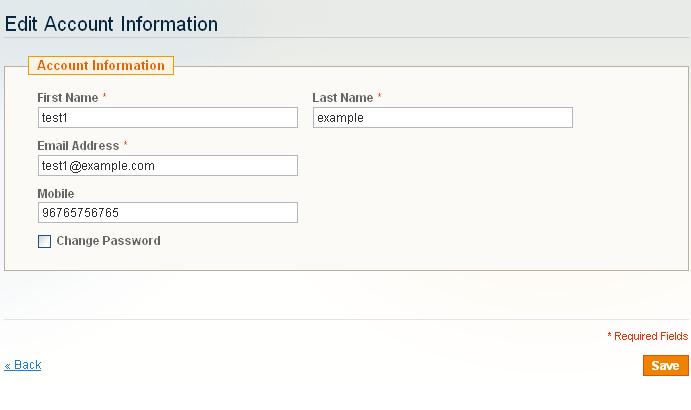
后台会员管理页面效果
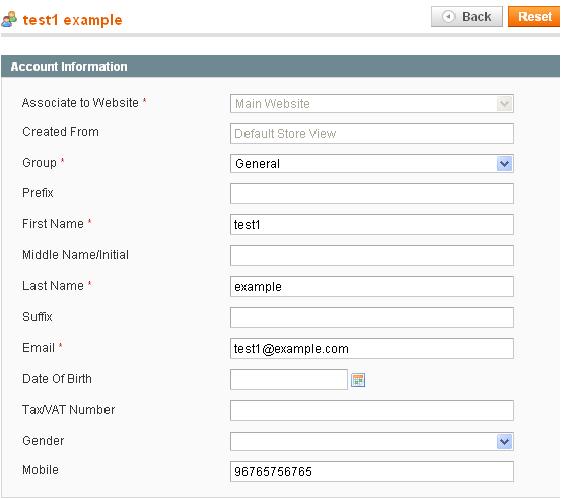
PS:1.4版本同样适用
参见原文:http://mydons.com/how-to-add-custom-fields-to-customer-registration-and-account-page-in-magento-1-5/
为Magento1.5新增会员注册字段(转)的更多相关文章
- 10天学会phpWeChat——第十天:phpWeChat的会员注册、登录以及微信网页开发
通过前面的系列教程,我们系统的讲解了phpWeChat从视图端.控制器端到模型端的操作流程:熟悉了phpWeChat的目录结构:掌握了视图端模板如何创建一个丰富的表单和模型端如何操作数据库.这一切都是 ...
- MVC会员注册
自从写了<数据库数据加密与解密>http://www.cnblogs.com/insus/p/3434735.html.其中也有提及Insus.NET将要在MVC应用程序中实现会员注册的功 ...
- 第三百八十四节,Django+Xadmin打造上线标准的在线教育平台—路由映射与静态文件配置以及会员注册
第三百八十四节,Django+Xadmin打造上线标准的在线教育平台—路由映射与静态文件配置以及会员注册 基于类的路由映射 from django.conf.urls import url, incl ...
- 帝国cms实现会员注册之后根据所在会员组转向的方法
帝国cms要实现会员注册之后根据所在会员组转向的能能,就需要修改/e/member/class/member_registerfun.php文件找到第175行,修改成如下代码: //审核 if($ch ...
- 将ECSHOP会员注册页面的Email修改成非必填项
将ECSHOP会员注册页面的Email修改成非必填项 ECSHOP教程/ ecshop教程网(www.ecshop119.com) 2011-07-29 有人说,在后台的 “会员注册项设置 ”里面 ...
- DISCUZ! X2.5设置仅允许QQ登录注册论坛 加固会员注册机制
论坛稍微有点起色之后,很多站长就会担心论坛经常被人恶意灌水.注册机.顶贴机等等一些列非法的手段.通常站长都会通过一些后台的设置和插件等等一 切有效的方法预防,但更多的站长会通过限制用户注册会员,需注册 ...
- DEDECMS会员注册如何配置邮箱发送邮件功能
网站邮件功能是一个非常基础和有效的通信工具,配合dede会员注册邮件验证功能可以大量的拒绝垃圾注册用户.那么如何配置DEDECMS会员注册邮箱发送邮件功能? 1:配置dedecms网站发信EMAI ...
- 【MVC】会员注册/登录,普通验证,会员名是否注册Ajax验证以及会员邮件验证实现原理
using System; using System.Collections.Generic; using System.ComponentModel; using System.ComponentM ...
- web会员注册页面代码(4)
<!DOCTYPE html PUBLIC "-//W3C//DTD XHTML 1.0 Transitional//EN" "http://www.w3.org/ ...
随机推荐
- 红米除线刷的另外一种救砖方法fastboot
原文来自:https://jingyan.baidu.com/article/48a42057e945bca9242504d7.html , 按照它操做了一下,虽然没有救活我的红米1,但是让我更好的了 ...
- GPUImage API 文档之GPUImagePicture类
GPUImagePicture类静态图像处理操作,它可以是需要处理的静态图像,也可以是一张作为纹理使用的图片,调用向它发送processImage消息,进行图像滤镜处理. 方法 - (id)initW ...
- OpenWRT下实现Portal认证(WEB认证)
首先简单介绍一下什么是Portal认证,Portal认证,通常也会叫Web认证,未认证用户上网时,设备强制用户登录到特定站点,用户可以免费访问其中的服务.当用户需要使用互联网中的其它信息时,必须在门户 ...
- Android 自定义 ListView 上下拉动刷新最新和加载更多
本文内容 开发环境 演示上下拉动刷新最新和加载更多 ListView 参考资料 本文演示上下拉动,刷新最新和加载更多,这个效果很常见,比如,新闻资讯类 APP,当向下拉动时,加载最新的资讯:向上拉动时 ...
- 【SCM】关于Gradle与maven的几篇文章
Gradle官方文档:https://docs.gradle.org/current/userguide/installation.html#sec:download 使用 Gradle 命令行:ht ...
- CMUSphinx Learn - Basic concepts of speech
Basic concepts of speech Speech is a complex phenomenon. People rarely understand how is it produced ...
- Lanczos Algorithm and it's Parallelization Stragegy
由于写了降维的一个系列算法分析,本来以为对这个Lanczos算法会理解一点,但是还是不知道讲了什么,最多的就是会如何调用,然后出结果,所以就翻译官网的相关内容.本篇翻译来自Dimensional Re ...
- Linux中在线安装Mysql和修改密码设置服务启动
一.说明:本文教大家在linux下在线安装mysql.网上的很多文章写的太乱,我们只取操作最方便的在线安装方式.本文以Centos为例. 二.安装过程. 1.安装客户端和服务端: (1)检查是否已经安 ...
- 【BZOJ2631】tree
Description 一棵n个点的树.每一个点的初始权值为1. 对于这棵树有q个操作,每一个操作为下面四种操作之中的一个: + u v c:将u到v的路径上的点的权值都加上自然数c: - u1 v1 ...
- mysql代理之Atlas
Atlas是由 Qihoo 360, Web平台部基础架构团队开发维护的一个基于MySQL协议的数据中间层项目.它在MySQL官方推出的MySQL-Proxy0.8.2版本号的基础上.改动了大量bu ...