
learning uboot how to set ddr parameter in qca4531 cpu
DDR工作频率 在600MHZ.
include/configs/board953x.h
#define CFG_PLL_FREQ CFG_PLL_650_600_200
#define CFG_DDR_REFRESH_VAL 0x4138 (default 12c)
0x0100 0001 0011 1000
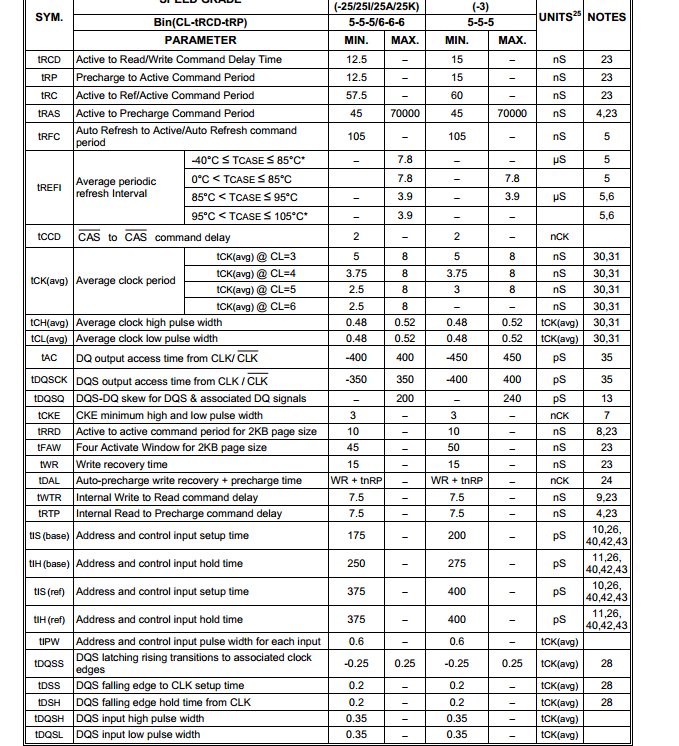
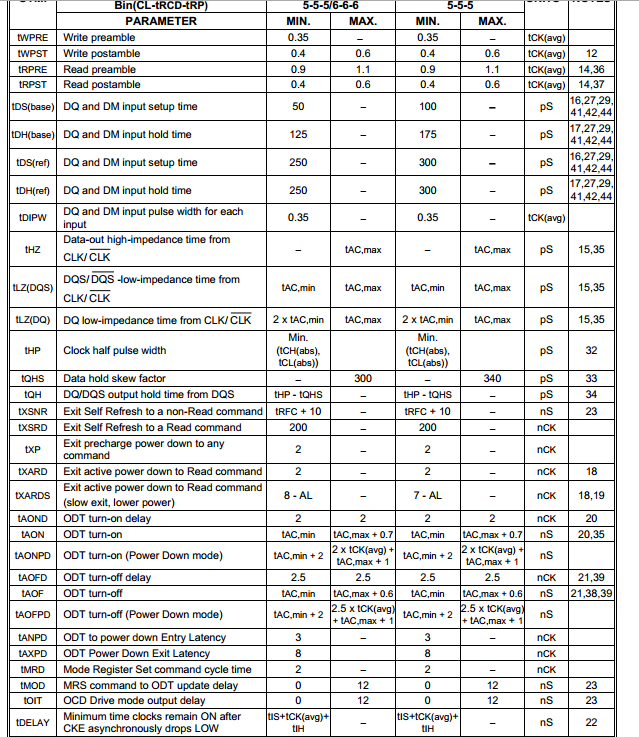
./board/atheros/common/init-953x.c:59:#define CFG_DDR2_SCORPION_CAS_LATENCY 4
#if CFG_DDR2_SCORPION_CAS_LATENCY == 4
#define CFG_DDR2_CONFIG_VAL DDR_CONFIG_CAS_LATENCY_MSB_SET(0x1) | \ c
DRAM CAS latency parameter MSB rounded up in memory core clock cycles
DDR_CONFIG_OPEN_PAGE_SET(0x1) | \
DDR_CONFIG_CAS_LATENCY_SET(0x1) | \
DRAM CAS latency parameter(first 3 bit) (?) 我认为应该是4;
DDR_CONFIG_TMRD_SET(0xf) | \
TMRD 最小为两个时钟周期: 取值范围: 0x2 - 0xf

DDR_CONFIG_TRFC_SET(0x15) | \
TRFC最小为105/5=21 = 0x15个时钟周期:

DDR_CONFIG_TRRD_SET(0x7) | \
TRRD最小为10/5=2 = 0x2个时钟周期

DDR_CONFIG_TRP_SET(0x9) | \
TRP最小为15/5=2 = 0x3个时钟周期

DDR_CONFIG_TRCD_SET(0x9) | \
TRCD最小为15/5=3 = 0x3个时钟周期

DDR_CONFIG_TRAS_SET(0x1b)
TRAS 最小为9个时钟周期
TRAS=max(Tras_min,tRcd+CL) = MAX(45,15+4) = 45 /5 =9

#define CFG_DDR2_CONFIG2_VAL DDR_CONFIG2_HALF_WIDTH_LOW_SET(0x1) | \
DDR_CONFIG2_SWAP_A26_A27_SET(DDR_CONFIG2_SWAP_A26_A27_VAL) \
DDR_CONFIG2_GATE_OPEN_LATENCY_SET(0x8) | \
DDR_CONFIG2_TWTR_SET(0x15) | \
TWTR=[1+BL/2+tWTR/tCK]*2 = [1+8/2+ROUND_UP(7.5/5) ] *2 = [1+4+2 ] * 2 = 14 = 0xE

DDR_CONFIG2_TRTP_SET(0x9) | \
TRTP= BL/2 +max(tRTP,2)-2 = 8/2 + max(2,2) -2 = 4;

DDR_CONFIG2_TRTW_SET(0xe) | \
TRTW = (CL+BL/2) *2 = (3+8/2)*2 = 14
DDR_CONFIG2_TWR_SET(0x1) | \
TWR= [BL/2 + tWR/tCK ] * 2 -1 = [8/2 + 15/5] *2-1 = [4+3]*2-1=13 (?)

DRAM CKE bit
DDR_CONFIG2_CKE_SET(0x1) | \
Control bit to allow the memory control to tri-state the address/control outputs;
DDR_CONFIG2_CNTL_OE_EN_SET(0x1) | \
DRAM burst type Sequential;
DDR_CONFIG2_BURST_LENGTH_SET(0x8)
DRAM burst length setting,Only 8 is supported
#define CFG_DDR2_CONFIG3_VAL 0x0000000a
#define CFG_DDR2_EXT_MODE_VAL 0x402
#define CFG_DDR2_MODE_VAL_INIT 0x143
#define CFG_DDR2_MODE_VAL 0x43
#define CFG_DDR2_TAP_VAL 0x10
#define CFG_DDR2_EN_TWL_VAL 0x0000167d
#define CFG_DDR2_RD_DATA_THIS_CYCLE_VAL_16 0xffff
#define CFG_DDR2_RD_DATA_THIS_CYCLE_VAL_32 0xff
learning uboot how to set ddr parameter in qca4531 cpu的更多相关文章
- learning uboot auto switch to stanbdy system in qca4531 cpu
design: when uboot load kerne failed,we can switch to stanbdy system; how to realize: when boot fail ...
- learning uboot bootargs panic parameter
By passing the kernel panic parameter, the system automatically resets after 3 seconds when kernel p ...
- learning uboot test command
uboot commad test test - minimal test like /bin/sh so we can use test command to some judge for exam ...
- uboot对Flash和DDR的分区管理
1.uboot阶段对Flash的分区 (1).所谓分区,就是对Flash进行分块管理. (2).PC机等产品中,因为大家都是在操作系统下使用硬盘的,整个硬盘由操作系统统一管理,操作系统会使用文件系统帮 ...
- learning uboot switch to standby system using button
pseudocode: If(reset_button was pressed ) { Change uboot env bootslot^1 }
- learning uboot how to enable watchdog in qca4531 cpu
find cpu datasheet , watchdog relate registers: 0x18060008 watchdong timer control 0x1806000c watchd ...
- learning uboot enable protect console
reference :https://github.com/lentinj/u-boot/blob/master/doc/README.autoboot how to enable protect s ...
- learning uboot distro design in am335x-evm board
reference: uboot_dir/doc/README.distro Linux distributions are faced with supporting a variety of bo ...
- learning uboot source command
reference: http://www.denx.de/wiki/DULG/UBootCmdGroupExec => help source source - run script from ...
随机推荐
- python数据库编程小应用
python DB api 数据库连接对象connection数据库交互对象cursor数据库异常类exceptions 流程:开始创建connection获取cursor执行查询.执行命令.获取数据 ...
- 【前端】javascript+jQuery实现旋转木马效果轮播图slider
实现效果: 实现原理: 技术栈: javascript+jQuery+html+css 实现步骤: // 0. 获取元素 // 1. 鼠标放置到轮播图上,显示两侧的控制按钮,移开后隐藏 // 2. 为 ...
- Python3基础 os listdir curdir 查看当前工作目录的所有文件的名字
Python : 3.7.0 OS : Ubuntu 18.04.1 LTS IDE : PyCharm 2018.2.4 Conda ...
- Asp.net简单概念知识
1. 简述 private. protected. public. internal 修饰符的访问权限.答 . private : 私有成员, 在类的内部才可以访问. protected ...
- spring-boot-devtools 实现热部署
1.devtools spring为开发者提供了一个名为spring-boot-devtools的模块来使Spring Boot应用支持热部署,提高开发者的开发效率,无需手动重启Spring Boot ...
- Slf4j+LogBack使用参考
博文参考: 最简例子:https://blog.csdn.net/johnson_moon/article/details/77532583 Web中配置:https://blog.csdn.net/ ...
- Ubuntu Eclipse ns3编译中 遇到的OSError 系列问题
问题1:Permission denied 解决方法:修改文件权限,利用 chmod 命令 修改在 /home/wasdns/workspace/MyNS3_Mac/ns-3.25 (eclipse工 ...
- Node.js中package.json中^和~的区别
webpack 项目的package.json 文件列出了项目所依赖的插件和库,同时也给出了对应的版本说明,但是在版本说明前面还有个符号:'^'(插入符号)和'~'(波浪符号),总结了下他们之间的区别 ...
- NOI 7614 最低通行费(多段图最短路)
http://noi.openjudge.cn/ch0206/7614/ 题意: 有一个N*N的正方形网格,商人从网格的左上角进,右下角出.每穿越中间1个小方格,都要花费1个单位时间.商人必须在(2N ...
- UVa 127 纸牌游戏(栈)
https://vjudge.net/problem/UVA-127 题意: 按从左至右的顺序发牌,并摆成一行,发牌不要相互重叠.游戏中一旦出现任何一张牌与它左边的第一张或第三张“匹配”,即花色或点数 ...