
日记整理---->2017-05-14
学习一下知识吧,好久没有写博客了。如果他总为别人撑伞,你又何苦非为他等在雨中。
学习的知识内容
一、关于base64的图片问题
byte[] decode = Base64.base64ToByteArray(string);

String strings = new String(decode);

IOUtils.write(strings, new FileOutputStream("D:/huhx1.png")); // we can't open this file

IOUtils.write(decode, new FileOutputStream("D:/huhx2.png")); // 正常显示
感觉在浏览器上,base64的前缀比较宽松。只要data:.....;base64。....中间的内容可以随意,具体情况也不是很明朗。以下是可以显示图片的。

上述的src的内容是图片的二进制流经过base编码的,想要保存图片的话。需要对内容进行base的解码操作,再将解码之后的字节保存为图片。
关于图片base64可以参考博客:http://www.cnblogs.com/coco1s/p/4375774.html
二、关于classLoader的一些继承关系
public void classLoader_1() {

    ClassLoader classLoader = getClass().getClassLoader();

    System.out.println(classLoader); // sun.misc.Launcher$AppClassLoader@3b05c7e1

    ClassLoader parent = classLoader.getParent();

    System.out.println(parent); // sun.misc.Launcher$ExtClassLoader@7885a30c

    ClassLoader parent1 = parent.getParent();

    System.out.println(parent1); // null

}
三、关于new File的路径问题
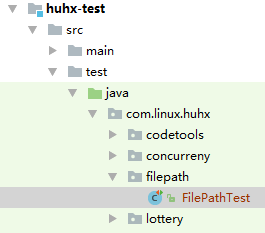
@Test

public void relativePath_1() {

    File file = new File("path/huhx.png"); // G:\Java\JavaEE\Program\2016-05-15\SpringLearn\huhx-test\path\huhx.png

    System.out.println(file.getAbsolutePath());

}

@Test

public void absolutePath_1() {

    File file = new File("/path/huhx.png"); // G:\path\huhx.png

    System.out.println(file.getAbsolutePath());

}
四、关于classLoader的getResource方法

// programPath = G:/Java/JavaEE/Program/2016-05-15/SpringLearn/huhx-test
public void classStreamPath_1() {

    System.out.println(Thread.currentThread().getContextClassLoader().getResource("")); // file:/programPath/target/test-classes/

    System.out.println(getClass().getClassLoader().getResource("")); // file:/programPath/target/test-classes/

    System.out.println(ClassLoader.getSystemResource("")); // file:/programPath/target/test-classes/

    System.out.println(getClass().getResource("")); // file:/programPath/target/test-classes/com/linux/huhx/filepath/

    System.out.println(getClass().getResource("/")); // file:/programPath/target/test-classes/

    System.out.println(new File("/").getAbsolutePath()); // G:\

    System.out.println(System.getProperty("user.dir")); // G:\Java\JavaEE\Program\2016-05-15\SpringLearn\huhx-test

}
五、关于编码的一些知识
public void charsetTest_1() {

    String string = "刘玲";

    String str = new String(string.getBytes()); // 默认的是utf-8的

    System.out.println(str); // 刘玲

    Charset charset = Charset.forName("gbk");

    ByteBuffer byteBuffer = charset.encode("刘玲");

    byte[] buffers = byteBuffer.array();

    System.out.println(new String(buffers)); // �����

    CharBuffer charBuffer = charset.decode(byteBuffer); // 刘玲

    System.out.println(charBuffer);

    try {

        System.out.println(new String(buffers, "gbk")); // 刘玲

    } catch (UnsupportedEncodingException e) {

        e.printStackTrace();

    }

}
六、嵌套目录的创建和删除
public void fileTest_1() {

    File file = new File("D:/liuling/liuling/huhx.txt");

    if (!file.exists()) {

        // 现在的目录D:/liuling/liuling/huhx.txt,注意这里的huhx.txt是一个目录名。

        System.out.println(file.mkdirs()); // true

    }

    File deletefile = new File("D:/liuling");

    System.out.println(deletefile.delete()); // false

    // huhx.txt目录被删除了

    System.out.println(file.delete()); // true

}
file.mkdir();是创建一级的子目录, mkdirs()是可以创建多级的嵌套子目录的。
七、关于java中的foreach的null问题
public void forEachTest() {

    String[] strings = null;

    for (String string : strings) { // java.lang.NullPointerException

        System.out.println(string);

    }

    List<String> lists = null;

    for (String list : lists) { // // java.lang.NullPointerException

        System.out.println(list);

    }

    List<String> list2s = new ArrayList<>();

    for (String list : list2s) {

        System.out.println(list); // 没有任何的打印

    }

}
ps:上述的文件不能直接运行的,因为异常的存在,后面的流程指定是不能执行的。
八、java中的import static使用
当在java中如果使用类的static方法和static变量时,可以import static该方法或者是变量。在代码中可以不用className.变量,而可以直接使用。下面是一个例子。
import static com.linux.huhx.utils.RegrexUtils.*;

String requestData = messageFormat(action, arrays[0], arrays[1]);
而在RegrexUtils中的messageFormat是一个static方法定义如下:
public static String messageFormat(String string, String... replace) {

    if (ArrayUtils.isEmpty(replace)) {

        return string;

    }

    for (int i = 0; i < replace.length; i++) {

        string = string.replace("{" + i + "}", replace[i]);

    }

    return string;

}
这里本来是想使用MessageFormat.format方法的,但是在解析某些字符串时,出现了问题。
九、关于Servlet中的请求对象的一些路径的方法
访问的url:http://localhost:8080/ListenerTest1/servlet/FirstServlet,ListenerTest1是项目名。
String contextPath = request.getContextPath();

String servletPath = request.getServletPath();

String realPath = request.getServletContext().getRealPath("/");
运行的结果如下:
/ListenerTest1

/servlet/FirstServlet

J:\project\web\apache-tomcat-7.0.-windows-x64\apache-tomcat-7.0.\webapps\ListenerTest1\
友情链接
日记整理---->2017-05-14的更多相关文章
- Gitlab一键端的安装汉化及问题解决(2017/12/14目前版本为10.2.4)
Gitlab的安装汉化及问题解决 一.前言 Gitlab需要安装的包太TM多了,源码安装能愁死个人,一直出错,后来发现几行命令就装的真是遇到的新大陆一样... ... 装完之后感觉太简单,加了汉化补丁 ...
- java selenium启动火狐浏览器报错:Cannot find firefox binary in PATH. Make sure firefox is installed. OS appears to be: VISTA Build info: version: '3.8.1', revision: '6e95a6684b', time: '2017-12-01T19:05:14.666Z
Cannot find firefox binary in PATH. Make sure firefox is installed. OS appears to be: VISTA Build in ...
- 2021.05.14 tarjan
2021.05.14 tarjan 标准版tarjan 这里使用数组来模拟栈 void tarjan(int x){ ++ind; dfn[x]=low[x]=ind; stacki[++top]=x ...
- 2017.10.14 Java的流程控制语句switch&&随机点名器
今日内容介绍 1.流程控制语句switch 2.数组 3.随机点名器案例 ###01switch语句解构 * A:switch语句解构 * a:switch只能针对某个表达式的值作 ...
- informatica 学习日记整理
1. INFORMATICA CLIENT的使用 1.1 Repository Manager 的使用 1.1.1 创建Repository. 前提: a.在ODBC数据源管理器中新建一个数据源连接至 ...
- AC日记——整理药名 openjudge 1.7 15
15:整理药名 总时间限制: 1000ms 内存限制: 65536kB 描述 医生在书写药品名的时候经常不注意大小写,格式比较混乱.现要求你写一个程序将医生书写混乱的药品名整理成统一规范的格式,即 ...
- 寻找大学目标及行动步骤——记ITAEM团队第二期宣讲会(2014.05.14)
·昨晚8:00-9:40.在 钟海楼03029 ,进行了ITAEM团队第二期宣讲会(第一期见第一期宣讲会总结).来參加的主要是大一学生.以信院为主.也有法学院.文学院的同学. 在宣讲会中,大家都比較积 ...
- 团队作业4——第一次项目冲刺(Alpha版本)2017.11.14
第一次会议:2017-11-14 额--这几天比较忙,忘记上传了,今天补上 先上个图,O(∩_∩)O哈哈: 会议主要内容: 1. 讨论整体框架 2. 个人具体分工 3. 代码统一 具体分工: 成员 计 ...
- 日记整理---->2016-11-01
这里我们整理一下项目的流程,一般来说做一个模块之前.会有需求文档.页面原型和接口文档. 一. js获取radio的值 页面的html代码: <ul class="list-group& ...
- OpenSpiel 随笔 05.14
------------恢复内容开始------------ 这两天年总算把自己的游戏写完了,也通过了所有的测试. 我将自己的代码上传到了我的github上, 地址是 https://github.c ...
随机推荐
- jQuery table td可编辑
参考链接: http://www.freejs.net/ http://www.freejs.net/article_biaodan_34.html http://www.freejs.net/sea ...
- js 原型链(转)
1.1 理解原型链 JavaScript中几乎所有的东西都是对象,我们说数组是对象.DOM节点是对象.函数等也是对象,创建对象的Object也是对象(本身是构造函数),那么有一个重要的问题:对象从哪里 ...
- Js参数值中含有单引号或双引号解决办法
<script type="text/javascript"> function Display(LoginEmail, UserName, ID) { ...
- qq划屏幕红包程序
qq划屏幕红包程序
- 4 Flask 命令行模式
preface 在Django中我们可以使用python manage.py shell进入 shell下面调试,在flask下面我们需要安装第三方模块来进入shell模式,安装的模块为Flask-S ...
- sql产生随机时间
--建立过程 CREATE PROCEDURE GetTime @BeginTime VARCHAR(5), @EndTime VARCHAR(5), @RandTime VA ...
- goquery 文档
https://www.itlipeng.cn/2017/04/25/goquery-%E6%96%87%E6%A1%A3/ http://blog.studygolang.com/2015/04/g ...
- Linux Device Tree
原创博文,转载请标明出处--周学伟 http://www.cnblogs.com/zxouxuewei/ 设备树使用手册 基本数据格式 设备树是一个包含节点和属性的简单树状结构.属性就是键-值对,而 ...
- Eclipse------启动Server时出现弹窗Server at localhost was unable to start within 45 seconds.
弹窗详细信息: Server Tomcat v8. Server at localhost was unable to start within seconds. If the server requ ...
- VMWare------安装时出现无法将值写入注册表项
安装时提示详情: 无法打开注册表项UNKNOWN\Components\...请确认你是否有足够的权限访问该注册表项,或者与技术支持人员联系. 解决方法: 关掉360安全卫士等软件再安装