
Selenium FF WebDriver 加载firebug 和设置代理
首先这次使用的webDriver for Firefox的
由于项目的原因,需要在测试的时候加载Firebug和使用vpn,加载代理
Firefox 加载代理,可以从FF菜单上看,代理分为好几种

我这里使用的是type 为2 的情况
FirefoxProfile profile = new FirefoxProfile();

        profile.setPreference("network.proxy.type", 2);

        profile.setPreference("network.proxy.autoconfig_url", "http://proxy.myweb.com:8083"); //自动代理配置

WebDriver driver = new FirefoxDriver(profile);
如果type 为1 ,需要这么设置
FirefoxProfile profile = new FirefoxProfile();

        profile.setPreference("network.proxy.type", 1);

        profile.setPreference("network.proxy.http", "proxy.domain.example.com");

        profile.setPreference("network.proxy.http_port", 8080);

        profile.setPreference("network.proxy.ssl", "proxy.domain.example.com");

        profile.setPreference("network.proxy.ssl_port", 8080);

        profile.setPreference("network.proxy.ftp", "proxy.domain.example.com");

        profile.setPreference("network.proxy.ftp_port", 8080);

        profile.setPreference("network.proxy.socks", "proxy.domain.example.com");

        profile.setPreference("network.proxy.socks_port", 8080);

WebDriver driver = new FirefoxDriver(profile);
public class sfLogin {

    static String company="autoPM2CandU";

    static String user="athompson";

    static String password="pwd";

    public static void main(String[] args) {

        // TODO Auto-generated method stub

        WindowsUtils.tryToKillByName("firefox.exe");

        WindowsUtils.getProgramFilesPath();

        WebDriver driver=DriverFactory.getFirefoxDriver();

        driver.get("https://qaautocand.successfactors.com/login");

        driver.manage().window().maximize();

        driver.manage().timeouts().implicitlyWait(60, TimeUnit.SECONDS);

        driver.manage().timeouts().pageLoadTimeout(60, TimeUnit.SECONDS);

        WebElement comp=driver.findElement(By.xpath("//*[@id='company']"));

        Actions actions =new Actions(driver);

        actions.sendKeys(Keys.F12).perform();//.keyUp(Keys.F12)

        WebElement username=driver.findElement(By.xpath("//*[@id='username']"));

        WebElement passwordHints=driver.findElement(By.xpath("//*[@id='passwordHints']"));

        passwordHints.click();

        WebElement pw=driver.findElement(By.xpath("//*[@id='password']"));

        WebElement login=driver.findElement(By.xpath("//*[@id='loginSubmitBtn']"));

        comp.sendKeys(company);

        username.sendKeys(user);

        passwordHints.click();

        pw.sendKeys(password);

        login.submit();

        WebElement home=driver.findElement(By.xpath("//*[@id='8:label']"));

        actions.moveToElement(home).click().build().perform();

        WebElement performance=driver.findElement(By.xpath("//*[@id='10:2']"));

        performance.click();

        WebElement endBox=driver.findElement(By.xpath("//*[@id='tablist']/tbody/tr[2]/td/div/div/div/table/tbody/tr[3]/td[2]/a"));

        endBox.click();

        WebElement auditTrailButton =driver.findElement(By.xpath("//*[@id='form_list_table']/tbody/tr/td[10]/a[2]/img"));

        auditTrailButton.click();

        WebElement action =driver.findElement(By.xpath("//*[@id='contentBodyTable']/tbody/tr[2]/td/div[2]/div/div[2]/div/div/div[2]/div/table/tbody/tr/td/table[2]/tbody/tr[2]/td/table/tbody/tr[4]/td/table/tbody/tr[4]/td[9]"));

        System.out.println(action.getText());

    }

}

如果需要加载firebug
    File file=new File("d:\\firebug-2.0.4-fx.xpi");//设置Firebug路径

        FirefoxProfile profile = new FirefoxProfile();

        profile.setPreference("network.proxy.type", 1);

        profile.setPreference("network.proxy.http", "proxy.domain.example.com");

        profile.setPreference("network.proxy.http_port", 8080);

        profile.setPreference("network.proxy.ssl", "proxy.domain.example.com");

        profile.setPreference("network.proxy.ssl_port", 8080);

        profile.setPreference("network.proxy.ftp", "proxy.domain.example.com");

        profile.setPreference("network.proxy.ftp_port", 8080);

        profile.setPreference("network.proxy.socks", "proxy.domain.example.com");

        profile.setPreference("network.proxy.socks_port", 8080);

        try {

            profile.addExtension(file);

            profile.setPreference("extensions.firebug.currentVersion", "2.0.4");//设置firebug 版本

        } catch (IOException e3) {

            // TODO Auto-generated catch block

            e3.printStackTrace();

        }

        WebDriver driver = new FirefoxDriver(profile);

        return driver;
如果需要在运行时候firebug执行
Actions actions =new Actions(driver);

actions.sendKeys(Keys.F12).perform();//使用F12调出firebug
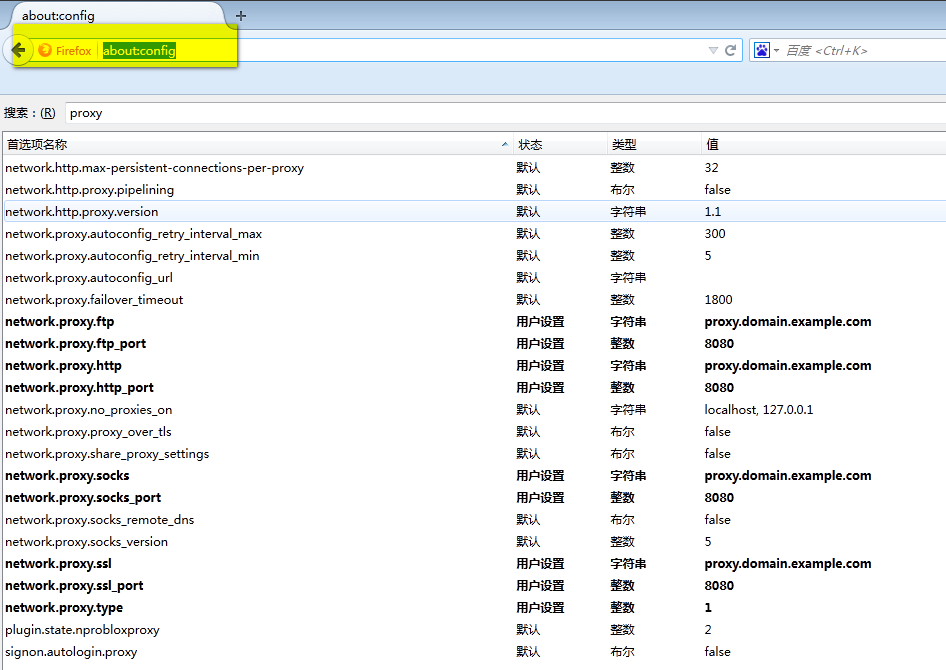
扩展,为什么这么设置
你可以使用about:config 在Firefox里边看看
Selenium FF WebDriver 加载firebug 和设置代理的更多相关文章
- Selenium FF WebDriver运行时开启firebug的2种方式
上一次我实测FF webdriver 加载firefoxhttp://www.cnblogs.com/tobecrazy/p/3997375.html 那么问题就来了,既然能加载firebug能否在运 ...
- js不需要知道图片宽高的懒加载方法(经过实际测试,不加宽高仍然是无法正常加载的,设置height:auto,height:100%,仍然显示高度为0)
js不需要知道图片宽高的懒加载方法 懒加载是如何实现的? - 简书https://www.jianshu.com/p/e86c61468285找到一个不需要知道图片宽高的懒加载方法了(经过实际测试,不 ...
- selenium2入门 用selenium安装、加载、启用插件(一)
一:下载 下载地址是:http://docs.seleniumhq.org/download/
- selenium2 用selenium安装、加载、启用插件(一)
一:下载 下载地址是:http://docs.seleniumhq.org/download/
- selenium自动化之加载浏览器的配置文件
做seleniumUI自动化关于选用哪个浏览器方面,对于我来说,火狐浏览器只是用于定位元素,因为有firebug(注意高版本的火狐已经安装不了这个插件了),而真正执行自动化脚本用的是谷歌,感觉谷歌的速 ...
- selenium 等待页面加载完成
一.隐形加载等待: file:///C:/Users/leixiaoj/Desktop/test.html 该页面负责创建一个div <html> <head> <tit ...
- Selenium WebDriver- 指定页面加载时间
#encoding=utf-8 import unittest import time from selenium import webdriver from selenium.webdriver i ...
- Selenium 的页面加载以及几种等待的问题
1. PageLoadStrategy : 当调用driver.get("https://xxxx.xxx.xxx")来访问某页面时,get方法通常会阻塞浏览器直到页面完全加载后才 ...
- python3 selenium 超时停止加载,并且捕捉异常, 进行下一步【亲测有效】
from selenium import webdriver import os import re class GetPage: def __init__(self, url_path): self ...
随机推荐
- GreenDao的使用
1.生成代码文件
- 【BZOJ 1005】【HNOI 2008】明明的烦恼
http://www.lydsy.com/JudgeOnline/problem.php?id=1005 答案是\[\frac{(n-2)!}{(n-2-sum)!×\prod_{i=1}^{cnt} ...
- 从点云到网格(二)VRIP介绍
VRIP(Volumetric Range Image Processing),顾名思义,是从深度图重建网格的一种方法.VRIP是Brian Curless和Marc Levoy在1996年提出来的方 ...
- 使用DataTable更新数据库
简例: string connStr = string.Format("Driver={1}Microsoft Access Driver (*.mdb){2};DBQ={0};" ...
- Atomikos的使用过程中要注意的事
在使用Atomikos过程中遇到的一些问题,以作记录: MySQL does not support TMJOIN MySQL does not allow for joining an existi ...
- mongodb未授权访问漏洞
catalogue . mongodb安装 . 未授权访问漏洞 . 漏洞修复及加固 . 自动化检测点 1. mongodb安装 apt-get install mongodb 0x1: 创建数据库目录 ...
- 【Beta】用户问题反馈及处理(一直更新)
1 用户id:吕* 张* 时间:20161211 问题描述:点击选择物理实验按钮(子菜单)选择实验,无响应 期望行为:点击选择物理实验按钮(子菜单)选择实验,选择框隐去,左侧数据栏出现对应选择实验的数 ...
- angularjs-$http.post请求传递参数,后台Controller接受不到原因
现象回显 js文件 app.controller('indexCtrl', function($scope, $state, $http) { $scope.login = function() { ...
- logging 文件日志
1. 例子 import logging logging.basicConfig(filename='log.txt', #文件名 level=logging.DEBUG, #级别 format=u' ...
- C++ 之namespace常见用法
一.背景 需要使用Visual studio的C++,此篇对namespace的常用用法做个记录. 二.正文 namespace通常用来给类或者函数做个区间定义,以使编译器能准确定位到适合的类或者函数 ...