
05 - Multitouch/RoutedEvents例子
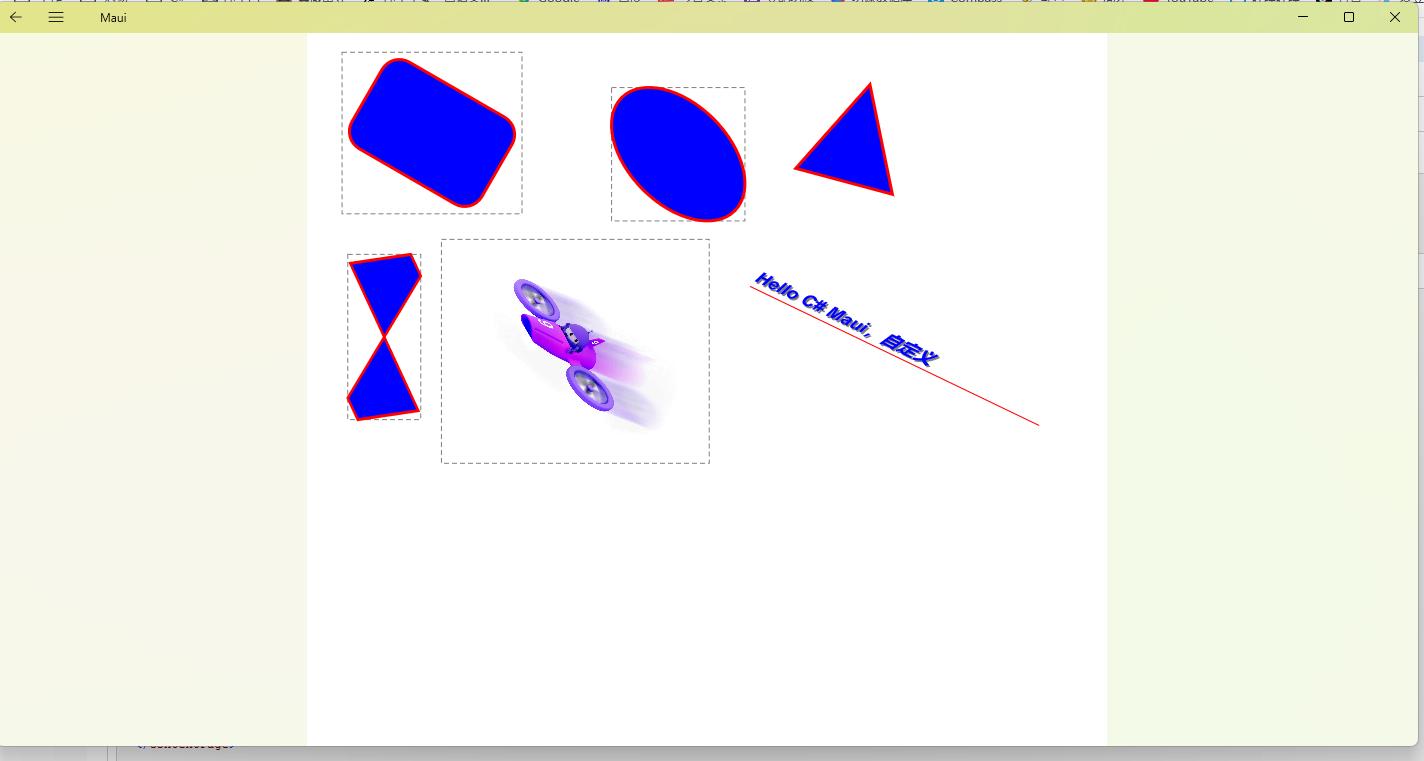
文中例子是基于wpf Canvas写的,由于Maui还没有支持Canvas,所以顺手自己写一个。之前写了一个InkCanvas,发现扩展性太差了,这次写这个Canvas,支持自定义碰撞测试等。自己写的碰撞测试,已经非常精准且通用了,可以处理任何点集,所以大家可以继承Shape类,写自己的Shape类。我抛砖引玉,写了几个常用的。Canvas目前支持的功能,单选,多选,单选移动,多选移动,二指手势缩放,多指手势选中。删除功能很简单,就不实现了。
Shape类以及子类扩展,利用矩阵完成旋转,位移,缩放。把常见的实现放到了基类,这样子类可以专注StyleDraw的逻辑,而不用担心旋转等影响。
//Shape基类
public abstract class Shape : BindableObject
{
public static readonly BindableProperty FillColorProperty =
BindableProperty.Create(nameof(FillColor), typeof(Color), typeof(Shape), Colors.Transparent); public static readonly BindableProperty StrokeColorProperty =
BindableProperty.Create(nameof(StrokeColor), typeof(Color), typeof(Shape), Colors.Black); public static readonly BindableProperty StrokeThicknessProperty =
BindableProperty.Create(nameof(StrokeThickness), typeof(float), typeof(Shape), 1f); public static readonly BindableProperty XProperty =
BindableProperty.Create(nameof(X), typeof(float), typeof(Shape), 0f); public static readonly BindableProperty YProperty =
BindableProperty.Create(nameof(Y), typeof(float), typeof(Shape), 0f); public static readonly BindableProperty WidthProperty =
BindableProperty.Create(nameof(Width), typeof(float), typeof(Shape), 100f); public static readonly BindableProperty HeightProperty =
BindableProperty.Create(nameof(Height), typeof(float), typeof(Shape), 100f); public static readonly BindableProperty RotationProperty =
BindableProperty.Create(nameof(Rotation), typeof(float), typeof(Shape), 0f); public static readonly BindableProperty ScaleXProperty =
BindableProperty.Create(nameof(ScaleX), typeof(float), typeof(Shape), 1f); public static readonly BindableProperty ScaleYProperty =
BindableProperty.Create(nameof(ScaleY), typeof(float), typeof(Shape), 1f); public static readonly BindableProperty IsSelectedProperty =
BindableProperty.Create(nameof(IsSelected), typeof(bool), typeof(Shape), false); public static readonly BindableProperty StrokeDashPatternProperty =
BindableProperty.Create(nameof(StrokeDashPattern), typeof(string), typeof(RectangleShape), null); public static readonly BindableProperty StrokeDashOffsetProperty =
BindableProperty.Create(nameof(StrokeDashOffset), typeof(float), typeof(RectangleShape), 0f); public static readonly BindableProperty AspectRatioProperty =
BindableProperty.Create(nameof(AspectRatio), typeof(float), typeof(Shape), 1f);
public Color FillColor
{
get => (Color)GetValue(FillColorProperty);
set => SetValue(FillColorProperty, value);
} public Color StrokeColor
{
get => (Color)GetValue(StrokeColorProperty);
set => SetValue(StrokeColorProperty, value);
} public float StrokeThickness
{
get => (float)GetValue(StrokeThicknessProperty);
set => SetValue(StrokeThicknessProperty, value);
} public float X
{
get => (float)GetValue(XProperty);
set => SetValue(XProperty, value);
} public float Y
{
get => (float)GetValue(YProperty);
set => SetValue(YProperty, value);
} public float Width
{
get => (float)GetValue(WidthProperty);
set => SetValue(WidthProperty, value);
} public float Height
{
get => (float)GetValue(HeightProperty);
set => SetValue(HeightProperty, value);
} public float Rotation
{
get => (float)GetValue(RotationProperty);
set => SetValue(RotationProperty, value);
} public float ScaleX
{
get => (float)GetValue(ScaleXProperty);
set => SetValue(ScaleXProperty, value);
} public float ScaleY
{
get => (float)GetValue(ScaleYProperty);
set => SetValue(ScaleYProperty, value);
}
public string StrokeDashPattern
{
get => (string)GetValue(StrokeDashPatternProperty);
set => SetValue(StrokeDashPatternProperty, value);
} public float StrokeDashOffset
{
get => (float)GetValue(StrokeDashOffsetProperty);
set => SetValue(StrokeDashOffsetProperty, value);
} public bool IsSelected
{
get => (bool)GetValue(IsSelectedProperty);
set => SetValue(IsSelectedProperty, value);
} public float AspectRatio
{
get => (float)GetValue(AspectRatioProperty);
set => SetValue(AspectRatioProperty, value);
} public RectF Bounds
{
get
{
// 使用局部坐标系(X, Y)为左上角的顶点
PointF[] points = this.GetPoints(); // 应用当前变换矩阵到所有顶点
Matrix3x2 transform = GetTransformMatrix();
for (int i = 0; i < points.Length; i++)
{
points[i] = Transform(points[i], transform);
} // 计算变换后顶点的边界框
// 计算变换后边界
float minX = points.Min(p => p.X);
float minY = points.Min(p => p.Y);
float maxX = points.Max(p => p.X);
float maxY = points.Max(p => p.Y); return new RectF(minX, minY, maxX - minX, maxY - minY);
}
}
// 获取变换矩
protected Matrix3x2 GetTransformMatrix()
{
// 计算原始中心点(局部坐标系)
float centerX = X + Width / 2;
float centerY = Y + Height / 2; // 构建变换矩阵
return
Matrix3x2.CreateScale(AspectRatio, AspectRatio) *
Matrix3x2.CreateRotation(Rotation * (MathF.PI / 180), new Vector2(centerX, centerY)) *
Matrix3x2.CreateScale(ScaleX, ScaleY);
}
//获取逆矩阵
protected Matrix3x2 GetInverseMatrix()
{
Matrix3x2.Invert(GetTransformMatrix(), out Matrix3x2 result);
return result;
}
public PointF Transform(PointF point, Matrix3x2 matrix)
{
return new PointF(
point.X * matrix.M11 + point.Y * matrix.M21 + matrix.M31,
point.X * matrix.M12 + point.Y * matrix.M22 + matrix.M32
);
}
//子类可重写
public virtual bool HitTest(PointF p, float tolerance = 5f)
{
PointF[] points = GetPoints();
Matrix3x2 transform = GetTransformMatrix(); for (int i = 0; i < points.Length; i++)
{
points[i] = Transform(points[i], transform);
}
//简单判断
if (Bounds.Contains(p))
{
//检查一个点或者两个点
if (points.Count() == 1)
{
return Math.Sqrt(DistanceSquare(p, points[0])) <= tolerance;
}
else if (points.Count() == 2)
{
return DistanceToSegment(p, points[0], points[1]) <= tolerance;
}
//点在形状类
return IsPointInPolygon(p, points) || IsPointNearPolygonEdge(p, points, tolerance);
}
return false;
}
public virtual bool HitTest(Shape other)
{
if (this.Bounds.IntersectsWith(other.Bounds))
{
// 使用局部坐标系(X, Y)为左上角的顶点
PointF[] pointsA = this.GetPoints();
PointF[] pointsB = other.GetPoints(); // 应用当前变换矩阵到所有顶点
Matrix3x2 transformA = GetTransformMatrix();
Matrix3x2 transformB = other.GetTransformMatrix();
for (int i = 0; i < pointsA.Length; i++)
{
pointsA[i] = Transform(pointsA[i], transformA);
}
for (int i = 0; i < pointsB.Length; i++)
{
pointsB[i] = Transform(pointsB[i], transformB);
}
return PolygonIntersects(pointsA, pointsB);
}
return false;
}
//形状到形状 : 检测两个多边形是否相交
public static bool PolygonIntersects(PointF[] polyA, PointF[] polyB)
{
// 检测polyA的边是否与polyB相交
for (int i = 0; i < polyA.Length; i++)
{
int nextI = (i + 1) % polyA.Length;
for (int j = 0; j < polyB.Length; j++)
{
int nextJ = (j + 1) % polyB.Length;
if (LinesIntersect(polyA[i], polyA[nextI], polyB[j], polyB[nextJ]))
return true;
}
} // 检测一个多边形是否完全包含在另一个多边形中
if (IsPointInPolygon(polyA[0], polyB) || IsPointInPolygon(polyB[0], polyA))
return true; return false;
}
//点到点
public static float DistanceSquare(PointF v, PointF w)
{
return (v.X - w.X) * (v.X - w.X) + (v.Y - w.Y) * (v.Y - w.Y);
}
//点到线
public static float DistanceToSegment(PointF p, PointF v, PointF w)
{
float l2 = (v.X - w.X) * (v.X - w.X) + (v.Y - w.Y) * (v.Y - w.Y);
if (l2 == 0.0)
return (float)Math.Sqrt(DistanceSquare(p, v)); float t = Math.Max(0, Math.Min(1,
((p.X - v.X) * (w.X - v.X) + (p.Y - v.Y) * (w.Y - v.Y)) / l2)); PointF projection = new PointF(
v.X + t * (w.X - v.X),
v.Y + t * (w.Y - v.Y)); return (float)Math.Sqrt(DistanceSquare(p, projection));
}
// 射线法判断点是否在多边形内部,默认是闭合路径
public static bool IsPointInPolygon(PointF p, PointF[] polygon)
{
if (polygon.Length < 3) return false; bool inside = false;
int j = polygon.Length - 1; for (int i = 0; i < polygon.Length; i++)
{
if ((polygon[i].Y > p.Y) != (polygon[j].Y > p.Y) &&
p.X < (polygon[j].X - polygon[i].X) * (p.Y - polygon[i].Y) /
(polygon[j].Y - polygon[i].Y) + polygon[i].X)
{
inside = !inside;
}
j = i;
} return inside;
}
// 判断点是否在多边形边线附近
public static bool IsPointNearPolygonEdge(PointF p, PointF[] points, float tolerance)
{
if (points.Length < 2)
return false; for (int i = 0; i < points.Length; i++)
{
int next = (i + 1) % points.Length;
float distance = DistanceToSegment(p, points[i], points[next]);
if (distance <= tolerance)
return true;
} return false;
}
//检测两条线段是否相交
public static bool LinesIntersect(PointF a1, PointF a2, PointF b1, PointF b2)
{
float d = (b2.Y - b1.Y) * (a2.X - a1.X) - (b2.X - b1.X) * (a2.Y - a1.Y); if (d == 0)
return false; // 平行线 float uA = ((b2.X - b1.X) * (a1.Y - b1.Y) - (b2.Y - b1.Y) * (a1.X - b1.X)) / d;
float uB = ((a2.X - a1.X) * (a1.Y - b1.Y) - (a2.Y - a1.Y) * (a1.X - b1.X)) / d; return uA >= 0 && uA <= 1 && uB >= 0 && uB <= 1;
}
public void Draw(ICanvas canvas, RectF dirtyRect)
{
canvas.SaveState(); canvas.FillColor = FillColor;
canvas.StrokeColor = StrokeColor;
canvas.StrokeSize = StrokeThickness;
canvas.StrokeDashPattern = StrokeDashPattern?.Split(" ").Select(s => float.Parse(s)).ToArray();
canvas.StrokeDashOffset = StrokeDashOffset; //测试点击区域
if (IsSelected)
{
canvas.SaveState();
RectF bounds = this.Bounds;
canvas.StrokeColor = Colors.Gray;
canvas.StrokeSize = 1f;
canvas.StrokeDashPattern = new float[] { 5, 3 };
canvas.DrawRectangle(bounds);
canvas.RestoreState();
} canvas.ConcatenateTransform(this.GetTransformMatrix());
StyleDraw(canvas, dirtyRect);
canvas.RestoreState();
}
//点集到线
public static PathF CreatePathF(PointF[] points, bool closed = true)
{
if (points.Length == 0)
return new PathF();
PathF path = new PathF();
path.MoveTo(points[0]);
for (int i = 1; i < points.Length; i++)
{
path.LineTo(points[i]);
}
if (closed)
path.Close();
return path;
}
protected abstract void StyleDraw(ICanvas canvas, RectF dirtyRect);
protected abstract PointF[] GetPoints();
}
//长方形类
public class RectangleShape : Shape
{
public static readonly BindableProperty CornerRadiusProperty =
BindableProperty.Create(nameof(CornerRadius), typeof(float), typeof(RectangleShape), 0f); public float CornerRadius
{
get => (float)GetValue(CornerRadiusProperty);
set => SetValue(CornerRadiusProperty, value);
}
protected override PointF[] GetPoints()
{
return new PointF[]
{
new PointF(X, Y), // 左上
new PointF(X + Width, Y), // 右上
new PointF(X + Width, Y + Height), // 右下
new PointF(X, Y + Height) // 左下
};
}
protected override void StyleDraw(ICanvas canvas, RectF dirtyRect)
{
// 绘制原始矩形(局部坐标)
canvas.FillRoundedRectangle(X, Y, Width, Height, CornerRadius);
canvas.DrawRoundedRectangle(X, Y, Width, Height, CornerRadius);
}
}
//椭圆形类
public class EllipseShape : Shape
{
//Length越大,性能要求越高,但是碰撞判断越精确。
public static readonly BindableProperty LengthProperty =
BindableProperty.Create(nameof(Length), typeof(int), typeof(EllipseShape), 60); public static readonly BindableProperty RadiusXProperty =
BindableProperty.Create(nameof(RadiusX), typeof(float), typeof(EllipseShape), 0f); public static readonly BindableProperty RadiusYProperty =
BindableProperty.Create(nameof(RadiusY), typeof(float), typeof(EllipseShape), 0f);
public int Length
{
get => (int)GetValue(LengthProperty);
set => SetValue(LengthProperty, value);
}
public float RadiusX
{
get => (float)GetValue(RadiusXProperty);
set => SetValue(RadiusXProperty, value);
} public float RadiusY
{
get => (float)GetValue(RadiusYProperty);
set => SetValue(RadiusYProperty, value);
}
protected override PointF[] GetPoints()
{
List<PointF> points = new List<PointF>();
float radiusX = RadiusX == 0 ? Width / 2 : RadiusX;
float radiusY = RadiusY == 0 ? Height / 2 : RadiusY;
float centerX = X + radiusX;
float centerY = Y + radiusY; for (int i = 0; i < Length; i++)
{
float angle = i * (float)Math.PI / Length * 2f;
points.Add(new PointF(
centerX + radiusX * (float)Math.Cos(angle),
centerY + radiusY * (float)Math.Sin(angle)));
} return points.ToArray();
} protected override void StyleDraw(ICanvas canvas, RectF dirtyRect)
{
float radiusX = RadiusX == 0 ? Width / 2 : RadiusX;
float radiusY = RadiusY == 0 ? Height / 2 : RadiusY; canvas.FillEllipse(X, Y, radiusX * 2, radiusY * 2);
canvas.DrawEllipse(X, Y, radiusX * 2, radiusY * 2);
}
}
//三角形类
public class TriangleShape : Shape
{
protected override PointF[] GetPoints()
{
return new PointF[]
{
new PointF(X + Width / 2, Y), // 顶点
new PointF(X + Width, Y + Height), // 右下角
new PointF(X, Y + Height) // 左下角
};
} protected override void StyleDraw(ICanvas canvas, RectF dirtyRect)
{
PathF path = CreatePathF(GetPoints());
canvas.FillPath(path);
canvas.DrawPath(path);
}
}
//线段或自定义类,支持SVG等
public class PathShape : Shape
{
public static readonly BindableProperty DataProperty =
BindableProperty.Create(nameof(Data), typeof(string), typeof(PathShape), null); public static readonly BindableProperty IsClosedPathProperty =
BindableProperty.Create(nameof(IsClosedPath), typeof(bool), typeof(PathShape), true);
public string Data
{
get => (string)GetValue(DataProperty);
set => SetValue(DataProperty, value);
}
public bool IsClosedPath
{
get => (bool)GetValue(IsClosedPathProperty);
set => SetValue(IsClosedPathProperty, value);
}
protected override PointF[] GetPoints()
{
if (Data != null)
{
PointF[] points = PathBuilder.Build(Data).Points.ToArray();
for (int i = 0; i < points.Length; i++)
{
points[i].X += X;
points[i].Y += Y;
}
return points;
}
return Array.Empty<PointF>();
} protected override void StyleDraw(ICanvas canvas, RectF dirtyRect)
{
PathF path = CreatePathF(GetPoints(), IsClosedPath);
canvas.FillPath(path);
canvas.DrawPath(path);
}
//分割线段
public List<PointF[]> SplitAt(PointF point, float tolerance = 5f)
{
PointF[] points = GetPoints();
// 应用当前变换矩阵到所有顶点
Matrix3x2 transform = GetTransformMatrix();
for (int i = 0; i < points.Length; i++)
{
points[i] = Transform(points[i], transform);
} List<PointF[]> result = new List<PointF[]>(); if (points.Length < 2)
{
// 点太少无法分割
return result;
} // 1. 查找最近的线段和分割点
float minDistance = float.MaxValue;
int splitIndex = -1;
PointF splitPoint = PointF.Zero;
bool isClosingSegment = false; // 检查所有线段(包括可能的闭合线段)
for (int i = 0; i < points.Length - 1; i++)
{
CheckSegment(points[i], points[i + 1], i, ref minDistance, ref splitIndex, ref splitPoint, point);
} // 如果是闭合路径,检查最后一段(从最后一个点到第一个点)
if (IsClosedPath && points.Length > 1)
{
isClosingSegment = CheckSegment(points[points.Length - 1], points[0],
points.Length - 1,
ref minDistance, ref splitIndex,
ref splitPoint, point);
} // 2. 如果没有找到在容差范围内的分割点
if (minDistance > tolerance || splitIndex == -1)
{
return result;
} // 3. 执行分割
if (isClosingSegment)
{
// 在闭合线段上分割
SplitClosingSegment(points, splitPoint, result);
}
else
{
// 在普通线段上分割
SplitRegularSegment(points, splitIndex, splitPoint, result);
} return result;
} private bool CheckSegment(PointF a, PointF b, int index,
ref float minDistance, ref int splitIndex,
ref PointF splitPoint, PointF testPoint)
{
float distance;
PointF projection = GetProjectionOnSegment(testPoint, a, b, out distance); if (distance < minDistance)
{
minDistance = distance;
splitIndex = index;
splitPoint = projection;
return true;
}
return false;
} private PointF GetProjectionOnSegment(PointF p, PointF a, PointF b, out float distance)
{
Vector2 ap = new Vector2(p.X - a.X, p.Y - a.Y);
Vector2 ab = new Vector2(b.X - a.X, b.Y - a.Y); float magnitude = ab.LengthSquared();
if (magnitude == 0)
{
distance = (float)Math.Sqrt(DistanceSquare(p, a));
return a;
} float t = Math.Clamp(Vector2.Dot(ap, ab) / magnitude, 0, 1);
PointF projection = new PointF(
a.X + t * ab.X,
a.Y + t * ab.Y
); distance = (float)Math.Sqrt(DistanceSquare(p, projection));
return projection;
} private void SplitRegularSegment(PointF[] points, int splitIndex,
PointF splitPoint, List<PointF[]> result)
{
// 第一部分:起点到分割点
List<PointF> part1 = new List<PointF>();
for (int i = 0; i <= splitIndex; i++)
{
part1.Add(points[i]);
}
part1.Add(splitPoint); // 第二部分:分割点到终点
List<PointF> part2 = new List<PointF>();
part2.Add(splitPoint);
for (int i = splitIndex + 1; i < points.Length; i++)
{
part2.Add(points[i]);
} result.Add(part1.ToArray());
result.Add(part2.ToArray());
} private void SplitClosingSegment(PointF[] points, PointF splitPoint, List<PointF[]> result)
{
// 第一部分:起点到最后一个点 + 分割点
List<PointF> part1 = new List<PointF>(points);
part1.Add(splitPoint); // 第二部分:分割点到起点
List<PointF> part2 = new List<PointF>();
part2.Add(splitPoint);
part2.Add(points[0]); result.Add(part1.ToArray());
result.Add(part2.ToArray());
}
}
//图片
public class ImageShape : Shape
{
public static readonly BindableProperty SourceProperty =
BindableProperty.Create(nameof(Source), typeof(ImageSource), typeof(ImageShape), null);
public ImageSource Source
{
get => (ImageSource)GetValue(SourceProperty);
set => SetValue(SourceProperty, value);
}
private IImage? image;
public ImageShape()
{
Dispatcher.Dispatch(() =>
{
image = ConvertImageSourceToIImage(Source);
});
}
protected override PointF[] GetPoints()
{
return new PointF[]
{
new PointF(X, Y), // 左上
new PointF(X + Width, Y), // 右上
new PointF(X + Width, Y + Height), // 右下
new PointF(X, Y + Height) // 左下
};
} protected override void StyleDraw(ICanvas canvas, RectF dirtyRect)
{
if (image != null)
canvas.DrawImage(image, X, Y, Width, Height);
} public static IImage? ConvertImageSourceToIImage(ImageSource imageSource)
{
try
{
// 1. 将 ImageSource 转换为 Stream
Stream? stream = GetStreamFromImageSource(imageSource); // 2. 使用 PlatformImage 加载流
return PlatformImage.FromStream(stream);
}
catch (Exception ex)
{
Trace.WriteLine($"转换失败: {ex.Message}");
return null;
}
} private static Stream? GetStreamFromImageSource(ImageSource imageSource)
{
if (imageSource is FileImageSource fileSource)
{
// 资源一定是"嵌入的资源"
Assembly assembly = Shell.Current.GetType().GetTypeInfo().Assembly;
return assembly.GetManifestResourceStream(assembly.FullName?.Split(',').First() + ".Resources.Images." + fileSource.File);
}
else if (imageSource is StreamImageSource streamSource)
{
// 处理流
return streamSource.Stream(CancellationToken.None).Result;
}
else if (imageSource is UriImageSource uriSource)
{
// 处理网络图片
using var httpClient = new HttpClient();
var response = httpClient.GetAsync(uriSource.Uri).Result;
return response.Content.ReadAsStreamAsync().Result;
} Trace.WriteLine("不支持的ImageSource类型");
return null;
}
}
//文字
public class TextShape : Shape
{
[Flags]
public enum TextAttributes
{
None = 0,
Bold = 1 << 0,
Italic = 1 << 1,
Underline = 1 << 2,
Shadow = 1 << 3,
} public static readonly BindableProperty TextProperty =
BindableProperty.Create(nameof(Text), typeof(string), typeof(TextShape), null); public static readonly BindableProperty FontSizeProperty =
BindableProperty.Create(nameof(FontSize), typeof(float), typeof(TextShape), 16f); public static readonly BindableProperty FontColorProperty =
BindableProperty.Create(nameof(FontColor), typeof(Color), typeof(TextShape), Colors.Black); public static readonly BindableProperty FontFamilyProperty =
BindableProperty.Create(nameof(FontFamily), typeof(string), typeof(TextShape), "Arial"); public static readonly BindableProperty FontAttributesProperty =
BindableProperty.Create(nameof(FontAttributes), typeof(TextAttributes), typeof(TextShape), TextAttributes.None); public static readonly BindableProperty HorizontalAlignmentProperty =
BindableProperty.Create(nameof(HorizontalAlignment), typeof(HorizontalAlignment), typeof(TextShape), HorizontalAlignment.Left); public static readonly BindableProperty VerticalAlignmentProperty =
BindableProperty.Create(nameof(VerticalAlignment), typeof(VerticalAlignment), typeof(TextShape), VerticalAlignment.Center); public string Text
{
get => (string)GetValue(TextProperty);
set => SetValue(TextProperty, value);
} public float FontSize
{
get => (float)GetValue(FontSizeProperty);
set => SetValue(FontSizeProperty, value);
} public Color FontColor
{
get => (Color)GetValue(FontColorProperty);
set => SetValue(FontColorProperty, value);
} public string FontFamily
{
get => (string)GetValue(FontFamilyProperty);
set => SetValue(FontFamilyProperty, value);
} public TextAttributes FontAttributes
{
get => (TextAttributes)GetValue(FontAttributesProperty);
set => SetValue(FontAttributesProperty, value);
} public HorizontalAlignment HorizontalAlignment
{
get => (HorizontalAlignment)GetValue(HorizontalAlignmentProperty);
set => SetValue(HorizontalAlignmentProperty, value);
} public VerticalAlignment VerticalAlignment
{
get => (VerticalAlignment)GetValue(VerticalAlignmentProperty);
set => SetValue(VerticalAlignmentProperty, value);
}
private SizeF size = SizeF.Zero;
private const float shadowOffset = 2;
protected override PointF[] GetPoints()
{
//canvas.GetStringSize存在bug,长宽反了
float w = size.Height, h = size.Width * 1.2f;
return new PointF[]
{
new PointF(X, Y), // 左上
new PointF(X + w, Y), // 右上
new PointF(X + w, Y + h), // 右下
new PointF(X, Y + h) // 左下
};
}
protected override void StyleDraw(ICanvas canvas, RectF dirtyRect)
{
//获取Text大小
Font font = new Font(FontFamily,
(int)(FontAttributes.HasFlag(TextAttributes.Bold) ? FontWeight.Bold : FontWeight.Regular),
(FontAttributes.HasFlag(TextAttributes.Italic) ? FontStyleType.Italic : FontStyleType.Normal));
size = canvas.GetStringSize(Text, font, FontSize, this.HorizontalAlignment, this.VerticalAlignment);
canvas.Font = font;
canvas.FontSize = FontSize;
SizeF rc = GetSizeF();
// 处理阴影(先绘制)
if (FontAttributes.HasFlag(TextAttributes.Shadow))
{
canvas.FontColor = new Color(0, 0, 0, 0.5f);
canvas.DrawString(Text, X + shadowOffset, Y + shadowOffset / 2, rc.Width, rc.Height,
this.HorizontalAlignment, this.VerticalAlignment);
} // 主文本
canvas.FontColor = FontColor;
canvas.DrawString(Text, X, Y, rc.Width, rc.Height, this.HorizontalAlignment, this.VerticalAlignment); // 处理下划线
if (FontAttributes.HasFlag(TextAttributes.Underline))
{
canvas.StrokeColor = StrokeColor;
canvas.StrokeSize = StrokeThickness;
canvas.DrawLine(X, Y + rc.Height, X + rc.Width, Y + rc.Height);
} }
private SizeF GetSizeF()
{
PointF[] points = GetPoints();
return new SizeF()
{
Width = (float)Math.Sqrt(DistanceSquare(points[0], points[1])),
Height = (float)Math.Sqrt(DistanceSquare(points[0], points[3]))
};
}
}
Canvas类
[ContentProperty(nameof(Shapes))]

public class Canvas : GraphicsView, IDrawable

{

    public ObservableCollection<Shape> Shapes { get; set; } = new ObservableCollection<Shape>();

    private RectangleShape selection = new RectangleShape()

    {

        IsSelected = false,

        StrokeDashPattern = "5 3",

        StrokeColor = Colors.Red

    };

    private PointF v = PointF.Zero, w = PointF.Zero;//支持单指或者双指手势

    public Canvas()

    {

        this.Drawable = this;

        this.StartInteraction += OnTouchStarted;

        this.DragInteraction += OnTouchMoved;

        this.EndInteraction += OnTouchEnded;

    }

    private void OnTouchStarted(object? sender, TouchEventArgs e)

    {

        if (e.Touches.Length == 0)

            return;

        else if (e.Touches.Length ==1)

        {

            v = e.Touches[0];

            if (Shapes.Any((shape) => shape.HitTest(v) && shape.IsSelected))

                return;

        }

        else if (e.Touches.Length == 2)

        {

            v = e.Touches[0];

            w = e.Touches[1];

        }

        foreach (Shape shape in Shapes)

        {

            if (e.Touches.Any((p) => shape.HitTest(p)))

            {

                shape.IsSelected = true;

            }

            else

            {

                shape.IsSelected = false;

            }

        }

        //如果没有任何选中且是单点,则启动选择框

        if (!Shapes.Any((shape) => shape.IsSelected) && e.Touches.Length == 1)

        {

            selection.IsSelected = true;

            selection.X = e.Touches[0].X;

            selection.Y = e.Touches[0].Y;

        }

    }

    private void OnTouchMoved(object? sender, TouchEventArgs e)

    {

        if (e.Touches.Length == 0)

            return;

        else if (e.Touches.Length == 1)

        {

            //选择框

            if (selection.IsSelected)

            {

                selection.Width = e.Touches[0].X - selection.X;

                selection.Height = e.Touches[0].Y - selection.Y;

                foreach (var shapre in Shapes)

                {

                    if (selection.HitTest(shapre))

                        shapre.IsSelected = true;

                }

            }

            else

            {

                var delta = GetOffsetPoint(v, e.Touches[0]);

                foreach (var shape in Shapes)

                {

                    if (shape.IsSelected)

                    {

                        shape.X += delta.X;

                        shape.Y += delta.Y;

                    }

                }

                v = e.Touches[0];

            }

        }

        else if (e.Touches.Length == 2)

        {

            if (!selection.IsSelected)

            {

                PointF p3 = e.Touches[0], p4 = e.Touches[1];

                float factor = GetZoomFactor(v, w, p3, p4);

                foreach (var shape in Shapes)

                {

                    if (shape.IsSelected)

                    {

                        shape.X *= factor;

                        shape.Y *= factor;

                    }

                }

                v = p3;

                w = p4;

            }

        }

        this.Invalidate();

    }

    private void OnTouchEnded(object? sender, TouchEventArgs e)

    {

        v = PointF.Zero;

        w = PointF.Zero;

        selection.IsSelected = false;

        this.Invalidate();

    }

    private PointF GetOffsetPoint(PointF p1, PointF p2)

    {

        return new PointF(p2.X - p1.X, p2.Y - p1.Y);

    }

    private float GetZoomFactor(PointF p1, PointF p2, PointF p3, PointF p4)

    {

        float current = (float)Math.Sqrt(Shape.DistanceSquare(p3, p4));

        float previous = (float)Math.Sqrt(Shape.DistanceSquare(p1, p2));

        return previous == 0 ? 1 : current / previous;

    }

    public void Draw(ICanvas canvas, RectF dirtyRect)

    {

        foreach (var shape in Shapes)

        {

            // 绘制形状

            shape.Draw(canvas, dirtyRect);

        }

        if (selection.IsSelected)

            selection.Draw(canvas, dirtyRect);

    }

}
xmal使用,这里我创建了一个Canvas.xaml。
<?xml version="1.0" encoding="utf-8" ?>

<ContentPage xmlns="http://schemas.microsoft.com/dotnet/2021/maui"

             xmlns:x="http://schemas.microsoft.com/winfx/2009/xaml"

             x:Class="MauiViews.MauiDemos.Book._03.Canvas"

             Title="Canvas" WidthRequest="800" HeightRequest="800">

    <Canvas>

        <RectangleShape FillColor="Blue" StrokeColor="Red" StrokeThickness="3" CornerRadius="20"

                X="50" Y="50" Width="150" Rotation="30"/>

        <EllipseShape X="300" Y="50" FillColor="Blue" StrokeColor="Red" StrokeThickness="3" RadiusX="80" Rotation="45"/>

        <TriangleShape X="500" Y="50" FillColor="Blue" StrokeColor="Red" StrokeThickness="3" Rotation="15"/>

        <PathShape X="50" Y="200" FillColor="Blue" StrokeColor="Red" StrokeThickness="3"

                   ScaleX="0.8" Rotation="60"

                   Data="M10 80 C 40 10, 65 10, 95 80 S 150 150, 180 80"/>

        <ImageShape X="150" Y="200" FillColor="Blue" StrokeColor="Red" StrokeThickness="3"

                    Rotation="30" Width="200" AspectRatio="1.2"

                    Source="dotnet_bot.png"/>

        <TextShape Text="Hello C# Maui,自定义" X="350" Y="250" FontAttributes="Italic,Bold,Underline,Shadow"

                   Rotation="30" ScaleX="1.2"

                   FontColor="Blue" StrokeColor="Red"/>

    </Canvas>

</ContentPage>
运行效
05 - Multitouch/RoutedEvents例子的更多相关文章
- Python之路(第十三篇)time模块、random模块、string模块、验证码练习
一.time模块 三种时间表示 在Python中,通常有这几种方式来表示时间: 时间戳(timestamp) : 通常来说,时间戳表示的是从1970年1月1日00:00:00开始按秒计算的偏移量.(从 ...
- 有意思的RTL函数RegisterClass(在持久化中,你生成的一个新类的对象,系统并不知道他是如何来的,因此需要你注册)good
例子1:Delphi中使用纯正的面向对象方法(这个例子最直接) Delphi的VCL技术使很多程序员能够非常快速的入门:程序员门只要简单的拖动再加上少量的几个Pascal语句,呵呵,一个可以运行得非常 ...
- EF——继承映射关系TPH、TPT和TPC的讲解以及一些具体的例子 05 (转)
EF里的继承映射关系TPH.TPT和TPC的讲解以及一些具体的例子 本章节讲解EF里的继承映射关系,分为TPH.TPT.TPC.具体: 1.TPH:Table Per Hierarchy 这是EF ...
- 异步编程系列第05章 Await究竟做了什么?
p { display: block; margin: 3px 0 0 0; } --> 写在前面 在学异步,有位园友推荐了<async in C#5.0>,没找到中文版,恰巧也想提 ...
- Runtime的几个小例子(含Demo)
一.什么是runtime(也就是所谓的“运行时”,因为是在运行时实现的.) 1.runtime是一套底层的c语言API(包括很多强大实用的c语言类型,c语言函数); [runti ...
- 驱动开发学习笔记. 0.05 linux 2.6 platform device register 平台设备注册 2/2 共2篇
驱动开发读书笔记. 0.05 linux 2.6 platform device register 平台设备注册 2/2 共2篇 下面这段摘自 linux源码里面的文档 : 内核版本2.6.22Doc ...
- 《uml大战需求分析》阅读笔记05
<uml大战需求分析>阅读笔记05 这次我主要阅读了这本书的第九十章,通过看这章的知识了解了不少的知识开发某系统的重要前提是:这个系统有谁在用?这些人通过这个系统能做什么事? 一般搞清楚这 ...
- 好用的SQL TVP~~独家赠送[增-删-改-查]的例子
以前总是追求新东西,发现基础才是最重要的,今年主要的目标是精通SQL查询和SQL性能优化. 本系列主要是针对T-SQL的总结. [T-SQL基础]01.单表查询-几道sql查询题 [T-SQL基础] ...
- Deep learning:四十四(Pylearn2中的Quick-start例子)
前言: 听说Pylearn2是个蛮适合搞深度学习的库,它建立在Theano之上,支持GPU(估计得以后工作才玩这个,现在木有这个硬件条件)运算,由DL大牛Bengio小组弄出来的,再加上Pylearn ...
- JavaScript学习05 定时器
JavaScript学习05 定时器 定时器1 用以指定在一段特定的时间后执行某段程序. setTimeout(): 格式:[定时器对象名=] setTimeout(“<表达式>”,毫秒) ...
随机推荐
- 内部类--成员内部类、静态内部类、局部内部类--java进阶day03
1.内部类 内部类分为4种,成员内部类用处不大,静态内部类和局部内部类更是鸡肋,唯有匿名内部类是需要我们重点掌握的 1.成员内部类 Inter类要访问Outer类的成员可以直接访问,而Outer要访问 ...
- 基于注解创建bean对象和注入方式
一.配置spring核心配置文件ApplicationContext.xml,添加扫描包 二.注解创建bean对象 三.注入方法
- 🎀腾讯云nodejs SDK打包体积过大吐槽事件
简介 2025年2月1日有位开发同学batchor在GitHub上提出了issue(你们是把***打包了吗?)对腾讯云Node.js的SDK打包体积过大进行吐槽(言语偏贴吧风格略显激进),SDK打包体 ...
- .NET周刊【4月第1期 2025-04-06】
国内文章 35岁程序员的中年求职记:四次碰壁后的深度反思 https://www.cnblogs.com/minily/p/18803259 文章探讨程序员的35岁危机,指出这一问题确实存在,但也有其 ...
- symfony里实现resfull api并实现权限控制
---------------------------------------------------------- 1.restfull api部分 注:笔记,自己摸索出来的,路子野,仅供参考. - ...
- liunx git 免密码登录
vscode远程git或在linux环境使用git时,每次clone都要输入帐号密码,很不方便,可以使用下面一行命令,系统会记录你输入的下一次帐号密码.(明文记录,注意规避风险) # 执行 g ...
- RabbitMq在win10上的安装、用户管理及控制台Demo
思路: 安装elang--设置elang的环境变量--安装erlang版本对应的rabbitmq--设置rabbitmq的环境变量--安装rabbitmq的可视化管理插件 相关链接: RabbitMQ ...
- EF Core 10 现已支持 LeftJoin 和 RightJoin 运算符查询了!
前言 最近发现 EF Core 10 中的新增功能引入了在 LINQ 中支持 LeftJoin 和 RightJoin 运算符查询的新功能.在 EF Core 10 之前,开发人员需要通过复杂的组合查 ...
- 解析异步消息加上(→_→)@SuppressLint("HandlerLeak")
在主线程又Handler处理消息出现时这样写会有警告 private Handler handler = new Handler(){ @Override public void handleMess ...
- 【BUG】Linux目录下明明有可执行文件却提示找不到,“No such file or directory”,解决:为64位Ubuntu安装32位程序的运行架构
问题 我做了如下努力: ls显示:(能够成功显示) 修改文件名:(能够正常复制.修改.移动,并且被复制的仍然不能运行) 调整文件属性,弄成777: cat显示文件.(能够成功显示) root执行文件: ...