
vmware15.5的解锁mac系统插件
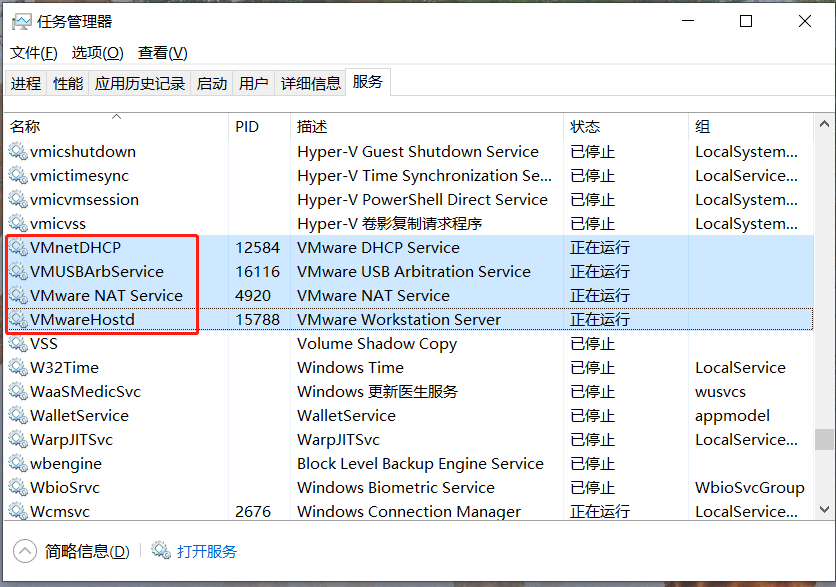
停止虚拟机服务
执行破解
进入插件MK-Unlocker-VM15.5目录内,右键以管理员权限运行win-install.cmd
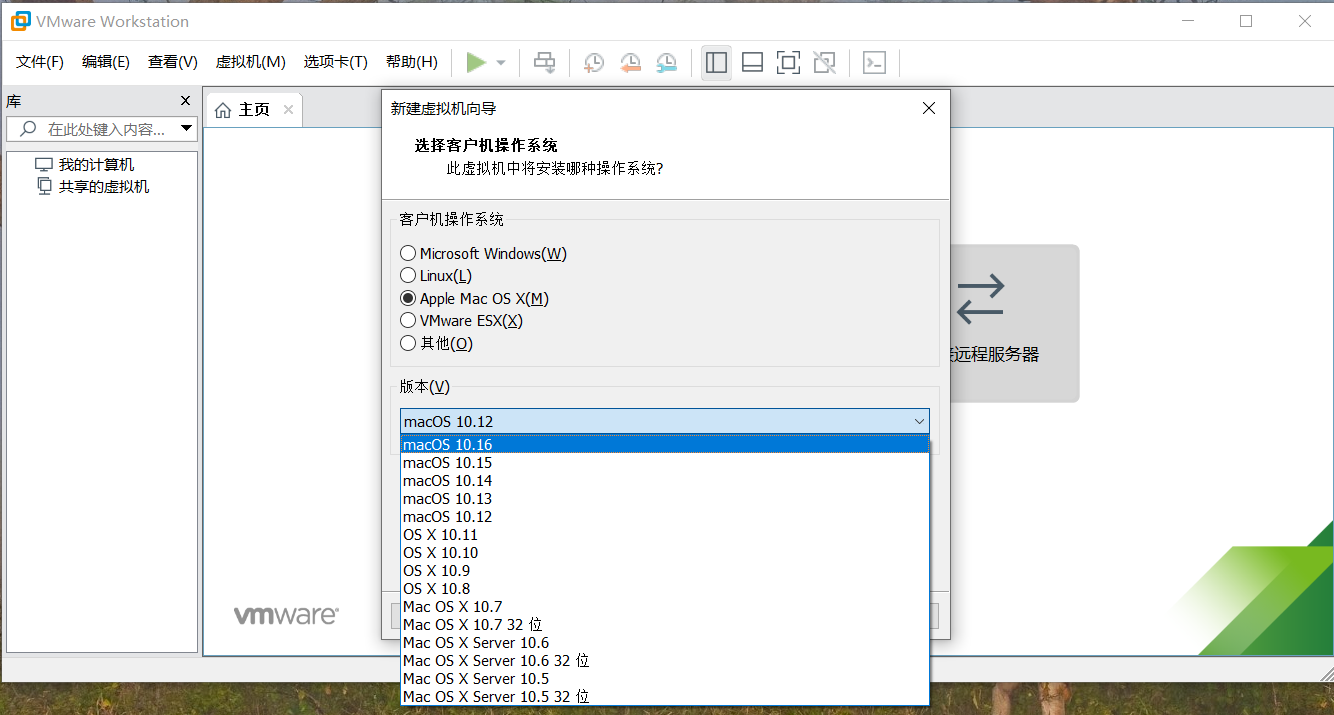
查看效果
等待如上的脚本执行完成后,再打开vm,创建虚拟机,看看就有了macos系统选项了
插件下载
链接: https://pan.baidu.com/s/1lp4h0OqMPaedCT6m1D2kRA
提取码: mpi4
原文档
macOS Unlocker V3.0 for VMware Workstation
+-----------------------------------------------------------------------------+
| IMPORTANT: |
| ========== |
| |
| Always uninstall the previous version of the Unlocker before using a new |
| version. Failure to do this could render VMware unusable. |
| |
+-----------------------------------------------------------------------------+
- Introduction
Unlocker 3 is designed for VMware Workstation 11-15 and Player 7-15.
If you are using an earlier product please continue using Unlocker 1.
Version 3 has been tested against:
- Workstation 11/12/14/15 on Windows and Linux
- Workstation Player 7/12/14/15 on Windows and Linux
The patch code carries out the following modifications dependent on the product
being patched:
- Fix vmware-vmx and derivatives to allow macOS to boot
- Fix vmwarebase .dll or .so to allow Apple to be selected during VM creation
- Download a copy of the latest VMware Tools for macOS
Note that not all products recognise the darwin.iso via install tools menu item.
You will have to manually mount the darwin.iso for example on Workstation 11 and Player 7.
In all cases make sure VMware is not running, and any background guests have
been shutdown.
The code is written in Python.
- Prerequisites
The code requires Python 2.7 to work. Most Linux distros ship with a compatible
Python interpreter and should work without requiring any additional software.
Windows Unlocker has a packaged version of the Python script using PyInstaller,
and so does not require Python to be installed.
- Limitations
If you are using VMware Player or Workstation on Windows you may get a core dump.
Latest Linux products are OK and do not show this problem.
+-----------------------------------------------------------------------------+
| IMPORTANT: |
| ========== |
| |
| If you create a new VM VMware may stop and create a core dump. |
| There are two options to work around this issue: |
| |
| 1. Change the VM to be HW 10 - this does not affect performance. |
| 2. Edit the VMX file and add: |
| smc.version = "0" |
| |
+-----------------------------------------------------------------------------+
- Windows
On Windows you will need to either run cmd.exe as Administrator or using
Explorer right click on the command file and select "Run as administrator".
win-install.cmd - patches VMware
win-uninstall.cmd - restores VMware
win-update-tools.cmd - retrieves latest macOS guest tools
- Linux
On Linux you will need to be either root or use sudo to run the scripts.
You may need to ensure the Linux scripts have execute permissions
by running chmod +x against the 2 files.
lnx-install.sh - patches VMware
lnx-uninstall.sh - restores VMware
lnx-update-tools.sh - retrieves latest macOS guest tools
- Thanks
Thanks to Zenith432 for originally building the C++ unlocker and Mac Son of Knife
(MSoK) for all the testing and support.
Thanks also to Sam B for finding the solution for ESXi 6 and helping me with
debugging expertise. Sam also wrote the code for patching ESXi ELF files and
modified the unlocker code to run on Python 3 in the ESXi 6.5 environment.
History
27/09/18 3.0.0 - First release
02/10/18 3.0.1 - Fixed gettools.py to work with Python 3 and correctly download darwinPre15.iso
10/10/18 3.0.2 - Fixed false positives from anti-virus software with Windows executables
- Allow Python 2 and 3 to run the Python code from Bash scripts
(c) 2011-2018 Dave Parsons
如何安装黑苹果
简单来说如下步骤:
下载(别人做好的)镜像,刻录到u盘,然后新建虚拟机安装
具体步骤参考这里
vmware15.5的解锁mac系统插件的更多相关文章
- 新买苹果电脑,mac系统中小白应该了解哪些东西?
本文旨在分享新买了mac电脑,应该做哪些设置,帮助苹果电脑小白轻松上手使用mac电脑,当然,新电脑肯定是需要安装各种软件,这里,小编推荐一下可以看看小编写的mac软件装机必备Mac 装机必备软件推荐, ...
- iStatistica Pro for mac(mac系统监视器)
iStatistica Pro for mac是一款运行在Mac平台上的mac系统监视器,你可以使用iStatistica pro for mac破解版轻松查看PAM使用情况.CPU信息.磁盘信息.本 ...
- virtualbox+vagrant学习-1-环境安装及vagrantfile的简单配置-Mac系统
在学习docker-machine时,发现需要使用到虚拟化平台,所以选择了使用virtualBox. 然后后面发现需要使用vagrant来在mac系统中作为虚拟机管理软件,所以下面将会简述我自己学习使 ...
- MAC系统压缩文件传到WINDOWS下出现乱码
可能使用Mac系统的朋友,在压缩文件时遇到过这样的问题: 要给朋友传文件,而对方又是WIN系统.我们打好包传过去以后,对方解压缩发现中文文件名都成乱码了.这是怎么回事? 原来,Mac下,默认文字编码是 ...
- 虚拟机中安装mac系统
虚拟机安装就很简单了,傻瓜式安装,一直点击下一步就行,这里就不多说了. 所需要的配置: 虚拟机下载地址:链接:http://pan.baidu.com/s/1i45wXRf 密码:7c4x mac补丁 ...
- mac系统 flutter从安装到第一个应用
mac系统 安装flutter 分三步: 1. 安装flutter sdk 2. flutter环境变量配置 3. 建立flutter应用 Flutter SDK下载 打开终端执行命令 git clo ...
- Mac系统下Datagrip打不开、点击没反应?
有没有可能是因为你从网上下载了一些破解软件导致的? 背景 Mac系统下JB公司家的IDEA. Datagrip.PyCharm 或 Goland 打不开点击没反应-- 分析 大概率是之前安装过 汉化插 ...
- 别老嫌Mac系统难用 这些快捷键你都用过吗
苹果今年10月发布的全新带把儿(bar)的MacBook,轻薄炫酷的外观大受欢迎,其中当然不乏很多从Windows转到Mac阵营的用户.不少习惯了Windows操作习惯的用户在上手Mac时都会觉得非常 ...
- Mac系统下React Native环境搭建
这里记录一下在Mac系统下搭建React Native开发环境的过程: 1. 安装HomeBrew: /usr/bin/ruby -e "$(curl -fsSL https://raw.g ...
- mac系统及xcode使用的SVN客户端安装升级
当前的SVN版本已经升级到1.8.x了,但mac系统自带的以及xcode使用的SVN客户端版本没有跟着升级,还是1.6.x的版本.为了解决隐藏目录.svn只在根目录下存在的情况,至少要升级到1.7.x ...
随机推荐
- 垂直模型和AI Workflow是开AGI的历史倒车
提供AI咨询+AI项目陪跑服务,有需要回复1 RL 之父 Rich Sutton在 2019 年的文章<苦涩的教训>中指出: 70 年的 AI 研究历史告诉我们一个最重要的道理:依靠纯粹算 ...
- Web前端入门第 35 问:CSS 细说 flex 弹性盒子布局(多图)
flex 作为现代布局方案中最常用的手段,有必要拉出来细说. flex 相关的 CSS 属性 容器(父元素)相关的 CSS 属性 以下的 CSS 属性,在 flex 布局中需喂给父元素,设置 flex ...
- thinkphp 命令行执行导入
<?phpdeclare (strict_types=1);namespace app\command;use think\console\Command;use think\console\I ...
- MySQL开启general_log
General_log 详解 1.介绍 开启 general log 将所有到达MySQL Server的SQL语句记录下来. 一般不会开启开功能,因为log的量会非常庞大.但个别情况下可能会临时的开 ...
- css_初阶
s10.html <!DOCTYPE html> <html lang="en"> <head> <meta charset=&q ...
- SQL 日常练习 (二十)
也只是尽快搬完这快一个月 sql 的砖, 准备要来整新学习模块了, 因此, 正好趁着五一, 加波速. 也会一直坚守和追求, 学无止境, 气有浩然. 每次都会说, 这是一种精神的传承,而我想的是, 不仅 ...
- git管理Unity项目
git管理Unity项目的正确打开方式 在创建仓库的时候进行初始化仓库,选择.gitignore模版的时候选择Unity,就能自动过滤不需要的文件 原文链接:https://blog.csdn.net ...
- 网络编程:阻塞I/O和进程模型
父进程和子进程 进程是程序执行的最小单位,一个进程有完整的地址空间.程序计数器等,如果想创建一个新的进程,使用函数 fork 就可以 pid_t fork(void) 返回:在子进程中为0,在父进程中 ...
- c语言笔记(翁凯男神
哼,要记得好好学习去泡帅哥吖 一.快速入门 %p 输出地址 #include <stdio.h> void f(int *p); int main(){ int i = 1; printf ...
- MySQL修改表和字段的字符集和排序规则
摘要:通过设置表的字符集和排序规则,解决MySQL查询时不区分字母大小写.插入时不支持特殊字符的问题. 关于MySQL查询时不区分字母大小写.插入时不支持特殊字符的问题,只有修改表的字符集和排序规 ...