
openwrt上网配置的一些理解(三)
接着上面的继续捣腾multiwan,首先考虑一下上一篇中记录的multiwan配置,这里的配置是否正确,得研究一下。先贴一下上一篇的配置文件,如下:
config 'multiwan' 'config'

    option 'default_route' 'balancer'

    # health_monitor below is defaulted to parallel, and can be set to

    # serial to save system resources.

    # option 'health_monitor' 'serial'

    # option 'debug' ''

config 'interface' 'wan'

    option 'weight' ''

    option 'health_interval' ''

    option 'icmp_hosts' 'gateway'

    # icmp_count is defaulted to , and can be increased to reduce

    # false positives.

    # option 'icmp_count' ''

    option 'timeout' ''

    option 'health_fail_retries' ''

    option 'health_recovery_retries' ''

    option 'failover_to' 'wan1'

    option 'dns' 'auto'

config 'interface' 'wan1'

    option 'weight' ''

    option 'health_interval' ''

    option 'icmp_hosts' 'gateway'

    option 'timeout' ''

    option 'health_fail_retries' ''

    option 'health_recovery_retries' ''

    option 'failover_to' 'wan2'

    option 'dns' 'auto'

config 'interface' 'wan2'

    option 'weight' ''

    option 'health_interval' ''

    option 'icmp_hosts' 'gateway'

    option 'timeout' ''

    option 'health_fail_retries' ''

    option 'health_recovery_retries' ''

    option 'failover_to' 'wan'

    option 'dns' 'auto'

#config 'mwanfw'

#    option 'src' '192.168.1.0/24'

#    option 'dst' 'ftp.netlab7.com'

#    option 'proto' 'tcp'

#    option 'ports' ''

#    option 'wanrule' 'lan'

# VoIP traffic goes through wan

# config 'mwanfw'

    # option 'src' '192.168.1.0/24'

    # option 'proto' 'udp'

    # option 'port_type' 'source-ports'

    # option 'ports' '5060,16384:16482'

    # option 'wanrule' 'wan'

config 'mwanfw'

#    option 'src' '192.168.0.3'

#    option 'proto' 'icmp'

    option 'wanrule' 'balancer'

config 'mwanfw'

#    option 'dst' 'www.whatismyip.com'

    option 'wanrule' 'fastbalancer'
还是在网上找找有没有相关人士做过这个:
http://www.openwrt.org.cn/bbs/forum.php?mod=viewthread&tid=9848&extra=&page=1实验多WAN带宽叠加——Multiwan篇
这个帖子做实验很严谨,于是我跟着做了跟我网络环境对应的实验,发现确实是不行的。当然根据帖子我把multiwan修改了,就是把failover_to全部修改成balancer。但是还是不行。后来我在http://wiki.openwrt.org/doc/uci/multiwan看到这么一句话:Note: Multiwan will NOT work if the WAN connections are on the same subnet and share the same default gateway.
我的是啥情况:用一张图来说明我的网络。
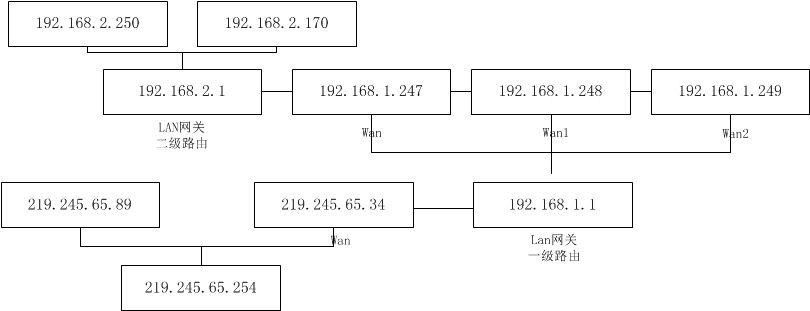
3个wan口,全部连上时,都会走eth1,也就是wan口,拔掉wan口网线,ping 百度不通,ping219.245.65.89可以回来一个数据,然后停止。很明显没有自动切换,但是不知道有没有叠加,其实我不关心叠不叠加,我只关心我随便插哪个,他就用哪个,我是要确保网络畅通。所以还得继续想办法。
根据帖子的内容我又进一步了解了下ip route。结果如下:
ip route show table

192.168.2.0/ dev br-lan    proto kernel    scope    link      src    192.168.2.1

192.168.1.0/ dev eth2     proto kernel     scope    link     src  192.168.1.247

default    proto    static

    nexthop    via    192.168.1.1    dev    eth1    weight

    nexthop     via     192.168.1.1    dev    eth2 weight

    nexthop     via     192.168.1.1    dev    eth3 weight

ip route show table

192.168.2.0/    dev    br-lan    proto    kernel    scope    link    src    192.168.2.1

192.168.1.0/    dev    eth1        proto    kernel    scope    link    src    192.168.1.247

Default    via    192.168.1.1    dev    eth1    proto    static    src    192.168.1.247

ip route show table

192.168.2.0/    dev    br-lan    proto    kernel    scope    link    src    192.168.2.1

192.168.1.0/    dev    eth1        proto    kernel    scope    link    src    192.168.1.247

Default    via    192.168.1.1    dev    eth1    proto    static    src    192.168.1.248

ip route show table

192.168.2.0/    dev    br-lan    proto    kernel    scope    link    src    192.168.2.1

192.168.1.0/    dev    eth1        proto    kernel    scope    link    src    192.168.1.247

Default    via    192.168.1.1    dev    eth1    proto    static    src    192.168.1.249
就是都会往eth1走,所以,把wan拔了肯定就有问题。回去检查了下multiwan,因为这个文件还是上一次的,只是根据这个帖子修改了failover_to,都改成balancer了,那么再看看这个帖子:http://www.openwrt.org.cn/bbs/forum.php?mod=viewthread&tid=14861&page=1&extra=#pid108970
里面multiwan的第一项中,我少了个option enabled 1.加上一试,还真是,我拿luci界面进行3个wan口的connect和stop。发现可以了,我把任意两个关了,还是可以上网。那就满足我的要求了,不过还是要研究一下luci界面机制。还是记录一下multiwan。
config 'multiwan' 'config'

    option 'default_route' 'balancer'

    # health_monitor below is defaulted to parallel, and can be set to

    # serial to save system resources.

    # option 'health_monitor' 'serial'

    option 'enabled' ''

config 'interface' 'wan'

    option 'weight' ''

    option 'health_interval' ''

    option 'icmp_hosts' 'gateway'

    # icmp_count is defaulted to , and can be increased to reduce

    # false positives.

    # option 'icmp_count' ''

    option 'timeout' ''

    option 'health_fail_retries' ''

    option 'health_recovery_retries' ''

    option 'failover_to' 'balancer'

    option 'dns' 'auto'

config 'interface' 'wan1'

    option 'weight' ''

    option 'health_interval' ''

    option 'icmp_hosts' 'gateway'

    option 'timeout' ''

    option 'health_fail_retries' ''

    option 'health_recovery_retries' ''

    option 'failover_to' 'balancer'

    option 'dns' 'auto'

config 'interface' 'wan2'

    option 'weight' ''

    option 'health_interval' ''

    option 'icmp_hosts' 'gateway'

    option 'timeout' ''

    option 'health_fail_retries' ''

    option 'health_recovery_retries' ''

    option 'failover_to' 'balancer'

    option 'dns' 'auto'

#config 'mwanfw'

#    option 'src' '192.168.1.0/24'

#    option 'dst' 'ftp.netlab7.com'

#    option 'proto' 'tcp'

#    option 'ports' ''

#    option 'wanrule' 'lan'

# VoIP traffic goes through wan

# config 'mwanfw'

    # option 'src' '192.168.1.0/24'

    # option 'proto' 'udp'

    # option 'port_type' 'source-ports'

    # option 'ports' '5060,16384:16482'

    # option 'wanrule' 'wan'

config 'mwanfw'

#    option 'src' '192.168.0.3'

#    option 'proto' 'icmp'

    option 'wanrule' 'balancer'

config 'mwanfw'

#    option 'dst' 'www.whatismyip.com'

    option 'wanrule' 'fastbalancer'
接下来还要把3g上网的也加进来试试。
openwrt上网配置的一些理解(三)的更多相关文章
- openwrt上网配置的一些理解
其实已经有很多帖子讲过openwrt路由器上网配置了,我这里主要是讲我自己的一块硬件路由使用openwrt后的一些上网配置.之所以要研究我自己的配置,是因为硬件,硬件不一样,配置也就不一样,但是总的原 ...
- openwrt上网配置的一些理解(四)
这次要解决的问题是3g上网和wan口上往可以随意切换,当然能够叠加也是好事,不过这不是我关心的.下面还是修改3个文件network,firewall,multiwan.首先在network中加入界面配 ...
- openwrt上网配置的一些理解(二)
上一篇里面遇到了只能静态上网的问题,动态不行.所以再接再励,问题总是要解决的,偷懒的下场就是一直停留在菜鸟的水平. 首先分析下问题,要动态上网,首先我要明确不是动态获取不了IP,是获取了,上不了外网. ...
- 【转】logback logback.xml常用配置详解(三) <filter>
原创文章,转载请指明出处:http://aub.iteye.com/blog/1110008, 尊重他人即尊重自己 详细整理了logback常用配置, 不是官网手册的翻译版,而是使用总结,旨在更快更透 ...
- [转]ubuntu server上网配置
[转]ubuntu server上网配置 http://blog.sina.com.cn/s/blog_6c9d65a101011pyt.html 今天我的ubuntu server上不去网了,所以重 ...
- OpenWRT 路由配置技巧
随着最近 Google 在国内已经完全无法访问,使得通过 VPN 访问网络的需求更加强烈,本文介绍的方法可以使一个普通的路由具备稳定连接 VPN 的能力,并能够根据目标访问网站选择国内外线路,从而得到 ...
- ElasticSearch 深入理解 三:集群部署设计
ElasticSearch 深入理解 三:集群部署设计 ElasticSearch从名字中也可以知道,它的Elastic跟Search是同等重要的,甚至以Elastic为主要导向. Elastic即可 ...
- VMware Workstation虚拟机中的Linux通过NAT模式共享上网配置教程
VMware Workstation虚拟机中的Linux通过NAT模式共享上网配置教程 在VMware Workstation虚拟机下面,Linux虚机要上网,一般是桥接模式,但我自己的电脑上网的环境 ...
- 联通光纤上网配置+华为HG8240光猫+TL-WR842N
最近搬家改用北京联通宽带,光纤入户的那种.联通送的光猫是华为HG8240,没看到天线,应该是不带无线路由.然后自己再买了个TP-Link的TL-WR842N,用来组局域网,也供ipad.kindle. ...
随机推荐
- javascript基础之for循环
1.数组定义声名 var arry = [1,2,3,4,5] //相当与var arry = Array(1,2,3,4,5) 2.数据的增删改查 var arry = [1,2,3,4,5] ...
- nginx配置学习文章
partOne 自我释义部分 我的是阿里云的ubuntu *******实际上感觉这里是基本配置,很用不到*********#定义其用户或用户组user www-data;#nginx的进程数,应当为 ...
- smarty半小时快速上手教程(转)
来源于:http://www.chinaz.com/program/2010/0224/107006.shtml 一:smarty的程序设计部分: 在smarty的模板设计部分我简单的把smarty在 ...
- office - 连接字符串.
Microsoft ACE OLEDB 12.0 Connect to Excel 2007 (and later) files with the Xlsx file extension. That ...
- 杂记之web篇
问题1:通过POST方式提交给后台的数据出现了乱码,用部分浏览器测试却是好的. 解决办法: 在web.config文件中加上 <globalization responseEncoding=&q ...
- XPath总结一
这里介绍下XPath的用法: 它生成一个string对象,作为XmlNode的方法SelectSingleNode,SelectNodes的输入参数 ,以此来查询符合条件的节点. 选择当前节点: . ...
- Java反射 - 1(得到类对象的几种方法,调用方法,得到包下的所有类)
通过反射获得对象的方法 准备工作: 有一个User类如下 package o1; /** * Created by yesiming on 16-11-19. */ public class User ...
- QT5-控件-QLabel和QLCDNumber-标签显示图片或者视频,LCD用于上位机不错
#ifndef MAINWINDOW_H #define MAINWINDOW_H #include <QMainWindow> #include <QLabel> #incl ...
- 洛谷 P1093 奖学金
P1093 奖学金 题目描述 某小学最近得到了一笔赞助,打算拿出其中一部分为学习成绩优秀的前5名学生发奖学金.期末,每个学生都有3门课的成绩:语文.数学.英语.先按总分从高到低排序,如果两个同学总分相 ...
- angular2 环境配置
看到angular发布正式版,心动不已准备测试下. 看着官网教程,使用了cli创建项目,在命令行中键入: 安装cli npm install -g angular-cli 如果安装过以前的版本,请执行 ...