
Beginning MyBatis 3 Part 2 : How to Handle One-to-Many and One-to-One Selects
One of the latest MyBatis feature is the ability to use Annotations or XML to do One-to-One or One-to-Many queries. Let’s start
with an example, as usual im using PostgreSQL, Netbeans 6.9 and MyBatis 3.0.2.
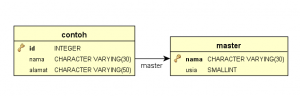
First is a simple database with 2 different tables,
CREATE DATABASE test

CREATE TABLE master

    (

        nama CHARACTER VARYING(30) NOT NULL,

        usia SMALLINT,

        CONSTRAINT idnama PRIMARY KEY (nama)

    )

CREATE TABLE contoh

    (

        id INTEGER NOT NULL,

        nama CHARACTER VARYING(30),

        alamat CHARACTER VARYING(50),

        CONSTRAINT id PRIMARY KEY (id)

    )

ALTER TABLE

    contoh ADD CONSTRAINT master FOREIGN KEY (nama) REFERENCES master (nama)

    ON DELETE CASCADE

    ON UPDATE CASCADE

insert into master (nama, usia) values ('pepe', 17);

insert into master (nama, usia) values ('bubu', 19);

insert into contoh (id, nama, alamat) values (1, 'bubu', 'Tangerang');

insert into contoh (id, nama, alamat) values (2, 'pepe', 'Jakarta');

insert into contoh (id, nama, alamat) values (3, 'bubu', 'Singapore');

insert into contoh (id, nama, alamat) values (4, 'pepe', 'Kuburan');
My java bean, as my java object representation of my database tables,
package com.edw.bean;

import java.util.List;

public class Master {

    private String nama;

    private Short usia;

    private List<Contoh> contohs;

    // other setters and getters

    @Override

    public String toString() {

        return "Master{" + "nama=" + nama + " usia=" + usia + " contohs=" + contohs + '}';

    }

}
package com.edw.bean;

public class Contoh {

    private Integer id;

    private String nama;

    private String alamat;

    private Master master;

    // other setters and getters

    @Override

    public String toString() {

        return "Contoh{" + "id=" + id + " nama=" + nama + " alamat=" + alamat + " master=" + master + '}';

    }

}
My XML files for table Contoh and Master queries, please take a look at association tags and collection tags. The association
element deals with a has-one type
relationship. While collection deals with a has-lots-of type
relationship.
<?xml version="1.0" encoding="UTF-8" ?>

<!DOCTYPE mapper PUBLIC "-//mybatis.org//DTD Mapper 3.0//EN" "http://mybatis.org/dtd/mybatis-3-mapper.dtd" >

<mapper namespace="com.edw.mapper.MasterMapper" >

    <!--    result maps     -->

    <resultMap id="ResultMap" type="com.edw.bean.Master" >

        <id column="nama" property="nama"  />

        <result column="usia" property="usia" />

        <!--    collections of Contoh     -->

        <collection property="contohs" ofType="com.edw.bean.Contoh"

            column="nama" select="selectContohFromMaster" />

    </resultMap>

    <!--    one to many select  -->

    <select id="selectUsingXML" resultMap="ResultMap" parameterType="java.lang.String" >

        SELECT

            master.nama,

            master.usia

        FROM

            test.master

        WHERE master.nama = #{nama}

    </select>

    <select id="selectContohFromMaster"

          parameterType="java.lang.String"

          resultType="com.edw.bean.Contoh">

        SELECT

            id,

            nama,

            alamat

        FROM

            test.contoh

        WHERE

            nama = #{nama}

    </select>

</mapper>
<?xml version="1.0" encoding="UTF-8" ?>

<!DOCTYPE mapper PUBLIC "-//mybatis.org//DTD Mapper 3.0//EN" "http://mybatis.org/dtd/mybatis-3-mapper.dtd" >

<mapper namespace="com.edw.mapper.ContohMapper" >

    <!--    result maps     -->

    <resultMap id="BaseResultMap" type="com.edw.bean.Contoh" >

        <id column="id" property="id" jdbcType="INTEGER" />

        <result column="nama" property="nama" jdbcType="VARCHAR" />

        <result column="alamat" property="alamat" jdbcType="VARCHAR" />

        <!--        one to one     -->

        <association property="master" column="nama" javaType="com.edw.bean.Master"

            select="selectMasterFromContoh"/>

    </resultMap>

    <!-- one to one select  -->

    <select id="selectUsingXML" resultMap="BaseResultMap" parameterType="java.lang.Integer" >

    SELECT

        contoh.id,

        contoh.nama,

        contoh.alamat

    FROM

        test.contoh

    WHERE

        id = #{id,jdbcType=INTEGER}

    </select>

    <select id="selectMasterFromContoh"

          parameterType="java.lang.String"

          resultType="com.edw.bean.Master">

        SELECT

            master.nama,

            master.usia

        FROM

            test.master

        WHERE

            nama = #{nama}

    </select>

</mapper>
This is my main xml configuration to handle my database connections,
<?xml version="1.0" encoding="UTF-8" ?>

<!DOCTYPE configuration

PUBLIC "-//mybatis.org//DTD Config 3.0//EN"

"http://mybatis.org/dtd/mybatis-3-config.dtd">

<configuration>

    <environments default="development">

        <environment id="development">

            <transactionManager type="JDBC"/>

            <dataSource type="UNPOOLED">

                <property name="driver" value="org.postgresql.Driver"/>

                <property name="url" value="jdbc:postgresql://localhost:5432/test"/>

                <property name="username" value="postgres"/>

                <property name="password" value="password"/>

            </dataSource>

        </environment>

    </environments>

    <mappers>

        <mapper resource="com/edw/xml/ContohMapper.xml" />

        <mapper resource="com/edw/xml/MasterMapper.xml" />

    </mappers>

</configuration>
and a java class to load my XML files
package com.edw.config;

import java.io.Reader;

import org.apache.ibatis.io.Resources;

import org.apache.ibatis.session.SqlSessionFactory;

import org.apache.ibatis.session.SqlSessionFactoryBuilder;

public class MyBatisSqlSessionFactory {

    protected static final SqlSessionFactory FACTORY;

    static {

        try {

            Reader reader = Resources.getResourceAsReader("com/edw/xml/Configuration.xml");

            FACTORY = new SqlSessionFactoryBuilder().build(reader);

        } catch (Exception e){

            throw new RuntimeException("Fatal Error.  Cause: " + e, e);

        }

    }

    public static SqlSessionFactory getSqlSessionFactory() {

        return FACTORY;

    }

}
These are my mapper interfaces, i put my annotation queries here. Please take a note at @Many and @One annotations.
MyBatis use @One to map a single property value of a complex type, while @Many for mapping a collection property of a complex types.
package com.edw.mapper;

import com.edw.bean.Contoh;

import com.edw.bean.Master;

import java.util.List;

import org.apache.ibatis.annotations.Many;

import org.apache.ibatis.annotations.Result;

import org.apache.ibatis.annotations.Results;

import org.apache.ibatis.annotations.Select;

public interface MasterMapper {

    Master selectUsingXML(String nama);

    /*

     *  one to many Select.

     */

    @Select("SELECT master.nama, master.usia FROM test.master WHERE master.nama = #{nama}")

    @Results(value = {

                      @Result(property="nama", column="nama"),

                      @Result(property="usia", column="usia"),

                      @Result(property="contohs", javaType=List.class, column="nama",

                             many=@Many(select="getContohs"))

                      })

    Master selectUsingAnnotations(String nama);

    @Select("SELECT contoh.id, contoh.nama, contoh.alamat FROM test.contoh WHERE contoh.nama = #{nama}")

    List<Contoh> getContohs(String nama);

}
package com.edw.mapper;

import com.edw.bean.Contoh;

import com.edw.bean.Master;

import org.apache.ibatis.annotations.One;

import org.apache.ibatis.annotations.Result;

import org.apache.ibatis.annotations.Results;

import org.apache.ibatis.annotations.Select;

public interface ContohMapper {

    Contoh selectUsingXML(Integer nama);

    /*

     *  one to one Select.

     */

    @Select("SELECT contoh.id, contoh.nama, contoh.alamat FROM test.contoh WHERE contoh.id = #{id}")

    @Results(value = {

        @Result(property = "nama", column = "nama"),

        @Result(property = "alamat", column = "alamat"),

        @Result(property = "master", column = "nama", one=@One(select = "getMaster"))

    })

    Contoh selectUsingAnnotations(Integer id);

    @Select("SELECT master.nama, master.usia FROM test.master WHERE master.nama = #{nama}")

    Master getMaster(String nama);

}
Here is my main java class
package com.edw.main;

import com.edw.bean.Contoh;

import com.edw.bean.Master;

import com.edw.config.MyBatisSqlSessionFactory;

import com.edw.mapper.ContohMapper;

import com.edw.mapper.MasterMapper;

import java.util.List;

import org.apache.ibatis.session.SqlSession;

import org.apache.log4j.Logger;

public class Main {

    private static Logger logger = Logger.getLogger(Main.class);

    public Main() {

    }

    private void execute() throws Exception{

       SqlSession session = MyBatisSqlSessionFactory.getSqlSessionFactory().openSession();

        try {

            MasterMapper masterMapper = session.getMapper(MasterMapper.class);

            // using XML queries ------------------------------

            Master master = masterMapper.selectUsingXML("pepe");

            logger.debug(master);

            List<Contoh> contohs = master.getContohs();

            for (Contoh contoh : contohs) {

                logger.debug(contoh);

            }

            // using annotation queries ------------------------------

            master = masterMapper.selectUsingAnnotations("pepe");

            logger.debug(master);

            List<Contoh> contohs2 = master.getContohs();

            for (Contoh contoh : contohs2) {

                logger.debug(contoh);

            }

            // using XML queries ------------------------------

            ContohMapper contohMapper = session.getMapper(ContohMapper.class);

            Contoh contoh = contohMapper.selectUsingXML(1);

            logger.debug(contoh.getMaster());

            // using annotation queries ------------------------------

            contoh = contohMapper.selectUsingAnnotations(1);

            logger.debug(contoh);

            session.commit();

        } finally {

            session.close();

        }

    }

    public static void main(String[] args) throws Exception {

        try {

            Main main = new Main();

            main.execute();

        } catch (Exception exception) {

            logger.error(exception.getMessage(), exception);

        }

    }

}
And this is what happen on my java console, im using log4j to do all the loggings.
DEBUG java.sql.Connection:27 - ooo Connection Opened

DEBUG java.sql.PreparedStatement:27 - ==>  Executing: SELECT master.nama, master.usia FROM test.master WHERE master.nama = ?

DEBUG java.sql.PreparedStatement:27 - ==> Parameters: pepe(String)

DEBUG java.sql.ResultSet:27 - <==    Columns: nama, usia

DEBUG java.sql.ResultSet:27 - <==        Row: pepe, 17

DEBUG java.sql.PreparedStatement:27 - ==>  Executing: SELECT id, nama, alamat FROM test.contoh WHERE nama = ?

DEBUG java.sql.PreparedStatement:27 - ==> Parameters: pepe(String)

DEBUG java.sql.ResultSet:27 - <==    Columns: id, nama, alamat

DEBUG java.sql.ResultSet:27 - <==        Row: 2, pepe, Jakarta

DEBUG java.sql.ResultSet:27 - <==        Row: 4, pepe, Kuburan

DEBUG com.edw.main.Main:32 - Master{nama=pepe usia=17 contohs=[Contoh{id=2 nama=pepe alamat=Jakarta master=null}, Contoh{id=4 nama=pepe alamat=Kuburan master=null}]}

DEBUG com.edw.main.Main:36 - Contoh{id=2 nama=pepe alamat=Jakarta master=null}

DEBUG com.edw.main.Main:36 - Contoh{id=4 nama=pepe alamat=Kuburan master=null}

DEBUG java.sql.PreparedStatement:27 - ==>  Executing: SELECT master.nama, master.usia FROM test.master WHERE master.nama = ?

DEBUG java.sql.PreparedStatement:27 - ==> Parameters: pepe(String)

DEBUG java.sql.ResultSet:27 - <==    Columns: nama, usia

DEBUG java.sql.ResultSet:27 - <==        Row: pepe, 17

DEBUG java.sql.PreparedStatement:27 - ==>  Executing: SELECT contoh.id, contoh.nama, contoh.alamat FROM test.contoh WHERE contoh.nama = ?

DEBUG java.sql.PreparedStatement:27 - ==> Parameters: pepe(String)

DEBUG java.sql.ResultSet:27 - <==    Columns: id, nama, alamat

DEBUG java.sql.ResultSet:27 - <==        Row: 2, pepe, Jakarta

DEBUG java.sql.ResultSet:27 - <==        Row: 4, pepe, Kuburan

DEBUG com.edw.main.Main:41 - Master{nama=pepe usia=17 contohs=[Contoh{id=2 nama=pepe alamat=Jakarta master=null}, Contoh{id=4 nama=pepe alamat=Kuburan master=null}]}

DEBUG com.edw.main.Main:45 - Contoh{id=2 nama=pepe alamat=Jakarta master=null}

DEBUG com.edw.main.Main:45 - Contoh{id=4 nama=pepe alamat=Kuburan master=null}

DEBUG java.sql.PreparedStatement:27 - ==>  Executing: SELECT contoh.id, contoh.nama, contoh.alamat FROM test.contoh WHERE id = ?

DEBUG java.sql.PreparedStatement:27 - ==> Parameters: 1(Integer)

DEBUG java.sql.ResultSet:27 - <==    Columns: id, nama, alamat

DEBUG java.sql.ResultSet:27 - <==        Row: 1, bubu, Tangerang

DEBUG java.sql.PreparedStatement:27 - ==>  Executing: SELECT master.nama, master.usia FROM test.master WHERE nama = ?

DEBUG java.sql.PreparedStatement:27 - ==> Parameters: bubu(String)

DEBUG java.sql.ResultSet:27 - <==    Columns: nama, usia

DEBUG java.sql.ResultSet:27 - <==        Row: bubu, 19

DEBUG com.edw.main.Main:51 - Master{nama=bubu usia=19 contohs=null}

DEBUG java.sql.PreparedStatement:27 - ==>  Executing: SELECT contoh.id, contoh.nama, contoh.alamat FROM test.contoh WHERE contoh.id = ?

DEBUG java.sql.PreparedStatement:27 - ==> Parameters: 1(Integer)

DEBUG java.sql.ResultSet:27 - <==    Columns: id, nama, alamat

DEBUG java.sql.ResultSet:27 - <==        Row: 1, bubu, Tangerang

DEBUG java.sql.PreparedStatement:27 - ==>  Executing: SELECT master.nama, master.usia FROM test.master WHERE master.nama = ?

DEBUG java.sql.PreparedStatement:27 - ==> Parameters: bubu(String)

DEBUG java.sql.ResultSet:27 - <==    Columns: nama, usia

DEBUG java.sql.ResultSet:27 - <==        Row: bubu, 19

DEBUG com.edw.main.Main:55 - Contoh{id=1 nama=bubu alamat=Tangerang master=Master{nama=bubu usia=19 contohs=null}}

DEBUG java.sql.Connection:27 - xxx Connection Closed
my
log4j.properties
# Global logging configuration

log4j.rootLogger=DEBUG,stdout

# Console output...

log4j.appender.stdout=org.apache.log4j.ConsoleAppender

log4j.appender.stdout.layout=org.apache.log4j.PatternLayout

log4j.appender.stdout.layout.ConversionPattern=%-5p %c:%L - %m%n
Beginning MyBatis 3 Part 2 : How to Handle One-to-Many and One-to-One Selects的更多相关文章
- MyBatis(3.2.3) - Configuring MyBatis using XML, typeHandlers
As discussed in the previous chapter, MyBatis simplifies the persistent logic implementation by abst ...
- MyBatis学习总结(一)——ORM概要与MyBatis快速起步
程序员应该将核心关注点放在业务上,而不应该将时间过多的浪费在CRUD中,多数的ORM框架都把增加.修改与删除做得非常不错了,然后数据库中查询无疑是使用频次最高.复杂度大.与性能密切相关的操作,我们希望 ...
- [翻译.每月一译.每日一段]Exploring Fonts with DirectWrite and Modern C++
Windows with C++ Exploring Fonts with DirectWrite and Modern C++ Kenny Kerr DirectWrite is an incred ...
- js实现省市区联动
先来看看效果图吧,嘻嘻~~~~~~~~~~~~~~~~~~~· 代码在下面: 示例一: html: <!DOCTYPE html> <html> <head> &l ...
- 我为什么放弃使用MyBatis3的Mapper注解
最近在使用MyBatis3做项目.在使用注解实现Mapper的时候遇到了比较奇葩的问题:在实现数据的batch insert的时候总是报错.好不容易可以正常插入了,但是又不能返回自增的主键id到实体b ...
- 我为什么放弃使用mybatis3的mapper注解了
原文链接 最近在使用MyBatis3做项目.在使用注解实现Mapper的时候遇到了比较奇葩的问题:在实现数据的batch insert的时候总是报错.好不容易可以正常插入了,但是又不能返回自增的主键i ...
- select2插件改造之设置自定义选项 源码
改造特性: 适应业务需要,选项里面包含“其他”其它”,可以点击填写并设置自定义选项 效果图: 具体代码不做阐述,如有类似需求,请私信.主要源码: /* Copyright 2012 Igor Vayn ...
- Building microservices with ASP.NET Core (without MVC)(转)
There are several reasons why it makes sense to build super-lightweight HTTP services (or, despite a ...
- android surfaView surfaHolder video 播放
主文件 package cn.com.sxp;import android.app.Activity;import android.media.AudioManager;import android. ...
随机推荐
- struct 如何存储指针类型的值
通过 __unsafe_unretained标示符标示指针类型的值,否则xcode会报以下错误(前提,你使用的是ARC模式): ARC forbids Objective-C objects in s ...
- Definitions
Definitions and ODR Definitions are declarations that fully define the entity introduced by the decl ...
- Django内置template标签
html过滤{% autoescape on|off %} {{body}} {% endautoescape %} 注释{% comment %} {% endcomment %} csrf攻击 { ...
- openrisc 之 Wishbone总线学习笔记——总线互联
一,总线命名规范 1,wishbone总线接口信号都是高电平有限 2,wishbone接口信号都是以 _i ,或者是 _o 结束.i表示输入, o表示输出. ()表示该信号为总线信号,总线位宽可以大于 ...
- 数据切分——Mysql分区表的建立及性能分析
Mysql的安装方法可以参考: http://blog.csdn.net/jhq0113/article/details/43812895 Mysql分区表的介绍可以参考: http://blog.c ...
- asp.net判断用户是否登录
最简单的代码: if(Session["LoginUser"] == null) //注意:Session["LoginUser"]后面,没有ToString ...
- 深入探究VC —— 编译器cl.exe(2)
这一章节介绍的全是VC编译器选项,option参数是cl.exe的编译选项,是cl.exe命令行参数中最复杂.也是最常用的.下面介绍一些常用的编译选项: 1.代码生成有关 这些选项将影响编译完成后生成 ...
- BZOJ 网站镜像
网站镜像大小:15Mb 镜像保存时间:2012年2月[有绝大多数题目] 镜像下载地址:http://download.csdn.net/detail/wnjxyk/7913125
- Threejs 官网 - Three.js 的图形用户界面工具(GUI Tools with Three.js)
Threejs 官网 - Three.js 的图形用户界面工具(GUI Tools with Three.js) 太阳火神的漂亮人生 (http://blog.csdn.net/opengl_es) ...
- HDU 4642 (13.08.25)
Fliping game Time Limit: 2000/1000 MS (Java/Others) Memory Limit: 32768/32768 K (Java/Others) Tot ...