
UGUI 帧动画插件

最近在开发一款功夫猫游戏,本来使用Unity Sprite制作,但是发现Sprite对各种分辨率不支持. 看着游戏很简单就使用UGUI制作,在中途发现有很多帧动画播放,使用了Animation调整使用多了的确很不方便.
于是改成脚本来控制Sprite帧动画切换,慢慢开始形成了写一个插件来调整. 写了两个通宵终于搞定了. O(∩_∩)O~
效果图:
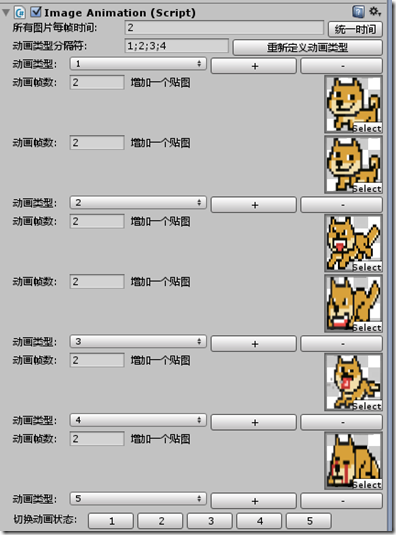
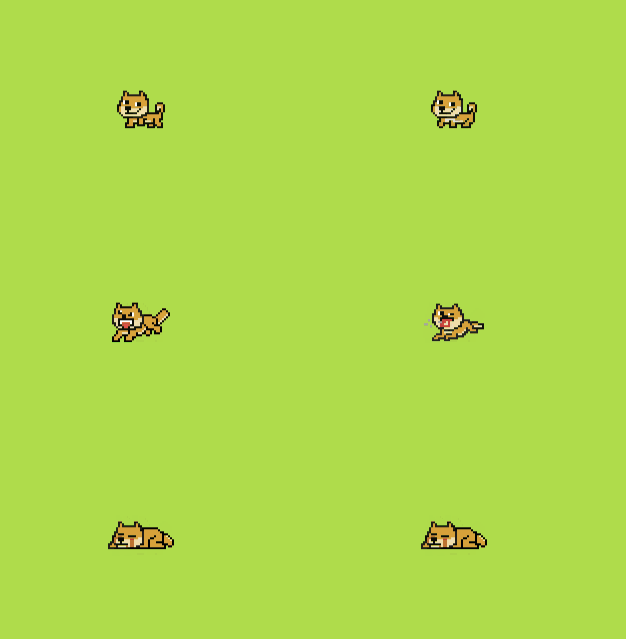
代码:
组件类:
using UnityEngine;

using System.Collections;

using System.Collections.Generic;

using UnityEngine.UI;

using System;

/// <summary>

///  帧动画组件

/// </summary>

[System.Serializable]

public class ImageAnimation : MonoBehaviour

{

    private float animationDeltaTime;

    public float animationDeltaTimer;

    public List<AnimationInfoEntity> animationInfo;

    public int type;

    public Image visualize;

    public int index;

    public string animationTypeList;

    public string tempAnimationTypeList;

    public string[] animationTypeProp;

    public void Awake()

    {

        visualize = this.transform.GetComponent<Image>();

    }

    public void Update()

    {

        animationDeltaTime += Time.deltaTime;

        #region List的用法

        if (animationInfo != null && animationInfo.Count > 0 && animationDeltaTime > animationInfo[type].deltaTime)

        {

            if (animationInfo[type].animationSprite != null && animationInfo[type].animationSprite.Count != 0)

            {

                index++;

                index = index % animationInfo[type].animationSprite.Count;

                visualize.sprite = animationInfo[type].animationSprite[index];

                animationDeltaTime = 0;

                visualize.SetNativeSize();

            }

        }

        #endregion

    }

    /// <summary>

    /// 切换动画状态

    /// </summary>

    /// <param name="index">输入动画状态下标值</param>

    public void ChangeAnimationState(int index)

    {

        if (animationTypeProp != null)

        {

            if (index < animationTypeProp.Length)

            {

                type = index;

            }

        }

    }

    /// <summary>

    /// 切换动画状态

    /// </summary>

    /// <param name="animationStateName">输入动画状态的名称</param>

    public void ChangeAnimationState(string animationStateName)

    {

        if (animationTypeProp != null)

        {

            for (int i = 0; i < animationTypeProp.Length; i++)

            {

                if (animationTypeProp[i].Equals(animationStateName))

                {

                    type = i;

                    return;

                }

            }

        }

    }

}

[System.Serializable]

public class AnimationInfoEntity

{

    /// <summary>

    /// 动画状态

    /// </summary>

    public int type;

    /// <summary>

    /// 播放当前帧需要的时间

    /// </summary>

    public float deltaTime;

    /// <summary>

    /// 动画状态所需要的图片集合

    /// </summary>

    public List<Sprite> animationSprite;

    public AnimationInfoEntity() { }

    public AnimationInfoEntity(int type, float deltaTime, int spriteNum = 1)

    {

        this.type = type;

        this.deltaTime = deltaTime;

        animationSprite = new List<Sprite>();

    }

}
编辑器类:
using UnityEngine;

using System.Collections;

using UnityEditor;

using System.Collections.Generic;

using System;

using System.Reflection;

using System.Reflection.Emit;

[CustomEditor(typeof(ImageAnimation))]

public class AnimationEditor : Editor

{

    public void OnEnable()

    {

        ImageAnimation model = target as ImageAnimation;

        if (model.tempAnimationTypeList == null)

        {

            model.tempAnimationTypeList = string.Empty;

        }

        if (model.animationInfo == null)

        {

            model.animationInfo = new List<AnimationInfoEntity>();

        }

    }

    public override void OnInspectorGUI()

    {

        ImageAnimation model = target as ImageAnimation;

        if (!string.IsNullOrEmpty(model.animationTypeList)) {

            model.animationTypeProp = model.animationTypeList.Split (';');

        }

        #region 动画分割

        GUILayout.BeginHorizontal();

        GUILayout.Label("所有图片每帧时间: ", new GUILayoutOption[] { GUILayout.Width(120) });

        model.animationDeltaTimer =  EditorGUILayout.FloatField(model.animationDeltaTimer);

        if (GUILayout.Button("统一时间"))

        {

            for (int j = 0; j < model.animationInfo.Count; j++)

            {

                model.animationInfo[j].deltaTime = model.animationDeltaTimer;

            }

        }

        GUILayout.EndHorizontal();

        GUILayout.BeginHorizontal ();

        GUILayout.Label("动画类型分隔符: ",new GUILayoutOption[]{ GUILayout.Width(120)});

        model.tempAnimationTypeList = GUILayout.TextField(model.tempAnimationTypeList, 50);

        if (GUILayout.Button ("重新定义动画类型"))

        {

            model.animationInfo = new List<AnimationInfoEntity>();

            model.animationTypeList = model.tempAnimationTypeList;

            model.animationTypeProp = model.animationTypeList.Split (';');

            //初始化动画类型集合

            for (int j = 0; j < model.animationTypeProp.Length; j++)

            {

                model.animationInfo.Add(new AnimationInfoEntity(j, model.animationDeltaTimer));

            }

        }

        GUILayout.EndHorizontal ();

        #endregion

        #region 绘制各个动画属性

        if (model.animationTypeProp != null && !string.IsNullOrEmpty(model.animationTypeProp[0]))

        {

            for (int i = 0; i < model.animationTypeProp.Length; i++) {

                //draw animation typea

                GUILayout.BeginHorizontal();

                GUILayout.Label("动画类型: ", new GUILayoutOption[] { GUILayout.Width(60) });

                int index = EditorGUILayout.Popup(i, model.animationTypeProp, new GUILayoutOption[] { GUILayout.Width(150) });

                if (GUILayout.Button("+"))

                {

                    model.animationInfo[i].animationSprite.Add(new Sprite());

                }

                if (GUILayout.Button("-"))

                {

                    if (model.animationInfo[i].animationSprite.Count > 0)

                    {

                        model.animationInfo[i].animationSprite.RemoveAt(model.animationInfo[i].animationSprite.Count - 1);

                    }

                }

                GUILayout.EndHorizontal();

                //draw image list

                GUILayout.BeginVertical();

                if (model.animationInfo != null && model.animationInfo.Count > 0)

                {

                    for (int k = 0; k < model.animationInfo[i].animationSprite.Count; k++)

                    {

                        GUILayout.BeginHorizontal();

                        GUILayout.Label("动画帧数: ", new GUILayoutOption[] { GUILayout.Width(60) });

                        EditorGUILayout.FloatField(model.animationInfo[i].deltaTime, new GUILayoutOption[] { GUILayout.Width(60) });

                        model.animationInfo[i].animationSprite[k] = EditorGUILayout.ObjectField("增加一个贴图", model.animationInfo[i].animationSprite[k], typeof(Sprite)) as Sprite;

                        GUILayout.EndHorizontal();

                    }

                }

                GUILayout.EndVertical();

            }

        }

        #endregion

        serializedObject.ApplyModifiedProperties();

        DrawAnimationButton();

    }

    /// <summary>

    /// 绘制动画切换按钮,方便用户切换动画,查看动画是否正确

    /// </summary>

    private void DrawAnimationButton()

    {

        ImageAnimation model = target as ImageAnimation;

        if (model.animationTypeProp != null)

        {

            GUILayout.BeginHorizontal();

            GUILayout.Label("切换动画状态: ",GUILayout.Width(80));

            for (int i = 0; i < model.animationTypeProp.Length; i++)

            {

                if (GUILayout.Button(model.animationTypeProp[i],GUILayout.Width(50)))

                {

                    model.ChangeAnimationState(i);

                }

            }

            GUILayout.EndHorizontal();

        }

    }

}
下载地址: http://yunpan.cn/cFRfdgXhK6ff2 访问密码 3aed
UGUI 帧动画插件的更多相关文章
- UGUI 过渡动画插件,模仿NGUI的Tween (转载)
最近在相亲,后来好朋友跟我说他写了一个好插件,于是我就把女朋友甩了,看看他的插件,可以在UGUI制作简单过渡动画. 我看了下是模仿NGUI的Tween, 我在筱程的基础上稍微改到人性化, 简单支持的让 ...
- [UGUI]帧动画
ImageFrameAnimation.cs using System.Collections.Generic; using UnityEngine; using UnityEngine.UI; [R ...
- Unity CCTween UGUI 动画插件
在这简单的介绍一下 CCTween 动画插件的使用 因为GIF 制作软件不太好(网上随便下载的)所以导致效果不太好,有时间我重新制作一下 这是一下简单的效果 下面介绍怎么使用 首先 先下载 CCTwe ...
- 让网站动起来!12款优秀的 jQuery 动画插件推荐
如今,大多数设计师和开发人员被要客户要求开发动态的网站.创造视觉震撼和醒目的动态网站是艰巨的任务,因为它需要大量的努力和创造力.在网络上有大量的工具和插件可用于创建网站动画.许多开发人员正在使用 HT ...
- 程序猿必备的10款web前端动画插件一
1.动画SVG框架幻灯片 在幻灯片之间切换时显示动画SVG帧的实验性幻灯片.不同的形状可以用来创建各种风格. 我们想和大家分享一个实验幻灯片.我们的想法是在从一个幻灯片转换到另一张幻灯片时,使SVG帧 ...
- Lottie在手,动画我有:ios/Android/Web三端复杂帧动画解决方案
为什么需要Lottie 在相对复杂的移动端应用中,我们可能会需要使用到复杂的帧动画.例如: 刚进入APP时候可能会看到的入场小动画,带来愉悦的视觉享受 许多Icon的互动变化比较复杂多变的时候,研 ...
- 深入理解CSS3 Animation 帧动画
CSS3我在5年之前就有用了,包括公司项目都一直在很前沿的技术. 最近在写慕课网的七夕主题,用了大量的CSS3动画,但是真的沉淀下来仔细的去深入CSS3动画的各个属性发现还是很深的,这里就写下关于帧动 ...
- Android动画效果之Frame Animation(逐帧动画)
前言: 上一篇介绍了Android的Tween Animation(补间动画) Android动画效果之Tween Animation(补间动画),今天来总结下Android的另外一种动画Frame ...
- android 帧动画,补间动画,属性动画的简单总结
帧动画——FrameAnimation 将一系列图片有序播放,形成动画的效果.其本质是一个Drawable,是一系列图片的集合,本身可以当做一个图片一样使用 在Drawable文件夹下,创建ani ...
随机推荐
- XPath详解
xPath技术 1 引入 问题:当使用dom4j查询比较深的层次结构的节点(标签,属性,文本),比较麻烦!!! 2 xPath作用 主要是用于快速获取所需的节点对象. 3 在dom4j中如何使用 ...
- 解析Function.prototype.bind
简介 对于一个给定的函数,创造一个绑定对象的新函数,这个函数和之前的函数功能一样,this值是它的第一个参数,其它参数,作为新的函数的给定参数. bind的作用 bind最直接的作用就是改变this的 ...
- 页面全屏显示JS代码
1.直接在页面加载时就全屏. <body onload="window.open(document.location,'big','fullscreen=yes'):window.cl ...
- js图片放大镜特效代码
<script language="JavaScript"> <!-- var srcX = 1024; //原图长宽 var srcY = 768; var b ...
- UTF8转GB2312(UTF8解码)
小弟C++上手没多久,代码不严谨之处敬请见谅.英语也不是很好,有的是直接使用的拼音. string MyUTF_8toGB2312(string str) { ,,str.c_str(),-,NULL ...
- AndroidAnnotations框架配置
如今Android Studio的普及,Android开发基本要舍弃Eclipse了,最近使用AndroidAnnotations 注解框架的时候,找了些资料慢慢整出来了,在这给大家简单分享一下: 首 ...
- 《第一行代码》学习笔记3-活动Activity(1)
1.活动-一种可以包含用户界面的组件,用于和用户进行交互. <Button android:id="@+id/button_1" android:layout_width=& ...
- HTML与JS
网页显示过程中的处理流程: 分析HTML 构造DOM树 载入外部JS文件及CSS文件 载入图像文件等外部资源 JS在分析后开始运行 全部完成 JS的表述方式及其执行流程: <script> ...
- Struts2 技术全总结 (正在更新)
背景:Struts1是一个高度成熟的框架,运行效率高,但其致命缺陷在于与JSP/Servlet的耦合非常紧密,因而导致了一些严重问题.其次,Struts1与Servlet API的严重耦合,使应用难以 ...
- CCFileUtils::getFileData疑惑
背景 这几天在使用cocos2d-x读取磁盘文件的时候,发现了CCFileUtils中一点不合理的地方,特此记录,以供研讨. 项目结构 ①我使用的是cocos2d-x 2.1.3版本,CCFileUt ...