
42_redux_counter应用_redux异步版本
前言:
redux默认不支持异步编程,需要下载redux插件(异步中间件)
如何下载:
npm install --save redux-thunk
项目结构:
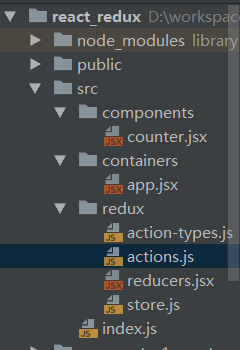
代码:
import React, {Component} from 'react'
import PropTypes from 'prop-types'
export default class Counter extends Component {
static propTypes = {
count: PropTypes.number.isRequired,
increment: PropTypes.func.isRequired,
decrement: PropTypes.func.isRequired,
incrementAsync: PropTypes.func.isRequired
}
increment = () => {
//1.得到选择的增加数量
const number = this.select.value * 1
//2.调用store的方法更新状态
this.props.increment(number)
};
decrement = () => {
//1.得到选择的增加数量
const number = this.select.value * 1
//2.调用store的方法更新状态
this.props.decrement(number)
};
incrementIfOdd = () => {
//1.得到选择的增加数量
const number = this.select.value * 1
//2.得到原本的count状态
const count = this.props.count
//3.判断,满足条件再更新状态
if (count % 2 === 1) {
//调用store方法更新状态
this.props.increment(number)
}
}
incrementAsync = () => {
//1.得到选择的增加数量
const number = this.select.value * 1
this.props.incrementAsync(number)
};
render() {
const {count} = this.props
// debugger
return (
<div>
<p>click {count} times</p>
<div>
<select ref={select => this.select = select}>
<option value="1">1</option>
<option value="2">2</option>
<option value="3">3</option>
</select>
<button onClick={this.increment}>+</button>
<button onClick={this.decrement}>-</button>
<button onClick={this.incrementIfOdd}>increment odd</button>
<button onClick={this.incrementAsync}>increment async</button>
</div>
</div>
)
}
}
counter.jsx
import React from 'react'
import {connect} from "react-redux";

import {decrement, increment, incrementAsync} from "../redux/actions";
import Counter from '../components/counter'

export default connect(
    state => ({count: state}),
    {increment, decrement, incrementAsync}
)(Counter)
app.jsx
/*
* 包含所有action type的常量字符串
* */

export const INCREMENT = 'INCREMENT';
export const DECREMENT = 'DECREMENT';
action-types.js
import {INCREMENT, DECREMENT} from '../redux/action-types';
/*
* 包含所有action creator
* 同步的action都是返回一个对象
* 异步的action返回的是一个函数
* */

//增加
export const increment = (number) => ({
    type: INCREMENT, data: number
})
//减少
export const decrement = (number) => ({
    type: DECREMENT, data: number
})
//异步action
export const incrementAsync = (number) => {
    return dispatch => {
        //异步的代码
        setTimeout(() => {
            //1S之后才去分发一个增加的action
            dispatch(increment(number))
        }, 1000)
    }
}
actions.js
/*
* 包含n个reducer函数的模块
* */
export function counter(state = 0, action) {

    console.log('counter()', state, action)

    switch (action.type) {
        case 'INCREMENT':
            return state + action.data
        case 'DECREMENT':
            return state - action.data
        default:
            return state
    }

}
reducers.jsx
import {createStore, applyMiddleware} from 'redux';
import thunk from 'redux-thunk'

import {counter} from './reducers';

//生成store对象
const store = createStore(
    counter,
    applyMiddleware(thunk)//应用上异步中间件
);//内部会第一次调用reduer函数得到初始state
console.log(store, store.getState());

export default store
store.js
import React from 'react';
import ReactDOM from 'react-dom';
import {Provider} from 'react-redux'

import App from './containers/app';
import store from './redux/store'

ReactDOM.render(
    <Provider store={store}>
        <App/>
    </Provider>, document.getElementById('root')
);
index.js
42_redux_counter应用_redux异步版本的更多相关文章
- struts 多文件上传 annotation注解(零配置)+ ajaxfileupload + 异步 版本
[本文简介] struts 多文件上传.基于”零配置“+"ajaxfileupload" 的一个简单例子. [导入依赖jar包] jquery-1.7.2.js : http:// ...
- 40_redux_counter应用_redux完善版本
项目结构: 代码: import React from 'react'; import ReactDOM from 'react-dom'; import store from './redux/st ...
- java8的版本对组合式异步编程
讨论了Java 8中的函数式数据处理,它可以将对集合数据的多个操作以流水线的方式组合在一起.本节继续讨论Java 8的新功能,主要是一个新的类CompletableFuture,它是对65节到83节介 ...
- [.NET] 怎样使用 async & await 一步步将同步代码转换为异步编程
怎样使用 async & await 一步步将同步代码转换为异步编程 [博主]反骨仔 [出处]http://www.cnblogs.com/liqingwen/p/6079707.html ...
- [Android]异步 layout inflation(翻译)
以下内容为原创,欢迎转载,转载请注明 来自天天博客:http://www.cnblogs.com/tiantianbyconan/p/5829809.html 异步 layout inflation ...
- Code First系列之视图,存储过程和异步API
返回<8天掌握EF的Code First开发>总目录 本篇目录 视图View 存储过程 使用存储过程CRUD 异步API 本章小结 自我测试 本系列的源码本人已托管于coding上:点击查 ...
- 异步编程系列第04章 编写Async方法
p { display: block; margin: 3px 0 0 0; } --> 写在前面 在学异步,有位园友推荐了<async in C#5.0>,没找到中文版,恰巧也想提 ...
- 异步编程系列06章 以Task为基础的异步模式(TAP)
p { display: block; margin: 3px 0 0 0; } --> 写在前面 在学异步,有位园友推荐了<async in C#5.0>,没找到中文版,恰巧也想提 ...
- Python-09-线程、进程、协程、异步IO
0. 什么是线程(thread)? 线程,有时被称为轻量级进程(Lightweight Process,LWP),是程序执行流的最小单元.一个标准的线程由线程ID,当前指令指针(PC),寄存器集合和堆 ...
随机推荐
- 弹出的 Dialog 里,包含 Form,如何在关闭 Dialog 时,执行 resetFields(对整个表单进行重置,将所有字段值重置为初始值并移除校验结果)
做法: before-close 事件中,调用 resetFields 取消按钮事件中,调用 resetFields <el-dialog title="弹出窗口" :vis ...
- DNS服务器地址汇总
如果修改DNS服务器地址就可以访问google等服务,你还等什么?使用免费DNS解析服务除了去掉了运营商的各种广告,还有个最大的好处就是不会重定向或者过滤用户所访问的地址,这样就防止了很多网站被电信. ...
- jquery 一键复制文本到剪切板
<a id="copy" data-clipboard-text="123456">复制文本</a> $(function(){ var ...
- Ansa 自动加载用户脚本设置
1.在安装路径(×××\AppData\Local\Apps\BETA_CAE_Systems\ansa_v16.0.0\config)找到user_ANSA_TRANSL.py: 打开文本可以发现里 ...
- ES - 处理TooManyClause异常
1.TooManyClause 我们在使用terms query.prefix query.fuzzy query.wildcard query.range query的时候,一不小心就会遇到TooM ...
- [转][Oracle]清理归档日志
来自:https://www.cnblogs.com/Roobbin/p/9617962.html 在Oracle 服务器,打开cmd命令行,执行以下命令: rman target / crossch ...
- 忘记秘密利用python模拟登录暴力破解秘密
忘记秘密利用python模拟登录暴力破解秘密: #encoding=utf-8 import itertools import string import requests def gen_pwd_f ...
- tensorflow学习001——MNIST
1.MNIST是一个入门级的计算机视觉数据集,它包含各种手写数字图片 数据集被分成两部分:60000行的训练数据集(mnist.train)和10000行的测试数据集(mnist.test). 这样的 ...
- C# 生成二维码扫码
转载 https://www.cnblogs.com/jys509/p/4592539.html 引用ThoughtWorks.QRCode.dll (源代码里有) 1.简单二维码生成及解码代码: / ...
- vue学习笔记(一)--Tab切换
最近在学Vue,写的第一个demo是Tab,刚开始还直接把js代码贴过来改,没觉得有什么不同.然后请教别人说,用Vue最好不要操作dom啦,又把代码做了修改-_-. html代码如下: <div ...