
Tensorflow Python 转 Java(一)
一、背景描述
最近python的tensorflow项目要弄到线上去。网络用的Tensorflow现成的包。数据用kaggle中的数据为例子。
数据地址:
https://www.kaggle.com/johnfarrell/gpu-example-from-prepared-data-try-deepfm
二、Python代码
1、Python Code
 # author: adrian.wu

 from __future__ import absolute_import

 from __future__ import division

 from __future__ import print_function

 import tensorflow as tf

 tf.logging.set_verbosity(tf.logging.INFO)

 # Set to INFO for tracking training, default is WARN

 print("Using TensorFlow version %s" % (tf.__version__))

 CATEGORICAL_COLUMNS = ["workclass", "education",

                        "marital.status", "occupation",

                        "relationship", "race",

                        "sex", "native.country"]

 # Columns of the input csv file

 COLUMNS = ["age", "workclass", "fnlwgt", "education",

            "education.num", "marital.status",

            "occupation", "relationship", "race",

            "sex", "capital.gain", "capital.loss",

            "hours.per.week", "native.country", "income"]

 FEATURE_COLUMNS = ["age", "workclass", "education",

                    "education.num", "marital.status",

                    "occupation", "relationship", "race",

                    "sex", "capital.gain", "capital.loss",

                    "hours.per.week", "native.country"]

 import pandas as pd

 df = pd.read_csv("/Users/adrian.wu/Desktop/learn/kaggle/adult-census-income/adult.csv")

 from sklearn.model_selection import train_test_split

 BATCH_SIZE = 40

 num_epochs = 1

 shuffle = True

 y = df["income"].apply(lambda x: ">50K" in x).astype(int)

 del df["fnlwgt"]  # Unused column

 del df["income"]  # Labels column, already saved to labels variable

 X = df

 print(X.describe())

 X_train, X_test, y_train, y_test = train_test_split(X, y, test_size=0.20)

 train_input_fn = tf.estimator.inputs.pandas_input_fn(

     x=X_train,

     y=y_train,

     batch_size=BATCH_SIZE,

     num_epochs=num_epochs,

     shuffle=shuffle)

 eval_input_fn = tf.estimator.inputs.pandas_input_fn(

     x=X_test,

     y=y_test,

     batch_size=BATCH_SIZE,

     num_epochs=num_epochs,

     shuffle=shuffle)

 def generate_input_fn(filename, num_epochs=None, shuffle=True, batch_size=BATCH_SIZE):

     df = pd.read_csv(filename)  # , header=None, names=COLUMNS)

     labels = df["income"].apply(lambda x: ">50K" in x).astype(int)

     del df["fnlwgt"]  # Unused column

     del df["income"]  # Labels column, already saved to labels variable

     type(df['age'].iloc[3])

     return tf.estimator.inputs.pandas_input_fn(

         x=df,

         y=labels,

         batch_size=batch_size,

         num_epochs=num_epochs,

         shuffle=shuffle)

 sex = tf.feature_column.categorical_column_with_vocabulary_list(

     key="sex",

     vocabulary_list=["female", "male"])

 race = tf.feature_column.categorical_column_with_vocabulary_list(

     key="race",

     vocabulary_list=["Amer-Indian-Eskimo",

                      "Asian-Pac-Islander",

                      "Black", "Other", "White"])

 # 先对categorical的列做hash

 education = tf.feature_column.categorical_column_with_hash_bucket(

     "education", hash_bucket_size=1000)

 marital_status = tf.feature_column.categorical_column_with_hash_bucket(

     "marital.status", hash_bucket_size=100)

 relationship = tf.feature_column.categorical_column_with_hash_bucket(

     "relationship", hash_bucket_size=100)

 workclass = tf.feature_column.categorical_column_with_hash_bucket(

     "workclass", hash_bucket_size=100)

 occupation = tf.feature_column.categorical_column_with_hash_bucket(

     "occupation", hash_bucket_size=1000)

 native_country = tf.feature_column.categorical_column_with_hash_bucket(

     "native.country", hash_bucket_size=1000)

 print('Categorical columns configured')

 age = tf.feature_column.numeric_column("age")

 deep_columns = [

     # Multi-hot indicator columns for columns with fewer possibilities

     tf.feature_column.indicator_column(workclass),

     tf.feature_column.indicator_column(marital_status),

     tf.feature_column.indicator_column(sex),

     tf.feature_column.indicator_column(relationship),

     tf.feature_column.indicator_column(race),

     # Embeddings for categories with more possibilities. Should have at least (possibilties)**(0.25) dims

     tf.feature_column.embedding_column(education, dimension=8),

     tf.feature_column.embedding_column(native_country, dimension=8),

     tf.feature_column.embedding_column(occupation, dimension=8),

     age

 ]

 m2 = tf.estimator.DNNClassifier(

     model_dir="model/dir",

     feature_columns=deep_columns,

     hidden_units=[100, 50])

 m2.train(input_fn=train_input_fn)

 start, end = 0, 5

 data_predict = df.iloc[start:end]

 predict_labels = y.iloc[start:end]

 print(predict_labels)

 print(data_predict.head(12))  # show this before deleting, so we know what the labels

 predict_input_fn = tf.estimator.inputs.pandas_input_fn(

     x=data_predict,

     batch_size=1,

     num_epochs=1,

     shuffle=False)

 predictions = m2.predict(input_fn=predict_input_fn)

 for prediction in predictions:

     print("Predictions:    {} with probabilities {}\n".format(prediction["classes"], prediction["probabilities"]))

 def column_to_dtype(column):

     if column in CATEGORICAL_COLUMNS:

         return tf.string

     else:

         return tf.float32

 # 什么数据要喂给输入

 FEATURE_COLUMNS_FOR_SERVE = ["workclass", "education",

                              "marital.status", "occupation",

                              "relationship", "race",

                              "sex", "native.country", "age"]

 serving_features = {column: tf.placeholder(shape=[1], dtype=column_to_dtype(column), name=column) for column in

                     FEATURE_COLUMNS_FOR_SERVE}

 # serving_input_receiver_fn有很多种方式

 export_dir = m2.export_savedmodel(export_dir_base="models/export",

                                   serving_input_receiver_fn=tf.estimator.export.build_raw_serving_input_receiver_fn(

                                       serving_features), as_text=True)

 export_dir = export_dir.decode("utf8")
2、通过 export_savedmodel这个函数生成了variables变量和pbtxt文件。如图所示:
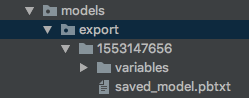
3、先打开saved_model.pbtxt文件浏览一下,会发现这是对tensorflow 的一个个描述。包含了node name, operation name,dtype等信息。在套用java时需要明确node的name。
node {

      name: "dnn/head/predictions/probabilities"

      op: "Softmax"

      input: "dnn/head/predictions/two_class_logits"

      attr {

        key: "T"

        value {

          type: DT_FLOAT

        }

      }

      attr {

        key: "_output_shapes"

        value {

          list {

            shape {

              dim {

                size: -1

              }

              dim {

                size: 2

              }

            }

          }

        }
三、Java代码
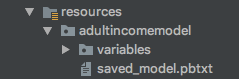
1、先将variable和pbtxt文件放到resources下面。
2、Java代码
 import org.tensorflow.SavedModelBundle;

 import org.tensorflow.Session;

 import org.tensorflow.Tensor;

 /**

  * Created by adrian.wu on 2019/3/14.

  */

 public class TestAdultIncome {

     public static void main(String[] args) throws Exception {

         SavedModelBundle model = SavedModelBundle.load("/Users/adrian.wu/Desktop/sc/adrian_test/src/main/resources/adultincomemodel", "serve");

         Session sess = model.session();

         String sex = "Female";

         String workclass = "?";

         String education = "HS-grad";

         String ms = "Widowed";

         String occupation = "?";

         String relationship = "Not-in-family";

         String race = "White";

         String nc = "United-States";

         //不能将string直接喂给create()接口

         Tensor sexTensor = Tensor.create(new byte[][]{sex.getBytes()});

         Tensor workclassTensor = Tensor.create(new byte[][]{workclass.getBytes()});

         Tensor eduTensor = Tensor.create(new byte[][]{education.getBytes()});

         Tensor msTensor = Tensor.create(new byte[][]{ms.getBytes()});

         Tensor occuTensor = Tensor.create(new byte[][]{occupation.getBytes()});

         Tensor ralaTensor = Tensor.create(new byte[][]{relationship.getBytes()});

         Tensor raceTensor = Tensor.create(new byte[][]{race.getBytes()});

         Tensor ncTesnsor = Tensor.create(new byte[][]{nc.getBytes()});

         float[][] age = {{90f}};

         Tensor ageTensor = Tensor.create(age);

         //根据pbtxt文件,查看operation name。

         Tensor result = sess.runner()

                 .feed("workclass", workclassTensor)

                 .feed("education", eduTensor)

                 .feed("marital.status", msTensor)

                 .feed("relationship", ralaTensor)

                 .feed("race", raceTensor)

                 .feed("sex", sexTensor)

                 .feed("native.country", ncTesnsor)

                 .feed("occupation",occuTensor)

                 .feed("age", ageTensor)

                 .fetch("dnn/head/predictions/probabilities")

                 .run()

                 .get(0);

         float[][] buffer = new float[1][2];

         result.copyTo(buffer);

         System.out.println("" + String.valueOf(buffer[0][0]));

     }

 }
四、结果对比
python和java结果:
 java: 0.9432887

 python: 0.9432887
Tensorflow Python 转 Java(一)的更多相关文章
- 谈谈Python、Java与AI
Python好像天生是为AI而生的,随着AI的火热,特别是用Python写的TensorFlow越来越火,Python的热度越来越高,就像当年Java就是随着互联网火起来的感觉.在我的工作中,Pyth ...
- 将来会是Python、Java、Golang三足鼎立的局面吗?
甲:听说最近java跌落神坛,python称霸武林了,你知道吗? 乙:不是吧,我前几天看python怎么还是第三? 丙:你们都在扯蛋,python在2018年就已经是最好的语言了! 乙:不可能吧? 甲 ...
- Golang、Php、Python、Java基于Thrift0.9.1实现跨语言调用
目录: 一.什么是Thrift? 1) Thrift内部框架一瞥 2) 支持的数据传输格式.数据传输方式和服务模型 3) Thrift IDL 二.Thrift的官方网站在哪里? 三.在哪里下载?需要 ...
- paip.判断文件是否存在uapi python php java c#
paip.判断文件是否存在uapi python php java c# ==========uapi file_exists exists() 面向对象风格: File.Exists 作者: 老哇 ...
- paip.web数据绑定 下拉框的api设计 选择框 uapi python .net java swing jsf总结
paip.web数据绑定 下拉框的api设计 选择框 uapi python .net java swing jsf总结 ====总结: 数据绑定下拉框,Uapi 1.最好的是默认绑定..Map(k ...
- MongoDB的账户与权限管理及在Python与Java中的登陆
本文主要介绍了MongoDB的账户新建,权限管理(简单的),以及在Python,Java和默认客户端中的登陆. 默认的MongoDB是没有账户权限管理的,也就是说,不需要密码即可登陆,即可拥有读写的权 ...
- tensorflow.python.framework.errors_impl.OutOfRangeError: FIFOQueue
tensorflow.python.framework.errors_impl.OutOfRangeError: FIFOQueue 原创文章,请勿转载哦~!! 觉得有用的话,欢迎一起讨论相互学习~F ...
- [翻译] 比较 Node.js,Python,Java,C# 和 Go 的 AWS Lambda 性能
[翻译] 比较 Node.js,Python,Java,C# 和 Go 的 AWS Lambda 性能 原文: Comparing AWS Lambda performance of Node.js, ...
- Python和Java的硬盘夜话
这是一个程序员的电脑硬盘,在一个叫做"学习"的目录下曾经生活着两个小程序,一个叫做Hello.java,即Java小子:另外一个叫做hello.c ,也就是C老头儿. C老头儿的命 ...
随机推荐
- 2018蓝桥杯 省赛D题(测试次数)
x星球的居民脾气不太好,但好在他们生气的时候唯一的异常举动是:摔手机.各大厂商也就纷纷推出各种耐摔型手机.x星球的质监局规定了手机必须经过耐摔测试,并且评定出一个耐摔指数来,之后才允许上市流通.x星球 ...
- kafka问题集锦
一. org.apache.kafka.common.errors.TimeoutException: Batch Expired 问题描述:通过java客户端访问kafka服务器,当生产者线程向ka ...
- POJ--1056 IMMEDIATE DECODABILITY && POJ--3630 Phone List(字典树)
题目链接 题目大意 看输入的每个字符串中是否有一个字符串是另一个字符串的前缀 #include<iostream> #include<cstring> #include< ...
- Servlet -- 重定向
重定向的两种方式: 1: protected void doGet(HttpServletRequest request, HttpServletResponse response) throws S ...
- springAop 使用@Around,@After等注解时,代码运行两边的问题
springAop使用@Around,@After等注解时,代码运行两边的问题 将@Component注解删掉就好了
- docker学习5--docker数据卷(volume)
https://blog.csdn.net/dream_broken/article/details/52314993 1.什么是数据卷volume 为了了解什么是Docker Volume,首先我们 ...
- 【模板】多项式乘法(FFT)
题目描述 给定一个n次多项式F(x),和一个m次多项式G(x). 请求出F(x)和G(x)的卷积. 输入输出格式 输入格式: 第一行2个正整数n,m. 接下来一行n+1个数字,从低到高表示F(x)的系 ...
- 【洛谷P2925 [USACO08DEC]干草出售Hay For Sale】
题意翻译 题目描述 农民john面临一个很可怕的事实,因为防范失措他存储的所有稻草给澳大利亚蟑螂吃光了,他将面临没有稻草喂养奶牛的局面.在奶牛断粮之前,john拉着他的马车到农民Don的农场中买一些稻 ...
- 第一篇-ubuntu18.04访问共享文件夹
1. 在访问Windows共享资料之前,请确保Windows共享是可用的.Linux访问Windows共享或者LInux共享资料给Windows时,都使用Samba软件 rpm -qa | grep ...
- 2050 Programming Competition (CCPC)
Pro&Sol 链接: https://pan.baidu.com/s/17Tt3EPKEQivP2-3OHkYD2A 提取码: wbnu 复制这段内容后打开百度网盘手机App,操作更方便哦 ...