
python_Tkinter1
一个更详细的Tkinter笔记:
首先是最重要基础的,如何
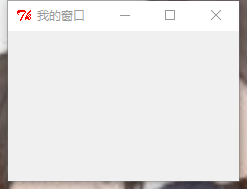
创建一个窗口
窗口代码:
#coding:utf8

import Tkinter

show = Tkinter.Tk()

show.title("我的窗口")

show.geometry('150x150')

show.resizable(width=True,height=False)

# 进入消息循环

#print show.keys()

show.mainloop()
如图:
创建窗口的常用属性:
- title: 设置窗口标题
- geometry: 设置窗口大小
- resizable():设置窗口是否可以变化长、宽
代码中的print show.keys()输出窗口的基本属性:
['bd', 'borderwidth', 'class', 'menu', 'relief', 'screen', 'use',

'background', 'bg', 'colormap', 'container', 'cursor', 'height',

'highlightbackground', 'highlightcolor', 'highlightthickness', 'padx',

'pady', 'takefocus', 'visual', 'width']
可以像这样设置这些属性:
show['bg']='lightblue'

show['height']=100
Tkinter的其他控件:
Button
Label
Entry
Text
Checkbutton
Radiobutton
每个控件都要加上pack()才能显示!
Button
def say_hi():

    print 'hello'

b=tk.Button(text='hello',command=say_hi)

b.pack()

b1=tk.Button(text='quit',command=quit)

b1.pack()
如图:
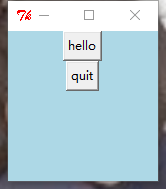
第一个按钮,输出'hello'
第二个按钮关闭窗口
可以在代码中 print b.keys()查看Button的相关属性,并使用b['xxx']=xxx设置相关属性。
['activebackground', 'activeforeground', 'anchor', 'background', 'bd', 'bg', 'bitmap', 'borderwidth', 'command', 'compound', 'cursor', 'default', 'disabledforeground', 'fg', 'font', 'foreground', 'height', 'highlightbackground', 'highlightcolor', 'highlightthickness', 'image', 'justify', 'overrelief', 'padx', 'pady', 'relief', 'repeatdelay', 'repeatinterval', 'state', 'takefocus', 'text', 'textvariable', 'underline', 'width', 'wraplength']
Label&&Text
label:标签控件;可以显示文本和位图。
Text:文本控件;用于显示多行文本。
l=tk.Label(text='hello')

l['bg']='red'

l['foreground']='blue'

l['font']=15

l.pack()
t=tk.Text(width=100,height=100)

t.insert(1.0,'insert into text')

t.pack()
text中还可以插入按钮,插入图片,示例:
#coding:utf8

from Tkinter import *

show = Tk()

text = Text(show,width=30,height=15)

#text插入按钮

b1 = Button(text,text='click me',command=quit)

text.window_create(INSERT,window=b1)

#text插入图片

img = PhotoImage(file='beauty.gif')

text.image_create(END,image=img)

text.pack()

mainloop()
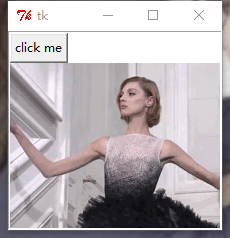
这里想说一下,img = PhotoImage(file='beauty.gif')中只能是gif,jpg图片不行,会报错。
(但是你gif运行出来也不会动啊喂!)
Entry
Entry 文本输入框
还是老样子
e=tk.Entry()

e.insert(1,'哈哈哈哈嚯')#插入数据

e.pack()
怎么获得文本框的值:
按Enter键,输出Entry的值。
#coding:utf8

from Tkinter import *

def show(event=None):

    print (e.get())

root = Tk()

u=StringVar()

e=Entry(root,textvariable=u)

e.pack()

e.bind('<Button>',show)

root.mainloop()
Radiobutton单选框&&Checkbox多选框
直接贴代码:
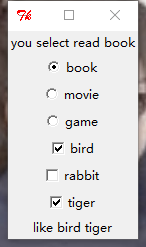
单选框点击选择哪个选项,那么就在上方label显示你的选项。
多选框点击选择哪个选项,那么就在下方label显示你的选项。
#coding:utf8

from Tkinter import *

import tkMessageBox

def show(event=None):

    str="you select "+u.get()

    #l['text']=str   label没有set方法,可以这样设置内容

    l.config(text=str)

def show1(event=None):

    list=["like"]

    if a.get()==True:

        list.append("bird")

    elif "bird" in list:

        list.remove("bird")

    if b.get()==True:

        list.append("rabbit")

    elif "rabbit" in list:

        list.remove("rabbit")

    if c.get()==True:

        list.append("tiger")

    elif "tiger" in list:

        list.remove("tiger")

    print list

    clabel['text']=list

root = Tk()

#单选框

l=Label(root,text="you select read book")

l.pack()

u=StringVar()

u.set("no")

rb1=Radiobutton(root,text='book',variable=u,value="read book",command=show)

rb2=Radiobutton(root,text='movie',variable=u,value="watch movie",command=show)

rb3=Radiobutton(root,text='game',variable=u,value="play games",command=show)

rb1.select() #不写这句的话,默认初始状态三个都被勾选

rb1.pack()

rb2.pack()

rb3.pack()

a=BooleanVar()

b=BooleanVar()

c=BooleanVar()

#复选框

cb1=Checkbutton(root,text="bird",variable=a,command=show1)

cb2=Checkbutton(root,text="rabbit",variable=b,command=show1)

cb3=Checkbutton(root,text="tiger",variable=c,command=show1)

cb1.pack()

cb2.pack()

cb3.pack()

clabel=Label(root,text="")

clabel.pack()

root.mainloop()
贴图:
python_Tkinter1的更多相关文章
随机推荐
- excle删除重复项的行,自定义删除第几个
在B1输入 =COUNTIF(A$1:A1,A1) 下拉,会有数字1.2.1.2 第二步,选中B列升序排序,排序后,将B列为1的整行删除即可. 再补充下,这样是以姓名为条件来筛选,不会影响你的数据.你 ...
- Windows下安装MySQL8
转自:https://blog.csdn.net/star_in_shy/article/details/82691330 感谢! 一.MySQL官网下载 (一)MySQL下载地址:https:// ...
- "Last_IO_Error: Fatal error: The slave I/O thread stops because master and slave have equal MySQL server UUIDs
最近在部署MySQL主从复制架构的时候,碰到了"Last_IO_Error: Fatal error: The slave I/O thread stops because master a ...
- springboot项目简单启动脚本
#!/bin/bash function log_info () { DATE=`date "+%Y-%m-%d %H:%M:%S"` USER=$(whoami) echo &q ...
- Angular:在应用初始化时运行代码
想象一下,您的应用需要一些动态配置信息,这些信息在应用启动之前需要动态获取,并在应用运行中使用. 显然不能直接写道静态配置文件中,但是从客户端发出的请求又是一个异步请求,如何协调这个问题呢? 这里,我 ...
- 页面中关于bootstrap框架的增删改查使用
bootstrap是一个简单又好用的前端框架 1.bootstrap 初始化 表格显示 2.自带的查询表单(需要配置要查询的条件 对应实体类) 3.工具(增加和查询) 4.查询方法 5.增加方法 ...
- TopSnackbar,在顶部滑出显示的Snackbar;
TopSnackbar 既然你能找到这篇文章,说明你一定使用过或了解Snackbar,所以我就不介绍Snackbar了.嗯~有图有真相! 嗯,就是图上这样: 我把Snackbar的源码拉了过来,重写了 ...
- 为什么vue支持IE9以上的IE浏览器?
原因如下: 1.vue框架中核心的双向绑定原理是利用Object.defineProperty()方法实现的. 2.该方法第一个被实现是在IE8中,但是存在诸多限制:只能在DOM对象上使用这个方法,而 ...
- Vue初接触 stage1
开始学Vue辣!哈哈哈哈哈真的好好玩啊Vue!这个写法我真的太爱了! stage1 4-27 先写一下安装Vue devtools时遇到的问题(说来神奇,我是写第一个实例的时候试着在控制台打印了这个空 ...
- lambda函数式编程
一.接口注解(@FunctionalInterface) @FunctionalInterface interface Interface1 { public void print(); } publ ...