
python_Tkinter1
一个更详细的Tkinter笔记:
首先是最重要基础的,如何
创建一个窗口
窗口代码:
#coding:utf8

import Tkinter

show = Tkinter.Tk()

show.title("我的窗口")

show.geometry('150x150')

show.resizable(width=True,height=False)

# 进入消息循环

#print show.keys()

show.mainloop()
如图:
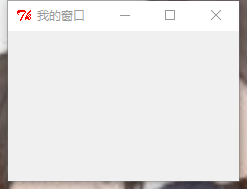
创建窗口的常用属性:
- title: 设置窗口标题
- geometry: 设置窗口大小
- resizable():设置窗口是否可以变化长、宽
代码中的print show.keys()输出窗口的基本属性:
['bd', 'borderwidth', 'class', 'menu', 'relief', 'screen', 'use',

'background', 'bg', 'colormap', 'container', 'cursor', 'height',

'highlightbackground', 'highlightcolor', 'highlightthickness', 'padx',

'pady', 'takefocus', 'visual', 'width']
可以像这样设置这些属性:
show['bg']='lightblue'

show['height']=100
Tkinter的其他控件:
Button
Label
Entry
Text
Checkbutton
Radiobutton
每个控件都要加上pack()才能显示!
Button
def say_hi():

    print 'hello'

b=tk.Button(text='hello',command=say_hi)

b.pack()

b1=tk.Button(text='quit',command=quit)

b1.pack()
如图:
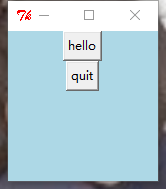
第一个按钮,输出'hello'
第二个按钮关闭窗口
可以在代码中 print b.keys()查看Button的相关属性,并使用b['xxx']=xxx设置相关属性。
['activebackground', 'activeforeground', 'anchor', 'background', 'bd', 'bg', 'bitmap', 'borderwidth', 'command', 'compound', 'cursor', 'default', 'disabledforeground', 'fg', 'font', 'foreground', 'height', 'highlightbackground', 'highlightcolor', 'highlightthickness', 'image', 'justify', 'overrelief', 'padx', 'pady', 'relief', 'repeatdelay', 'repeatinterval', 'state', 'takefocus', 'text', 'textvariable', 'underline', 'width', 'wraplength']
Label&&Text
label:标签控件;可以显示文本和位图。
Text:文本控件;用于显示多行文本。
l=tk.Label(text='hello')

l['bg']='red'

l['foreground']='blue'

l['font']=15

l.pack()
t=tk.Text(width=100,height=100)

t.insert(1.0,'insert into text')

t.pack()
text中还可以插入按钮,插入图片,示例:
#coding:utf8

from Tkinter import *

show = Tk()

text = Text(show,width=30,height=15)

#text插入按钮

b1 = Button(text,text='click me',command=quit)

text.window_create(INSERT,window=b1)

#text插入图片

img = PhotoImage(file='beauty.gif')

text.image_create(END,image=img)

text.pack()

mainloop()
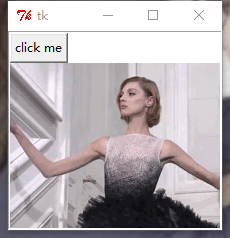
这里想说一下,img = PhotoImage(file='beauty.gif')中只能是gif,jpg图片不行,会报错。
(但是你gif运行出来也不会动啊喂!)
Entry
Entry 文本输入框
还是老样子
e=tk.Entry()

e.insert(1,'哈哈哈哈嚯')#插入数据

e.pack()
怎么获得文本框的值:
按Enter键,输出Entry的值。
#coding:utf8

from Tkinter import *

def show(event=None):

    print (e.get())

root = Tk()

u=StringVar()

e=Entry(root,textvariable=u)

e.pack()

e.bind('<Button>',show)

root.mainloop()
Radiobutton单选框&&Checkbox多选框
直接贴代码:
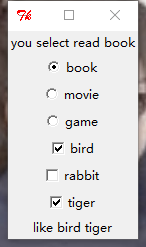
单选框点击选择哪个选项,那么就在上方label显示你的选项。
多选框点击选择哪个选项,那么就在下方label显示你的选项。
#coding:utf8

from Tkinter import *

import tkMessageBox

def show(event=None):

    str="you select "+u.get()

    #l['text']=str   label没有set方法,可以这样设置内容

    l.config(text=str)

def show1(event=None):

    list=["like"]

    if a.get()==True:

        list.append("bird")

    elif "bird" in list:

        list.remove("bird")

    if b.get()==True:

        list.append("rabbit")

    elif "rabbit" in list:

        list.remove("rabbit")

    if c.get()==True:

        list.append("tiger")

    elif "tiger" in list:

        list.remove("tiger")

    print list

    clabel['text']=list

root = Tk()

#单选框

l=Label(root,text="you select read book")

l.pack()

u=StringVar()

u.set("no")

rb1=Radiobutton(root,text='book',variable=u,value="read book",command=show)

rb2=Radiobutton(root,text='movie',variable=u,value="watch movie",command=show)

rb3=Radiobutton(root,text='game',variable=u,value="play games",command=show)

rb1.select() #不写这句的话,默认初始状态三个都被勾选

rb1.pack()

rb2.pack()

rb3.pack()

a=BooleanVar()

b=BooleanVar()

c=BooleanVar()

#复选框

cb1=Checkbutton(root,text="bird",variable=a,command=show1)

cb2=Checkbutton(root,text="rabbit",variable=b,command=show1)

cb3=Checkbutton(root,text="tiger",variable=c,command=show1)

cb1.pack()

cb2.pack()

cb3.pack()

clabel=Label(root,text="")

clabel.pack()

root.mainloop()
贴图:
python_Tkinter1的更多相关文章
随机推荐
- 设置 P2415Q & P2715Q 显示器使其支持 HDMI 2.0 启用 4k@60hz
简介:2016 年 2 月后购买的 Dell P2415Q 和 P2715Q 显示器,支持 HDMI 2.0,但是默认启用的是 HDMI 1.4. HDMI 2.0 默认没有启用 Dell P2415 ...
- To be taught if i am fortunate
此博客算是我自娱自乐的海洋球池吧. 由于我十分的菜并且文笔拙劣,所以您可能并不能在这找到什么有用的信息或者好玩的东西(或者exciting的内容). 如果您能指出我的一些错误,我将十分感激.
- 搭建zookeeper+kafka集群
搭建zookeeper+kafka集群 一.环境及准备 集群环境: 软件版本: 部署前操作: 关闭防火墙,关闭selinux(生产环境按需关闭或打开) 同步服务器时间,选择公网ntpd服务器或 ...
- js 索引数组转JSON为空
let a = [] a.a = 1 console.log(a) // [a: 1] console.log(JSON.stringify(a)) // [] 当然js根本没索引数组一说,这是php ...
- Python的闭包和装饰器
什么是闭包 python中函数名是一个特殊的变量,它可以作为另一个函数的返回值,而闭包就是一个函数返回另一个函数后,其内部的局部变量还被另一个函数引用. 闭包的作用就是让一个变量能够常驻内存. def ...
- C# 面试知识点网络文档整理
一 C# .NET技术 1.ASP.NET MVC如何控制权限? 2.C#.NET中的CTS.CLS和CLR? 3.什么是多线程,如何创建和如何使用?请写一个多线程单例模式? 4.什么是单例模式? 5 ...
- 离职有感(CVTE,创业公司,求职...)
最近几个月,真的各种心酸......体现出来的就是对自己身体的,心里的.......6月底离职以来,一直到现在,经历了两个公司...才这么三个月,就经历了两个公司......我都忍不住怀疑自己,是不是 ...
- Swift处理异常
import UIKit class ViewController: UIViewController { override func viewDidLoad() { super.viewDidLoa ...
- take it easy
昨天魏辉在群里说,觉得自己以前很多事情做的不对,以前是个傻瓜,我说我也是这么觉得的.为什么这么说呢?因为我真的觉得以前的自己就是个SB.人的成长可能就是这样的吧,小时候的一些事情,或者是原生家庭的环境 ...
- PowerDesigner工具将表字段转成java实体
首先将数据库的表导出为SQL文件.下载安装PowerDesigner工具. 下面以图文的形式讲解: 图 (1) 图 (2) 图 (3) 图 (4) 图 (5) 图 (6) 图 ...