
eclipse tomcat报Several ports(8005 8080 8009)端口被占用问题解决方案
在启动tomcat的时候eclipse突然报错
Several ports (8005,8080,8009) required by Tomcat v6.0 Server at localhost are already in use. The server may already be running in another process, or a system process may be using the port. To start this server you will need to stop the other process or change the port number(s).
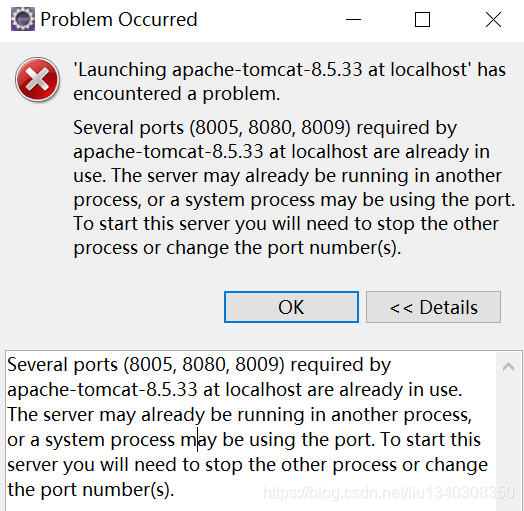
可以判断8080、8009端口已经被占用,通过以下方法,找出被哪个进程占用:
在命令提示符下,输入netstat -aon | findstr 8080

获得该端口被PID为1052的进程占用
输入tasklist |findstr 1052

可以获得当前端口被java.exe占用
继续输入taskkill -F -IM java.exe或taskkill /pid 1052 /F
结束该进程

再次在eclipse中启动tomcat正常

eclipse tomcat报Several ports(8005 8080 8009)端口被占用问题解决方案的更多相关文章
- Several ports (8005, 8080, 8009) required by Tomcat v8.5 Server at localhost are already in use. The server may already be running in another process, or a system process may be using the port. To sta
eclipse出现:Several ports (8005, 8080, 8009) required by Tomcat v8.5 Server at localhost are already i ...
- 启动Tomcat服务器报错: Several ports (8005, 8080, 8009) required
错误记录--更改tomcat端口号方法,Several ports (8005, 8080, 8009) http://blog.csdn.net/xinxin19881112/article/det ...
- 错误记录--更改tomcat端口号方法,Several ports (8005, 8080, 8009)
启动Tomcat服务器报错: Several ports (8005, 8080, 8009) required by Tomcat v5.5 Server at localhost are alre ...
- 启动tomcat时报错Several ports (8005, 8080, 8009) required by Tomcat v5.5 Server at localhost are already in use.
[报错] Several ports (8005, 8080, 8009) required by Tomcat v5.5 Server at localhost are already in use ...
- 错误记录--更改tomcat端口号方法,Several ports (8005, 8080, 8009)【转】
启动Tomcat服务器报错: Several ports (8005, 8080, 8009) required by Tomcat v5.5 Server at localhost are alre ...
- Tomcat启动失败--Several ports (8005, 8080, 8009)
启动Tomcat服务器报错: Several ports (8005, 8080, 8009) required by Tomcat v7.0 Server at localhost are alre ...
- myeclipse2015不能启动tomcat,提示: Several ports (8005, 8080, 8009) required by Tomcat v7.0 Server at local
myeclipse2015不能启动tomcat,提示: Several ports (8005, 8080, 8009) required by Tomcat v7.0 Server at local ...
- Several ports (8005, 8080, 8009) required by Tomcat v9.0 Server at localhost
Several ports (8005, 8080, 8009) required by Tomcat v9.0 Server at localhost 问题:Tomcat服务器的端口被占用 解决: ...
- Java tomcat Several ports (8005, 8080, 8009) required by Tomcat v9.0 Server at localhost
关于 下面问题是因为(8005, 8080, 8009) 被原tomcat占用了. Several ports (8005, 8080, 8009) required by Tomcat v9.0 S ...
随机推荐
- git的学习笔记(一):git本地操作
1.Git介绍 Git是一个开源的分布式版本控制软件,用以有效.高速的处理从很小到非常大的项目版本管理. Git 最初是由Linus Torvalds设计开发的,用于管理Linux内核开发. Git ...
- if __name__ == __'main'__: 判断讲解
"""王思聪作为消费者 要吃热狗生产者 负责做热狗问题:王思聪不清楚对方会生产多少热狗 """from multiprocessing im ...
- spring boot 整合 shiro
shrio官网:https://shiro.apache.org/ Apache Shiro是一个功能强大且易于使用的Java安全框架,可执行身份验证,授权,加密和会话管理.借助Shiro易于理解的A ...
- 根据ip地址获得国家和城市(C#)
/// <summary> /// get country and city /// </summary> /// <param name="ip"& ...
- GoogleTest入门
Googletest入门 来源:https://github.com/google/googletest/blob/master/googletest/docs/primer.md P.S. gmoc ...
- Gradle Build速度加快方法汇总
Android Studio用起来越来越顺手,但是却发现Build的速度实在不敢恭维,在google和度娘了几把(....)之后,大体就是分配更高的内存,步骤:Setting-->搜索gradl ...
- rabbitmq的安装与使用
1.RabbitMQ的安装,rabbitmq为erlang语言开发,所以先安装erlang语言开发包,现在电脑一般都是64位的,所以下载64位的都行了.红色框可以选择版本,箭头选择64位的进行下载.下 ...
- 监控宝设置snmp
https://wiki.jiankongbao.com/doku.php/%E6%96%87%E6%A1%A3:snmp%E8%AF%8A%E6%96%AD
- es6 2017
http://es6.ruanyifeng.com/ 18.async 20.Decorator 属于ES2017, nodejs 未实现 21.Module 中的 import export n ...
- centos 6 切换base源
切换为阿里云源: mv /etc/yum.repos.d/CentOS-Base.repo /etc/yum.repos.d/CentOS-Base.repo.backup && wg ...