
SQL to JSON Data Modeling with Hackolade
Review: SQL to JSON data modeling
First, let’s review, the main way to represent relations in a relational database is via a key/foreign key relationship between tables.
When looking at modeling in JSON, there are two main ways to represent relationships:
Referential - Concepts are given their own documents, but reference other document(s) using document keys.
Denormalization - Instead of splitting data between documents using keys, group the concepts into a single document.
I started with a relational model of shopping carts and social media users.
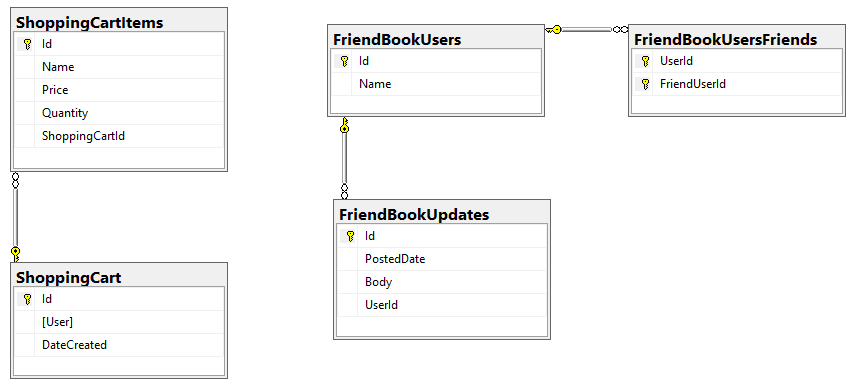
In my example, I said that a Shopping Cart - to - Shopping Cart Items relationship in a relational database would probably be better represented in JSON by a single Shopping Cart document (which contains Items). This is the "denormalization" path. Then, I suggested that a Social Media User - to - Social Media User Update relationship would be best represented in JSON with a referential relationship: updates live in their own documents, separate from the user.
This was an entirely manual process. For that simple example, it was not difficult. But with larger models, it would be helpful to have some tooling to assist in the SQL to JSON data modeling. It won’t be completely automatic: there’s still some art to it, but the tooling can do a lot of the work for us.
Starting with a SQL Server DDL
This next part assumes you’ve already run the SQL scripts to create the 5 tables: ShoppingCartItems, ShoppingCart, FriendBookUsers, FriendBookUpdates, and FriendBookUsersFriends. (Feel free to try this on your own databases, of course).
The first step is to create a DDL script of your schema. You can do this with SQL Server Management Studio.
First, right click on the database you want. Then, go to "Tasks" then "Generate Scripts". Next, you will see a wizard. You can pretty much just click "Next" on each step, but if you’ve never done this before you may want to read the instructions of each step so you understand what’s going on.
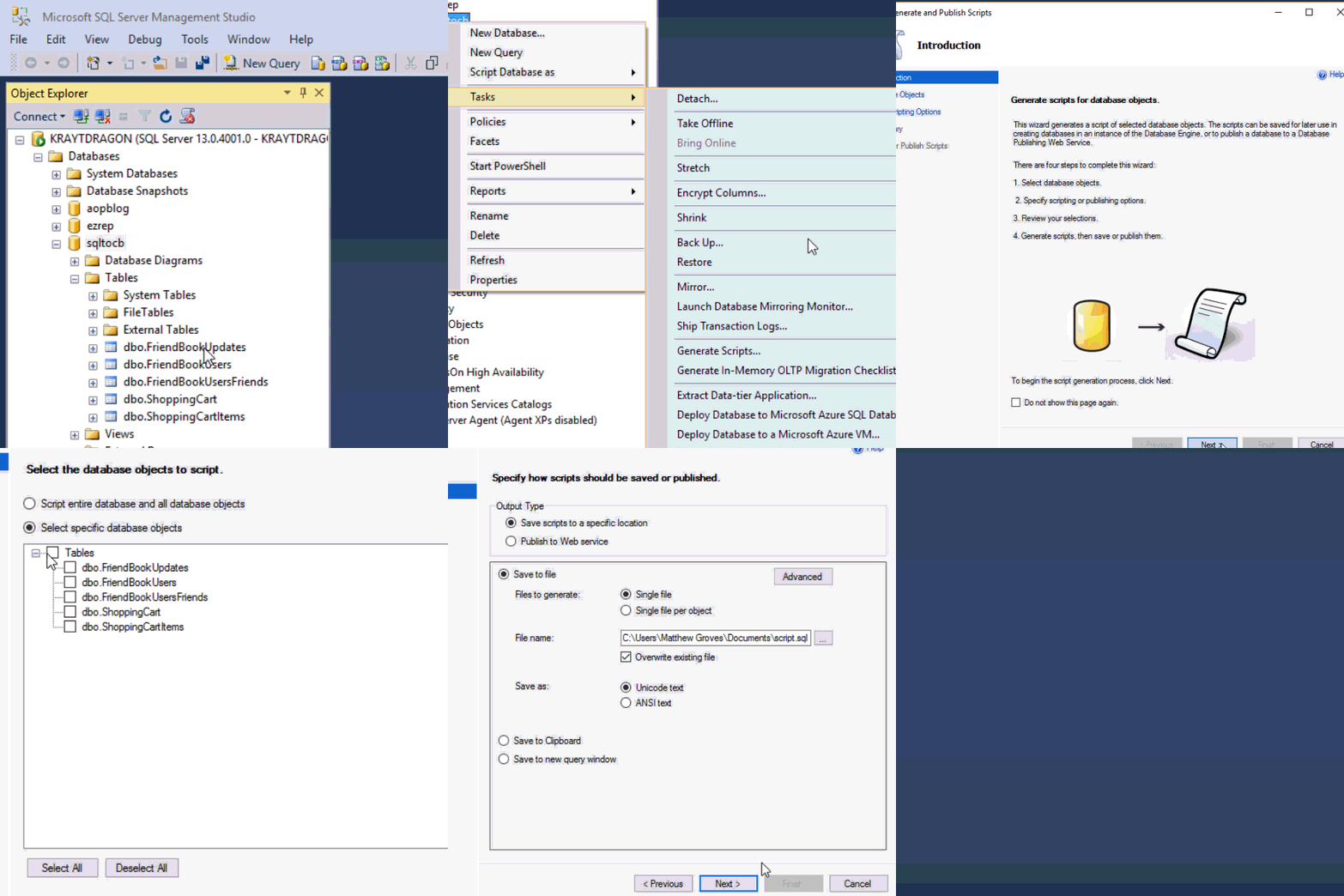
Finally, you will have a SQL file generated at the path you specified.
This will be a text file with a series of CREATE and ALTER statements in it (at least). Here’s a brief excerpt of what I created (you can find the full version on Github).
CREATE TABLE [dbo].[FriendBookUpdates](

	[Id] [uniqueidentifier] NOT NULL,

	[PostedDate] [datetime] NOT NULL,

	[Body] [nvarchar](256) NOT NULL,

	[UserId] [uniqueidentifier] NOT NULL,

 CONSTRAINT [PK_FriendBookUpdates] PRIMARY KEY CLUSTERED

(

	[Id] ASC

)WITH (PAD_INDEX = OFF, STATISTICS_NORECOMPUTE = OFF, IGNORE_DUP_KEY = OFF, ALLOW_ROW_LOCKS = ON, ALLOW_PAGE_LOCKS = ON) ON [PRIMARY]

) ON [PRIMARY]

GO

-- etc...
By the way, this should also work with SQL Azure databases.
Note: Hackolade works with other types of DDLs too, not just SQL Server, but also Oracle and MySQL.
Enter Hackolade
This next part assumes that you have downloaded and installed Hackolade. This feature is only available on the Professional edition of Hackolade, but there is a 30-day free trial available.
Once you have a DDL file created, you can open Hackolade.
In Hackolade, you will be creating/editing models that correspond to JSON models: Couchbase (of course) as well as DynamoDB and MongoDB. For this example, I’m going to create a new Couchbase model.
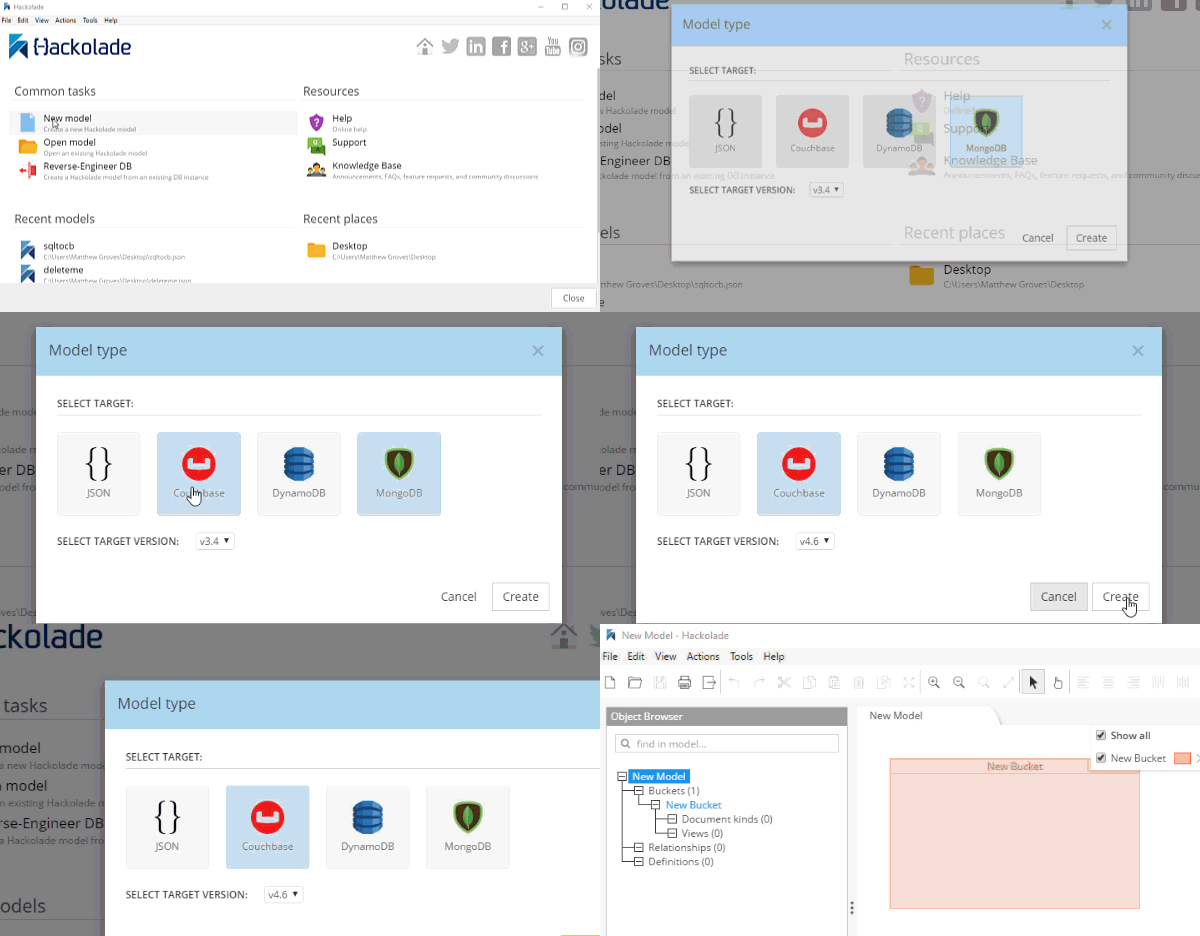
At this point, you have a brand new model that contains a "New Bucket". You can use Hackolade as a designing tool to visually represent the kinds of documents you are going to put in the bucket, the relationships to other documents, and so on.
We already have a relational model and a SQL Server DDL file, so let’s see what Hackolade can do with it.
Reverse engineer SQL to JSON data modeling
In Hackolade, go to Tools → Reverse Engineer → Data Definition Language file. You will be prompted to select a database type and a DDL file location. I’ll select "MS SQL Server" and the "script.sql" file from earlier. Finally, I’ll hit "Ok" to let Hackolade do its magic.

Hackolade will process the 5 tables into 5 different kinds of documents. So, what you end up with is very much like a literal translation.
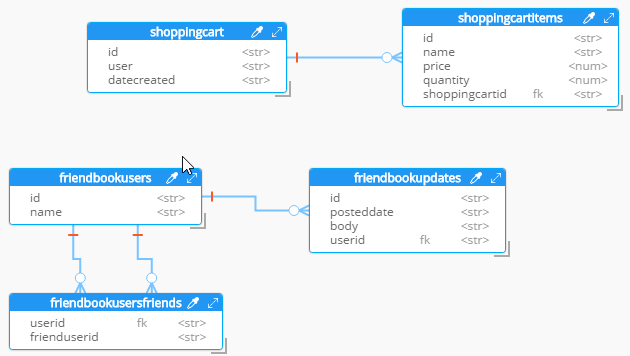
This diagram gives you a view of your model. But now you can think of it as a canvas to construct your ultimate JSON model. Hackolade gives you some tools to help.
Denormalization
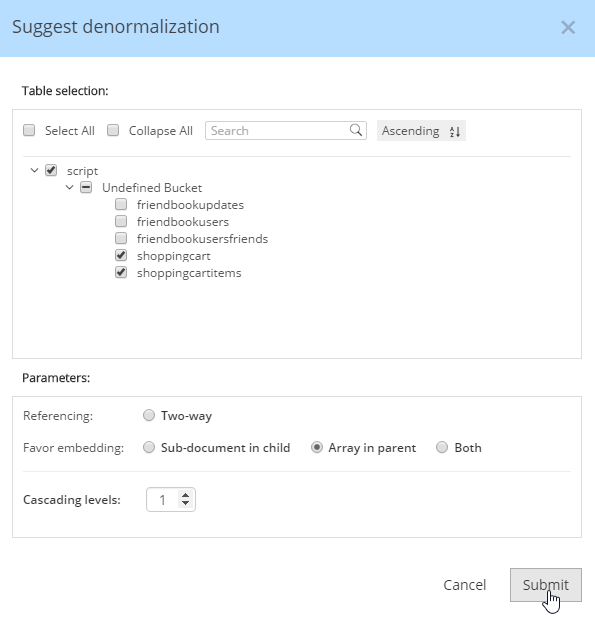
For instance, Hackolade can make suggestions about denormalization when doing SQL to JSON data modeling. Go to Tools→Suggest denormalization. You’ll see a list of document kinds in "Table selection". Try selecting "shoppingcart" and "shoppingcartitems". Then, in the "Parameters" section, choose "Array in parent".
After you do this, you will see that the diagram looks different. Now, the items are embedded into an array in shoppingcart, and there are dashed lines going to shoppingcartitems. At this point, we can remove shoppingcartitems from the model (in some cases you may want to leave it, that’s why Hackolade doesn’t remove it automatically when doing SQL to JSON data modeling).
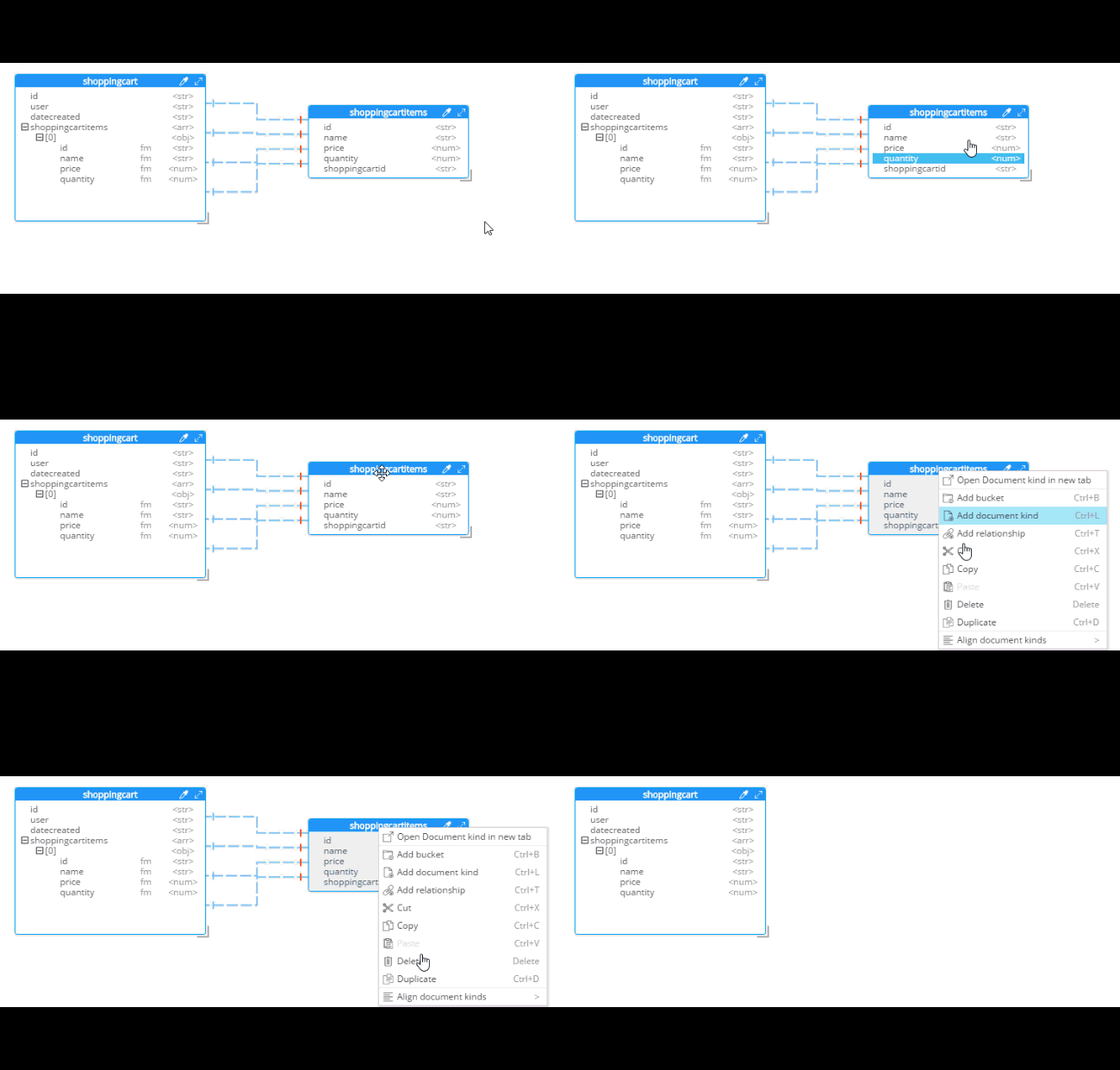
Notice that there are other options here too:
Embedding Array in parent - This is what was demonstrated above.
Embedding Sub-document in child - If you want to model the opposite way (e.g. store the shopping cart within the shopping cart item).
Embedding Both - Both array in parent and sub-document approach.
Two-way referencing - Represent a many-to-many relationship. In relational tables, this is typically done with a "junction table" or "mapping table"
Also note cascading. This is to prevent circular referencing where there can be a parent, child, grandchild, and so on. You select how far you want to cascade.
More cleanup
There are a couple of other things that I can do to clean up this model.
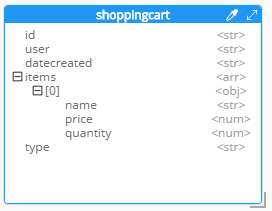
Add a 'type' field. In Couchbase, we might need to distinguish shoppingcart documents from other documents. One way to do this is to add a "discriminator" field, usually called 'type' (but you can call it whatever you like). I can give it a "default" value in Hackolade of "shoppingcart".
Remove the 'id' field from the embedded array. The SQL table needed this field for a foreign key relationship. Since it’s all embedded into a single document, we no longer need this field.
Change the array name to 'items'. Again, since a shopping cart is now consolidated into a single document, we don’t need to call it 'shoppingcartitems'. Just 'items' will do fine.
Output
A model like this can be a living document that your team works on. Hackolade models are themselves stored as JSON documents. You can share with team members, check them into source control, and so on.
You can also use Hackolade to generate static documentation about the model. This documentation can then be used to guide the development and architecture of your application.
Go to File → Generate Documentation → HTML/PDF. You can choose what components to include in your documentation.
SQL to JSON Data Modeling with Hackolade的更多相关文章
- MS SQL OPENJSON JSON
前段时间,有写过一个小练习<MS SQL读取JSON数据>https://www.cnblogs.com/insus/p/10911739.html 晚上为一个网友的问题,尝试获取较深层节 ...
- directly receive json data from javascript in mvc
if you send json data to mvc,how can you receive them and parse them more simply? you can do it like ...
- Guzzle Unable to parse JSON data: JSON_ERROR_SYNTAX - Syntax error, malformed JSON
项目更新到正式平台时,出现Guzzle(5.3) client get请求出现:Unable to parse JSON data: JSON_ERROR_SYNTAX - Syntax error, ...
- sql System.Data.SqlClient.SqlError: 无法覆盖文件 'C:\Program Files\Microsoft SQL Server\MSSQL\data\itsm_Data.MDF'。数据库 'my1' 正在使用该文件的解决方案
对数据库备份进行还原时遇到“sql System.Data.SqlClient.SqlError: 无法覆盖文件 'C:\Program Files\Microsoft SQL Server\MSSQ ...
- SQL*Net more data to client
The server process is sending more data/messages to the client. The previous operation to the client ...
- SQL*Net more data from client
SQL*Net more data from client The server is waiting on the client to send more data to its client sh ...
- 奇葩的SQL*Net more data from client等待,导致批处理巨慢
<pre name="code" class="sql"><pre name="code" class="sql ...
- 一个session已经ACTIVE20多小时,等待事件SQL*Net more data from client
问题描述: 一个session已经ACTIVE20多小时,等待事件SQL*Net more data from client 有一人session,从昨天上午11点多登陆(v$session.logi ...
- iReport 5.6.0 Error: net.sf.jasperreports.engine.JRException: Error executing SQL statement for : data 最优解决方案
问题描述 近期学习iReport(个人使用的是最新版本的 iReport-5.6.0,MySQL是 5.5.56版本),遇到一些问题,在安装完成后,创建了数据库,配置了MySQL数据库连接信息,新建报 ...
随机推荐
- 江苏省选2019Round1游记
JSOI2019R1过去了. Day0 打板子.看白书. 晚上太热了,楼下还在打铁,睡不着. 折腾到好晚才勉强睡着. Day1 早上好困啊. 开T1.看起来T1的60分很可做的样子?5min打完了(为 ...
- buildroot使用介绍
buildroot是Linux平台上一个构建嵌入式Linux系统的框架.整个Buildroot是由Makefile脚本和Kconfig配置文件构成的.你可以和编译Linux内核一样,通过buildro ...
- Codeforces Round #545 (Div. 1) Solution
人生第一场Div. 1 结果因为想D想太久不晓得Floyd判环法.C不会拆点.E想了个奇奇怪怪的set+堆+一堆乱七八糟的标记的贼难写的做法滚粗了qwq靠手速上分qwqqq A. Skyscraper ...
- Item 22: 当使用Pimpl机制时,在实现文件中给出特殊成员函数的实现
本文翻译自<effective modern C++>,由于水平有限,故无法保证翻译完全正确,欢迎指出错误.谢谢! 博客已经迁移到这里啦 如果你曾经同过久的编译时间斗争过,那么你肯定对Pi ...
- flink1.7 checkpoint源码分析
初始化state类 //org.apache.flink.streaming.runtime.tasks.StreamTask#initializeState initializeState(); p ...
- Maven 安装和配置
一.Maven 简介 Maven 是一个强大的Java项目构建工具,类似.NET中的NuGet ,Node.js的NPM. 正如nuget.org ,Maven有一个中央仓库 maven.org,可以 ...
- Python-SMTP发送邮件(HTML、图片、附件)
前言: SMTP(Simple Mail Transfer Protocol)即简单邮件传输协议,它是一组用于由源地址到目的地址传送邮件的规则,由它来控制信件的中转方式. 一.Python发送HTML ...
- 七、Json格式的对象都可以通过遍历来获得里面的value值
- java 浅克隆 深克隆
对象的克隆是java的一项高级技术,他可以根据给定的对象,获得与其完全相同的另一个对象. 1.浅克隆主要是复制对象的值 2.深克隆:当类存在聚合关系的时候,克隆就必须考虑聚合对象的克隆,可以复制引用类 ...
- 杭电 1061 Rightmost Digit计算N^N次方的最后一位
Problem Description Given a positive integer N, you should output the most right digit of N^N. Input ...