
阿里云 部署dashboard
本文是基于kubeasz 进行部署安装,将部署心得记录下来。可以查看原文地址:
https://github.com/gjmzj/kubeasz/blob/master/docs/guide/dashboard.md
1. 创建一个yaml文件。eg:dashboard.yaml。复制一下代码
# Copyright 2017 The Kubernetes Authors.

#

# Licensed under the Apache License, Version 2.0 (the "License");

# you may not use this file except in compliance with the License.

# You may obtain a copy of the License at

#

#     http://www.apache.org/licenses/LICENSE-2.0

#

# Unless required by applicable law or agreed to in writing, software

# distributed under the License is distributed on an "AS IS" BASIS,

# WITHOUT WARRANTIES OR CONDITIONS OF ANY KIND, either express or implied.

# See the License for the specific language governing permissions and

# limitations under the License.

# ------------------- Dashboard Secret ------------------- #

apiVersion: v1

kind: Secret

metadata:

  labels:

    k8s-app: kubernetes-dashboard

  name: kubernetes-dashboard-certs

  namespace: kube-system

type: Opaque

---

# ------------------- Dashboard Service Account ------------------- #

apiVersion: v1

kind: ServiceAccount

metadata:

  labels:

    k8s-app: kubernetes-dashboard

  name: kubernetes-dashboard

  namespace: kube-system

---

# ------------------- Dashboard Role & Role Binding ------------------- #

kind: Role

apiVersion: rbac.authorization.k8s.io/v1

metadata:

  name: kubernetes-dashboard-minimal

  namespace: kube-system

rules:

  # Allow Dashboard to create 'kubernetes-dashboard-key-holder' secret.

- apiGroups: [""]

  resources: ["secrets"]

  verbs: ["create"]

  # Allow Dashboard to create 'kubernetes-dashboard-settings' config map.

- apiGroups: [""]

  resources: ["configmaps"]

  verbs: ["create"]

  # Allow Dashboard to get, update and delete Dashboard exclusive secrets.

- apiGroups: [""]

  resources: ["secrets"]

  resourceNames: ["kubernetes-dashboard-key-holder", "kubernetes-dashboard-certs"]

  verbs: ["get", "update", "delete"]

  # Allow Dashboard to get and update 'kubernetes-dashboard-settings' config map.

- apiGroups: [""]

  resources: ["configmaps"]

  resourceNames: ["kubernetes-dashboard-settings"]

  verbs: ["get", "update"]

  # Allow Dashboard to get metrics from heapster.

- apiGroups: [""]

  resources: ["services"]

  resourceNames: ["heapster"]

  verbs: ["proxy"]

- apiGroups: [""]

  resources: ["services/proxy"]

  resourceNames: ["heapster", "http:heapster:", "https:heapster:"]

  verbs: ["get"]

---

apiVersion: rbac.authorization.k8s.io/v1

kind: RoleBinding

metadata:

  name: kubernetes-dashboard-minimal

  namespace: kube-system

roleRef:

  apiGroup: rbac.authorization.k8s.io

  kind: Role

  name: kubernetes-dashboard-minimal

subjects:

- kind: ServiceAccount

  name: kubernetes-dashboard

  namespace: kube-system

---

# ------------------- Dashboard Deployment ------------------- #

kind: Deployment

apiVersion: apps/v1beta2

metadata:

  labels:

    k8s-app: kubernetes-dashboard

  name: kubernetes-dashboard

  namespace: kube-system

spec:

  replicas: 1

  revisionHistoryLimit: 10

  selector:

    matchLabels:

      k8s-app: kubernetes-dashboard

  template:

    metadata:

      labels:

        k8s-app: kubernetes-dashboard

    spec:

      containers:

      - name: kubernetes-dashboard

        #image: k8s.gcr.io/kubernetes-dashboard-amd64:v1.8.3

        image: mirrorgooglecontainers/kubernetes-dashboard-amd64:v1.10.0

        ports:

        - containerPort: 8443

          protocol: TCP

        args:

          - --auto-generate-certificates

          # Uncomment the following line to manually specify Kubernetes API server Host

          # If not specified, Dashboard will attempt to auto discover the API server and connect

          # to it. Uncomment only if the default does not work.

          # - --apiserver-host=http://my-address:port

        volumeMounts:

        - name: kubernetes-dashboard-certs

          mountPath: /certs

          # Create on-disk volume to store exec logs

        - mountPath: /tmp

          name: tmp-volume

        livenessProbe:

          httpGet:

            scheme: HTTPS

            path: /

            port: 8443

          initialDelaySeconds: 30

          timeoutSeconds: 30

      volumes:

      - name: kubernetes-dashboard-certs

        secret:

          secretName: kubernetes-dashboard-certs

      - name: tmp-volume

        emptyDir: {}

      serviceAccountName: kubernetes-dashboard

      # Comment the following tolerations if Dashboard must not be deployed on master

      tolerations:

      - key: node-role.kubernetes.io/master

        effect: NoSchedule

---

# ------------------- Dashboard Service ------------------- #

kind: Service

apiVersion: v1

metadata:

  labels:

    k8s-app: kubernetes-dashboard

    kubernetes.io/cluster-service: "true"

    addonmanager.kubernetes.io/mode: Reconcile

  name: kubernetes-dashboard

  namespace: kube-system

spec:

  ports:

    - port: 443

      targetPort: 8443

      nodePort: 30065

  selector:

    k8s-app: kubernetes-dashboard

  type: NodePort
本文使用NodePort方式部署,所以需要修改加粗部分的端口号,端口应该大于30000
2. 创建dashboard 服务
kubectl apply -f ./dashboard.yaml
查看dashboard是否创建
kubectl get svc -n kube-system

3.使用https://Ip:30065,由于本文使用的是30065端口。可以根据实际情况修改。
如果使用chrome浏览器提示安全问题,可以是用Firefox。登录页面可以跳过验证或者添加token,如果跳过验证可能会有权限问题。
本文使用token的方式,创建一个account.yaml文件:
apiVersion: v1

kind: ServiceAccount

metadata:

  name: admin-user

  namespace: kube-system

---

apiVersion: rbac.authorization.k8s.io/v1

kind: ClusterRoleBinding

metadata:

  name: admin-user

roleRef:

  apiGroup: rbac.authorization.k8s.io

  kind: ClusterRole

  name: cluster-admin

subjects:

- kind: ServiceAccount

  name: admin-user

  namespace: kube-system
kubectl apply -f ./account.yaml
kubectl -n kube-system describe secret $(kubectl -n kube-system get secret | grep admin-user | awk '{print $1}')
输入的文件中复制"token:" 以后的内容到登录页面的TOKEN中,然后就登录成功。
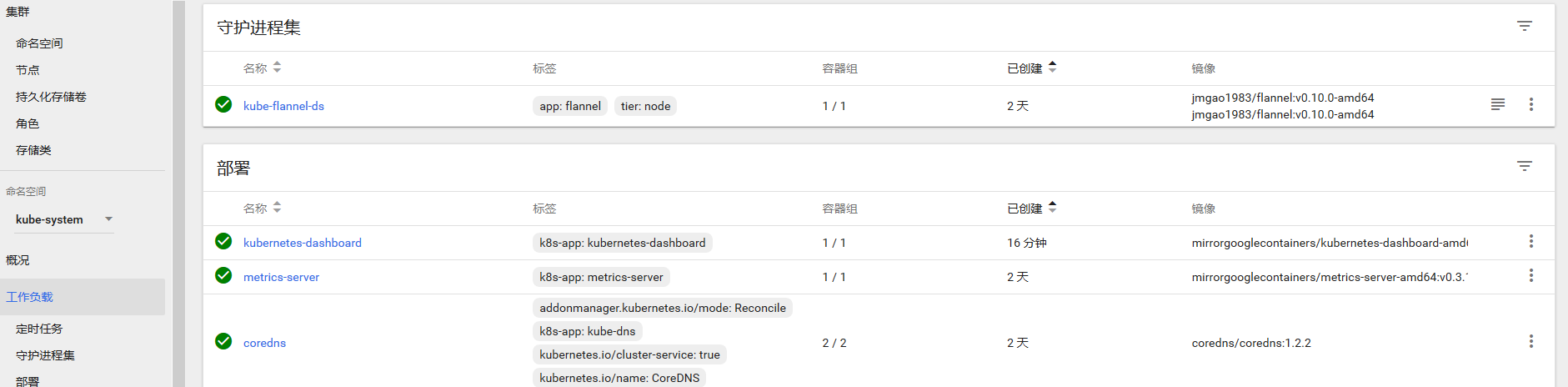
阿里云 部署dashboard的更多相关文章
- 阿里云部署Docker(5)----管理和公布您的镜像
出到这节,我在百度搜索了一下"阿里云部署Docker",突然发现怎么会有人跟我写的一样呢?哦,原来是其它博客系统的爬虫来抓取,然后也不会写转载自什么什么的.所以,我最终明确为什么那 ...
- 阿里云部署django实现公网访问
本博的主要目的是对阿里云部署django实现公网访问进行一次简单的记录,方便日后查询. 内容目录: (1)申请阿里云服务器及安全组配置 (2)实现ssh远程控制 (3)实现ftp文件传输 (4)安装p ...
- 阿里云部署自己的web服务器
阿里云部署自己的web服务器 [外链图片转存失败(img-GIKNTPPx-1564287221547)(https://upload-images.jianshu.io/upload_images/ ...
- 阿里云部署JeecgBoot
阿里云部署JeecgBoot 首先贴出官网教程:http://jeecg-boot.mydoc.io/?t=345682 自己在部署的时候遇到了各种各样的问题,其实一步一步的按照官网给出的步骤来是没问 ...
- 阿里云部署Java开发环境
阿里云部署Java网站和微信开发调试心得技巧(上) 本文主要是记录在阿里云服务器从零开始搭建Java执行环境并且部署web project的过程,方面以后查阅. 一.申请阿里云服务器 购买阿里云服务器 ...
- 小白从零开始阿里云部署react项目+node服务接口(三:部署到服务器)
服务器 准备工具 依次安装即可 nginx 安装nginx https://www.runoob.com/linux/nginx-install-setup.html 配置全局nginx命令 http ...
- 小白从零开始阿里云部署react项目+node服务接口(二:node服务+web)
我们用极简的方式来创建服务,没有任何附加功能 1 新建一个server文件夹 2 使用npm init 或者yarn init 一路enter 3 yarn add express cors ...
- 小白从零开始阿里云部署react项目+node服务接口(一:阿里云服务器)
准备阿里云服务器,并安装系统 如果没用自己服务器可以购买一个 https://www.aliyun.com/minisite/goods?userCode=x7i5glgc 初级购买一个1核2G的主机 ...
- 阿里云-部署-服务-Docker
目录 ♫ MusicPlayer Naiveboom - 比较安全 个人阿里云部署的小服务,欢迎使用,服务器资源有限,如果遇到卡顿还请谅解~ 索引: 在线音乐播放器 阅后即焚 ♫ MusicPlaye ...
随机推荐
- Excel--截取所需内容
如上图,需截取*号后的数字,那么公式怎么写: 1.使用Find和Mid函数: FIND:获取指定字符所在字串的位置: MID:截取字串中的子串. 写法: 2.也可以使用Replace函数代替mid函数 ...
- 关于CPU 架构与指令集的一些个人理解
关于CPU 架构与指令集的一些个人理解 (理解不一定正确,只是目前的理解) 1.一般所说的X86,是指基于Intel X86架构处理器的一套指令集,即X86指令集: 2.CPU的架构是最底层的,是处理 ...
- 利用grep参数查看某关键词前后几行内容
查看文件中含有“哈哈哈”关键字所在行后5行内容 cat xxxxxx | grep -A 5 哈哈哈 查看文件中含有“哈哈哈”关键字所在行前5行内容 cat xxxxxx | grep -B 5 哈哈 ...
- 工控随笔_16_西门子_S7-200.Smart软件安装兼容性说明和错误代码:error code hr=0x80070430
现在西门子的软件是更新换代太快了,前几年还是Step 7 Micro/Win,后来又出了S7-200 Smart PLC,理所当然的编程调试软件也水涨船高,出了新的Step 7 Micro/Win ...
- Extjs相关知识
1.链接 1.1.零散知识链接 https://blog.csdn.net/zhaojianrun/article/details/70141071 https://www.cnblogs.com/p ...
- (一)CentOS6.3安装Hadoop2.6.5
1.准备环境 下载CentOS: https://www.centos.org/download/ 下载JDK: https://www.oracle.com/technetwork/java/jav ...
- Promise.all处理多个异步请求
一个前台页面需要请求2个rest接口获取数据,一个用于解析文件获取列名,一个查询数据库获得列值. 有很低的概率页面显示为空,刷新可能就有显示了. 使用Promise.all就解决了上面的问题,2部分数 ...
- 软件推荐----RDO(Remote Desktop Organizer)
平时工作,经常使用远程桌面控制,在多个远程之间切换.使用上Remote Desktop Organizer方便很多.类似的软件很多,此软件只能应用于windows的远程桌面控制,好处如下: 可以保存用 ...
- 微信小程序是怎么运行的?
微信客户端在打开小程序之前,会把整个小程序的代码包下载到本地. 紧接着通过 app.json 的 pages 字段就可以知道你当前小程序的所有页面路径 而写在 pages 字段的第一个页面就是这个小程 ...
- 分布式系统session同步解决方案
来源:架构师之路 session的概念 什么是session? 当浏览器端第一次访问web server时,server端会调用getSession()方法创建session对象,经过特殊算法计算出s ...