
The Engine Document of JustWeEngine
JustWeEngine - Android FrameWork
An easy open source Android Native Game FrameWork.
Github



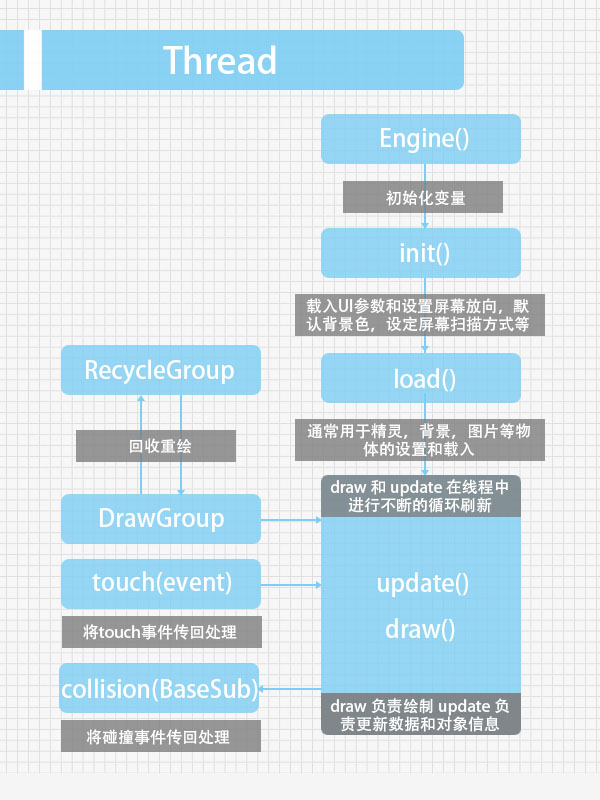
Game core graph
How To Import?
Import Engine as Library to use;
OR Import *.jar in "/jar";
OR use Gradle to build:
- Step 1. Add the JitPack repository to your build file
Add it in your root build.gradle at the end of repositories:
  	allprojects {

  		repositories {

  			...

  			maven { url "https://jitpack.io" }

  		}

}- Step 2. Add the dependency on
    dependencies {

          compile 'com.github.lfkdsk:JustWeEngine:v1.03'

}- Step 1. Add the JitPack repository to your build file
OR use Maven to build:
- Step 1. Add the JitPack repository to your build file
  <repositories>

  	<repository>

  	    <id>jitpack.io</id>

  	    <url>https://jitpack.io</url>

  	</repository>

</repositories>- Step 2. Add the dependency
  <dependency>

      <groupId>com.github.lfkdsk</groupId>

      <artifactId>JustWeEngine</artifactId>

      <version>v1.03</version>

  </dependency>
Engine come to V1.03
PlaneGame Demo:Demo
OtherTools:JustWeTools
Web Demo:JustWe-WebServer
Quick Start
- 1.Basic Function
- 2.Animation System
- 3.Object collision detection and death decision
- 4.Type of screen scan
- 5.Tools
- 6.Music System
Advanced Application
Extend Method
1.Basic Function
1.1Extend Engine Class:
This FrameWork's all screen use SurfaceView to draw, never use other Android views like Button or Layout, so you should new a class extent Engine class,
It will control game's flow path.I had note the function in the code.
	public class Game extends Engine {

	// Please init your var in constructor.

    public Game() {

    	// If open debug mode. If you open debug mode, you can print log, frame number, and parse on screen.

        super(true);

    }

	// load some UI parameters. And set screen direction, default background color, set screen's scan method.

    @Override

    public void init() {

    	// init UI default par, you must use at here . Some var in UIdefaultData for more phones should be init.

        UIdefaultData.init(this);

    }

	// load sprite , background , picture and other BaseSub

    @Override

    public void load() {

    }

	// draw and update in a new Thread

	// update message and sprite's msg

    @Override

    public void draw() {

    }

    @Override

    public void update() {

    }

	// receive touch event , its function depend on screen's scan mode.

    @Override

    public void touch(MotionEvent event) {

    }

	// receive collision event , BaseSub is the father class of all the sprites and others.

	// use to solve collision event default use rect collision.

    @Override

    public void collision(BaseSub baseSub) {

    }

    }
1.2Draw Text:
Use GamePrinter to draw text, in addition to some other methods to draw.
    @Override

    public void draw() {

        Canvas canvas = getCanvas();

        GameTextPrinter printer = new GameTextPrinter(canvas);

        printer.drawText("Hello", 100, 100);

    }
Picture:
1.3Draw Picture:
Please put your pic in asset.
	GameTexture texture = new GameTexture(this);

	texture.loadFromAsset("pic/logo.jpg")

	texture.draw(canvas, 100, 100);
Picture:

And you can use loadFromAssetStripFrame to get a pic from a large picture.
	/**

     * get bitmap from a big bitmap

     *

     * @param filename

     * @param x

     * @param y

     * @param width

     * @param height

     * @return

     */

    public boolean loadFromAssetStripFrame(String filename,

                                           int x, int y,

                                           int width, int height)
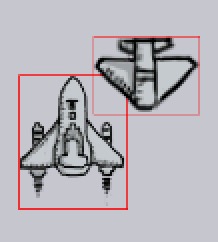
Such as you can get a plane with this four par.


PicUtils have many functions to compress and solve Bitmap.
1.4Use Sprite:
If you want add a sprite , you can use BaseSprite or extend it , BaseSprite have lots of functions for animation, many of them should be used with animation system, I will introduce it later.
New a Sprite:
1.Simple init:
sprite = new BaseSprite(this);
2.Init with Frame Animation:
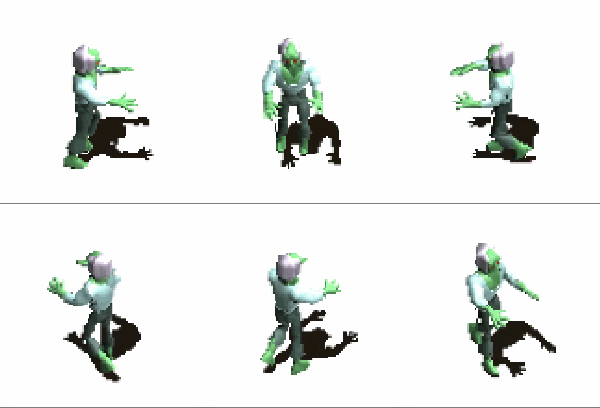
Init with Frame Animation need pic like this:

      GameTexture texture = new GameTexture(this);

      texture.loadFromAsset("pic/zombie.png");

      // w,h,lines

      sprite = new BaseSprite(this, 96, 96, 8);

      sprite.setTexture(texture);

      sprite.setPosition(100, 100);

      sprite.setDipScale(100, 100);

      // use FrameAnimation is important

      sprite.addAnimation(new FrameAnimation(0, 63, 1));

      addToSpriteGroup(sprite);
picture:
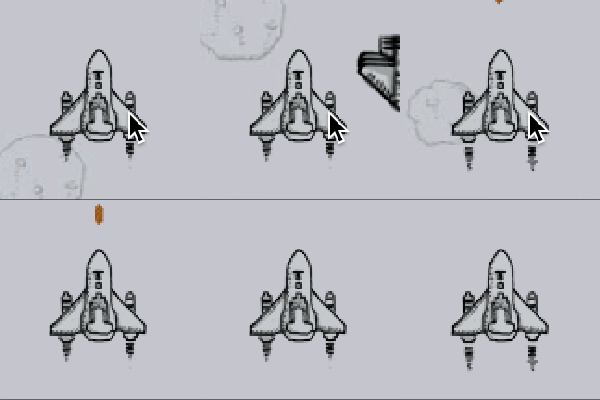
3.Init with Frame Animation(Pics from an large Bitmap):
  	// new an large Picture

      GameTexture texture = new GameTexture(this);

      texture.loadFromAsset("pic/shoot.png");

      // Init width,height,and mode.

		ship = new BaseSprite(this, 100, 124, FrameType.COMMON);

		// set large pic

      ship.setTexture(texture);

      // get two frame in pic

      ship.addRectFrame(0, 100, 100, 124);

      ship.addRectFrame(167, 361, 100, 124);

      ship.addAnimation(new FrameAnimation(0, 1, 1));
picture(two frames change quickly):
4.Some other important settings:
	  // set bitmap

	  ship.setTexture(texture);

	  // get Frame from bitmap

	  ship.addRectFrame(0, 100, 100, 124);

	  // set position

	  ship.setPosition(x, y);

	  // set w,h with dp(Can scale)

    ship.setDipScale(96, 96);

    // set position with dp(Can scale)

    ship.setDipPosition(x, y);

    // set alpha transparency value

    ship.setAlpha(...);

    // add Sprite to Group. Only use this Function your sprite can draw automatically.

    addToSpriteGroup(ship);

    ...
1.5Use Button:
If you want to use Button, you can extent the BaseButton, and also you can straightly use TextureButton and TextButton.
Button's API is like Android's, you can set onClick with this interface:
		button.setOnClickListener(new OnClickListener() {

        @Override

        public void onClick() {

            Log.e("button", "onClick");

        }

      });
1.TextureButton:
    TextureButton button;

    // Init and set Button's Name.

    button = new TextureButton(this, "logo");

    texture = new GameTexture(this);

    texture.loadFromAsset("pic/logo.jpg");

    // Add pic

    button.setTexture(texture);

    // button's interface

    button.setOnClickListener(new OnClickListener() {

        @Override

        public void onClick() {

            Log.e("button", "onClick");

        }

      });

    button.setPosition(200, 300);

    button.setDipScale(100, 150);

    // add to button group to draw and update

    addToButtonGroup(button);
picture:

Combined with PicUtil in a variety of Bitmap processing methods can be easy to make a variety of styles of Button:

2.TextButton:
    TextButton button;

    button = new TextButton(this, "logo");

    button.setText("刘丰恺");

    addToButtonGroup(button);

    // other functions in code.

    ...
picture:

2.Animation System
Now Animation System, you can use Some Animations extent BaseAnimation, and you can also extent BaseAnim by yourself.
2.1Animation Bind on BaseSub
AnimType save the type of Animations.
| Animation | method | function |
|---|---|---|
| AliveAnimation | adjustAlive(boolean ori) | If sprite is alive |
| AlphaAnimation | adjustAlpha(int ori) | change sub's alpha |
| CircleMoveAnimation | adjustPosition(Float2 ori) | circle run with a point |
| FenceAnimation | adjustPosition(Float2 ori) | limit Sub in screen |
| FrameAnimation | adjustFrame(int ori) | Frame Animation |
| MoveAnimation | adjustPosition(Float2 ori) | Move |
| SpinAnimation | adjustRotation(float ori) | Spin |
| ThrobAnimation | adjustScale(Float2 ori) | Throb |
| VelocityAnimation | adjustPosition/adjustAlive | Velocity for one direction |
| WrapMoveAnimation | adjustPosition(Float2 ori) | move to another corner of screen |
| ZoomAnimation | adjustScale(Float2 ori) | zoom Sprite |
| more | ... | ... |
ListAnimation:Animation can loop work automatically;
FixedAnimation:Animation can work by call its name.
Such as Frame Animation is a ListAnimation.And follow the plane coming in is a FixAnimation.
        ship.addfixedAnimation("start",

                new MoveAnimation(UIdefaultData.centerInHorizontalX -   ship.getWidthWithScale() / 2,

                        UIdefaultData.screenHeight - 2 * ship.getHeightWidthScale(), new Float2(10, 10)));
picture:

2.2Animation Bind on Button
BaseButtonAnimation is Animation for button ,which extent BaseAnim.
| Animation | method | function |
|---|---|---|
| ZoomCenterButtonAnim | adjustButtonRect(Rect ori,boolean touchType) | click zoom |
| ColorAnimation | adjustButtonBackGround(int ori,boolean type) | TextButton click change color |
| more | ... | ... |
set ZoomCenterButtonAnim for BUtton:
	// set zoom in center

    button.setZoomCenter(true);

    // three par, The initial value / value / amplification frames

    button.setAnimation(new ZoomCenterButtonAnim(10, 30, 3));
picture:

set ColorAnimation for Button:
	// init color / click color

	button.setAnimation(

       new ColorAnimation(UIdefaultData.colorAccent,

       UIdefaultData.colorPressed));
picture:

3.Object collision detection and death decision:
Use ID and Name,we can make Sprites in different groups and have their own name,Engine core class will check different group.
	final int SHIP = 0;

	ship.setName("SHIP");

    ship.setIdentifier(SHIP);
If you use addToSpriteGroup(sprite) for a sprite, it will find collision automatically, and callback event at here.
    @Override

    public void collision(BaseSub baseSub) {

    	// get Sub collide with It.

        BaseSprite other = (BaseSprite) baseSub.getOffender();

        // get Group Name

        if (baseSub.getIdentifier() == BULLET &&

                other.getIdentifier() == ENEMY) {

            // set dead

            other.setAlive(false);

            // recycle or auto

            removeFromSpriteGroup(other);

            addToRecycleGroup(other);

        }

    }
You can use getOffender() get Sub collide with It,and use getIdentifier() get Group, then solve them.
If you open Debug mode , you can see the collided line.
picture:
4.Type of screen scan
It's used to give priority to the response of the screen, click, Button, and multi touch, and placed in different situations can optimize the screen refresh.
  	// find single touch

  	SINGLE,

  	// find click button

    BUTTON,

    // find more than one touch

    FULL,

    // find single touch and click button

    SINGLE_BUTTON
set It like this:
super.setTouchMode(TouchMode.BUTTON);
5.Tools
NetUtilsNetToolsPicUtilsPicture ToolsServiceUtilsService ToolsImageHelperImage ToolsDisplayUtilsDate canvert ToolsSpUtilssimple Sp(Can save list and map)ValidatorsUtilsValidators Tools
6.Music System
6.1Play short Sound
Play short Sound,Init SoundManager to load Sound .
	// Context and size of Manager

    SoundManager manager = new SoundManager(this, 5);

    // get Sound from assets , and url will be save too.

	manager.addSound("mic/open.mid");

	// play with name

	manager.play("mic/open.mid");
You can play a sound like this, but please use short sound. If you want to play background music, please read following.
	public void removeSound(String musicName) // remove

	public void play(String musicName, float volume) // play with volume

	public boolean containSoundID(int soundID) // find if exist

	public int getSoundID(String soundName)  // get music ID

	...
6.2Play Music
Play Music fix play music such as background music.
	// context and url

	MusicPlayer player = new MusicPlayer(this, "mic/open.mp3");

    player.play();
some other methods.
	public void dispose() // clear

	public void setLooping(boolean isLooping) // is loop?

	public void setVolume(float volume) // set volume

	...
6.3Compose with short sound
Set some sounds in SoundManager and play quickly to compose.
    SoundManager manager = new SoundManager(this, 5);

    manager.addSound("mic/1.mid");

    manager.addSound("mic/2.mid");

    SoundPlayer player = new SoundPlayer(manager, 500, 16);

    player.addSound("mic/1.mid");

    player.addSound("mic/2.mid");

    ...
use player.play(); to play.
7.Use Internet
You can use Internet like this Demo.JustWe-WebServer.
use like:
        server.apply("/lfk", new OnWebStringResult() {

            @Override

            public String OnResult() {

                return "=======";

            }

        });

        server.apply("/main", new OnWebFileResult() {

            @Override

            public File returnFile() {

                return new File(WebServerDefault.WebServerFiles+"/"+"welcome.html");

            }

        });
You can bind router like this way, if you want to send msg, you can straightly use HTTP Get/Post.
8.Use State Machine Sprite
    // add a new state to sprite

    sprite.addState(new StateFinder() {

        @Override

        public boolean isContent(BaseSub baseSub) {

            return Math.abs(zom.s_position.x - baseSub.s_position.x) > 50;

        }

    }, new FrameAnimation(0, 63, 1));
You can add a task to the state machine wizard by the addState method above, and only when the return value of the first parameter interface callback is true,
Will run second parameters to provide the instruction, if the return is false will run the second state of the judgment.
The priority of the state is provided by the join order.
picture:

9.CrashHandler
CrashHandler is used to deal with the unexpected crash event of the game, and the initialization is recommended in Application.
CrashHandler can automatically save models and abnormal log in order to allow developers to find the problem.
CrashHandler.getInstance().init(this);
You can use it like this.
And:
    CrashHandler.getInstance().setRestartActivity(MainActivity.class); // restartActivity

    CrashHandler.getInstance().setAfterCrashListener(new AfterCrashListener() {

        @Override

        public void AfterCrash() {  // set what to save

            ...

        }

    });
10.Use BlueTooth
10.1Open/Close Server
BlueTooth Use requires a new BlueToothServer object, the incoming context and the MessageBack interface.
        blueToothServer = new BlueToothServer(this, new OnMessageBack() {

            @Override

            public void getMessage(String msg) {

                Log.e("L", msg);

            }

            @Override

            public void sendMessage(String msg) {

                Log.e("L", msg);

            }

            @Override

            public void getDevice(ArrayList<String> msg) {

                Log.e("L", msg.size() + "");

            }

        });

		// init like this

        blueToothServer.init();
After the service is initialized, such as not to open the Bluetooth, the system will automatically prompt application of Bluetooth enabled.
Through the MessageBack interface can be received to send, receive, and Devices Scan information, to take the corresponding operation can get data.
When closing the service, please use blueToothServer.unBindService (); off service.
10.2Scan Devices
Using blueToothServer.doDiscovery (); device scan, return the results in the OnMessageBack () interface
GetDevice () method to receive.
Use blueToothServer.ensureDiscoverable (); allow to be scanned. Use blueToothServer.getPairedDevices (); return a list of paired devices.
10.3Send Message
In the match after the success can be used blueToothServer.sendMessage (String MSG); Send Message.
At the same time, the message received from the getMessage (Interface) can also be obtained.
Draw by yourselves
Can accept the user's drawing input, and to generate the wizard, background, or other objects:How To Use?
Feedback
Please send your feedback as long as there occurs any inconvenience or problem. You can contact me with:
License
Copyright 2015 [刘丰恺](http://www.cnblogs.com/lfk-dsk/)

Licensed under the Apache License, Version 2.0 (the "License");

you may not use this file except in compliance with the License.

You may obtain a copy of the License at

   http://www.apache.org/licenses/LICENSE-2.0

Unless required by applicable law or agreed to in writing, software

distributed under the License is distributed on an "AS IS" BASIS,

WITHOUT WARRANTIES OR CONDITIONS OF ANY KIND, either express or implied.

See the License for the specific language governing permissions and

limitations under the License.
The Engine Document of JustWeEngine的更多相关文章
- 使用X-UA-Compatible来设置IE浏览器兼容模式(转)
使用X-UA-Compatible来设置IE浏览器兼容模式 文件兼容性用于定义让IE如何编译你的网页.此文件解释文件兼容性,如何指定你网站的文件兼容性模式以及如何判断一个网页该使用的文件模式. 前言 ...
- 【转】http-equiv="X-UA-Compatible" 设置IE浏览器兼容模式详解
文件兼容性用于定义让IE如何编译你的网页.此文件解释文件兼容性,如何指定你网站的文件兼容性模式以及如何判断一个网页该使用的文件模式. 前言 为了帮助确保你的网页在所有未来的IE版本都有一致的外观,IE ...
- 关于IE中通过http-equiv="X-UA-Compatible指定文件兼容性模式
.csharpcode, .csharpcode pre { font-size: small; color: black; font-family: consolas, "Courier ...
- 使用X-UA-Compatible来设置IE浏览器兼容模式
文件兼容性用于定义让IE如何编译你的网页.此文件解释文件兼容性,如何指定你网站的文件兼容性模式以及如何判断一个网页该使用的文件模式. 前言 为了帮助确保你的网页在所有未来的IE版本都有一致的外观,IE ...
- IE浏览器模式设置
文件兼容性用于定义让IE如何编译你的网页.此文件解释文件兼容性,如何指定你网站的文件兼容性模式以及如何判断一个网页该使用的文件模式. 前言 为了帮助确保你的网页在所有未来的IE版本都有一致的外观,IE ...
- 使用X-UA-Compatible来设置IE8/IE9兼容模式
文件兼容性用于定义让IE如何编译你的网页.此文件解释文件兼容性,如何指定你网站的文件兼容性模式以及如何判断一个网页该使用的文件模式. 前言 为了帮助确保你的网页在所有未来的IE版本都有一致的外观,IE ...
- <META http-equiv=X-UA-Compatible content=IE=EmulateIE7>
未来兼容性中的 META 标记和锁定 注意:本文档是预备文档,随时可能变更. 对于 Web 开发人员来说,文本兼容性是一个要考虑的重要问题.Windows Internet Explorer 8 引入 ...
- IE9兼容性视图与IE9标准视图
如果你使用的是IE9,那么按下F12键就会出现开发者工具,上面有两个下拉菜单:浏览器模式和文档模式.那么什么是浏览器模式?什么又是文档模式?二者有何区别? 浏览器模式用于切换IE针对该网页的默认文档模 ...
- 强制将IE8设置为IE7兼容模式来解析网页
强制将IE8设置为IE7兼容模式来解析网页 英文原文:http://msdn.microsoft.com/en-us/library/cc288325(VS.85).aspx 文件兼容性用于定义让IE ...
随机推荐
- C# NPOI导出Excel和EPPlus导出Excel比较
系统中经常会使用导出Excel的功能. 之前使用的是NPOI,但是导出数据行数多就报内存溢出. 最近看到EPPlus可以用来导出Excel,就自己测了下两者导出上的差异. NPIO官网地址:http: ...
- [Q&A] MySQL Error 1050(42S01): Table already exist
[环境说明] 1:MySQL Server 5.5 2:MyEclipse 2014 3:JDK 1.7 造成该问题的可能原因: 1:用 Java 读取 SQL 文件,并执行其中的 sql 语句,但是 ...
- 强大的HTTP包装开源项目ASIHTTPRequest介绍
ASIHTTPRequest 是一个直接在CFNetwork上做的开源项目,提供了一个比官方更方便更强大的HTTP网络传输的封装.它的特色功能如下: 1,下载的数据直接保存到内存或文件系统里 2,提供 ...
- SQL SERVER2012附加 (PS:开始试过sql2012直接附加失败)
Northwind 示例数据库下载: NORTHWND.MDF (PS:开始试过sql2012直接附加失败) 新建查询-执行下面代码 USE [master] GO CREATE DATABAS ...
- 使用NPOI创建Excel
一.NPOI 函式庫: NPOI 函式庫檔案有七個,NPOI 函式庫可以在 http://npoi.codeplex.com 中下載,分別是: NPOI.DLL:NPOI 核心函式庫. NPOI.DD ...
- 数据结构:链表(python版)续:带有尾节点引用的单链表
#!/usr/bin/env python # -*- coding:utf-8 -*- from chapter3.single_linked_list import LNode,LinkedLis ...
- OpenSAML
一.背景知识: SAML即安全断言标记语言,英文全称是Security Assertion Markup Language.它是一个基于XML的标准,用于在不同的安全域(security domain ...
- 【算法】PHP实现冒泡排序和快速排序--防遗忘
有没有这样的感觉,排序算法虽然简单,但是没看过一次,一会就又忘了,所以有必要 自己使用实际的代码运行实现,才记忆牢固,为此Mark //需求:将数组中元素,从大到小排列$a = array(11, 2 ...
- java web学习总结(十二) -------------------Session
一.Session简单介绍 在WEB开发中,服务器可以为每个用户浏览器创建一个会话对象(session对象),注意:一个浏览器独占一个session对象(默认情况下).因此,在需要保存用户数据时,服务 ...
- OData V4 系列 Ajax请求 CRUD
OData 学习目录 上一篇已经完成了服务创建,本篇主要介绍如何通过Ajax请求Odata服务,OData操作主要有 Get.Post.Patch.Put.Delete等操作. Post 操作 p ...