
Spring 系列之jdbcTemplate的使用
Spring系列之 jdbcTemplate

啥是jdncTemplate?
t他是spring框架中提供的一个对象,是对原始的jdbcAPI对象的简单封装,spring框架为我们提供了很多操作,模板类,比如操作关系型数据库的jdbcTemplate,操作nosql数据库的Redis Template,操作消息队列的jmsTemplate等等
JdbcTemplate开发步骤
1.导入sprign-jdbc和spring-tx坐标
2.创建数据库表和实体
3.创建JdbcTemplate对象
4.执行数据库操作
1.导入sprign-jdbc和spring-tx坐标
<dependencies>

    <dependency>

        <groupId>org.springframework</groupId>

        <artifactId>spring-test</artifactId>

        <version>5.0.2.RELEASE</version>

    </dependency>

    <dependency>

        <groupId>org.springframework</groupId>

        <artifactId>spring-jdbc</artifactId>

        <version>5.0.3.RELEASE</version>

    </dependency>

    <dependency>

        <groupId>org.springframework</groupId>

        <artifactId>spring-tx</artifactId>

        <version>5.0.3.RELEASE</version>

    </dependency>

    <dependency>

        <groupId>mysql</groupId>

        <artifactId>mysql-connector-java</artifactId>

        <version>5.1.32</version>

    </dependency>

    <dependency>

        <groupId>junit</groupId>

        <artifactId>junit</artifactId>

        <version>4.12</version>

    </dependency>

    <dependency>

        <groupId>c3p0</groupId>

        <artifactId>c3p0</artifactId>

        <version>0.9.1.2</version>

    </dependency>

    <dependency>

        <groupId>com.alibaba</groupId>

        <artifactId>druid</artifactId>

        <version>1.0.9</version>

    </dependency>

</dependencies>
2.创建数据库表和实体
使用sqlyog创建一个表
语句
CREATE TABLE test1(

id INT,

NAME VARCHAR(10)

 );
创建实体
package com.pjh;

public class user {

    private Integer id;

    private String name;

    public Integer getId() {

        return id;

    }

    public void setId(Integer id) {

        this.id = id;

    }

    public String getName() {

        return name;

    }

    public void setName(String name) {

        this.name = name;

    }

    @Override

    public String toString() {

        return "user{" +

                "id=" + id +

                ", name='" + name + '\'' +

                '}';

    }

}
JbdcTemplate快速入门*,不使用spring框架的时候
@Test

    public void test1() throws PropertyVetoException {

    ComboPooledDataSource comboPooledDataSource = new ComboPooledDataSource();

    comboPooledDataSource.setDriverClass("com.mysql.jdbc.Driver");

    comboPooledDataSource.setJdbcUrl("jdbc:mysql://localhost:3309/one");

    comboPooledDataSource.setUser("root");

    comboPooledDataSource.setPassword("1234");

    //创建jdbcTemplate对象

    JdbcTemplate jdbcTemplate = new JdbcTemplate();

    jdbcTemplate.setDataSource(comboPooledDataSource);

    //执行语句

    jdbcTemplate.update("insert into test1 values(?,?)",10,"one");

}
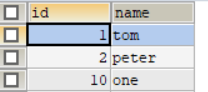
结果
抽取配置文件
配置文件代码:
jdbc.driver=com.mysql.jdbc.Driver

jdbc.url=jdbc:mysql://localhost:3309/one

jdbc.name=root

jdbc.password=1234
测试函数操作
@Test

public void test3() throws PropertyVetoException {

    //读取配置文件

    ResourceBundle jdbc = ResourceBundle.getBundle("jdbc");

    //获取连接池

    ComboPooledDataSource comboPooledDataSource = new ComboPooledDataSource();

    //设置参数

    comboPooledDataSource.setDriverClass(jdbc.getString("jdbc.driver"));

    comboPooledDataSource.setJdbcUrl(jdbc.getString("jdbc.url"));

    comboPooledDataSource.setUser(jdbc.getString("jdbc.name"));

    comboPooledDataSource.setPassword(jdbc.getString("jdbc.password"));

    //创建jdbcTemplate对象

    JdbcTemplate jdbcTemplate = new JdbcTemplate();

    jdbcTemplate.setDataSource(comboPooledDataSource);

    jdbcTemplate.update("insert into test1 values(?,?)",13,"three");

}
使用spring创建JdbcTemplate对象
将数据源DataSource与JdbcTemplate的创建权交给Spring并在Spring容器内进行依赖注入
配置代码:
<bean id="datasource" class="com.mchange.v2.c3p0.ComboPooledDataSource">

    <property name="driverClass" value="com.mysql.jdbc.Driver"/>

    <property name="jdbcUrl" value="jdbc:mysql://localhost:3309/one"/>

    <property name="user" value="root"/>

    <property name="password" value="1234"/>

</bean>

    <bean id="jdbcTemplate" class="org.springframework.jdbc.core.JdbcTemplate">

        <property name="dataSource" ref="datasource"/>

    </bean>
测试函数
@Test

    public void test2(){

    ClassPathXmlApplicationContext classPathXmlApplicationContext =

            new ClassPathXmlApplicationContext("applicationContext.xml");

    JdbcTemplate jdbcTemplate =(JdbcTemplate) classPathXmlApplicationContext.getBean("jdbcTemplate");

    jdbcTemplate.update("insert into test1 values(?,?)",11,"two");

}
结果
成功插入

这个也可以使用读取配置文件的方式
我们首先要导入context的约束路径与命名空间
命名空间: xmlns:context="http://www.springframework.org/schema/context"
约束路径:http://www.springframework.org/schema/context http://www.springframework.org/schema/context/spring-context.xsd
配置文件修改
<?xml version="1.0" encoding="UTF-8"?>

<beans xmlns="http://www.springframework.org/schema/beans"

       xmlns:context="http://www.springframework.org/schema/context"

       xmlns:xsi="http://www.w3.org/2001/XMLSchema-instance"

       xsi:schemaLocation="http://www.springframework.org/schema/beans http://www.springframework.org/schema/beans/spring-beans.xsd

http://www.springframework.org/schema/context http://www.springframework.org/schema/context/spring-context.xsd">

<bean id="datasource" class="com.mchange.v2.c3p0.ComboPooledDataSource">

    <property name="driverClass" value="${jdbc.driver}"/>

    <property name="jdbcUrl" value="${jdbc.url}"/>

    <property name="user" value="${jdbc.name}"/>

    <property name="password" value="${jdbc.password}"/>

</bean>

    <bean id="jdbcTemplate" class="org.springframework.jdbc.core.JdbcTemplate">

        <property name="dataSource" ref="datasource"/>

    </bean>

   <context:property-placeholder location="classpath:jdbc.properties"/>

</beans>
测试代码
 @Test

    public void test4(){

        ClassPathXmlApplicationContext classPathXmlApplicationContext =

                new ClassPathXmlApplicationContext("applicationContext.xml");

        JdbcTemplate jdbcTemplate =(JdbcTemplate) classPathXmlApplicationContext.getBean("jdbcTemplate");

        jdbcTemplate.update("insert into test1 values(?,?)",100,"pjh");

    }
结果
成功插入

通过注解的方式来得到JdbcTemplate
使用框架
@RunWith(SpringJUnit4ClassRunner.class)

@ContextConfiguration("classpath:applicationContext.xml")

public class test {

@Autowired

private  JdbcTemplate jdbcTemplate;

    @Test

    public void test7(){

        jdbcTemplate.update("insert into test1 values(?,?)",110,"GGB");

    }
不使用框架
public void test1() throws PropertyVetoException {

    ComboPooledDataSource comboPooledDataSource = new ComboPooledDataSource();

    comboPooledDataSource.setDriverClass("com.mysql.jdbc.Driver");

    comboPooledDataSource.setJdbcUrl("jdbc:mysql://localhost:3309/one");

    comboPooledDataSource.setUser("root");

    comboPooledDataSource.setPassword("1234");

    //创建jdbcTemplate对象

    JdbcTemplate jdbcTemplate = new JdbcTemplate();

    jdbcTemplate.setDataSource(comboPooledDataSource);

    //执行语句

    jdbcTemplate.update("insert into test1 values(?,?)",10,"one");

}
由二者对比即可看出框架的巨大好处,上面那么长的代码现在只要几行即可解决

JDBCTemplate的常用操作
查询语句
查询数据库中的所有内容
@RunWith(SpringJUnit4ClassRunner.class)

@ContextConfiguration("classpath:applicationContext.xml")

public class test {

@Autowired

private  JdbcTemplate jdbcTemplate;

   @Test

public void test8(){

    String sql="select * from test1 where name=?";

    List<user> query = jdbcTemplate.query(sql, new BeanPropertyRowMapper<user>(user.class));

    for (user user : query) {

        System.out.println(user);

    }

}
结果

查询数据库中的某条内容
@RunWith(SpringJUnit4ClassRunner.class)

@ContextConfiguration("classpath:applicationContext.xml")

public class test {

@Autowired

private  JdbcTemplate jdbcTemplate;

   @Test

 @Test

    public void test9(){

        String sql="select * from test1 where id=?";

        List<user> query = jdbcTemplate.query(sql, new BeanPropertyRowMapper<user>(user.class), 10);

        for (user user : query) {

            System.out.println(user);

        }

    }

}
查询数据库记录的数量
@RunWith(SpringJUnit4ClassRunner.class)

@ContextConfiguration("classpath:applicationContext.xml")

public class test {

@Autowired

private  JdbcTemplate jdbcTemplate;

@Test

public void test90(){

    String sql="select count(*) from test1";

    Long aLong = jdbcTemplate.queryForObject(sql, Long.class);

    System.out.println("记录条数:"+aLong);

}

}
删除指定记录
@RunWith(SpringJUnit4ClassRunner.class)

@ContextConfiguration("classpath:applicationContext.xml")

public class test {

@Autowired

private  JdbcTemplate jdbcTemplate;

@Test

public void test11(){

    String sql="delete from test1 where id=11";

    jdbcTemplate.update(sql);

}

}
以上就是Spring jdbc操作的一些知识,我会不断的学习,也会不断更新我的学习文章,主要有java和数据结构两个方面,有想要一起学习的伙伴可以私信或则关注我,共勉

Spring 系列之jdbcTemplate的使用的更多相关文章
- Spring Boot2 系列教程(二十)Spring Boot 整合JdbcTemplate 多数据源
多数据源配置也算是一个常见的开发需求,Spring 和 SpringBoot 中,对此都有相应的解决方案,不过一般来说,如果有多数据源的需求,我还是建议首选分布式数据库中间件 MyCat 去解决相关问 ...
- Spring Boot2 系列教程(十九)Spring Boot 整合 JdbcTemplate
在 Java 领域,数据持久化有几个常见的方案,有 Spring 自带的 JdbcTemplate .有 MyBatis,还有 JPA,在这些方案中,最简单的就是 Spring 自带的 JdbcTem ...
- Spring系列
Spring系列之访问数据库 阅读目录 一.概述 二.JDBC API的最佳实践 三.Spring对ORM的集成 回到顶部 一.概述 Spring的数据访问层是以统一的数据访问异常层体系为核心,结 ...
- Spring系列(六):Spring事务源码解析
一.事务概述 1.1 什么是事务 事务是一组原子性的SQL查询,或者说是一个独立的工作单元.要么全部执行,要么全部不执行. 1.2 事务的特性(ACID) ①原子性(atomicity) 一个事务必须 ...
- Spring系列之初识Spring Spring概述
初始Spring 啥是Spring? 下面这个就是Spring Spring当然不是上面那个Spring,Spring之所以命名为Spring是因为这个开源的轻量级的开源框架的出现给软件行业带来了春天 ...
- Spring系列之事务的控制 注解实现+xml实现+事务的隔离等级
Spring系列之事务的控制 注解实现+xml实现 在前面我写过一篇关于事务的文章,大家可以先去看看那一篇再看这一篇,学习起来会更加得心应手 链接:https://blog.csdn.net/pjh8 ...
- Spring系列之JDBC对不同数据库异常如何抽象的?
前言 使用Spring-Jdbc的情况下,在有些场景中,我们需要根据数据库报的异常类型的不同,来编写我们的业务代码.比如说,我们有这样一段逻辑,如果我们新插入的记录,存在唯一约束冲突,就会返回给客户端 ...
- Spring 系列: Spring 框架简介 -7个部分
Spring 系列: Spring 框架简介 Spring AOP 和 IOC 容器入门 在这由三部分组成的介绍 Spring 框架的系列文章的第一期中,将开始学习如何用 Spring 技术构建轻量级 ...
- Spring 系列: Spring 框架简介
Spring AOP 和 IOC 容器入门(转载) 在这由三部分组成的介绍 Spring 框架的系列文章的第一期中,将开始学习如何用 Spring 技术构建轻量级的.强壮的 J2EE 应用程序.dev ...
随机推荐
- Java多线程_生产者消费者模式2
在我的上一条博客中,已经介绍到了多线程的经典案列——生产者消费者模式,但是在上篇中用的是传统的麻烦的非阻塞队列实现的.在这篇博客中我将介绍另一种方式就是:用阻塞队列完成生产者消费者模式,可以使用多种阻 ...
- 曹工改bug:cpu狂飙,old gc频繁,线程神秘死亡连环案件调查报告
曹工改bug:cpu狂飙,old gc频繁,线程神秘死亡连环案件调查报告 前言 前两天,访问开发环境上一个java服务,发现一直转圈圈,因为我开着fiddler,可以看到的现象是,接口一直没返回:本来 ...
- Trie详解
Trie,又名字典树.单词查找树,可以较高效地实现统计.排序和保存大量的字符串. 顾名思义,Trie是一个树状的结构,按照树型结构来存储字符串,显然是一种以空间换时间的方法.整体上理解和实现都不会很难 ...
- 华为手机logcat中不显示log.e以下级别日志的解决方法
(1) 进入拨号界面输入:*#*#2846579#*#* (2) 进入“后台设置” ——>“LOG设置” (3) 点击选择“AP日志” (4) 部分手机可能需要重启.
- Unity3D中可重载虚函数的总结
重载虚函数:Unity3D中所有控制脚本的基类MonoBehaviour有一些虚函数用于绘制中事件的回调,也可以直接理解为事件函数,例如大家都很清楚的Start,Update等函数,以下做个总结. A ...
- 使用easyexcel时遇到Could not initialize class net.sf.cglib.beans.BeanMap$Generator
可以访问 这里 查看更多关于大数据平台建设的原创文章. 上一篇文章 Maven项目为什么会产生NoClassDefFoundError的jar包冲突 结合了大量的图解,详细介绍了Maven项目产生ja ...
- Java 与 Mysql连接,并分页显示
这是我第一个上规模的Java项目,我们必须在一周内完成的作业,零基础学习Java,网上收集了很多资料,逐渐对面向对象的思想有所了解,但还是半灌水,后期打算结合项目系统地学习一遍Java.老师布置的任务 ...
- [MRCTF]Web WriteUp
和武科大WUSTCTF同时打的一场比赛,最后因为精力放在武科大比赛上了,排名13 - -Web题目难度跨度过大,分不清层次,感觉Web题目分布不是很好,质量还是不错的 Ez_bypass 进入题目得 ...
- vueRooter的总结
这一周学习了Vue的脚手架的结构,最重要的router 该进行总结和回忆了. 1首先是router的安装,用npm命令npm install vue-router --save 2装完后,在main. ...
- NutUI 视频组件开发心得
引子 说到在项目中引入一个视频,我们肯定会想到 HTML5 为我们提供的 Video 标签,它为我们提供了许多属性和方法,使用起来很方便,当然直接使用也会遇到各种兼容问题,在最初学习 Video 标签 ...