
C# NOPI 项目实战(经典)(可下载项目源码)
1 -.首先说明下项目目的:
之前我有写过一篇 "NPOI操作EXCEL"
这篇文章主要介绍了如何安装NPOI,以及NPOI具体如何使用,并且用具体实例介绍了excel导入到datagridview以及 datagridview如何导出到excel并保存。如果不清楚这块的去我公众号去搜索这篇文章阅读。
今天这篇文章主要是实现多个excel多张表格的合并,这个是我们数据处理时候经常使用的一个功能,其实最佳的途径是用excel自带的power query(excel2016自带,excel2016以下版本需要安装插件),用这个功能你甚至不需要写一句代码,就可以轻轻松松实现百万计甚至千万级数据操作,当然你也可以用excel里面的vba,这些都可以,但是这不是今天要将的内容,今天的内容就是要用C# 实现数据表格的合并。
2. 源码:
npoi.cs
using System;
using System.Collections.Generic;
using NPOI.HSSF.UserModel;
using NPOI.SS.UserModel;
using NPOI.XSSF.UserModel;
using System.Data;
using System.IO; namespace npoi1
{
public class NPOIExcel
{
/// <summary>
/// 将excel导入到datatable
/// </summary>
/// <param name="filePath">excel路径</param>
/// <param name="isColumnName">第一行是否是列名</param>
/// <returns>返回datatable</returns>
public static DataTable ExcelToDataTable(string filePath, bool isColumnName)
{
DataTable dataTable = null;
FileStream fs = null;
DataColumn column = null;
DataRow dataRow = null;
IWorkbook workbook = null;
ISheet sheet = null;
IRow row = null;
ICell cell = null;
int startRow = 0;
try
{
using (fs = File.OpenRead(filePath))
{
// 2007版本
if (filePath.IndexOf(".xlsx") > 0)
workbook = new XSSFWorkbook(fs);
// 2003版本
else if (filePath.IndexOf(".xls") > 0)
workbook = new HSSFWorkbook(fs); if (workbook != null)
{
sheet = workbook.GetSheetAt(0);//读取第一个sheet,当然也可以循环读取每个sheet
dataTable = new DataTable();
if (sheet != null)
{
int rowCount = sheet.LastRowNum;//总行数
if (rowCount > 0)
{
IRow firstRow = sheet.GetRow(0);//第一行
int cellCount = firstRow.LastCellNum;//列数 //构建datatable的列
if (isColumnName)
{
startRow = 1;//如果第一行是列名,则从第二行开始读取
for (int i = firstRow.FirstCellNum; i < cellCount; ++i)
{
cell = firstRow.GetCell(i);
if (cell != null)
{
if (cell.StringCellValue != null)
{
column = new DataColumn(cell.StringCellValue);
dataTable.Columns.Add(column);
}
}
}
}
else
{
for (int i = firstRow.FirstCellNum; i < cellCount; ++i)
{
column = new DataColumn("column" + (i + 1));
dataTable.Columns.Add(column);
}
} //填充行
for (int i = startRow; i <= rowCount; ++i)
{
row = sheet.GetRow(i);
if (row == null) continue; dataRow = dataTable.NewRow();
for (int j = row.FirstCellNum; j < cellCount; ++j)
{
cell = row.GetCell(j);
if (cell == null)
{
dataRow[j] = "";
}
else
{
//CellType(Unknown = -1,Numeric = 0,String = 1,Formula = 2,Blank = 3,Boolean = 4,Error = 5,)
switch (cell.CellType)
{
case CellType.Blank:
dataRow[j] = "";
break;
case CellType.Numeric:
short format = cell.CellStyle.DataFormat;
//对时间格式(2015.12.5、2015/12/5、2015-12-5等)的处理
if (format == 14 || format == 31 || format == 57 || format == 58)
dataRow[j] = cell.DateCellValue;
else
dataRow[j] = cell.NumericCellValue;
break;
case CellType.String:
dataRow[j] = cell.StringCellValue;
break;
}
}
}
dataTable.Rows.Add(dataRow);
}
}
}
}
}
return dataTable;
}
catch (Exception)
{
if (fs != null)
{
fs.Close();
}
return null;
}
} /// <summary>
/// 写入excel
/// </summary>
/// <param name="dt">datatable</param>
/// <param name="strFile">strFile</param>
/// <returns></returns>
public static bool DataTableToExcel(DataTable dt, string strFile)
{
bool result = false;
IWorkbook workbook = null;
FileStream fs = null;
IRow row = null;
ISheet sheet = null;
ICell cell = null;
try
{
if (dt != null && dt.Rows.Count > 0)
{
workbook = new XSSFWorkbook();//HSSFWorkbook:是操作Excel2003以前(包括2003)的版本,扩展名是.xls XSSFWorkbook:是操作Excel2007的版本,扩展名是.xlsx
sheet = workbook.CreateSheet("Sheet0");//创建一个名称为Sheet0的表
int rowCount = dt.Rows.Count;//行数
int columnCount = dt.Columns.Count;//列数 //设置列头
row = sheet.CreateRow(0);//excel第一行设为列头
for (int c = 0; c < columnCount; c++)
{
cell = row.CreateCell(c);
cell.SetCellValue(dt.Columns[c].ColumnName);
} //设置每行每列的单元格,
for (int i = 0; i < rowCount; i++)
{
row = sheet.CreateRow(i + 1);
for (int j = 0; j < columnCount; j++)
{
cell = row.CreateCell(j);//excel第二行开始写入数据
cell.SetCellValue(dt.Rows[i][j].ToString());
}
}
using (fs = File.OpenWrite(strFile))
{
workbook.Write(fs);//向打开的这个xls文件中写入数据
result = true;
}
}
return result;
}
catch (Exception ex)
{
if (fs != null)
{
fs.Close();
}
Console.WriteLine(ex.StackTrace + ex.Message);
return false;
}
} /// <summary>
/// Excel导入成Datable
/// </summary>
/// <param name="file">导入路径(包含文件名与扩展名)</param>
/// <returns></returns>
public static DataTable ExcelToTable(string file ,int nSheet)
{
DataTable dt = new DataTable();
IWorkbook workbook;
string fileExt = Path.GetExtension(file).ToLower();
using (FileStream fs = new FileStream(file, FileMode.Open, FileAccess.Read))
{
//XSSFWorkbook 适用XLSX格式,HSSFWorkbook 适用XLS格式
if (fileExt == ".xlsx") { workbook = new XSSFWorkbook(fs); } else if (fileExt == ".xls") { workbook = new HSSFWorkbook(fs); } else { workbook = null; }
if (workbook == null) { return null; }
ISheet sheet = null;
if (nSheet < workbook.NumberOfSheets) //为了不让获取超过表格数量最大索引导致报错
sheet = workbook.GetSheetAt(nSheet);
else
{ return null; } //表头
IRow header = sheet.GetRow(sheet.FirstRowNum);
List<int> columns = new List<int>();
for (int i = 0; i < header.LastCellNum; i++)
{
object obj = GetValueType(header.GetCell(i));
if (obj == null || obj.ToString() == string.Empty)
{
dt.Columns.Add(new DataColumn("Columns" + i.ToString()));
}
else
dt.Columns.Add(new DataColumn(obj.ToString()));
columns.Add(i);
}
//数据
for (int i = sheet.FirstRowNum + 1; i <= sheet.LastRowNum; i++)
{
DataRow dr = dt.NewRow();
bool hasValue = false;
foreach (int j in columns)
{
dr[j] = GetValueType(sheet.GetRow(i).GetCell(j));
if (dr[j] != null && dr[j].ToString() != string.Empty)
{
hasValue = true;
}
}
if (hasValue)
{
dt.Rows.Add(dr);
}
}
}
return dt;
} /// <summary>
/// Datable导出成Excel
/// </summary>
/// <param name="dt"></param>
/// <param name="file">导出路径(包括文件名与扩展名)</param>
public static void TableToExcel(DataTable[] dt, string file , int nSheet)
{
IWorkbook workbook;
string fileExt = Path.GetExtension(file).ToLower();
if (fileExt == ".xlsx") { workbook = new XSSFWorkbook(); } else if (fileExt == ".xls") { workbook = new HSSFWorkbook(); } else { workbook = null; }
if (workbook == null) { return; }
ISheet[] sheet = new ISheet[nSheet];
for (int k = 0; k < nSheet; k++)
{
if (dt[k] != null)
{
sheet[k] = string.IsNullOrEmpty(dt[k].TableName) ? workbook.CreateSheet("Sheet" + (k + 1).ToString()) : workbook.CreateSheet(dt[k].TableName); //表头
IRow row = sheet[k].CreateRow(0);
for (int i = 0; i < dt[k].Columns.Count; i++)
{
ICell cell = row.CreateCell(i);
cell.SetCellValue(dt[k].Columns[i].ColumnName);
} //数据
for (int i = 0; i < dt[k].Rows.Count; i++)
{
IRow row1 = sheet[k].CreateRow(i + 1);
for (int j = 0; j < dt[k].Columns.Count; j++)
{
ICell cell = row1.CreateCell(j);
cell.SetCellValue(dt[k].Rows[i][j].ToString());
}
}
}
else
continue;
} //转为字节数组
MemoryStream stream = new MemoryStream();
workbook.Write(stream);
var buf = stream.ToArray(); //保存为Excel文件
using (FileStream fs = new FileStream(file, FileMode.Create, FileAccess.Write))
{
fs.Write(buf, 0, buf.Length);
fs.Flush();
}
} /// <summary>
/// 获取单元格类型
/// </summary>
/// <param name="cell"></param>
/// <returns></returns>
private static object GetValueType(ICell cell)
{
if (cell == null)
return null;
switch (cell.CellType)
{
case CellType.Blank: //BLANK:
return null;
case CellType.Boolean: //BOOLEAN:
return cell.BooleanCellValue;
case CellType.Numeric: //NUMERIC:
return cell.NumericCellValue;
case CellType.String: //STRING:
return cell.StringCellValue;
case CellType.Error: //ERROR:
return cell.ErrorCellValue;
case CellType.Formula: //FORMULA:
default:
return "=" + cell.CellFormula; }
} } }
mainForm.cs
using NPOI.SS.UserModel;

using System;

using System.Data;

using System.Diagnostics;

using System.IO;

using System.Windows.Forms;

namespace npoi1

{

    public partial class mainForm : Form

    {

        public mainForm()

        {

            InitializeComponent();

        }

        private void Form1_Load(object sender, EventArgs e)

        {

        }

        public static int sheetCount=5;//定义表的最大数量

        DataTable[] lastTable = new DataTable[sheetCount];

        private void button1_Click(object sender, EventArgs e)

        {

            Stopwatch sw = new Stopwatch();

            sw.Start();

            //dataGridView1.DataSource = NPOIExcel.ExcelToDataTable("电脑统计表.xlsx", true);//方式1

            DataTable[] tempTable = new DataTable[sheetCount];

            DirectoryInfo dir = new DirectoryInfo(@"C:\Users\TPS20\Desktop\excel\");

            for (int i = 0; i < sheetCount; i++) //遍历一个excel的每个sheet

            {

                bool flag = true;

                foreach (FileInfo dChild in dir.GetFiles("*.xlsx"))//遍历文件夹下的xlsx文件

                {

                    tempTable[i] =  NPOIExcel.ExcelToTable(dChild.FullName, i);//方式2

                    if (flag && lastTable[i] == null&& tempTable[i] != null) //第一次直接赋值,使得lastTable[i]获取表结构不为null

                    {

                        lastTable[i] = tempTable[i];

                        flag = false;

                    }

                    if (tempTable[i]!=null)

                    GetAllDataTable(tempTable[i] , i);//DataTable合并

                }

            }

            NPOIExcel.TableToExcel(lastTable, @"C:\Users\TPS20\Desktop\excel\1\111.xlsx", sheetCount);//方式2

            dataGridView1.DataSource = lastTable[0];//调试时候显示用的,可以去掉

            dataGridView2.DataSource = lastTable[1];//调试时候显示用的,可以去掉

            dataGridView3.DataSource = lastTable[2];//调试时候显示用的,可以去掉

            sw.Stop();

            label1.Text = sw.ElapsedMilliseconds.ToString("数据导入耗时:" + "0000"+"ms");

            MessageBox.Show("数据导入完成");

        }

        public void GetAllDataTable(DataTable dt,int nSheet)

        {

            if(lastTable[nSheet]!=null)

            lastTable[nSheet].Merge(dt, false, MissingSchemaAction.AddWithKey);

        }

        private void dataGridView1_RowsAdded(object sender, DataGridViewRowsAddedEventArgs e)

        {

            for (int i = 0; i < dataGridView1.Rows.Count; i++)

                this.dataGridView1.Rows[i].HeaderCell.Value = (i + 1).ToString();

        }

        private void button2_Click(object sender, EventArgs e)

        {

            //Stopwatch sw = new Stopwatch();

            //sw.Start();

            //DataTable dt = (dataGridView1.DataSource as DataTable);

            ////NPOIExcel.DataTableToExcel(dt, "d:\\111.xlsx");//方式1

            //NPOIExcel.TableToExcel(dt, "d:\\111.xlsx",0);//方式2

            //sw.Stop();

            //label2.Text = sw.ElapsedMilliseconds.ToString("数据导出耗时:" + "0000" + "ms");

            //MessageBox.Show("数据导出完成");

        }

    }

}
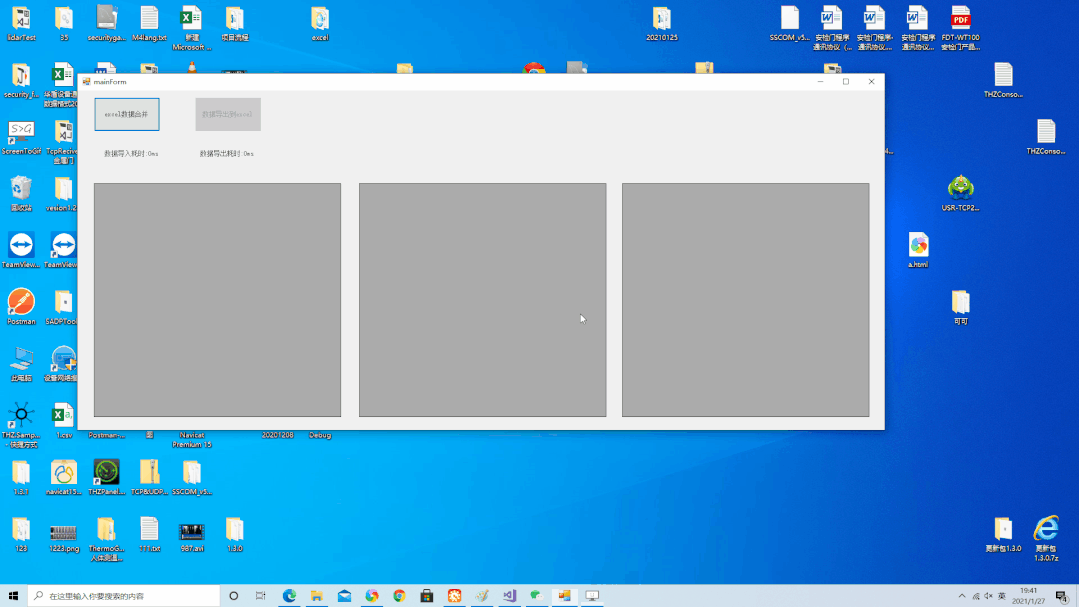
3. 运行效果
4.源码百度网盘下载地址:
链接:https://pan.baidu.com/s/1L0rv_CM0N4FTZ-fpwS-YXA
提取码:cjj8
想了解更多C#知识,请扫描下方公众号二维码

需加微信交流群的,请加小编微信号z438679770,切记备注 加群,小编将会第一时间邀请你进群!
C# NOPI 项目实战(经典)(可下载项目源码)的更多相关文章
- svn工具安装下载Tomcat源码以及导入eclipse
安装 1.svn下载地址 https://tortoisesvn.net/downloads.html 2.语言包下载 3.先安装svn,在直接安装语言包 4.桌面右键可以看到相关svn信息 下载To ...
- ActiveMQ学习系列(三)----下载github源码并编译
前记:坚持使用官网的资源去学习是挺痛苦的一个过程,昨天瞎溜达了一天,也没看到有系统性的学习文章,倒是发现了github上的ActiveMq项目. 地址:https://github.com/apach ...
- spring源码系列(一)sring源码编译 spring源码下载 spring源码阅读
想对spring框架进行深入的学习一下,看看源代码,提升和沉淀下自己,工欲善其事必先利其器,还是先搭建环境吧. 环境搭建 sping源码之前是svn管理,现在已经迁移到了github中了,新版本基于g ...
- Scala实战高手****第4课:零基础彻底实战Scala控制结构及Spark源码解析
1.环境搭建 基础环境配置 jdk+idea+maven+scala2.11.以上工具安装配置此处不再赘述. 2.源码导入 官网下载spark源码后解压到合适的项目目录下,打开idea,File-&g ...
- 《Android NFC 开发实战详解 》简介+源码+样章+勘误ING
<Android NFC 开发实战详解>简介+源码+样章+勘误ING SkySeraph Mar. 14th 2014 Email:skyseraph00@163.com 更多精彩请直接 ...
- 【转】Linux CentOS内核编译:下载CentOS源码、编译2.6.32-220的错误(apic.c:819 error 'numi_watchdog' undeclared)
一.下载CentOS源码 1.1 查看CentOS版本 cat /etc/issue 1.2 查看Linux内核版本 uname -r 1.3 下载 文件名:kernel-2.6.32-220.el6 ...
- 【Linux/Ubuntu学习6】unbuntu 下载android源码
在Windows下安装Cygwin,通过Cygwin也可在Windows里通过本文的下载步骤下载Android源码. 以下为在Ubuntu下下载Google Android4.4源码的步骤: 1. 安 ...
- [转]如何下载tizen源码(图文教程)?
http://blog.csdn.net/flydream0/article/details/8996654 当前tizen发布的最新源码版本是2.1,本文将以图文教程讲述如何下载tizen源码,关于 ...
- 转:用 git 下载 uboot 源码
1. 起因: 想下载 uboot 源码,原先的方法都是下载压缩包,然后放到虚拟机上的 Ubuntu ,再解压. 在看 uboot 源码的时候,发现 v2016.01 版本的uboot中关于 board ...
随机推荐
- Spring Cloud与Docker——微服务架构概述
Spring Cloud与Docker--微服务架构概述 单体应用架构概述 微服务概述 微服务的特性 微服务架构的优点 微服务面临的挑战 微服务的设计原则 单体应用架构概述 传统的服务发布都是采用单体 ...
- 使用Selenium截取网页上的图片
前言 同样是为了刷课,没想到工作后依然和大学一样逃脱不了需要刷网课的命运-- 正文 直接说干货了,截取图片,需要截取的图片是什么图片大家都懂(说的就是你,验证码),其他图片的话不需要截取,直接拿到地址 ...
- DEDECMS:解决无法上传图片(在后台插入图片时提示类型不允许)
在include/uploadsafe.inc.php里把 $imtypes = array ( "image/pjpeg", "image/jpeg", &q ...
- 【机制】js的闭包、执行上下文、作用域链
1.从闭包说起 什么是闭包 一个函数和对其周围状态(词法环境)的引用捆绑在一起,这样的组合就是闭包. 也就是说,闭包让你可以在一个内层函数中访问到其外层函数的作用域. 在 JavaScript 中,每 ...
- Java排序算法(三)直接插入排序
一.测试类SortTest import java.util.Arrays; public class SortTest { private static final int L = 20; publ ...
- C - 小希的迷宫
上次Gardon的迷宫城堡小希玩了很久(见Problem B),现在她也想设计一个迷宫让Gardon来走.但是她设计迷宫的思路不一样,首先她认为所有的通道都应该是双向连通的,就是说如果有一个通道连通了 ...
- 【uva 658】It's not a Bug, it's a Feature!(图论--Dijkstra或spfa算法+二进制表示+类“隐式图搜索”)
题意:有N个潜在的bug和m个补丁,每个补丁用长为N的字符串表示.首先输入bug数目以及补丁数目.然后就是对M个补丁的描述,共有M行.每行首先是一个整数,表明打该补丁所需要的时间.然后是两个字符串,第 ...
- Light Bulb ZOJ - 3203 三分
三分: 和二分非常类似的一个算法,与二分不同的是 二分是单调的,而三分是一个先增后减或者先减后增 三分可以求出峰值. 注意三分一定是严格单调的,不能有相等的情况. 讲个例题: 题目 题意: 一个人发现 ...
- 笔记-EF Core 并发冲突与令牌
并发标记并发分悲观并发和乐观并发.悲观并发:比如有两个用户A,B,同时登录系统修改一个文档,如果A先进入修改,则系统会把该文档 锁住,B就没办法打开了,只有等A修改完,完全退出的时候B才能进入修改.乐 ...
- httprunner(11)运行测试报告
前言 受益于pytest的集成,HttpRunner v3.x可以使用pytest所有插件,包括pytest-html和allure-pytest,也可以实现这2种方式的报告 内置html报告 pyt ...