
Shiro - 关于Realm
之前在Authentication和Authorization中也提到Realm。
无论是身份验证还是权限验证,无论数据以什么方式存在,我们都需要访问一些数据并将其转换为Shiro可以识别的格式。
通常一个数据源对应一个Realm。因此,实现一个Realm时会用到该数据源相关的API。
通常一个数据源中会同时保存身份相关数据与权限相关数据。因此,一个Realm实现类可以进行认证和授权两种操作。
可以将Realm简单地理解为DAO。
(虽然IDEA生成的type hirarchy diagram很漂亮,但是太大了...还是用回eclipse截图..)
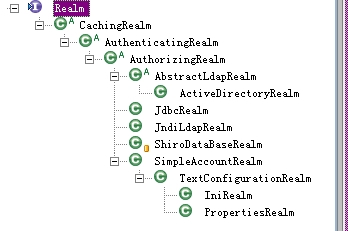
如果使用.ini配置,我们可以在[main]部分定义N个Realm,但我们可以用显式(explicit)和隐式(implicit)两种方式为securityManager指定Realm(有点IOC容器的意思)。
显示指定就是常见的方式,即定义Realm后再为securityManager按需要的顺序指定Realm。
fooRealm = com.company.foo.Realm

barRealm = com.company.another.Realm

bazRealm = com.company.baz.Realm

securityManager.realms = $fooRealm, $barRealm, $bazRealm
显示指定的方式相对较为明确,即使不改变Realm的定义,我们仍可以让验证和授权按我们给securityManager指定的顺序的Realm来执行。
如果因为某些原因(可能是定义的Realm太多?)不想为securityManager.realms指定,我们也可以使用隐式方式。
也就是说,把上面的配置改成如下形式就是隐式方式了:
blahRealm = com.company.blah.Realm

fooRealm = com.company.foo.Realm

barRealm = com.company.another.Realm
隐式方式其实就是不指定,只定义(define),Shiro会搜索配置中所有的Realm并将它们一一指定给securityManager。
使用隐式方式时只要稍微改一下Realm的定义,Shiro就可能会给我们来个惊喜。
在介绍Authentication的文章中,说的是当一个验证请求出现时Shiro框架的工作流程。
在这里具体记录一下Realm负责的工作(虽然说securiyManager验证开始的地方,但从数据源取数据并作比较的工作是由Realm来进行的)。
以ModularRealmAuthenticator为例:
   protected AuthenticationInfo doMultiRealmAuthentication(Collection<Realm> realms, AuthenticationToken token) {

        AuthenticationStrategy strategy = getAuthenticationStrategy();

        AuthenticationInfo aggregate = strategy.beforeAllAttempts(realms, token);

        if (log.isTraceEnabled()) {

            log.trace("Iterating through {} realms for PAM authentication", realms.size());

        }

        for (Realm realm : realms) {

            aggregate = strategy.beforeAttempt(realm, token, aggregate);

            if (realm.supports(token)) {

                log.trace("Attempting to authenticate token [{}] using realm [{}]", token, realm);

                AuthenticationInfo info = null;

                Throwable t = null;

                try {

                    info = realm.getAuthenticationInfo(token);

                } catch (Throwable throwable) {

                    t = throwable;

                    if (log.isDebugEnabled()) {

                        String msg = "Realm [" + realm + "] threw an exception during a multi-realm authentication attempt:";

                        log.debug(msg, t);

                    }

                }

                aggregate = strategy.afterAttempt(realm, token, info, aggregate, t);

            } else {

                log.debug("Realm [{}] does not support token {}.  Skipping realm.", realm, token);

            }

        }

        aggregate = strategy.afterAllAttempts(token, aggregate);

        return aggregate;

    }
在Realm开始处理验证的逻辑之前,Authenticator将调用Realm的supports方法去验证当前Realm是否支持获得的AuthenticationToken。
通常,Realm检查的是token的类型,比如在AuthenticatingRealm中检查类型是否相同。
public boolean supports(AuthenticationToken token) {

    return token != null && getAuthenticationTokenClass().isAssignableFrom(token.getClass());

}
另外,AuthenticatingRealm的constructor中类型默认为
authenticationTokenClass = UsernamePasswordToken.class;
如果当前Realm支持提交过来的token,authenticator则调用getAuthenticationInfo(token)方法。
以AuthenticatingRealm为例(注意是final):
public final AuthenticationInfo getAuthenticationInfo(AuthenticationToken token) throws AuthenticationException {

    AuthenticationInfo info = getCachedAuthenticationInfo(token);

    if (info == null) {

        //otherwise not cached, perform the lookup:

        info = doGetAuthenticationInfo(token);

        log.debug("Looked up AuthenticationInfo [{}] from doGetAuthenticationInfo", info);

        if (token != null && info != null) {

            cacheAuthenticationInfoIfPossible(token, info);

        }

    } else {

        log.debug("Using cached authentication info [{}] to perform credentials matching.", info);

    }

    if (info != null) {

        assertCredentialsMatch(token, info);

    } else {

        log.debug("No AuthenticationInfo found for submitted AuthenticationToken [{}].  Returning null.", token);

    }

    return info;

}
如果可以从缓存中获得验证信息,下一步则检查密码是否匹配,即assertCredentialsMatch(token, info)。
如果缓存中不存在验证信息则调用以下方法。
protected abstract AuthenticationInfo doGetAuthenticationInfo(AuthenticationToken token) throws AuthenticationException;
这里我们暂时先不考虑缓存的情况,考虑doGetAuthenticationInfo应该做什么。
有些人(比如我)直接在该方法中完成也验证,验证通过时返回SimpleAuthenticationInfo实例,失败则抛出相应的验证异常。
但下面有个assertCredentialsMatch,说明doGetAuthenticationInfo本没有打算这样用,这种使用方式会让CredentialMatcher失去意义。
参考JdbcRealm的实现,只是根据身份(用户名)去查询并返回SimpleAuthenticationInfo实例。
然后让assertCredentialsMatch比较token和authenticationInfo。
protected void assertCredentialsMatch(AuthenticationToken token, AuthenticationInfo info) throws AuthenticationException {

    CredentialsMatcher cm = getCredentialsMatcher();

    if (cm != null) {

        if (!cm.doCredentialsMatch(token, info)) {

            //not successful - throw an exception to indicate this:

            String msg = "Submitted credentials for token [" + token + "] did not match the expected credentials.";

            throw new IncorrectCredentialsException(msg);

        }

    } else {

        throw new AuthenticationException("A CredentialsMatcher must be configured in order to verify " +

                "credentials during authentication.  If you do not wish for credentials to be examined, you " +

                "can configure an " + AllowAllCredentialsMatcher.class.getName() + " instance.");

    }

}
既然提到了CredentialMatcher,我们来看看他的意义所在。 首先说明,AuthenticatingRealm的默认CredentialMatcher是...
public AuthenticatingRealm() {

    this(null, new SimpleCredentialsMatcher());

}
如果仅仅是做密码字符比较我们大可不必做出这样一个接口(字符串比较的可插拔+可定制么?)
之前在说Authentication的时候就提过,AuthenticationToken的Principal和Credential可以是任何类型的,光是拿过来直接比较是否相符也不只是比较密码字符那么简单了。
SimpleCredentialsMatcher就是用来比较两个credential是否相同的。
其doCredentialsMatch方法返回其equals方法的返回值。
protected boolean equals(Object tokenCredentials, Object accountCredentials) {

    if (log.isDebugEnabled()) {

        log.debug("Performing credentials equality check for tokenCredentials of type [" +

                tokenCredentials.getClass().getName() + " and accountCredentials of type [" +

                accountCredentials.getClass().getName() + "]");

    }

    if (isByteSource(tokenCredentials) && isByteSource(accountCredentials)) {

        if (log.isDebugEnabled()) {

            log.debug("Both credentials arguments can be easily converted to byte arrays.  Performing " +

                    "array equals comparison");

        }

        byte[] tokenBytes = toBytes(tokenCredentials);

        byte[] accountBytes = toBytes(accountCredentials);

        return Arrays.equals(tokenBytes, accountBytes);

    } else {

        return accountCredentials.equals(tokenCredentials);

    }

}
当然,实现类不只是SimpleCredentialsMatcher...
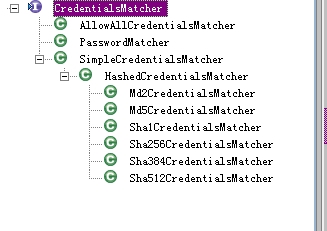
SimpleCredentialsMatcher下还跟着HashedCredentialsMatcher,再往下就都deprecated了。
说到HashedCredentialsMatcher,他只是给密码加个salt以提高安全。
其中hashSalted属性基本不用考虑,因为从Shiro 1.1开始salt是根据SaltedAuthenticationInfo的getCredentialSalt()方法返回的non-null value。
public HashedCredentialsMatcher() {

    this.hashAlgorithm = null;

    this.hashSalted = false;

    this.hashIterations = 1;

    this.storedCredentialsHexEncoded = true; //false means Base64-encoded

}
说到salting就不得不说SaltedAuthenticationInfo,该接口继承AuthenticationInfo,即除了principal和credential,他还有一个credentialsSalt。
public interface SaltedAuthenticationInfo extends AuthenticationInfo {

    /**

     * Returns the salt used to salt the account's credentials or {@code null} if no salt was used.

     *

     * @return the salt used to salt the account's credentials or {@code null} if no salt was used.

     */

    ByteSource getCredentialsSalt();

}
HashedCredentialsMatcher有个默认的salt,是将自己的principal作为salt,后来这个方法也被deprecated了。
因为从1.1开始,Shiro禁止salt从用户的登录信息中获取,而应该从数据源获取。
@Deprecated

protected Object getSalt(AuthenticationToken token) {

    return token.getPrincipal();

}
这一系列方法和属性会从Shiro 2.0开始彻底消失。
Shiro - 关于Realm的更多相关文章
- shiro自定义Realm
1.1 自定义Realm 上边的程序使用的是shiro自带的IniRealm,IniRealm从ini配置文件中读取用户的信息,大部分情况下需要从系统的数据库中读取用户信息,所以需要自定义realm. ...
- Shiro笔记(四)Shiro的realm认证
认证流程: 1.获取当前Subject.调用SecurityUtils.getSubject(); 2.测试当前用户是否已经被认证,即是否已经登录,调用Subject的isAurhenticated( ...
- Shiro中Realm
6.1 Realm [2.5 Realm]及[3.5 Authorizer]部分都已经详细介绍过Realm了,接下来再来看一下一般真实环境下的Realm如何实现. 1.定义实体及关系 即用户-角色 ...
- 自定义shiro的Realm实现和CredentialsMatcher实现以及Token实现
Realm是shiro比较核心的接口,简单说它的实现类就是校验用户输入的账号信息的地方.如果想自定义实现一般的配置文件如下: <!--自定义Realm 继承自AuthorizingRealm - ...
- 权限框架 - shiro 自定义realm
上篇文章中是使用的默认realm来实现的简单登录,这仅仅只是个demo,真正项目中使用肯定是需要连接数据库的 首先创建自定义realm文件,如下: 在shiro中注入自定义realm的完全限定类名: ...
- shiro多Realm第一次调用不生效问题
1. 由于最近自己写的一个项目上用到了多realm的使用,遇到了一个这样的问题: 1. 自己继承了BasicHttpAuthenticationFilter,实现了获取token,然后直接请求api的 ...
- shiro自定义realm支持MD5算法认证(六)
1.1 散列算法 通常需要对密码 进行散列,常用的有md5.sha, 对md5密码,如果知道散列后的值可以通过穷举算法,得到md5密码对应的明文. 建议对md5进行散列时加salt(盐),进行 ...
- shiro自定义realm认证(五)
上一节介绍了realm的作用: realm:需要根据token中的身份信息去查询数据库(入门程序使用ini配置文件),如果查到用户返回认证信息,如果查询不到返回null.token就相当于是对用户输入 ...
- Shiro自定义Realm时用注解的方式注入父类的credentialsMatcher
用Shiro做登录权限控制时,密码加密是自定义的. 数据库的密码通过散列获取,如下,算法为:md5,盐为一个随机数字,散列迭代次数为3次,最终将salt与散列后的密码保存到数据库内,第二次登录时将登录 ...
- shiro双realm验证
假设现在有这样一种需求:存在两张表user和admin,分别记录普通用户和管理员的信息.并且现在要实现普通用户和管理员的分开登录,即需要两个Realm——UserRealm和AdminRealm,分别 ...
随机推荐
- git .gitignore忽略规则不生效解决办法
忽略规则不生效, 原因是.gitignore只能忽略那些原来没有被track的文件, 如果某些文件已经被纳入了版本管理中,则修改.gitignore是无效的. 那么解决方法就是先把本地缓存删除(改变成 ...
- Python的编码详解
一. 编码介绍 计算机只能处理数字(最底层的0和1),如果要处理文本,就必须将文本转换为数字才能处理.最早的计算机在设计时采用8个比特(bit)作为一个字节(byte),所以一个字节能表示的最大整数就 ...
- 2016级算法第二次上机-B.Bamboo的OS实验
Bamboo的OS实验 分析 首先理解题意,要完成不同数量的不同命令,但是完成相同的命令之间必须有n个间隔,为使得时间最短,自然优先用其他命令来填充这n分钟的时间,由于数量少的命令可以用来填充空隙,所 ...
- 九校联考(DL24凉心模拟) 整除(中国剩余定理+原根性质)
题意简述 给定 \(n, m\),求 \(n|x^m - x\) 在满足 \(x \in [1, n]\) 时合法的 \(x\) 的数量.答案模 \(998244353\).单个测试点包含多组数据. ...
- Android Studio Gradle下载的包在哪里?
C:\Users\Administrator\.gradle\caches\modules-2\files-2.1
- C回调函数
转自:https://segmentfault.com/a/1190000008293902?utm_source=tag-newest 在面试的时候被问到什么是回调函数,我是属于会用但不懂概念的那类 ...
- es与hive整合
在hive classpath中添加elasticsearch-hadoop.jar,以下方法任一种均可: 1.启动hiveserver2 前,在hive-site.xml文件中更改hive.aux. ...
- String数据转Matrix矩阵
String数据转Matrix矩阵 private Matrix String_To_Matrix(string str) { int[] Remove_Num = new int[10]; int ...
- 使用express创建node服务器的两种方法及区别
使用express创建node服务器有两种方法,如下所示: 方法一: var express = require('express'); var app = express(); app.listen ...
- oracle dump的使用心得
使用DS开发的时候,有的时候会遇到一个问题:数据库层面定义的空格与DS自已定义的空格概念不一致,导致生成的数据会有一定的问题. 举例来说: 在数据库里面定义CHAR(20),如果插入的字符不足20的时 ...