
Python调用外部程序
通过os.system和subprocess.call()函数调用其他程序
预备知识:cmd中打开和关闭程序
cmd中打开程序
a.打开系统自带程序
系统自带的程序的路径一般都已加入环境变量之中,只需在cmd窗口中直接输入程序名称即可。
以notepad为例,直接在cmd窗口中输入notepad后回车即可打开。
b.打开自己安装且没有加入环境变量的程序
以网易云音乐为例,在cmd窗口中需要输入完整的程序路径 "D:\Program Files (x86)\Netease\CloudMusic\cloudmusic.exe"。
注意,双引号是必须的。
若将网易云音乐的路径加入环境变量之中,则在cmd窗口中输入cloudmusic后回车即可运行。
在cmd中关闭程序
在cmd中关闭程序可以使用taskkill命令,语法如下:
taskkill /f /t /im 进程名
注意,这里只需要程序的进程名即可,而非完整路径名。
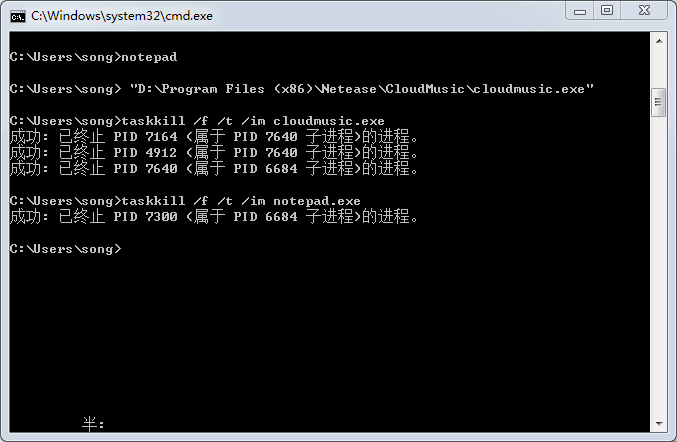
仍以网易云音乐为例,在cmd窗口中输入 taskkill /f /t /im cloudmusic.exe 后回车即可关闭网易云音乐。
如下图所示:
a.os.system方法
os.system(command) 链接 https://docs.python.org/2/library/os.html#os.system
Execute the command (a string) in a subshell. This is implemented by calling the Standard C function system(), and has the same limitations. Changes to sys.stdin, etc. are not reflected in the environment of the executed command.
On Unix, the return value is the exit status of the process encoded in the format specified for wait(). Note that POSIX does not specify the meaning of the return value of the C system() function, so the return value of the Python function is system-dependent.
On Windows, the return value is that returned by the system shell after running command, given by the Windows environment variableCOMSPEC: on command.com systems (Windows 95, 98 and ME) this is always 0; on cmd.exe systems (Windows NT, 2000 and XP) this is the exit status of the command run; on systems using a non-native shell, consult your shell documentation.
The subprocess module provides more powerful facilities for spawning new processes and retrieving their results; using that module is preferable to using this function. See the Replacing Older Functions with the subprocess Module section in the subprocessdocumentation for some helpful recipes.
Availability: Unix, Windows.
os模块中的system()函数可以方便地运行其他程序或者脚本。其函数原型为:
os.system(command)
command 为要执行的命令,近似于Windows下cmd窗口中输入的命令。
如果要向程序或者脚本传递参数,可以使用空格分隔程序及多个参数。
b.用subprocess.call()代替os.system()
17.1.4.3. Replacing os.system()
链接 https://docs.python.org/2/library/subprocess.html#replacing-os-system
1 status = os.system("mycmd" + " myarg")

2 # becomes

3 status = subprocess.call("mycmd" + " myarg", shell=True)
Notes:
- Calling the program through the shell is usually not required.
A more realistic example would look like this:

1 try:

2     retcode = call("mycmd" + " myarg", shell=True)

3     if retcode < 0:

4         print >>sys.stderr, "Child was terminated by signal", -retcode

5     else:

6         print >>sys.stderr, "Child returned", retcode

7 except OSError as e:

8     print >>sys.stderr, "Execution failed:", e
实例演示:
打开记事本:
1 import os

2 os.system('notepad')
或
1 import subprocess

2 subprocess.call('notepad')
我们看以下代码:
1 import os

2 os.system(r'"D:\Program Files (x86)\Netease\CloudMusic\cloudmusic.exe"')
这段代码会启动网易云音乐,效果和我们在cmd窗口中输入 "D:\Program Files (x86)\Netease\CloudMusic\cloudmusic.exe" 效果一样。注意字符串中含有空格,所以有 r''。
而以下代码也可以实现同样的功能:
1 import subprocess

2 subprocess.call("D:\Program Files (x86)\Netease\CloudMusic\cloudmusic.exe")
同上面那段代码的区别只是括号中的 r''。
到目前为止一切正常,我们再看下面的代码,尝试着同时打开两个程序:
1 import os

2 os.system(r'"D:\Program Files (x86)\Netease\CloudMusic\cloudmusic.exe""notepad"')

3 或

4 os.system("D:\Program Files (x86)\Netease\CloudMusic\cloudmusic.exe""notepad")

5 或

6 os.system(""D:\Program Files (x86)\Netease\CloudMusic\cloudmusic.exe""notepad"")
以上尝试都不会成功。
换做subprocess.call()函数也不能实现。
这个问题早在07年就有人提交过,请参考http://bugs.python.org/issue1524
os.system()和subprocess.call()的区别以后补充。
Python调用外部程序的更多相关文章
- Python调用外部程序——os.system()和subprocess.call
通过os.system函数调用其他程序 预备知识:cmd中打开和关闭程序 cmd中打开程序 a.打开系统自带程序 系统自带的程序的路径一般都已加入环境变量之中,只需在cmd窗口中直接输入程序名称即可. ...
- Python调用(运行)外部程序
在Python中可以方便地使用os模块运行其他的脚本或者程序,这样就可以在脚本中直接使用其他脚本,或者程序提供的功能,而不必再次编写实现该功能的代码.为了更好地控制运行的进程,可以使用win32pro ...
- 【转】 Python调用(运行)外部程序
在Python中可以方便地使用os模块运行其他的脚本或者程序,这样就可以在脚本中直接使用其他脚本,或者程序提供的功能,而不必再次编写实现该功能的代码.为了更好地控制运行的进程,可以使用win32pro ...
- 举例讲解Linux系统下Python调用系统Shell的方法
有时候难免需要直接调用Shell命令来完成一些比较简单的操作,比如mount一个文件系统之类的.那么我们使用Python如何调用Linux的Shell命令?下面来介绍几种常用的方法:1. os 模块 ...
- python调用linux的命令
有时候难免需要直接调用Shell命令来完成一些比较简单的操作,比如mount一个文件系统之类的.那么我们使用Python如何调用Linux的Shell命令?下面来介绍几种常用的方法: 1. os 模块 ...
- python 调用Linux shell
有时候难免需要直接调用Shell命令来完成一些比较简单的操作,比如mount一个文件系统之类的.那么我们使用Python如何调用Linux的Shell命令?下面来介绍几种常用的方法: 1. os 模块 ...
- [教程]K8Cscan调用外部程序(Win/Linux批量上控/执行多条命令/保存结果)
0x000 调用原理 Cscan调用外部程序有两种方式,一是编写DLL,二是配置文件 编写DLL文件对于不懂编程的人来说可能会很难(虽然支持各语言) 由于考虑到很多人不会编程或会编程又急用无法短时间转 ...
- 笔记||Python3进阶之调用外部程序
像wget可以下载文件 ffmpeg可以切割.合并.转换.录制视频 free命令可以查看linux内存使用信息 python提供了库来调用外部程序.命令?> 最常见的两种方法: ①o ...
- 【初学python】使用python调用monkey测试
目前公司主要开发安卓平台的APP,平时测试经常需要使用monkey测试,所以尝试了下用python调用monkey,代码如下: import os apk = {'j': 'com.***.test1 ...
随机推荐
- Arrays.sort()
今天在做一个按更新时间搜寻出某个目录里面的全部文件,因为自己写算法比較花费时间,干脆就用j2se提供的类Arrays提供的sort()方法,这样就比較省力.对于基本数据类型仅仅要Arrays.sort ...
- (七)Oracle学习笔记—— 游标
1.游标简介 游标用来处理从数据库中检索的多行记录(使用SELECT语句).利用游标,程序可以逐个地处理和遍历一次检索返回的整个记录集. 为了处理SQL语句,Oracle将在内存中分配一个区域,这就是 ...
- php fpm安装curl后,nginx出现connect() to unix:/var/run/php5-fpm.sock failed (13: Permission denied)的错误
这里选择直接apt-get安装,因为比起自己编译简单多了,不需要自己配置什么 #sudo apt-get install curl libcurl3 libcurl3-dev php5-curl 安装 ...
- js 时间毫秒
1. "2014-08-18 00:00:00" 与 13位毫秒 互换 var oTime = { _format_13_time:function (str){ var tim ...
- c#金额转换成中文大写金额 .Net开发Windows服务
c#金额转换成中文大写金额 2018-08-24 转别人 c#金额转换成中文大写金额 /// <summary> /// 金额转换成中文大写金额 /// </summary> ...
- Request to https://bower.herokuapp.com failed with 502
bower 版本过低,需要升级为最新bower版本, 如果升级版本后依然无法使用,更改.bowerrc配置,如下所示 { "directory": "bower_comp ...
- android之内容提供者解析
该系统有两个应用,比较繁琐.但是内容提供者是android里非常非常重要的一个内容,我们得好好学习下哦.先看效果图,我们提供了四个按钮,点击按钮便会进行相应的操作. 我们先看内容提供者所在的应用,代码 ...
- CSS/JQuery元素选择器之&&和||,选择器的逻辑操作
使用CSS或JQuery选中元素的时候.非常多时候我们须要对条件进行&&或者||操作. JQuery或者CSS中的||操作是非经常常使用的.也非常easy,就是通过逗号来分隔的. se ...
- hdu 1711 Number Sequence KMP 基础题
Number Sequence Time Limit: 10000/5000 MS (Java/Others) Memory Limit: 32768/32768 K (Java/Others) ...
- WebRTC编译具体介绍
WebRTC编译具体介绍--记录+转载 原文地址:http://blog.csdn.net/temotemo/article/details/7056581 WebRTC编译 本人环境: 操作系统:X ...