
Angular2使用boostrap和ng-bootstrap总结
Angular2使用bootstrap有几种方式,本文主要介绍两种方式进行Boostrap样式的使用:
一、直接通过静态文件的方式进行引入:
通过命令新建一个Bootstrap的工程
ng new Bootstrap
npm install
接着在src下的assets下新建一个bootstrap文件夹,将相关的boostrap文件进行引入。
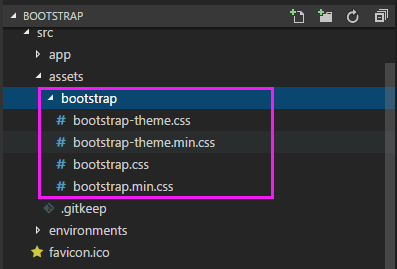
在src目录下的styles.css文件里头进行样式的引入:
@import "~bootstrap/dist/css/bootstrap.min.css";
测试下功能,在app.component.html添加一下代码:
<!-- Standard button -->

<button type="button" class="btn btn-default">(默认样式)Default</button>

<!-- Provides extra visual weight and identifies the primary action in a set of buttons -->

<button type="button" class="btn btn-primary">(首选项)Primary</button>

<!-- Indicates a successful or positive action -->

<button type="button" class="btn btn-success">(成功)Success</button>

<!-- Contextual button for informational alert messages -->

<button type="button" class="btn btn-info">(一般信息)Info</button>

<!-- Indicates caution should be taken with this action -->

<button type="button" class="btn btn-warning">(警告)Warning</button>

<!-- Indicates a dangerous or potentially negative action -->

<button type="button" class="btn btn-danger">(危险)Danger</button>

<!-- Deemphasize a button by making it look like a link while maintaining button behavior -->

<button type="button" class="btn btn-link">(链接)Link</button>
敲打ng serve 浏览器敲打http://localhost:4200
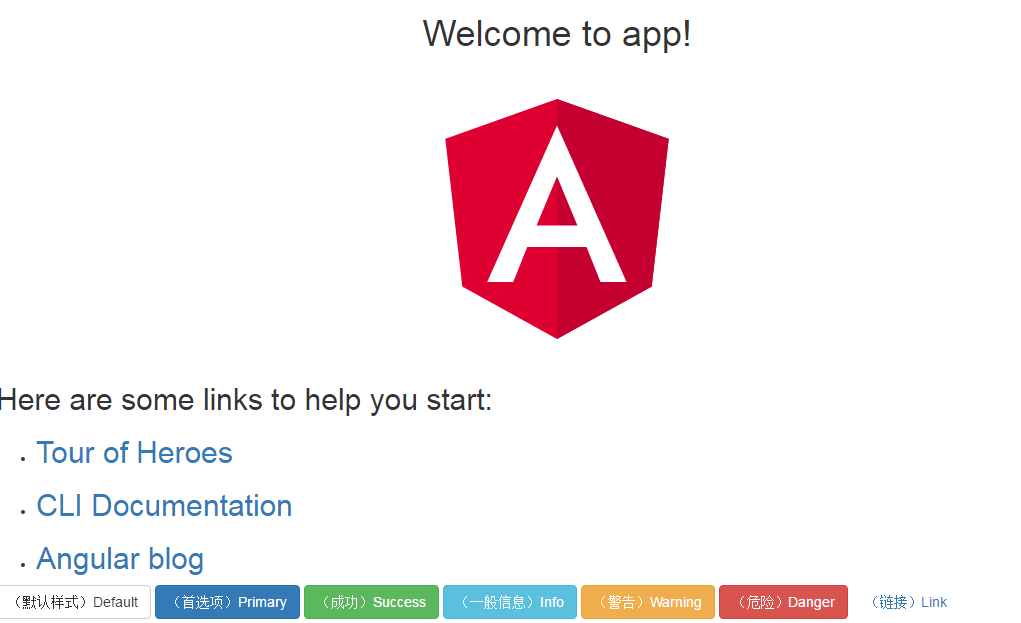
可以看到bootstrap样式效果生效了。
第二种:用angular ng-boostrap进行样式的安装使用
2.1新建工程
ng new my-app --style=scss 带style参数原因:ng-bootstrap要求使用scss
安装相关依赖npm install
2.2 安装相关ng-boostrap依赖
npm install @ng-bootstrap/ng-bootstrap bootstrap@next --save 安装ng-bootstrap和bootstrap
2.3添加bootstrap.min.css引用
工程根目录下,打开.angular-cli.json文件,在styles中添加bootstrap.min.css引用
  "styles": [

    "../node_modules/bootstrap/dist/css/bootstrap.min.css",  此行为新添加

     "styles.scss"

   ]
2.4 在src目录下的styles.scss文件中添加如下内容
@import '../node_modules/bootstrap/scss/bootstrap';
2.5在src的app目录下, 找得到app.module.ts类中引用NgbModule
import {NgbModule} from '@ng-bootstrap/ng-bootstrap';
在imports里头新增 NgbModule.forRoot()
@NgModule({

  declarations: [

    AppComponent

  ],

  imports: [

    NgbModule.forRoot(),

    BrowserModule

  ],

  providers: [],

  bootstrap: [AppComponent]

})
2.6添加模板
在src的app目录下的app.component.html中开头添加如下内容
 <p>

  <ngb-alert type="success" [dismissible]="false">

    <strong>Success!</strong> Good work.

  </ngb-alert>

  </p>
2.7启动验证 ng serve
浏览器输入:http://localhost:4200
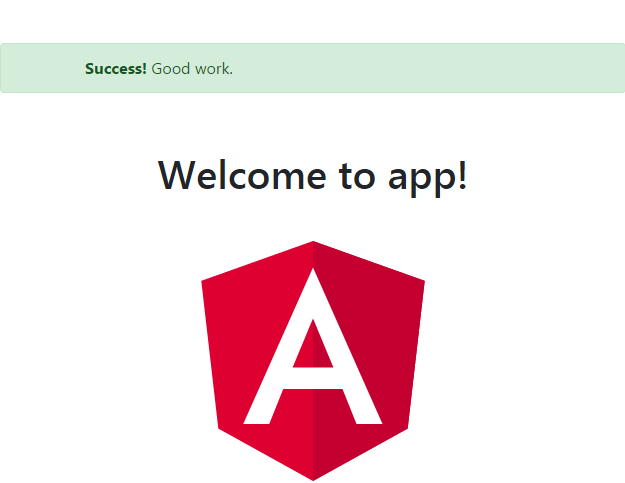
如果npm失败了,找个网络好的地方,多试几次,
npm install @ng-bootstrap/ng-bootstrap bootstrap@next --save -f
在末尾加上-f/-force表示重新安装,多试几次一般是可以的。
Angular2使用boostrap和ng-bootstrap总结的更多相关文章
- 跟我学Angular2(1-初体验)
0.导言 Angular1作为最流行的前端MV*框架,给前端开发带来了极大的便利性.但是,仍然有许多不好的地方已经很难再改变了.Angular团队根据WEB发展的趋势和Angular1中积累的经验来开 ...
- angular2 启动步骤
以下内容转自网络 1. 创建项目文件夹 创建一个新的文件夹来保存你的项目,比如一开始有个self就好了 2.安装基础库 首先确保已经安装了node.js 我们使用 npm package manage ...
- BootStrap 最佳资源合集(转)
witter BootStrap是一款优秀的前端的框架,称得上是前端的一个框架利器.Web前端开发者每天都在与HTML.CSS.JavaScript打交道,然 而不少人都是在周而复始的写模板.样式和交 ...
- 浅谈Bootstrap自适应功能在Web开发中的应用
随着移动端市场的强势崛起,web的开发也变得愈发复杂,对于个体开发者来说,自己开发的网站,在电脑.手机.Pad等上面都要有正常的显示以及良好的用户体验.如果每次都要自己去调整网页去匹配各个不同的客户端 ...
- Angular2 入门详解
AngularJS 2 快速入门 npm是什么? npm其实是Node.js Package Manager的简称,是Node.js包管理工具(package manager) 安装Node.js ...
- 快速搭建vue2.0+boostrap项目
一.Vue CLI初始化Vue项目 全局安装vue cli npm install --global vue-cli 创建一个基于 webpack 模板的新项目 vue init webpack my ...
- Angular 2 - 5 分钟快速入门
原文地址: https://angular.io/docs/ts/latest/quickstart.html 让我们从 0 开始创建一个简单的 Angular 2 应用. 下载任何版本的 angul ...
- ApacheCN Angular 译文集 20211114 更新
Angular 专家级编程 零.前言 一.架构概述和在 Angular 中构建简单应用 二.将 AngularJS 应用迁移到 Angular 应用 三.使用 Angular CLI 生成具有最佳实践 ...
- jQuery使用load方法加载其他文档内容
A文档载入B文档的内容,并且通过JQ操作被引入到A文档中的元素 A文档 (index.html): <!DOCTYPE html> <html lang="en" ...
随机推荐
- shell脚本实现进度条
使用shell脚本编写进度条 可已加入到shell脚本当中 主要作用:好看 美观 没毛用 (一) 普通进度条: #!/bin/bashb='' for ((i=0;$i<=20;i++)) do ...
- Percona 工具包 pt-online-schema-change 简介
mysql的在线表结构修改,因为低效和阻塞读写.一直被诟病.至于ALTER TABLE 的原理,参看我上一篇文章.MySQL在线修改大表结构.看完后,发现的问题是还是会锁的,且对于在线更新的这块也是不 ...
- Merge-Sort(归并排序)
Merge-Sort(归并排序) 思想 利用分治的思想,具体实现也就是递归,不断的将问题话分为更小的子问题,当子问题中规模为1的时候,认为数组已经有序了,然后再将子问题求得的结果不断的合并.也就是将长 ...
- 一图看懂join、left join、right join、fulljoin间的区别
INNER JOIN 关键字在表中存在至少一个匹配时返回行. LEFT JOIN 关键字从左表(table1)返回所有的行,即使右表(table2)中没有匹配.如果右表中没有匹配,则结果为 NULL. ...
- plot 含缺失值的图
x = np.linspace(1,10,25) y = (x-4)**2 index = random.sample(range(25),5) # 从1-24中不放回随机抽取5个数 y[index ...
- 使用TypeScript拓展你自己的VSCode
转自:http://www.iplaysoft.com/brackets.html使用TypeScript拓展你自己的VSCode! 0x00 前言在前几天的美国纽约,微软举行了Connect(); ...
- idea结合git使用
1.下载安装好git.exe2. 2.安装好以后在cmd输入git 3.在idea配置git环境 4.托管项目到码云 5.登录码云官网,地址就是你在码云注册的账号和密码
- C#外部类、内部类(嵌套类)之间的成员访问特点
最近程序中需要用到多线程工作下的单例模式.而其多种实现方法中,利用内部类实现懒汉模式是一种值得推荐的方式.顺便也就对内部类和外部类之间的关系做了一下研究,总结如下(理解不困难,不粘贴代码了,有需要的留 ...
- Cassandra二级索引原理——新创建了一张表格,同时将原始表格之中的索引字段作为新索引表的Primary Key,并且存储的值为原始数据的Primary Key,然后再通过pk一级索引找到真正的值
1.什么是二级索引? 我们前面已经介绍过Cassandra之中有各种Key,比如Primary Key, Cluster Key 等等.如果您对这部分概念并不熟悉,可以参考之前的文章: [Cassan ...
- Elasticsearch压缩索引——lucene倒排索引本质是列存储+使用嵌套文档可以大幅度提高压缩率
注意:由于是重复数据,词法不具有通用性!文章价值不大! 摘自:https://segmentfault.com/a/1190000002695169 Doc Values 会压缩存储重复的内容. 给定 ...