
TensorFlow实现CNN
TensorFlow是目前深度学习最流行的框架,很有学习的必要,下面我们就来实际动手,使用TensorFlow搭建一个简单的CNN,来对经典的mnist数据集进行数字识别。
如果对CNN还不是很熟悉的朋友,可以参考:Convolutional Neural Network。
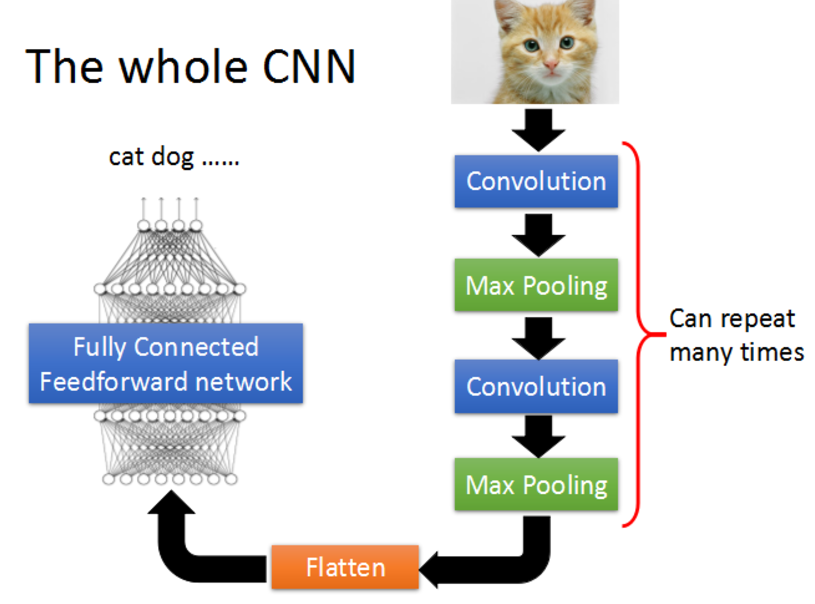
下面就开始。
step 0 导入TensorFlow
 import tensorflow as tf

 from tensorflow.examples.tutorials.mnist import input_data
step 1 加载数据集mnist
声明两个placeholder,用于存储神经网络的输入,输入包括image和label。这里加载的image是(784,)的shape。
 mnist = input_data.read_data_sets('MNIST_data/', one_hot=True)

 x = tf.placeholder(tf.float32,[None, 784])

 y_ = tf.placeholder(tf.float32, [None, 10])
step 2 定义weights和bias
为了使代码整洁,这里把weight和bias的初始化封装成函数。
 #----Weight Initialization---#

 #One should generally initialize weights with a small amount of noise for symmetry breaking, and to prevent 0 gradients

 def weight_variable(shape):

     initial = tf.truncated_normal(shape, stddev=0.1)

     return tf.Variable(initial)

 def bias_variable(shape):

     initial = tf.constant(0.1, shape=shape)

     return tf.Variable(initial)
step 3 定义卷积层和maxpooling
同样,为了代码的整洁,将卷积层和maxpooling封装起来。padding=‘SAME’表示使用padding,不改变图片的大小。
 #Convolution and Pooling

 #Our convolutions uses a stride of one and are zero padded so that the output is the same size as the input.

 #Our pooling is plain old max pooling over 2x2 blocks

 def conv2d(x, W):

     return tf.nn.conv2d(x, W, strides=[1,1,1,1], padding='SAME')

 def max_pool_2x2(x):

     return tf.nn.max_pool(x, ksize=[1,2,2,1], strides=[1,2,2,1], padding='SAME')
step 4 reshape image数据
为了神经网络的layer可以使用image数据,我们要将其转化成4d的tensor: (Number, width, height, channels)
 #To apply the layer, we first reshape x to a 4d tensor, with the second and third dimensions corresponding to image width and height,

 #and the final dimension corresponding to the number of color channels.

 x_image = tf.reshape(x, [-1,28,28,1])
下面我们就要开始搭建CNN结构了。
step 5 搭建第一个卷积层
使用32个5x5的filter,然后通过maxpooling。
 #----first convolution layer----#

 #he convolution will compute 32 features for each 5x5 patch. Its weight tensor will have a shape of [5, 5, 1, 32].

 #The first two dimensions are the patch size,

 #the next is the number of input channels, and the last is the number of output channels.

 W_conv1 = weight_variable([5,5,1,32])

 #We will also have a bias vector with a component for each output channel.

 b_conv1 = bias_variable([32])

 #We then convolve x_image with the weight tensor, add the bias, apply the ReLU function, and finally max pool.

 #The max_pool_2x2 method will reduce the image size to 14x14.

 h_conv1 = tf.nn.relu(conv2d(x_image, W_conv1) + b_conv1)

 h_pool1 = max_pool_2x2(h_conv1)
step 6 第二层卷积
使用64个5x5的filter。
 #----second convolution layer----#

 #The second layer will have 64 features for each 5x5 patch and input size 32.

 W_conv2 = weight_variable([5,5,32,64])

 b_conv2 = bias_variable([64])

 h_conv2 = tf.nn.relu(conv2d(h_pool1, W_conv2) + b_conv2)

 h_pool2 = max_pool_2x2(h_conv2)
step 7 构建全链接层
需要将上一层的输出,展开成1d的神经层。
 #----fully connected layer----#

 #Now that the image size has been reduced to 7x7, we add a fully-connected layer with 1024 neurons to allow processing on the entire image

 W_fc1 = weight_variable([7*7*64, 1024])

 b_fc1 = bias_variable([1024])

 h_pool2_flat = tf.reshape(h_pool2, [-1, 7*7*64])

 h_fc1 = tf.nn.relu(tf.matmul(h_pool2_flat,W_fc1) + b_fc1)
step 8 添加Dropout
加入Dropout层,可以防止过拟合问题。注意,这里使用了另外一个placeholder,可以控制在训练和预测时是否使用Dropout。
 #-----dropout------#

 #To reduce overfitting, we will apply dropout before the readout layer.

 #We create a placeholder for the probability that a neuron's output is kept during dropout.

 #This allows us to turn dropout on during training, and turn it off during testing.

 keep_prob = tf.placeholder(tf.float32)

 h_fc1_dropout = tf.nn.dropout(h_fc1, keep_prob)
step 9 输入层
没有什么特别的,就是输出一个线性结果。
 #----read out layer----#

 W_fc2 = weight_variable([1024,10])

 b_fc2 = bias_variable([10])

 y_conv = tf.matmul(h_fc1_dropout, W_fc2) + b_fc2
step 10 训练和评估
首先,需要指定一个cost function --cross_entropy,在输出层使用softmax。然后指定optimizer--adam。需要特别指出的是,一定要记得
tf.global_variables_initializer().run()初始化变量
 #------train and evaluate----#

 cross_entropy = tf.reduce_mean(tf.nn.softmax_cross_entropy_with_logits(labels=y_, logits=y_conv))

 train_step = tf.train.AdamOptimizer(1e-4).minimize(cross_entropy)

 accuracy = tf.reduce_mean(tf.cast(tf.equal(tf.argmax(y_, 1), tf.argmax(y_conv, 1)), tf.float32))

 with tf.Session() as sess:

     tf.global_variables_initializer().run()

     for i in range(3000):

         batch = mnist.train.next_batch(50)

         if i % 100 == 0:

             train_accuracy = accuracy.eval(feed_dict = {x: batch[0],

                                                        y_: batch[1],

                                                        keep_prob: 1.})

             print('setp {},the train accuracy: {}'.format(i, train_accuracy))

         train_step.run(feed_dict = {x: batch[0], y_: batch[1], keep_prob: 0.5})

     test_accuracy = accuracy.eval(feed_dict = {x: mnist.test.images, y_: mnist.test.labels, keep_prob: 1.})

     print('the test accuracy :{}'.format(test_accuracy))

     saver = tf.train.Saver()

     path = saver.save(sess, './my_net/mnist_deep.ckpt')

     print('save path: {}'.format(path))
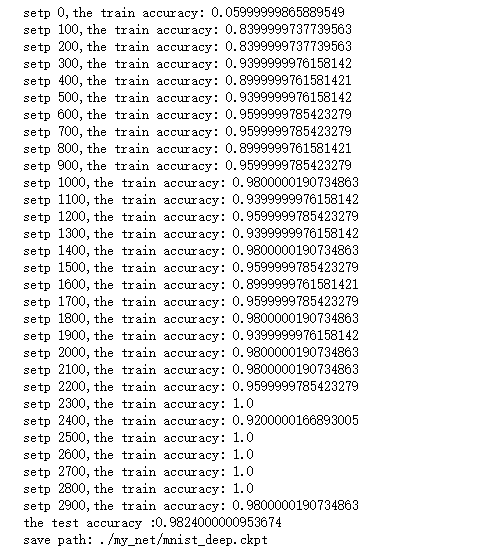
这是我训练的结果。
reference:
https://www.tensorflow.org/get_started/mnist/pros
TensorFlow实现CNN的更多相关文章
- FaceRank-人脸打分基于 TensorFlow 的 CNN 模型
FaceRank-人脸打分基于 TensorFlow 的 CNN 模型 隐私 因为隐私问题,训练图片集并不提供,稍微可能会放一些卡通图片. 数据集 130张 128*128 张网络图片,图片名: 1- ...
- Tensorflow简单CNN实现
觉得有用的话,欢迎一起讨论相互学习~Follow Me 少说废话多写代码~ """转换图像数据格式时需要将它们的颜色空间变为灰度空间,将图像尺寸修改为同一尺寸,并将标签依 ...
- Tensorflow的CNN教程解析
之前的博客我们已经对RNN模型有了个粗略的了解.作为一个时序性模型,RNN的强大不需要我在这里重复了.今天,让我们来看看除了RNN外另一个特殊的,同时也是广为人知的强大的神经网络模型,即CNN模型.今 ...
- [DL学习笔记]从人工神经网络到卷积神经网络_3_使用tensorflow搭建CNN来分类not_MNIST数据(有一些问题)
3:用tensorflow搭个神经网络出来 为什么用tensorflow呢,应为谷歌是亲爹啊,虽然有些人说caffe更适合图像啊mxnet效率更高等等,但爸爸就是爸爸,Android都能那么火,一个道 ...
- 第三节,TensorFlow 使用CNN实现手写数字识别(卷积函数tf.nn.convd介绍)
上一节,我们已经讲解了使用全连接网络实现手写数字识别,其正确率大概能达到98%,这一节我们使用卷积神经网络来实现手写数字识别, 其准确率可以超过99%,程序主要包括以下几块内容 [1]: 导入数据,即 ...
- [Tensorflow] Cookbook - CNN
Convolutional Neural Networks (CNNs) are responsible for the major breakthroughs in image recognitio ...
- 6 TensorFlow实现cnn识别手写数字
------------------------------------ 写在开头:此文参照莫烦python教程(墙裂推荐!!!) ---------------------------------- ...
- tensorflow构建CNN模型时的常用接口函数
(1)tf.nn.max_pool()函数 解释: tf.nn.max_pool(value, ksize, strides, padding, data_format='NHWC', name=No ...
- 用 Tensorflow 建立 CNN
稍稍乱入的CNN,本文依然是学习周莫烦视频的笔记. 还有 google 在 udacity 上的 CNN 教程. CNN(Convolutional Neural Networks) 卷积神经网络简单 ...
随机推荐
- Ubuntu系统-网络配置
网络配置 静态IP root@ubuntu:~# cat /etc/network/interfaces # This file describes the network interfaces av ...
- 【译】.Net 垃圾回收机制原理(转)
上一篇文章介绍了.Net 垃圾回收的基本原理和垃圾回收执行Finalize方法的内部机制:这一篇我们看下弱引用对象,代,多线程垃圾回收,大对象处理以及和垃圾回收相关的性能计数器. 让我们从弱引用对象说 ...
- 大数据技术大合集:Hadoop家族、Cloudera系列、spark、storm【转】
大数据我们都知道hadoop,可是还会各种各样的技术进入我们的视野:Spark,Storm,impala,让我们都反映不过来.为了能够更好 的架构大数据项目,这里整理一下,供技术人员,项目经理,架构师 ...
- 面试STAR法则
昨天投了几家公司的简历,A公司还没看简历,B公司没有通过简历,另外的后说(其实只投了这两家),B公司最终给了蛮中肯的回复: 虽然,一开始看到这样的结果,有些失落,仔细看过回复后,有些不屑和好奇.百度了 ...
- dubbo zookeeper报错failed to connect to server , error message is:No route to host
failed to connect to server , error message is:No route to host 转自:http://blog.csdn.net/miaohongyu1/ ...
- JDK源码分析之concurrent包(四) -- CyclicBarrier与CountDownLatch
上一篇我们主要通过ExecutorCompletionService与FutureTask类的源码,对Future模型体系的原理做了了解,本篇开始解读concurrent包中的工具类的源码.首先来看两 ...
- 17.Recflection_反射
www.cnblogs.com/rollenholt/archive/2011/09/02/2163758.html
- Storm-源码分析-Topology Submit-Executor-mk-threads
对于executor thread是整个storm最为核心的代码, 因为在这个thread里面真正完成了大部分工作, 而其他的如supervisor,worker都是封装调用. 对于executor的 ...
- 看用Tornado如何自定义实现表单验证
我们知道,平时在登陆某个网站或软件时,网站对于你输入的内容是有要求的,并且会对你输入的错误内容有提示,对于Django这种大而全的web框架,是提供了form表单验证功能,但是对于Tornado而言, ...
- 解决chrome在ubuntu+root模式下打不开的问题
chrome在ubuntu root模式下打不开 双击图标,chrome打不开了: 解决办法: 查看一下打开chrome浏览器的命令是什么,右键properties 发现是chromium-brows ...