
windows服务是如何被调用的?
1、服务介绍
操作系统在启动的时候,会启动一些不需要用户交互的进程。这些进程被称为服务。当操作系统启动后它就自动被运行。
2、组成
服务程序、服务控制程序(SCP,service control program)和服务控制管理器(SCM,service control manager)组成了Windows服务。我们可以通过SCP操纵SCM启动、暂停、停止服务程序。其中服务程序和SCP由我们自己编写。
SCM
servics.exe是操作系统内置的一个部件。建立数据库、启动服务(自启动),分配服务进程。
SCP
服务控制程序,例如windows自带的服务工具:
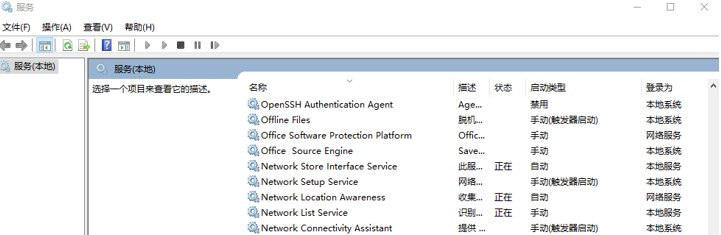
当然也可以自己写一个服务管理工具。
服务程序
我们需要执行的任务
3、执行原理
首先看看服务入口:
  static void Main()

  {

      ServiceBase[] ServicesToRun;

      ServicesToRun = new ServiceBase[]

      {

         new MainService()

      };

      ServiceBase.Run(ServicesToRun);

 }
从入口看,这和控制台程序一样,因为绝大部分的服务都不需要交互,所以没有用户界面。 那么ServiceBase.Run到底做了什么事情呢?平常情况下,我们并不关心,只是windows服务听起来有点神秘。于是就搜索关于windows service原理的文章,理解一下。如下图:
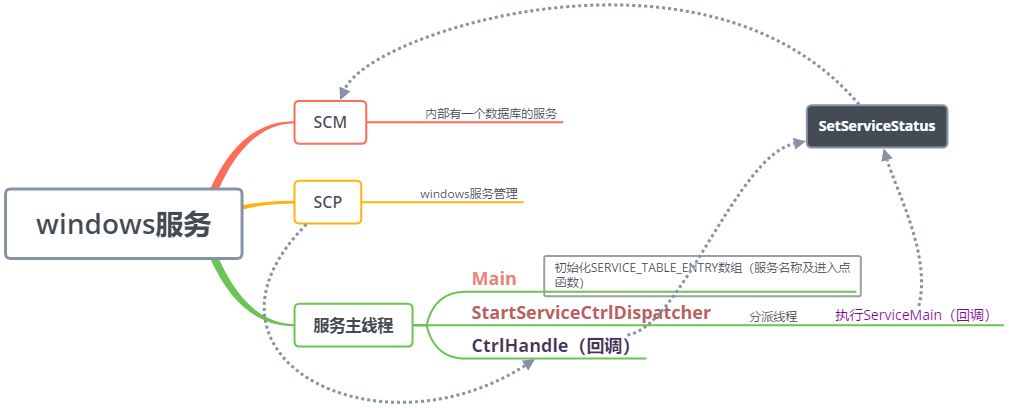
大致原理:服务主线程调用StartServiceCtrlDispatcher,最终执行了ServiceMain回调,调用了我们自己写的服务代码。SCP通过CtrlHandle回调了我们对服务的一些操作,比如暂停,启动等等。它们都通过SetServiceStatus方法与SCM通信,把服务的状态等信息及时地告诉SCM。我结合代码主要介绍下,我们的服务代码是如何被调用的。
Main方法中的ServiceBase是一个什么样的类呢?


从继承关系上看,它是可以跨应用程序域调用(MarshalByRefObject——Enables access to objects across application domain boundaries in applications that support remoting)以及需要释放资源(IDisposable)。这说明,可以远程调用服务以及服务占用了非托管资源。
我们看Run方法:
         public static void Run(ServiceBase[] services)

         {

             if ((services == null) || (services.Length == ))

             {

                 throw new ArgumentException(Res.GetString("NoServices"));

             }

             if (Environment.OSVersion.Platform != PlatformID.Win32NT)

             {

                 string message = Res.GetString("CantRunOnWin9x");

                 string title = Res.GetString("CantRunOnWin9xTitle");

                 LateBoundMessageBoxShow(message, title);

             }

             else

             {

                 IntPtr entry = Marshal.AllocHGlobal((IntPtr) ((services.Length + ) * Marshal.SizeOf(typeof(System.ServiceProcess.NativeMethods.SERVICE_TABLE_ENTRY))));

                 System.ServiceProcess.NativeMethods.SERVICE_TABLE_ENTRY[] service_table_entryArray = new System.ServiceProcess.NativeMethods.SERVICE_TABLE_ENTRY[services.Length];

                 bool multipleServices = services.Length > ;

                 IntPtr zero = IntPtr.Zero;

                 for (int i = ; i < services.Length; i++)

                 {

                     services[i].Initialize(multipleServices);

                     service_table_entryArray[i] = services[i].GetEntry();

                     zero = (IntPtr) (((long) entry) + (Marshal.SizeOf(typeof(System.ServiceProcess.NativeMethods.SERVICE_TABLE_ENTRY)) * i));

                     Marshal.StructureToPtr(service_table_entryArray[i], zero, true);

                 }

                 System.ServiceProcess.NativeMethods.SERVICE_TABLE_ENTRY structure = new System.ServiceProcess.NativeMethods.SERVICE_TABLE_ENTRY {

                     callback = null,

                     name = IntPtr.Zero

                 };

                 zero = (IntPtr) (((long) entry) + (Marshal.SizeOf(typeof(System.ServiceProcess.NativeMethods.SERVICE_TABLE_ENTRY)) * services.Length));

                 Marshal.StructureToPtr(structure, zero, true);

                 bool flag2 = System.ServiceProcess.NativeMethods.StartServiceCtrlDispatcher(entry);

                 foreach (ServiceBase base2 in services)

                 {

                     if (base2.startFailedException != null)

                     {

                         base2.startFailedException.Throw();

                     }

                 }

                 string str = "";

                 if (!flag2)

                 {

                     str = new Win32Exception().Message;

                     string str4 = Res.GetString("CantStartFromCommandLine");

                     if (Environment.UserInteractive)

                     {

                         string str5 = Res.GetString("CantStartFromCommandLineTitle");

                         LateBoundMessageBoxShow(str4, str5);

                     }

                     else

                     {

                         Console.WriteLine(str4);

                     }

                 }

                 foreach (ServiceBase base3 in services)

                 {

                     base3.Dispose();

                     if (!flag2 && (base3.EventLog.Source.Length != ))

                     {

                         object[] args = new object[] { str };

                         base3.WriteEventLogEntry(Res.GetString("StartFailed", args), EventLogEntryType.Error);

                     }

                 }

             }

         }
第32行 System.ServiceProcess.NativeMethods.StartServiceCtrlDispatcher(entry),这是一个平台调用,它非常关键,看看原型:

它接收一个参数 entry,这是一个指针或者句柄类型( A platform-specific type that is used to represent a pointer or a handle)。那么它应该指向服务的入口地址。我们看看entry是什么结构?
第15行 IntPtr entry = Marshal.AllocHGlobal((IntPtr) ((services.Length + 1) * Marshal.SizeOf(typeof(System.ServiceProcess.NativeMethods.SERVICE_TABLE_ENTRY)))); 这句一看就是分配内存的。如果我们都学过c语言的话,也不会陌生。虽然c#自动分配内存,我们不用管,其实这件事情还是存在的。SERVICE_TABLE_ENTRY,这个结构如下:
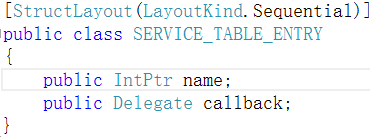
callback是委托类型。这个类什么时候实例化的?第22行 service_table_entryArray[i] = services[i].GetEntry(); GetEntry方法如下:
         private System.ServiceProcess.NativeMethods.SERVICE_TABLE_ENTRY GetEntry()

         {

             System.ServiceProcess.NativeMethods.SERVICE_TABLE_ENTRY service_table_entry = new System.ServiceProcess.NativeMethods.SERVICE_TABLE_ENTRY();

             this.nameFrozen = true;

             service_table_entry.callback = this.mainCallback;

             service_table_entry.name = this.handleName;

             return service_table_entry;

        }
第5行,callback的实例是this.mainCallback,定义 private System.ServiceProcess.NativeMethods.ServiceMainCallback mainCallback; 它的类型: public delegate void ServiceMainCallback(int argCount, IntPtr argPointer);在什么时候实例化呢?
        private void Initialize(bool multipleServices)

        {

            if (!this.initialized)

            {

                ...this.status.currentState = ;

                this.status.controlsAccepted = ;

                this.status.win32ExitCode = ;

                this.status.serviceSpecificExitCode = ;

                this.status.checkPoint = ;

                this.status.waitHint = ;

                this.mainCallback = new System.ServiceProcess.NativeMethods.ServiceMainCallback(this.ServiceMainCallback);

                ...

            }

        }
在服务初始化的方法中实例化的。在Run方法的第21行中调用了初始化方法 :services[i].Initialize(multipleServices); 所以现在重心转移到 this.ServiceMainCallback:
     public unsafe void ServiceMainCallback(int argCount, IntPtr argPointer)

        {

            fixed (System.ServiceProcess.NativeMethods.SERVICE_STATUS* service_statusRef = &this.status)

            {

                string[] state = null;

                ...this.startCompletedSignal = new ManualResetEvent(false);

                this.startFailedException = null;

                ThreadPool.QueueUserWorkItem(new WaitCallback(this.ServiceQueuedMainCallback), state);

                this.startCompletedSignal.WaitOne();

                if ((this.startFailedException != null) && (this.status.win32ExitCode == ))

                {

                    this.status.win32ExitCode = 0x428;

                }

                if (!System.ServiceProcess.NativeMethods.SetServiceStatus(this.statusHandle, service_statusRef))

                {

                    object[] objArray2 = new object[] { new Win32Exception().Message };

                    this.WriteEventLogEntry(Res.GetString("StartFailed", objArray2), EventLogEntryType.Error);

                    this.status.currentState = ;

                    System.ServiceProcess.NativeMethods.SetServiceStatus(this.statusHandle, service_statusRef);

                }

            }

        }
在这段代码中,它开启了一个新的线程 ThreadPool.QueueUserWorkItem,回调了ServiceQueuedMainCallback,除此之外,定义了ManualResetEvent,用于主线程和子线程之间的同步。this.startCompletedSignal.WaitOne() 开启子线程后,先阻塞主线程运行,等待子线程的结果。ServiceQueuedMainCallback干了些什么事情?
       private void ServiceQueuedMainCallback(object state)

         {

             string[] args = (string[]) state;

             try

             {

                 this.OnStart(args);

                 this.WriteEventLogEntry(Res.GetString("StartSuccessful"));

                 this.status.checkPoint = ;

                 this.status.waitHint = ;

                 this.status.currentState = ;

             }

             catch (Exception exception)

             {

                 object[] objArray1 = new object[] { exception.ToString() };

                 this.WriteEventLogEntry(Res.GetString("StartFailed", objArray1), EventLogEntryType.Error);

                 this.status.currentState = ;

                 if (!System.LocalAppContextSwitches.DontThrowExceptionsOnStart)

                 {

                     this.startFailedException = ExceptionDispatchInfo.Capture(exception);

                 }

             }

             this.startCompletedSignal.Set();

         }
第6行,this.OnStart,这是一个服务开始运行的地方。
   protected virtual void OnStart(string[] args)

   {

   }
相应还有OnStop方法,微软暴露出这些虚方法,我们在子类中,刚好重写,这样我们写的服务代码就被执行了。
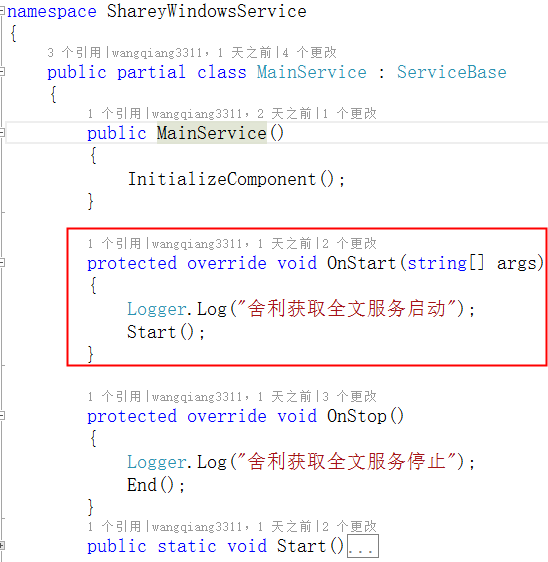
感兴趣的同学,可以写个服务,安装个反编译工具,按F12,就可以跟进到代码里面去看了。
windows服务是如何被调用的?的更多相关文章
- ASP.NET MVC 中应用Windows服务以及Webservice服务开发分布式定时器
ASP.NET MVC 中应用Windows服务以及Webservice服务开发分布式定时器一:闲谈一下:1.现在任务跟踪管理系统已经开发快要结束了,抽一点时间来写一下,想一想自己就有成就感啊!! ...
- 使用 Topshelf 结合 Quartz.NET 创建 Windows 服务
Ø 前言 之前一篇文章已经介绍了,如何使用 Topshelf 创建 Windows 服务.当时提到还缺少一个任务调度框架,就是 Quartz.NET.而本文就展开对 Quartz.NET 的研究,以 ...
- Windows服务调用Quartz.net 实现消息调度
Quartz.NET是一个开源的作业调度框架,是OpenSymphony 的 Quartz API的.NET移植,它用C#写成,可用于winform和asp.net应用中.它提供了巨大的灵活性而不牺牲 ...
- 使用C#创建及调用WCF完整实例 (Windows服务宿主)
关于WCF的概念.原理.优缺点等,在这里就不多说了,网上很多,可以自行搜索,比我解释的要专业的多. 这里直接说使用Windows 服务(Windows Service)作为宿主如何实现,其它方式不在此 ...
- webform调用windows服务
准备工作: .电脑->管理->本地用户和组->组->Administrator双击->隶属->添加Network service->确定 .启动windows ...
- C#使用windows服务定时调用api接口
使用VS创建windows服务项目: 创建好项目 会出现一个设计界面 右键弹出对话框 选择添加安装程序 名字什么的自己可以改: 项目目录: 打开项目中的ProjectInstaller.Design ...
- Windows服务的新建,安装,卸载,调试以及调用!
一.前言: 写这篇博文之前,我正顶着压力在尝试着调试我一无所知的Windows自建服务.历经千辛万苦,找了无数零散文档拼凑关于VisualStudio2015中怎样创建和调试服务程序!最后终于调试成功 ...
- Python搭建调用本地dll的Windows服务(浏览器可以访问,附测试dll64位和32位文件)
一.前言说明 博客声明:此文链接地址https://www.cnblogs.com/Vrapile/p/14113683.html,请尊重原创,未经允许禁止转载!!! 1. 功能简述 (1)本文提供生 ...
- 基于SignalR实现B/S系统对windows服务运行状态的监测
通常来讲一个BS项目肯定不止单独的一个BS应用,可能涉及到很多后台服务来支持BS的运行,特别是针对耗时较长的某些任务来说,Windows服务肯定是必不可少的,我们还需要利用B/S与windows服务进 ...
随机推荐
- Linux——网络配置及命令
traceroute命令(unix)/tracert命令(windows) tracert命令的格式为:tracert [-d] [-h maximum_hops] [-j host-list] [- ...
- Mybatis中trim的使用
trim标记是一个格式化的标记,可以完成set或者是where标记的功能,如下代码: 1. select * from user <trim prefix="WHERE" p ...
- pt-osc使用方法
pt-osc实战运用 1.安装pt-osc,解压即可用 安装包在:10.135.2.217:data/online/software/percona-toolkit-3.0.12.tar.gz tar ...
- Linux 上下左右键变成^A,^B,^C,^D解决方法
用gedit打开 /etc/vim/vimrc.tiny,将里面的 set compatible 改成 set nocompatible 对于退格键backspace的问题,只需在刚才那句话下面加上一 ...
- Google揭露SHA-1碰撞,加速数据重删字节对比
原创 架构师技术联盟 近期,Google和道荷兰阿姆斯特研究者宣布攻破了世界上第一例公开的SHA-1哈希碰撞实例,业界一片哗然.当两组不同的数据(文件.一段数据)计算出相同的Hash值时,即视为二者 ...
- fabric动态获取远程目录列表
#!/usr/bin/pythonfrom fabric.api import *env.user='root'env.hosts=['172.10.224.183','172.10.224.132' ...
- Linux新手常用命令 - 转载
开始→运行→cmd命令 集锦 cls------------命令窗清屏eqit-----------退出当前命令ping ip--------检查网络故障ipconfig-------查看IP地址wi ...
- merge two sorted lists, 合并两个有序序列
/** * Definition for singly-linked list. * public class ListNode { * int val; * ListNode next; * Lis ...
- ssm框架搭建流程及原理分析
这几天自己想搭建个ssm框架玩一下,有些东西长时间不玩都给忘了,所以自己把整个流程整理了一下,只要跟着步骤,就能顺利完成ssm框架的搭建. 一.搭建步骤: 1.整理jar包 2.对于一个web ...
- InfiniBand技术和协议架构分析
Infiniband开放标准技术简化并加速了服务器之间的连接,同时支持服务器与远程存储和网络设备的连接. IB技术的发展 1999年开始起草规格及标准规范,2000年正式发表,但发展速度不及Rapid ...