
source insight Confirm by typing ‘yes' below"、"has been changed outside of the editor. Do you want to reload the file?"、“
阅读内核代码习惯和喜欢使用source insight。如果能在source insight上修改内核代码,同时又不需要把修改的内核代码再拷贝到虚拟ubuntu上去那就方便了。于是想通过用samba与xp共享的方式来实现。即xp、samba、虚拟ubuntu9.10等工具。
事实上是可以的,用source insight把在samba上共享的内核源文件建立了工程,速度上不是特别慢,可以接受。但在Source insight上修改通过samba共享ubuntu上内核源程序文件出现了"Confirm by typing ‘yes' below"、"has been changed outside of the editor. Do you want to reload the file?"、“There was an error saving ....”和”An invalid Source Insight serial number was detected”等一些问题,如下图所示:
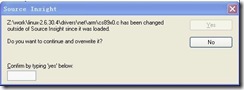
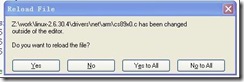

通过在网上搜索,,找到了问题原因及其解决方法。
出现上述问题的原因是source insight本身的问题,具体引用网上说明:
问题描述:我的电脑安装了Windows xp,又在虚拟机里装了个Ubuntu9.04.代码都放在Ubuntu中,并通过samba与windows共享,而后用source insight打开。但问题在于:每次在 source insight里面做修改,而后切换到另一个文件的时后都会出现 “... has been changed outside of the editor. Do you want to reload the file?"
该问题在Fedora11上也会出现,但Redhat9不会。
解决办法:怀疑了很多地方,如Ubuntu的同步、samba的同步等,但最后在sourceinsight3.50.0051的更新日志中找到如下更新日志:
Fix: Sometimes files were said to be modified outside of SI, but they were not. This most likely happened on network drives. Under some conditions, the Windows directory information can lag for remote drives. SI now uses a better method of getting file information.
至此,问题明朗,将source insight升级到最新版本。问题解决。
既然是source insight版本的问题,就下载了新的版本,我下的是sourceinsight3.50.0065
但在安装的时候又出现了问题,出现了“An invalid Source Insight serial number was detected”,但根据提示重新安装也不能输入注册码,在网上找到解决方法,如下:
Source Insight3.5升级遗留问题: an invalid source insight serial number was detected解决方法
2010-08-20 20:07
Source Insight最新版 3.50.0064安装时,出现an invalid source insight serial number was detected,
无论怎么卸载,还是用清理软件在卸载以后来清除,都没有办法删除掉遗留注册表中的sn。
请注意,注册表里头有个键,
/HKEY_CURRENT_USER/Software/Source Dynamics/Source Insight/3.0,
HKEY_LOCAL_MACHINE/Software/Source Dynamics/Source Insight/3.0。
卸载后,把红色的部分删除。好了,用别的清理软件清理下系统垃圾。再安装。
是不是可以了呢?重新输入注册码。 ^_^
根据上述方法可以重新输入注册码了,在这里提供几个注册码:
SI3US-205035-36448这个71版本可用http://blog.csdn.net/reille/article/category/832303
SI3US-466908-65897
SI3US-368932-59383
SI3US-065458-30661
SI3US-759512-70207
经过一翻折腾后,终于这些问题解决,可以正常使用source insight阅读修改内核源代码了。
source insight Confirm by typing ‘yes' below"、"has been changed outside of the editor. Do you want to reload the file?"、“的更多相关文章
- windows7使用Source insight上远程修改ubuntu共享内核源码
由于本人阅读喜欢使用source insight.前段时间接触了linux核代码,而这份代码只能放在ubuntu服务器上编译,刚开始的时候是在windows上修改,完了之后再copy到服务器上去编译, ...
- windows7使用Source insight上远程改动ubuntu共享内核源代码
因为本人阅读喜欢使用source insight.前段时间接触了linux核代码,而这份代码仅仅能放在ubuntuserver上编译.刚開始的时候是在windows上改动,完了之后再copy到serv ...
- 【工具篇】source Insight
不多说,阅读代码利器. 一.修改背景颜色 使用淡绿色更护眼(听说而已),菜单“选项”>>“属性”,使用自己喜欢的颜色吧.我的淡绿色RGB是181,236,207 二.行号,空格替换tabs ...
- source insight搭建python环境
SI是一个受到广泛欢迎的代码阅读/编辑器,那么能不能用SI来进行python开发呢,经过一晚上的试验,终于实现了这一功能. 1.python的语法高亮 source insight 4.0版本已经默认 ...
- Source Insight 4 中文乱码的解决办法(source insight 3.5 及以下版本就到其他地方看看吧)
干货:Source Insight 4 中文乱码的解决办法(source insight 3.5 及以下版本就到其他地方看看吧) [解决办法]: 菜单栏中[File]->[Reload As E ...
- Source Insight、Xshell(putty)、Xftp
body, table{font-family: 微软雅黑} table{border-collapse: collapse; border: solid gray; border-width: 2p ...
- source insight支持查看makefile、kconfig以及.s代码方法
在用sourceinsight查看linux内核源码的时候,大家会发现不能查看源码中的makefile和kconfig代码,即不能搜索到makefile和kconfig文件.这是因为source in ...
- Source Insight中文注释乱码、字体大小、等宽解决方法
中文注释乱码解决方法: 用记事本打开源文件,然后,选择文件->另存为,编码选为”ANSI“ 字体的调整: Source Insight 菜单栏选择Options->Document O ...
- 关于source insight、添加.s和.S文件,显示全部路径、加入项目后闪屏幕
1.source insight使用也有一年多时间了,今天出现建工程后添加文件“no files found” 百思不得姐: 后面发现是原工程命名时出现非法字符.重新命名就ok了. 切记切记 2.实用 ...
随机推荐
- 超棒的JS移动设备滑动内容幻灯实现 - Swiper
来源:GBin1.com 在线演示 如果你需要一款帮助你实现手机或者移动设备上内容幻灯实现的JS类库的话 , Swiper是一个不错的选择,它不依赖于任何第三方的类库.因此体积非常小,适合运行在移动设 ...
- C#运行原理——我的柔情你永远不懂
记得歌手陈琳曾经在1993年发行了第一张专辑<你的柔情我永远不懂>,创造了150万张的销售纪录,里边的主打歌——我的柔情你永远不懂,多年以后才发现是写给C#运行原理的,因为原理总是伤不起~ ...
- tornado ThreadPoolExecutor
import os import sys import time import tornado.httpserver import tornado.ioloop import tornado.opti ...
- 算法笔记_054:Prim算法(Java)
目录 1 问题描述 2 解决方案 2.1 贪心法 1 问题描述 何为Prim算法? 此处引用网友博客中一段介绍(PS:个人感觉网友的这篇博客对于Prim算法讲解的很清楚,本文与之相区别的地方在于具 ...
- 一次vm 虚拟机时间倒流而导致的oracle 数据库启动故障
一次vm 虚拟机时间倒流而导致的oracle 数据库启动故障 本文是原创文章.若转载请注明出处: http://blog.csdn.net/msdnchina/article/details/3878 ...
- 伪分布模式安装hadoop
准备工具: 虚拟机:VMware Linux系统:CentOS hadoop-1.1.2.tar.gz jdk-7u75-linux-x64.gz CentOS的网络配置 1.设置主机中VMware ...
- 【Linux】通过传入变量进行数学运算
一个简单的sum求和 #! /bin/bash ## For get the sum of tow numbers ## Writen by Qinys ## Date:2018-06-26 a=1 ...
- 给第三方dll加上强命名的方法[C#]
在VS.NET 的命名行窗口下,输入如下的代码. 1 ,生成一个KeyFile sn -k keyPair.snk 2, 得到程序集的MSIL ildasm SomeAssembly.dll /out ...
- 实现对数据进行分组小计并计算合计的实例 asp.net
可以通过数据绑定来实现 通过union all 来实现数据库 SELECT * FROM v3_pay_list2 where ( (ought_date >= '2012-12-06') a ...
- 改动文件后缀的C语言实现
,其他配置项保持一致. step 3: 在"Old2New"目录下新建名为"update.bat"的批处理文件,该文件的内容为: ChangeS ...