
重写Alert
var isIE = navigator.appName.indexOf("Internet Explorer") != -1;
var oldAlert = window.alert;
window.alert = function (str) {
var eSrc;
if (!isIE) {
eSrc = (document.all) ? window.event.srcElement : arguments[1];
} else {
eSrc = document.activeElement;
}
var shield = document.createElement("DIV");
shield.id = "shield";
shield.style.position = "absolute";
shield.style.left = "0px";
shield.style.top = "0px";
shield.style.width = "100%";
shield.style.height = ((document.documentElement.clientHeight > document.documentElement.scrollHeight) ? document.documentElement.clientHeight : document.documentElement.scrollHeight) + "px";
shield.style.background = "#FFF000";
shield.style.textAlign = "center";
shield.style.zIndex = "10000";
shield.style.filter = "alpha(opacity=0)";
shield.style.opacity = 0;
var alertFram = document.createElement("DIV");
alertFram.id = "alertFram";
alertFram.style.position = "absolute";
alertFram.style.left = "50%";
alertFram.style.top = "50%";
alertFram.style.marginLeft = "-225px";
alertFram.style.marginTop = -75 + document.documentElement.scrollTop + "px";
alertFram.style.width = "450px";
alertFram.style.height = "150px";
alertFram.style.background = "#ccc";
alertFram.style.textAlign = "center";
alertFram.style.lineHeight = "150px";
alertFram.style.zIndex = "10001";
strHtml = "<ul style=\"list-style:none;margin:0px;padding:0px;width:100%\">\n";
strHtml += " <li style=\"background:#DD828D;text-align:left;padding-left:20px;font-size:14px;font-weight:bold;height:25px;line-height:25px;border:1px solid #F9CADE;\">[系统提示]</li>\n";
strHtml += " <li style=\"background:#fff;text-align:center;font-size:12px;height:120px;line-height:120px;border-left:1px solid #F9CADE;border-right:1px solid #F9CADE;\">" + str + "</li>\n";
strHtml += " <li style=\"background:#FDEEF4;text-align:center;font-weight:bold;height:25px;line-height:25px; border:1px solid #F9CADE;\"><input type=\"button\" value=\"确 定\" id=\"do_OK\" onclick=\"doOk()\" /></li>\n";
strHtml += "</ul>\n";
alertFram.innerHTML = strHtml;
document.body.appendChild(alertFram);
document.body.appendChild(shield);
this.setOpacity = function (obj, opacity) {
if (opacity >= 1) opacity = opacity / 100;
try { obj.style.opacity = opacity; } catch (e) { }
try {
if (obj.filters.length > 0 && obj.filters("alpha")) {
obj.filters("alpha").opacity = opacity * 100;
} else {
obj.style.filter = "alpha(opacity=\"" + (opacity * 100) + "\")";
}
} catch (e) { }
}
var c = 0;
this.doAlpha = function () {
if (++c > 20) { clearInterval(ad); return 0; }
setOpacity(shield, c);
}
var ad = setInterval("doAlpha()", 1);
this.doOk = function () {
//alertFram.style.display = "none";
//shield.style.display = "none";
document.body.removeChild(alertFram);
document.body.removeChild(shield);
eSrc.focus();
document.body.onselectstart = function () { return true; }
document.body.oncontextmenu = function () { return true; }
}
document.getElementById("do_OK").focus();
eSrc.blur();
document.body.onselectstart = function () { return false; }
document.body.oncontextmenu = function () { return false; }
}
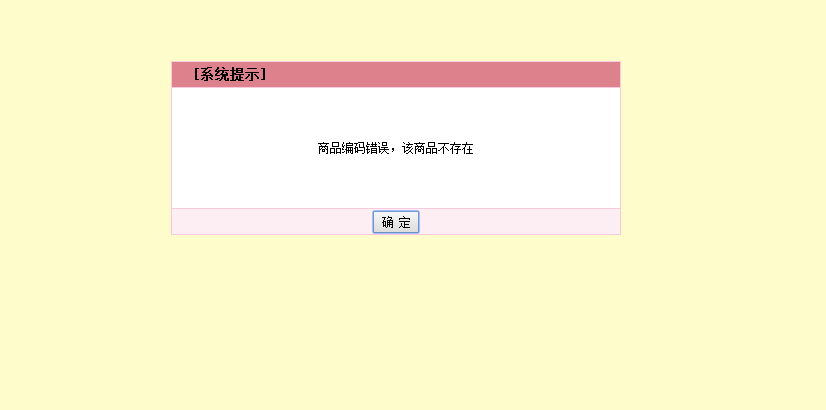
效果如下:
样式还可自己再改
}
重写Alert的更多相关文章
- JS重写alert,保证弹窗错误的友好性
// ------------------------------------------------------------- // 重写alert,保证弹窗错误的友好性 var j_oldAler ...
- 重写alert方法,去掉地址显示
//重写alert方法,去掉地址显示window.alert = function(name){ var iframe = document.createElement("IFRAME&qu ...
- [Winform]Cefsharp重写alert与confirm弹窗
摘要 在使用winform内嵌cefsharp浏览本地页面的时候,如果出现alert弹窗,会在标题栏显示页面所在目录.所以想起来重写alert的样式,通过winform的MessageBox进行提示. ...
- 重写Alert和confirm方法去除地址显示
//重写alert方法,去掉地址显示window.alert = function(name){var iframe = document.createElement("IFRAME&quo ...
- js重写alert()弹窗
//重写alertwindow.alert = function(str){ var alertFram = document.getElementById('alertFram'); var shi ...
- Cef 重写alert与confirm弹窗
在使用form内嵌cef浏览本地页面的时候,如果出现alert弹窗,会在标题栏显示页面所在目录.所以想起来重写alert的样式,通过MessageBox进行提示,或者自己写一个弹窗. 以下代码基于 3 ...
- 重写alert方法完成类似gmail的友好提示
当在网页中调用aelrt()方法的时候,系统会自动显示友好的提示方式 . 下面是css样式控制代码: /*----------------------------------------------- ...
- 自定义alert弹框,title不显示域名(重写alert)
问题: 系统默认的alert弹框的title会默认显示网页域名 解决办法: (修改弹框样式) (function() { window.alert = function(name) { $(" ...
- js 重写alert 兼容iphone使得alert 不带src
<script> window.alert = function(name){ var iframe = document.createElement("IFRAME" ...
- JS 重写alert,使之能输出多个参数
windows._alert = windows.alert; windows.alert = function(){ _alert = (Array.prototype.slice(argument ...
随机推荐
- usaco中遇到的问题
numbers are integers with unique digits 意思是数字中的每一个数字都是不一样的& 让一个图成为强连通图只需添加max(出度为0,入度为0)的点,然后如果图 ...
- [USACO06NOV]玉米田Corn Fields 状压DP
题面: 农场主John新买了一块长方形的新牧场,这块牧场被划分成M行N列(1 ≤ M ≤ 12; 1 ≤ N ≤ 12),每一格都是一块正方形的土地.John打算在牧场上的某几格里种上美味的草,供他的 ...
- 重拾C#教程:变量
一个变量只不过是一个供程序操作的存储区的名字.在 C# 中,每个变量都有一个特定的类型,类型决定了变量的内存大小和布局.范围内的值可以存储在内存中,可以对变量进行一系列操作. 我们已经讨论了各种数据类 ...
- BZOJ2527 & 洛谷3527:[Poi2011]Meteors——题解
+++++++++++++++++++++++++++++++++++++++++++ +本文作者:luyouqi233. + +欢迎访问我的博客:http://www.cnblogs.com/luy ...
- ZOJ1081:Points Within——题解
http://acm.zju.edu.cn/onlinejudge/showProblem.do?problemCode=1081 题目大意:给定一个点数为 n 的多边形,点按照顺序给出,再给出 m ...
- HDU4812 D tree 【点分治 + 乘法逆元】
D树 时间限制:10000/5000 MS(Java / Others)内存限制:102400/102400 K(Java / Others) 总共提交5400个已接受的提交1144 问题描述 南京理 ...
- 卡特兰数(Catalan Number) 学习笔记
一.三个简单的问题 1.给定一串长为2n的01序列,其中0和1的数量相等,满足任意前缀中0的个数不少于1的个数,求序列的个数 2.给出一串长为n的序列,按顺序将他们进栈,随意出栈,求最后进出栈的方案 ...
- CodeForces 185A. Plant (矩阵快速幂)
CodeForces 185A. Plant (矩阵快速幂) 题意分析 求解N年后,向上的三角形和向下的三角形的个数分别是多少.如图所示: N=0时只有一个向上的三角形,N=1时有3个向上的三角形,1 ...
- 直通BAT面试算法精讲课2
对于一个int数组,请编写一个冒泡排序算法,对数组元素排序. 给定一个int数组A及数组的大小n,请返回排序后的数组. 测试样例: [1,2,3,5,2,3],6 [1,2,2,3,3,5] clas ...
- Linux之根文件系统的构建20160611
说一下LINUX根文件系统的构建: 制作文件系统 1. 交叉编译busybox 安装:make install CONFIG_PREFIX=/work/nfs_root/fs_mini_mdev_ne ...