
最简单的基于FFMPEG的图像编码器(YUV编码为JPEG)(转)
原文转自 https://blog.csdn.net/leixiaohua1020/article/details/25346147/
伴随着毕业论文的完成,这两天终于腾出了空闲,又有时间搞搞FFMPEG的研究了。想着之前一直搞的都是FFMPEG解码方面的工作,很少涉及到FFMPEG编码方面的东西,于是打算研究一下FFMPEG的编码。在网上看了一些例子,发现要不然是难度略微有些大,要不然就是类库比较陈旧,于是就决定自己做一个编码方面的例子,方便以后学习。
简介
本文的编码器实现了YUV420P的数据编码为JPEG图片。本着简单的原则,代码基本上精简到了极限。使用了2014年5月6号编译的最新的FFMPEG类库。
程序很简单,打开工程后直接运行即可将YUV数据编码为JPEG。本程序十分灵活,可以根据需要修改成编码各种图像格式的编码器,比如PNG,GIF等等。平台使用VC2010。
源代码
/**

 * 最简单的基于FFmpeg的图像编码器

 * Simplest FFmpeg Picture Encoder

 *

 * 雷霄骅 Lei Xiaohua

 * leixiaohua1020@126.com

 * 中国传媒大学/数字电视技术

 * Communication University of China / Digital TV Technology

 * http://blog.csdn.net/leixiaohua1020

 *

 * 本程序实现了YUV420P像素数据编码为JPEG图片。是最简单的FFmpeg编码方面的教程。

 * 通过学习本例子可以了解FFmpeg的编码流程。

 */

#include <stdio.h>

#define __STDC_CONSTANT_MACROS

#ifdef _WIN32

//Windows

extern "C"

{

#include "libavcodec/avcodec.h"

#include "libavformat/avformat.h"

};

#else

//Linux...

#ifdef __cplusplus

extern "C"

{

#endif

#include <libavcodec/avcodec.h>

#include <libavformat/avformat.h>

#ifdef __cplusplus

};

#endif

#endif

int main(int argc, char* argv[])

{

    AVFormatContext* pFormatCtx;

    AVOutputFormat* fmt;

    AVStream* video_st;

    AVCodecContext* pCodecCtx;

    AVCodec* pCodec;

    uint8_t* picture_buf;

    AVFrame* picture;

    AVPacket pkt;

    int y_size;

    int got_picture=;

    int size;

    int ret=;

    FILE *in_file = NULL;                            //YUV source

    int in_w=,in_h=;                           //YUV's width and height

    const char* out_file = "cuc_view_encode.jpg";    //Output file

    in_file = fopen("cuc_view_480x272.yuv", "rb");

    av_register_all();

    //Method 1

    pFormatCtx = avformat_alloc_context();

    //Guess format

    fmt = av_guess_format("mjpeg", NULL, NULL);

    pFormatCtx->oformat = fmt;

    //Output URL

    if (avio_open(&pFormatCtx->pb,out_file, AVIO_FLAG_READ_WRITE) < ){

        printf("Couldn't open output file.");

        return -;

    }

    //Method 2. More simple

    //avformat_alloc_output_context2(&pFormatCtx, NULL, NULL, out_file);

    //fmt = pFormatCtx->oformat;

    video_st = avformat_new_stream(pFormatCtx, );

    if (video_st==NULL){

        return -;

    }

    pCodecCtx = video_st->codec;

    pCodecCtx->codec_id = fmt->video_codec;

    pCodecCtx->codec_type = AVMEDIA_TYPE_VIDEO;

    pCodecCtx->pix_fmt = AV_PIX_FMT_YUVJ420P;

    pCodecCtx->width = in_w;

    pCodecCtx->height = in_h;

    pCodecCtx->time_base.num = ;

    pCodecCtx->time_base.den = ;

    //Output some information

    av_dump_format(pFormatCtx, , out_file, );

    pCodec = avcodec_find_encoder(pCodecCtx->codec_id);

    if (!pCodec){

        printf("Codec not found.");

        return -;

    }

    if (avcodec_open2(pCodecCtx, pCodec,NULL) < ){

        printf("Could not open codec.");

        return -;

    }

    picture = av_frame_alloc();

    size = avpicture_get_size(pCodecCtx->pix_fmt, pCodecCtx->width, pCodecCtx->height);

    picture_buf = (uint8_t *)av_malloc(size);

    if (!picture_buf)

    {

        return -;

    }

    avpicture_fill((AVPicture *)picture, picture_buf, pCodecCtx->pix_fmt, pCodecCtx->width, pCodecCtx->height);

    //Write Header

    avformat_write_header(pFormatCtx,NULL);

    y_size = pCodecCtx->width * pCodecCtx->height;

    av_new_packet(&pkt,y_size*);

    //Read YUV

    if (fread(picture_buf, , y_size*/, in_file) <=)

    {

        printf("Could not read input file.");

        return -;

    }

    picture->data[] = picture_buf;              // Y

    picture->data[] = picture_buf+ y_size;      // U

    picture->data[] = picture_buf+ y_size*/;  // V

    //Encode

    ret = avcodec_encode_video2(pCodecCtx, &pkt,picture, &got_picture);

    if(ret < ){

        printf("Encode Error.\n");

        return -;

    }

    if (got_picture==){

        pkt.stream_index = video_st->index;

        ret = av_write_frame(pFormatCtx, &pkt);

    }

    av_free_packet(&pkt);

    //Write Trailer

    av_write_trailer(pFormatCtx);

    printf("Encode Successful.\n");

    if (video_st){

        avcodec_close(video_st->codec);

        av_free(picture);

        av_free(picture_buf);

    }

    avio_close(pFormatCtx->pb);

    avformat_free_context(pFormatCtx);

    fclose(in_file);

    return ;

}
结果
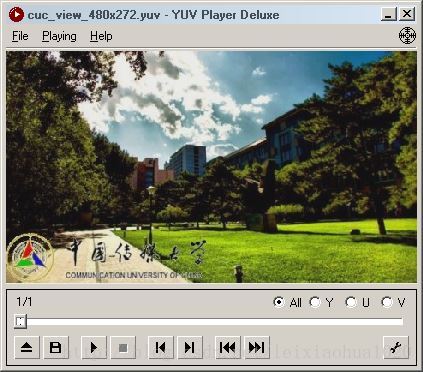
编码前的YUV420P数据:
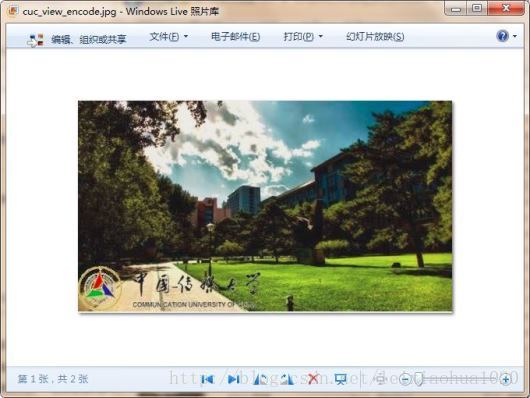
编码后的JPEG:
下载
simplest ffmpeg picture encoder
项目主页
SourceForge:https://sourceforge.net/projects/simplestffmpegpictureencoder/
Github:https://github.com/leixiaohua1020/simplest_ffmpeg_picture_encoder
开源中国:http://git.oschina.net/leixiaohua1020/simplest_ffmpeg_picture_encoder
CSDN工程下载地址:
http://download.csdn.net/detail/leixiaohua1020/7319265
PUDN工程下载地址:
http://www.pudn.com/downloads644/sourcecode/multimedia/detail2605252.html
本程序实现了YUV420P像素数据编码为JPEG图片。是最简单的FFmpeg编码方面的教程。通过学习本例子可以了解FFmpeg的编码流程。
更新-1.1(2015.2.13)=========================================
这次考虑到了跨平台的要求,调整了源代码。经过这次调整之后,源代码可以在以下平台编译通过:
VC++:打开sln文件即可编译,无需配置。
cl.exe:打开compile_cl.bat即可命令行下使用cl.exe进行编译,注意可能需要按照VC的安装路径调整脚本里面的参数。编译命令如下。
::VS2010 Environment

call "D:\Program Files\Microsoft Visual Studio 10.0\VC\vcvarsall.bat"

::include

@set INCLUDE=include;%INCLUDE%

::lib

@set LIB=lib;%LIB%

::compile and link

cl simplest_ffmpeg_picture_encoder.cpp /link avcodec.lib avformat.lib avutil.lib ^

avdevice.lib avfilter.lib postproc.lib swresample.lib swscale.lib /OPT:NOREF
MinGW:MinGW命令行下运行compile_mingw.sh即可使用MinGW的g++进行编译。编译命令如下。
g++ simplest_ffmpeg_picture_encoder.cpp -g -o simplest_ffmpeg_picture_encoder.exe \

-I /usr/local/include -L /usr/local/lib \

-lavformat -lavcodec -lavutil
GCC:Linux或者MacOS命令行下运行compile_gcc.sh即可使用GCC进行编译。编译命令如下。
gcc simplest_ffmpeg_picture_encoder.cpp -g -o simplest_ffmpeg_picture_encoder.out \

-I /usr/local/include -L /usr/local/lib -lavformat -lavcodec -lavutil
PS:相关的编译命令已经保存到了工程文件夹中
CSDN下载地址:http://download.csdn.net/detail/leixiaohua1020/8444893
SourceForge上已经更新。
最简单的基于FFMPEG的图像编码器(YUV编码为JPEG)(转)的更多相关文章
- 最简单的基于FFMPEG的图像编码器(YUV编码为JPEG)
伴随着毕业论文的完成,这两天终于腾出了空闲,又有时间搞搞FFMPEG的研究了.想着之前一直搞的都是FFMPEG解码方面的工作,很少涉及到FFMPEG编码方面的东西,于是打算研究一下FFMPEG的编码. ...
- 最简单的基于FFMPEG的视频编码器(YUV编码为H.264)
本文介绍一个最简单的基于FFMPEG的视频编码器.该编码器实现了YUV420P的像素数据编码为H.264的压缩编码数据.编码器代码十分简单,可是每一行代码都非常重要,适合好好研究一下.弄清楚了本代码也 ...
- 最简单的基于FFMPEG的音频编码器(PCM编码为AAC)
http://blog.csdn.net/leixiaohua1020/article/details/25430449 本文介绍一个最简单的基于FFMPEG的音频编码器.该编码器实现了PCM音频采样 ...
- 最简单的基于FFmpeg的编码器-纯净版(不包含libavformat)
===================================================== 最简单的基于FFmpeg的视频编码器文章列表: 最简单的基于FFMPEG的视频编码器(YUV ...
- 最简单的基于FFMPEG的转码程序
本文介绍一个简单的基于FFmpeg的转码器.它可以将一种视频格式(包括封转格式和编码格式)转换为另一种视频格式.转码器在视音频编解码处理的程序中,属于一个比较复杂的东西.因为它结合了视频的解码和编码. ...
- 最简单的基于FFmpeg的视频编码器-更新版(YUV编码为HEVC(H.265))
===================================================== 最简单的基于FFmpeg的视频编码器文章列表: 最简单的基于FFMPEG的视频编码器(YUV ...
- 最简单的基于FFmpeg的内存读写的例子:内存转码器
===================================================== 最简单的基于FFmpeg的内存读写的例子系列文章列表: 最简单的基于FFmpeg的内存读写的 ...
- 最简单的基于FFmpeg的内存读写的例子:内存播放器
===================================================== 最简单的基于FFmpeg的内存读写的例子系列文章列表: 最简单的基于FFmpeg的内存读写的 ...
- (转)最简单的基于FFmpeg的内存读写的例子:内存播放器
ffmpeg内存播放解码 目录(?)[+] ===================================================== 最简单的基于FFmpeg的内存读写的例子系列文章 ...
随机推荐
- 从Mysql某一表中随机读取n条数据的SQL查询语句
若要在i ≤ R ≤ j 这个范围得到一个随机整数R ,需要用到表达式 FLOOR(i + RAND() * (j – i + 1)).例如, 若要在7 到 12 的范围(包括7和12)内得到一个随机 ...
- 第25天:js-封装函数-淘宝鼠标展示
封装函数: 1.函数形参相当于变量,不能加引号. 2.实参要和形参一一对应. 案例:鼠标移到小图上,背景展示相应放大的图片.代码如下: <!DOCTYPE html> <html l ...
- 【ADO.NET】SqlBulkCopy批量添加DataTable
使用事务和SqlBulkCopy批量插入数据 SqlBulkCopy是.NET Framework 2.0新增的类,位于命名空间System.Data.SqlClient下,主要提供把其他数据源的数据 ...
- hash 默认使用equal进行元素比较 防止元素重复
hash 默认使用equal进行元素比较 防止元素重复
- HUAS 1483 mex(离线+线段树)
实在是太弱了.... 考虑离线,从mex[l,r]向mex[l,r+1]转移,显然是没啥东西可以记录的... 从mex[l,r]向mex[l+1,r]转移,记x=mex[l,r],如果[l+1,r]不 ...
- Give NetScaler a “Tune-Up”
Give NetScaler a “Tune-Up” https://www.citrix.com/blogs/2014/10/21/give-netscaler-a-tune-up/ To Opti ...
- POJ3621:Sightseeing Cows——题解
http://poj.org/problem?id=3621 全文翻译参自洛谷:https://www.luogu.org/problemnew/show/P2868 题目大意:一个有向图,每个点都有 ...
- HDU5306:Gorgeous Sequence——题解
http://acm.hdu.edu.cn/showproblem.php?pid=5306 给一个数组,m次操作: 1:l r x,将a[i](l<=i<=r)=min(a[i],x) ...
- git安装和使用 linux系统和window系统
一.git简介 git是一款免费.开放源代码的分布式版本控制系统特点: git是一个开源的分布式版本控制系统,可以有效, 高速的处理从很小到非常大的项目版本管理 二.git安装 Linux:下载.安装 ...
- [Jenkins 新插件] 兼容阿里开发手册 (P3C) 的火线插件安装使用教程
一.前言 火线(Fireline)的Jenkins官方插件已经上线,目前火线不仅能检查出安卓代码中的安全类问题和内存泄露问题,还兼容了阿里开源的Java开发规约(P3C项目),本文将以教程的形式帮助大 ...