
FastDFS介绍和配置过程
由于网站使用nfs共享方式保存用户上传的图片,附件等资料,然后通过apache下载的方式供用户访问,在网站架构初期,使用这种简单的方式实现了静态资源的读写分离,但随着网站数据量的增加,图片服务器渐渐成为整个网站的短板,缘次催生了使用fastfds的想法,故而先进行一番简单的测试!在开始之前还是先来看看fastfds的介绍信息:
|
FastDFS is an open source high performance distributed file system (DFS). It's major functions include: file storing, file syncing and file accessing, and design for high capacity and load balancing. FastDFS is an open source high performance distributed file system. It's major functions include: file storing, file syncing and file accessing (file uploading and file downloading), and it can resolve the high capacity and load balancing problem. FastDFS should meet the requirement of the website whose service based on files such as photo sharing site and vidio sharing site. FastDFS has two roles: tracker and storage. The tracker takes charge of scheduling and load balancing for file access. The storage store files and it's function is file management including: file storing, file syncing, providing file access interface. It also manage the meta data which are attributes representing as key value pair of the file. For example: width=1024, the key is "width" and the value is "1024". The tracker and storage contain one or more servers. The servers in the tracker or storage cluster can be added to or removed from the cluster by any time without affecting the online services. The servers in the tracker cluster are peer to peer. The storarge servers organizing by the file volume/group to obtain high capacity. The storage system contains one or more volumes whose files are independent among these volumes. The capacity of the whole storage system equals to the sum of all volumes' capacity. A file volume contains one or more storage servers whose files are same among these servers. The servers in a file volume backup each other, and all these servers are load balancing. When adding a storage server to a volume, files already existing in this volume are replicated to this new server automatically, and when this replication done, system will switch this server online to providing storage services. When the whole storage capacity is insufficiency, you can add one or more volumes to expand the storage capacity. To do this, you need to add one or more storage servers. The identification of a file is composed of two parts: the volume name and the file name. |
大意为:
fastdfs是一个开源的,高性能的的分布式文件系统,他主要的功能包括:文件存储,同步和访问,设计基于高可用和负载均衡,fastfd非常适用于基于文件服务的站点,例如图片分享和视频分享网站
fastfds有两个角色:跟踪服务和存储服务,跟踪服务控制,调度文件以负载均衡的方式访问;存储服务包括:文件存储,文件同步,提供文件访问接口,同时以key value的方式管理文件的元数据
跟踪和存储服务可以由1台或者多台服务器组成,同时可以动态的添加,删除跟踪和存储服务而不会对在线的服务产生影响,在集群中,tracker服务是对等的
存储系统由一个或多个卷组成,卷与卷之间的文件是相互独立的,所有卷的文件容量累加就是整个存储系统中的文件容量。一个卷可以由一台或多台存储服务器组成,一个卷下的存储服务器中的文件都是相同的,卷中的多台存储服务器起到了冗余备份和负载均衡的作用。在卷中增加服务器时,同步已有的文件由系统自动完成,同步完成后,系统自动将新增服务器切换到线上提供服务。当存储空间不足或即将耗尽时,可以动态添加卷。只需要增加一台或多台服务器,并将它们配置为一个新的卷,这样就扩大了存储系统的容量。
下面几张图可以清楚的说明fastfds的架构和文件上传和下载流程等:

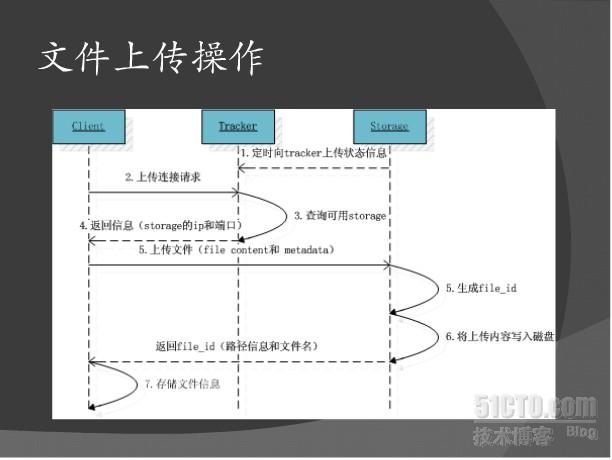
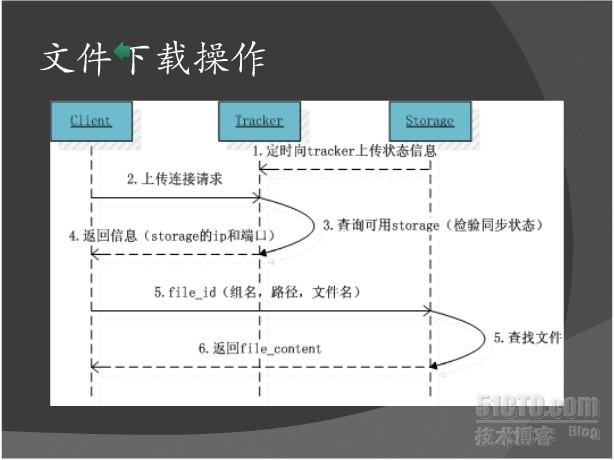
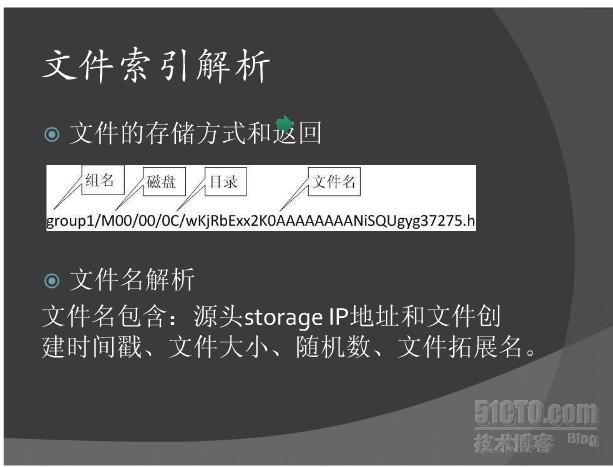
下面将介绍下fastdfs在rhel上的部署过程
tracker服务器:192.168.123.110/24
storage服务器:192.168.123.20/24
一:编译安装
- [root@db1 ~]# wget http://cloud.github.com/downloads/libevent/libevent/libevent-2.0.14
- -stable.tar.gz
- [root@db1 ~]# tar -zxvpf libevent-2.0.14-stable.tar.gz
- [root@db1 ~]# cd libevent-2.0.14-stable
- [root@db1 libevent-2.0.14-stable]# ./configure --prefix=/usr/local/libevent-2.0.14 &&
- make && make install
- [root@db1 ~]# wget http://fastdfs.googlecode.com/files/FastDFS_v3.02.tar.gz
- [root@db1 ~]# tar -zxvf FastDFS_v3.02.tar.gz
- [root@db1 ~]# cd FastDFS
- [root@db1 FastDFS]# grep -A 4 '/usr/local/FastDFS' make.sh
- TARGET_PREFIX=/usr/local/FastDFS
- TARGET_CONF_PATH=/etc/fdfs
- WITH_HTTPD=1
- WITH_LINUX_SERVICE=1
- [root@db1 FastDFS]# ./make.sh C_INCLUDE_PATH=/usr/local/libevent-2.0.14/include
- LIBRARY_PATH=/usr/local/libevent-2.0.14/lib
- [root@db1 FastDFS]# ./make.sh install
- [root@db1 FastDFS]# ls /etc/fdfs/
- client.conf http.conf mime.types storage.conf tracker.conf
二:tracker配置文件
- [root@db1 ~]# grep -v '^#' /etc/fdfs/tracker.conf |grep -v '^$'
- disabled=false
- bind_addr=192.168.123.110
- port=22122
- connect_timeout=30
- network_timeout=60
- base_path=/home/data/fastdfs
- max_connections=256
- work_threads=4
- store_lookup=2
- store_group=group2
- store_server=0
- store_path=0
- download_server=0
- reserved_storage_space = 4GB
- log_level=info
- run_by_group=
- run_by_user=
- allow_hosts=*
- sync_log_buff_interval = 10
- check_active_interval = 120
- thread_stack_size = 64KB
- storage_ip_changed_auto_adjust = true
- storage_sync_file_max_delay = 86400
- storage_sync_file_max_time = 300
- use_trunk_file = false
- slot_min_size = 256
- slot_max_size = 16MB
- trunk_file_size = 64MB
- http.disabled=false
- http.server_port=8080
- http.check_alive_interval=30
- http.check_alive_type=tcp
- http.check_alive_uri=/status.html
- http.need_find_content_type=true
- [root@db1 ~]# grep -v '^#' /etc/fdfs/http.conf |grep -v '^$'
- http.default_content_type = application/octet-stream
- http.mime_types_filename=/etc/fdfs/mime.types
- http.anti_steal.check_token=false
- http.anti_steal.token_ttl=900
- http.anti_steal.secret_key=FastDFS1234567890
- http.anti_steal.token_check_fail=/home/data/fastdfs/conf/anti-steal.jpg
三:启动tracker服务,需要注意tracker.conf文件最后一行为#include httpd.conf
- [root@db1 ~]# /usr/local/FastDFS/bin/fdfs_trackerd /etc/fdfs/tracker.conf
- /usr/local/FastDFS/bin/fdfs_trackerd: error while loading shared libraries: libevent-
- 2.0.so.5: cannot open shared object file: No such file or directory
- [root@db1 ~]# echo '/usr/local/libevent-2.0.14/include/' >> /etc/ld.so.conf
- [root@db1 ~]# echo '/usr/local/libevent-2.0.14/lib/' >> /etc/ld.so.conf
- [root@db1 ~]# ldconfig
- [root@db1 ~]# /usr/local/FastDFS/bin/fdfs_trackerd /etc/fdfs/tracker.conf
- [2012-07-04 17:52:25] ERROR - file: tracker_func.c, line: 160, "/home/data/fastdfs"
- can't be accessed, error info: No such file or directory
- [root@db1 ~]# mkdir -p /home/data/fastdfs
- [root@db1 ~]# /usr/local/FastDFS/bin/fdfs_trackerd /etc/fdfs/tracker.conf
- [root@db1 ~]# echo $?
- 22
- [root@db1 ~]# cat /home/data/fastdfs/logs/trackerd.log
- [2012-07-04 17:52:50] ERROR - file: ../common/fdfs_http_shared.c, line: 128, param
- "http.mime_types_filename" not exist or is empty
- [root@db1 ~]# tail -1 /etc/fdfs/tracker.conf
- #include http.conf
- [root@db1 ~]# /usr/local/FastDFS/bin/fdfs_trackerd /etc/fdfs/tracker.conf
- [root@db1 ~]# echo $?
- 0
- [root@db1 ~]# ps -ef |grep track
- root 3535 1 0 15:47 ? 00:00:00 /usr/local/FastDFS/bin/fdfs_trackerd
- /etc/fdfs/tracker.conf
- [root@db1 ~]# netstat -ntpl |grep fdfs
- tcp 0 0 192.168.123.110:22122 0.0.0.0:* LISTEN
- 3535/fdfs_trackerd
- tcp 0 0 192.168.123.110:8080 0.0.0.0:* LISTEN
- 3535/fdfs_trackerd
四:storage配置文件
- [root@db2 ~]# grep -v '^#' /etc/fdfs/storage.conf |grep -v '^$'
- disabled=false
- group_name=group1
- bind_addr=192.168.123.20
- client_bind=true
- port=23000
- connect_timeout=30
- network_timeout=60
- heart_beat_interval=30
- stat_report_interval=60
- base_path=/home/data/fastdfs
- max_connections=256
- buff_size = 256KB
- work_threads=4
- disk_rw_separated = true
- disk_rw_direct = false
- disk_reader_threads = 1
- disk_writer_threads = 1
- sync_wait_msec=50
- sync_interval=0
- sync_start_time=00:00
- sync_end_time=23:59
- write_mark_file_freq=500
- store_path_count=1
- store_path0=/home/data/fastdfs
- subdir_count_per_path=256
- tracker_server=192.168.123.110:22122
- log_level=info
- run_by_group=
- run_by_user=
- allow_hosts=*
- file_distribute_path_mode=0
- file_distribute_rotate_count=100
- fsync_after_written_bytes=0
- sync_log_buff_interval=10
- sync_binlog_buff_interval=10
- sync_stat_file_interval=300
- thread_stack_size=512KB
- upload_priority=10
- if_alias_prefix=
- check_file_duplicate=0
- key_namespace=FastDFS
- keep_alive=0
- http.disabled=false
- httphttp.domain_name=
- http.server_port=8888
- http.trunk_size=256KB
- http.need_find_content_type=true
- [root@db2 ~]# grep -v '^#' /etc/fdfs/client.conf |grep -v '^$'
- connect_timeout=30
- network_timeout=60
- base_path=/home/data/fastdfs
- tracker_server=192.168.123.110:22122
- log_level=info
- http.tracker_server_port=8080
- [root@db2 ~]# grep -v '^#' /etc/fdfs/http.conf |grep -v '^$'
- http.default_content_type = application/octet-stream
- http.mime_types_filename=mime.types
- http.anti_steal.check_token=false
- http.anti_steal.token_ttl=900
- http.anti_steal.secret_key=FastDFS1234567890
- http.anti_steal.token_check_fail=/home/data/fastdfs/conf/anti-steal.jpg
五:启动storage,需要注意storage.conf文件最后一行为#include httpd.conf
- [root@db2 ~]# mkdir -p /home/data/fastdfs
- [root@db2 ~]# echo '/usr/local/libevent-2.0.14/include/' >> /etc/ld.so.conf
- [root@db2 ~]# echo '/usr/local/libevent-2.0.14/lib/' >> /etc/ld.so.conf
- [root@db2 ~]# ldconfig
- [root@db2 ~]# tail -2 /etc/fdfs/storage.conf
- #use "#include" directive to include HTTP other settings
- #include http.conf
- [root@db2 ~]# /usr/local/FastFDS/bin/fdfs_storaged /etc/fdfs/storage.conf
- mkdir data path: 00 ...
- mkdir data path: 01 ...
- mkdir data path: 02 ...
- ———输出省略————
- data path: /home/data/fastdfs/data, mkdir sub dir done.
- [root@db2 ~]# ps -ef |grep fdfs
- root 14451 1 0 16:15 ? 00:00:00 /usr/local/FastFDS/bin/fdfs_storaged
- /etc/fdfs/storage.conf
- root 14468 8238 0 16:16 pts/1 00:00:00 grep fdfs
- [root@db2 ~]# netstat -ntpl |grep fdfs
- tcp 0 0 192.168.123.20:8888 0.0.0.0:* LISTEN
- 14451/fdfs_storaged
- tcp 0 0 192.168.123.20:23000 0.0.0.0:* LISTEN
- 14451/fdfs_storaged
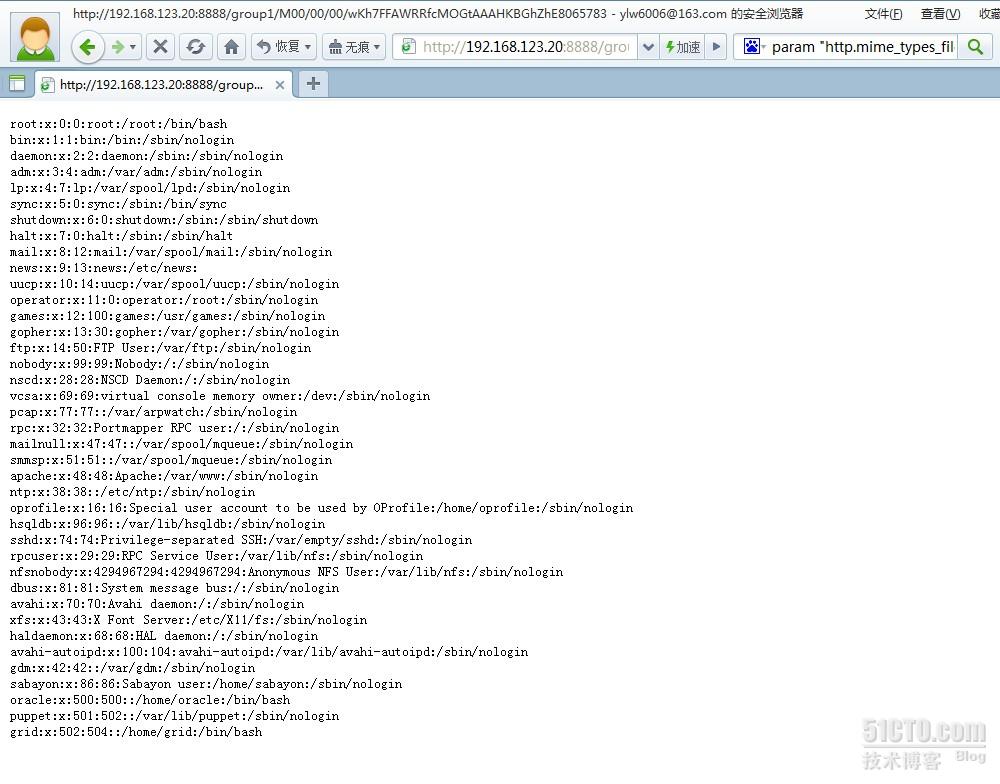
五:测试文件上传
|
[root@db2 ~]# /usr/local/FastFDS/bin/fdfs_test /etc/fdfs/client.conf upload /etc/passwd [2012-07-30 16:25:59] INFO - base_path=/home/data/fastdfs, connect_timeout=30, network_timeout=60, tracker_server_count=1, anti_steal_token=0, anti_steal_secret_key length=0 tracker_query_storage_store_list_without_group: [root@db2 ~]# /usr/local/FastFDS/bin/fdfs_test /etc/fdfs/client.conf upload 2.jpg [2012-07-30 16:29:22] INFO - base_path=/home/data/fastdfs, connect_timeout=30, network_timeout=60, tracker_server_count=1, anti_steal_token=0, anti_steal_secret_key length=0 tracker_query_storage_store_list_without_group: |


本文出自 “斩月” 博客,谢绝转载!
FastDFS介绍和配置过程的更多相关文章
- 分布式文件系统FastDFS介绍和配置过程
http://ylw6006.blog.51cto.com/470441/948729/ 由于网站使用nfs共享方式保存用户上传的图片,附件等资料,然后通过apache下载的方式供用户访问,在网站架构 ...
- FastDFS介绍和配置过程 二
最近在研究负载均衡和集群,其中涉及到一个主要问题是,如何让集群中的real server共享一套文件系统.在网上查到FastDFS,国人(happy fish,感谢他的开源精神)开发的一套轻量级分 ...
- FastDFS介绍和搭建(转载)
FastDFS介绍和配置过程--http://blog.51cto.com/ylw6006/948729 FastDFS的五篇文章--http://www.cnblogs.com/smartycity ...
- FastDFS配置过程
在我的生产环境中利用FastDFS实现动静分离的方案
- FastDFS的安装配置
一:实验描述: fastdfs 介绍 FastDFS是一个开源的分布式文件系统,它对文件进行管理,功能包括:文件存储.文件同步.文件访问(文件上传.文件下载)等,解决了大容量存储和负载均衡的问题.特别 ...
- FastDFS、nginx配置手记
第一部分 FastDFS介绍 1.FastDFS是什么 FastDFS是一款类Google FS的开源分布式文件系统,它用纯C语言实现,支持Linux.FreeBSD.AIX等UNIX系统.它只能 ...
- synergy 两台Windows电脑配置过程
Synergy 介绍 软件作用 Synergy 两台独立电脑,共享一套鼠标和键盘的工具, 软件原理(我自己想的) 保证两台电脑在一个局域网内,可以相互Ping通的电脑(这样才能直接通过TCP连接) 将 ...
- 图解MySQL5.5详细安装与配置过程
MySQL是一个开源的关系型数据库管理系统,原由瑞典MySQL AB公司开发,目前属于Oracle公司旗下.MySQL是目前世界上开源数据库中最受欢迎的产品之一,是应用最为广泛的开源数据库.MySQL ...
- Win7上Git安装及配置过程
Win7上Git安装及配置过程 文档名称 Win7上Git安装及配置过程 创建时间 2012/8/20 修改时间 2012/8/20 创建人 Baifx 简介(收获) 1.在win7上安装msysgi ...
随机推荐
- mysql学习之数据备份与恢复
该文使用mysql5.5 centos6.5 64位(本人使用rpm安装mysql,数据库的安装目录默认) 一.数据备份注意事项 读锁问题:数据库(或者某个表)一旦进行读锁操作则影响数据库的写操作所以 ...
- hdu 1150 Machine Schedule (二分匹配)
Machine Schedule Time Limit: 2000/1000 MS (Java/Others) Memory Limit: 65536/32768 K (Java/Others) ...
- (七)Redis对键key的操作
key的全部命令如下: keys pattern # 查找所有符合给定模式pattern的key ,查找所有key 使用[keys *] del key1 key2 ... # 删除给定的一个或多个k ...
- 2018牛客多校第五场 E.room
题意: 一共有n个宿舍,每个宿舍有4个人.给出第一年的人员分布和第二年的人员分布,问至少有多少人需要移动. 题解: 对于第一年的每个宿舍,向今年的每种组合连边.流量为1,费用为(4 - 组合中已在该宿 ...
- [bzoj4398] 福慧双修 最短路 二进制分组
---题面--- 题解: 考场上看的这道题,,,当时70分算法打挂了,今天才知道这个也是原题.... 首先,对于不跟1相邻的边,肯定不会经过两次,因为经过两次就回来了,除了增加路径长度之外没有任何意义 ...
- [NOI2009]管道取珠 DP + 递推
---题面--- 思路: 主要难点在思路的转化, 不能看见要求$\sum{a[i]^2}$就想着求a[i], 我们可以对其进行某种意义上的拆分,即a[i]实际上可以代表什么? 假设我们现在有两种取出某 ...
- 【CKplayer】使用CKplayer插件在网页中嵌入视频的方法
在做网站中有时候我们需要在网页中嵌入视频,一般视频嵌入有以下几种方法: 1. 优酷代码嵌入 优点:简单,方便,可靠. 缺点:有广告,现在的网站非常注重用户体验,如果打开一个在线视频是有长广告的一定会崩 ...
- UVA.10881 Piotr's Ants (思维题)
UVA.10881 Piotr's Ants (思维题) 题意分析 有一根长度为L cm的木棍,上有n只蚂蚁,蚂蚁要么向左爬,要么向右,速度均为1cm/s,若2只蚂蚁相撞,则蚂蚁同时调头.求解第T秒时 ...
- 认识MEAN开发框架[转]
MEAN是一个Javascript平台的现代Web开发框架总称,它是MongoDB + Express +AngularJS + NodeJS 四个框架的第一个字母组合. MongoDB是一个使用JS ...
- React router 4 获取路由参数,跨页面参数
1. match通过路径 <Route path="/path/:name" component={example} /> 路由组件内获取参数使用 this.props ...