
WEB开发的jsp例子标签库(jstl)的使用
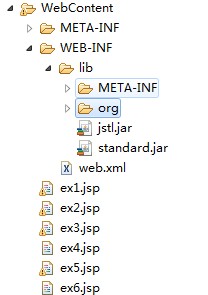
<!-- e1 -->

<%@ page language="java" contentType="text/html; charset=UTF-8"

    pageEncoding="UTF-8"%>

<%@ taglib prefix="c" uri="http://java.sun.com/jsp/jstl/core" %>

<%@ page import="java.util.*" %>

<!DOCTYPE html PUBLIC "-//W3C//DTD HTML 4.01 Transitional//EN" "http://www.w3.org/TR/html4/loose.dtd">

<html>

<head>

<meta http-equiv="Content-Type" content="text/html; charset=UTF-8">

<title>Insert title here</title>

</head>

<body>

<%

    request.setAttribute("attr_request","attr_request值");

    session.setAttribute("attr_session","attr_session值");

    application.setAttribute("attr_application","attr_application值");

%>

<div>

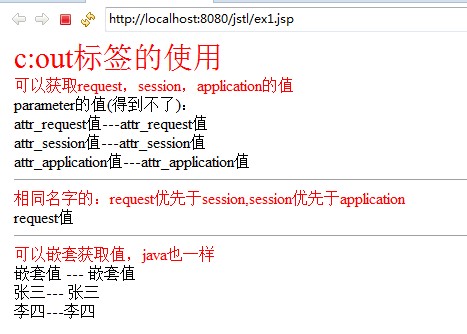
<div style="color:red;font-size:30px;">c:out标签的使用</div>

<div style="color:red">可以获取request,session,application的值</div>

    parameter的值(得到不了):<c:out value="${name}"/><br />

    <c:out value="${attr_request}"/>---${attr_request}<br />

    <c:out value="${attr_session}"/>---${attr_session}<br />

    <c:out value="${attr_application}"/>---${attr_application}<br />

</div>

<hr />

<%

    request.setAttribute("same_name","request值");

    session.setAttribute("same_name","session值");

    application.setAttribute("same_name","application值");

%>

<div>

<div style="color:red">相同名字的:request优先于session,session优先于application</div>

    <c:out value="${same_name}"/><br />

</div>

<hr />

<%

    HashMap map = new HashMap();

    map.put("name","嵌套值");

    request.setAttribute("result",map);

    ArrayList list = new ArrayList();

    HashMap map1 = new HashMap();

    map1.put("name","张三");

    list.add(map1);

    HashMap map2 = new HashMap();

    map2.put("name","李四");

    list.add(map2);

    request.setAttribute("list",list);

%>

<div>

<div style="color:red">可以嵌套获取值,java也一样</div>

    <c:out value="${result.name}"/> --- ${result.name}<br />

    <c:out value="${list[0].name}"/>--- ${list[0].name}<br />

    <c:out value="${list[1].name}"/>---${list[1].name}<br />

</div>

</body>

</html>

<!-- e2 -->

<%@ page language="java" contentType="text/html; charset=UTF-8"

    pageEncoding="UTF-8"%>

<%@ taglib prefix="c" uri="http://java.sun.com/jsp/jstl/core" %>

<%@ page import="java.util.*" %>

<!DOCTYPE html PUBLIC "-//W3C//DTD HTML 4.01 Transitional//EN" "http://www.w3.org/TR/html4/loose.dtd">

<html>

<head>

<meta http-equiv="Content-Type" content="text/html; charset=UTF-8">

<title>Insert title here</title>

</head>

<body>

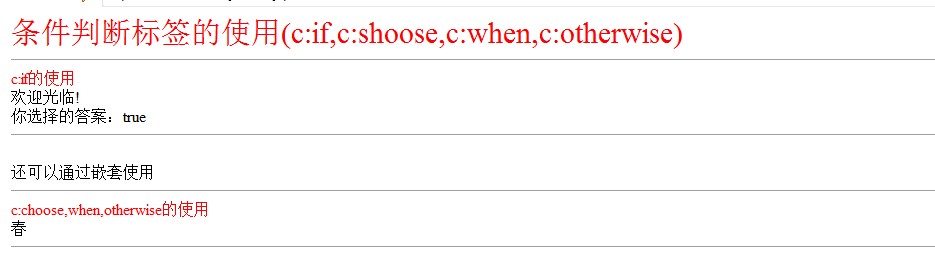
<div style="color:red;font-size:30px;">条件判断标签的使用(c:if,c:shoose,c:when,c:otherwise)</div>

<hr />

<div>

<div style="color:red">c:if的使用</div>

<%

    request.setAttribute("result",true);

%>

<c:set var="userName" value="张三"/>

<c:if test="${result == true}"  var="flag">

    欢迎${sessionScope.userName}光临!

</c:if>

<br />

你选择的答案:${flag}

<hr />

<%

HashMap map = new HashMap();

map.put("mark",1);

request.setAttribute("result1",map);

%>

<br />

<c:if test="${result1.mark == 1}">

    还可以通过嵌套使用

</c:if>

<hr />

<div style="color:red">c:choose,when,otherwise的使用</div>

<%

request.setAttribute("month",2);

%>

    <c:choose>

        <c:when test="${month>0 && month<4}">春</c:when>

        <c:when test="${month>3 && month<7}">夏</c:when>

        <c:when test="${month>6 && month<10}">秋</c:when>

        <c:when test="${month>9 && month<13}">冬</c:when>

        <c:otherwise>错误</c:otherwise>

    </c:choose>

</div>

<hr />

</body>

</html>

<!-- e3 -->

<%@ page language="java" contentType="text/html; charset=UTF-8"

    pageEncoding="UTF-8"%>

<%@ taglib prefix="c" uri="http://java.sun.com/jsp/jstl/core" %>

<%@ page import="java.util.*" %>

<!DOCTYPE html PUBLIC "-//W3C//DTD HTML 4.01 Transitional//EN" "http://www.w3.org/TR/html4/loose.dtd">

<html>

<head>

<meta http-equiv="Content-Type" content="text/html; charset=UTF-8">

<title>Insert title here</title>

</head>

<body>

<div style="color:red;font-size:30px;">循环标签的使用(c:forEach,c:fortokens)</div>

<hr />

<div>

<div style="color:red">c:forEach的使用</div>

<%

    List<String> list = new ArrayList<String>();

    list.add("aaa1");

    list.add("aaa2");

    list.add("aaa3");

    request.setAttribute("list",list);

%>

    <c:forEach items="${list}" var="str" varStatus="xh">

      ${xh.count}序号从1开始,

      ${xh.index}序号从0开始,

      ${xh.last}最后一个序号,

      ${xh.first}第一个序号,

      :${str}<br/>

    </c:forEach>

<br />

<hr />

<div style="color:red">c:forEach的使用(空指针不会报错)</div>

    <% request.setAttribute("list1",null);%>

    <c:forEach items="${list1}" var="str">

        ${str}<br/>

    </c:forEach>

<br />

<hr />

<div style="color:red">c:forEach的使用(数组使用)</div>

<%

    String[] nums = { "1", "2", "3", "4", "5", "6", "7", "8", "9"};

    request.setAttribute("nums",nums);

%>

    <c:forEach items="${nums}" var="num">

    ${num}<br />

    </c:forEach>

<br />

<hr />

<div style="color:red">c:forEach的使用(下标从0开始)</div>

<c:forEach items="${nums}" var="num" begin="1" end="7" step="2">

    ${num}<br />

    </c:forEach>

<br />

<div style="color:red">c:forEach的使用(数组使用)</div>

<%

        ArrayList array = new ArrayList();

        HashMap m = new HashMap();

        m.put("name","张三");

        array.add(m);

        m = new HashMap();

        m.put("name","李四");

        array.add(m);

        m = new HashMap();

        m.put("name","王五");

        array.add(m);

        m = new HashMap();

        m.put("name","赵六");

        array.add(m);

        m = new HashMap();

        m.put("name","林奇");

        array.add(m);

        request.setAttribute("result_list", array);

%>

 <c:forEach items="${result_list}"  var="user">

         ${user.name}<br />

 </c:forEach>

<br />

<hr />

<div style="color:red">c:forTokens的使用</div>

<c:forTokens items="a:b:c:d" delims=":" var="token">

    <c:out value="${token}"/>

</c:forTokens>

</body>

</html>

<!-- e4 -->

<%@ page language="java" contentType="text/html; charset=UTF-8"

    pageEncoding="UTF-8"%>

<%@ taglib prefix="c" uri="http://java.sun.com/jsp/jstl/core" %>

<%@ taglib uri="http://java.sun.com/jsp/jstl/fmt" prefix="fmt" %>

<%@ page import="java.util.*" %>

<!DOCTYPE html PUBLIC "-//W3C//DTD HTML 4.01 Transitional//EN" "http://www.w3.org/TR/html4/loose.dtd">

<html>

<head>

<meta http-equiv="Content-Type" content="text/html; charset=UTF-8">

<title>Insert title here</title>

</head>

<body>

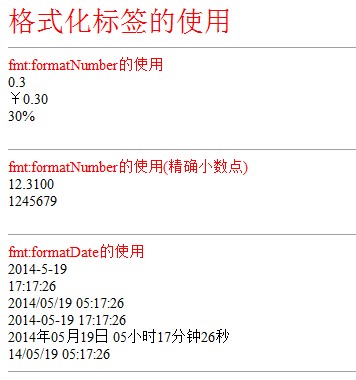
<div style="color:red;font-size:30px;">格式化标签的使用</div>

<hr />

<div style="color:red">fmt:formatNumber的使用</div>

    <fmt:formatNumber value="0.3" type="number"/><br />

    <fmt:formatNumber value="0.3" type="currency"/><br />

    <fmt:formatNumber value="0.3" type="percent"/><br />

<br />

<hr />

<div style="color:red">fmt:formatNumber的使用(精确小数点)</div>

<fmt:formatNumber value="12.31" pattern=".0000"/><br/>

<fmt:formatNumber value="1245678.61" pattern="#"/><br/>

<br />

<hr />

<div style="color:red">fmt:formatDate的使用</div>

<fmt:formatDate value="<%=new Date()%>" /><br/>

<fmt:formatDate value="<%=new Date()%>" type="time"/><br/>

<fmt:formatDate value="<%=new Date()%>" pattern="yyyy/MM/dd hh:mm:ss" /><br />

<fmt:formatDate value="<%=new Date()%>" pattern="yyyy-MM-dd HH:mm:ss" /><br />

<fmt:formatDate value="<%=new Date()%>" pattern="yyyy年MM月dd日 hh小时mm分钟ss秒" /><br />

<fmt:formatDate value="<%=new Date()%>" pattern="yy/MM/dd hh:mm:ss" /><br />

<hr>

</body>

</html>

<!-- e5 -->

<%@ page language="java" contentType="text/html; charset=UTF-8"

    pageEncoding="UTF-8"%>

<%@ taglib prefix="c" uri="http://java.sun.com/jsp/jstl/core" %>

<%@ taglib uri="http://java.sun.com/jsp/jstl/fmt" prefix="fmt" %>

<%@ page import="java.util.*" %>

<!DOCTYPE html PUBLIC "-//W3C//DTD HTML 4.01 Transitional//EN" "http://www.w3.org/TR/html4/loose.dtd">

<html>

<head>

<meta http-equiv="Content-Type" content="text/html; charset=UTF-8">

<title>Insert title here</title>

</head>

<body>

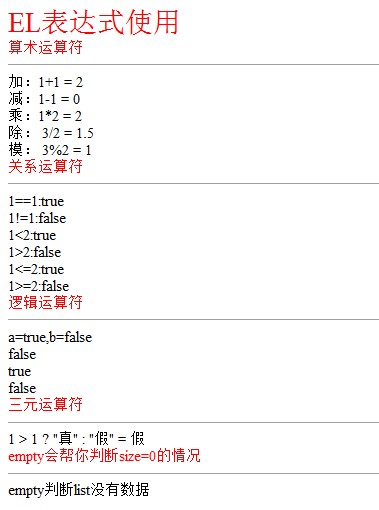
<div style="color:red;font-size:30px;">EL表达式使用</div>

<div style="color:red">算术运算符</div>

<hr />

加:1+1    = ${1+1}<br/>

减:1-1    = ${1-1}<br/>

乘:1*2    = ${1*2}<br/>

除:    3/2 = ${3/2}<br/>

模:    3%2 = ${3%2}<br/>

<div style="color:red">关系运算符</div>

<hr />

1==1:${1==1}<br/>

1!=1:${1!=1}<br/><2:${1<2}<br/>

1>2:${1>2}<br/><=2:${1<=2}<br/>

1>=2:${1>=2}<br/>

<div style="color:red">逻辑运算符</div>

<hr />

<%

request.setAttribute("a",true);

request.setAttribute("b",false);

%>

a=true,b=false<br/>

${a && b}<br/>

${a || b}<br/>

${!a}<br/>

<div style="color:red">三元运算符</div>

<hr />

1 > 1 ? "真" : "假" = ${1 > 1 ? "真" : "假"}

<div style="color:red">empty会帮你判断size=0的情况</div>

<hr />

<% request.setAttribute("list",new  ArrayList());%>

<c:if test="${empty list}">empty判断list没有数据</c:if>

</body>

</html>

<!-- e6 -->

<%@ page language="java" contentType="text/html; charset=UTF-8"

    pageEncoding="UTF-8"%>

<%@ taglib prefix="c" uri="http://java.sun.com/jsp/jstl/core" %>

<%@ taglib uri="http://java.sun.com/jsp/jstl/fmt" prefix="fmt" %>

<%@ page import="java.util.*" %>

<!DOCTYPE html PUBLIC "-//W3C//DTD HTML 4.01 Transitional//EN" "http://www.w3.org/TR/html4/loose.dtd">

<html>

<head>

<meta http-equiv="Content-Type" content="text/html; charset=UTF-8">

<title>Insert title here</title>

</head>

<body>

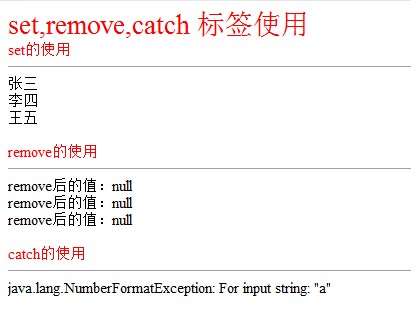
<div style="color:red;font-size:30px;">set,remove,catch 标签使用</div>

<div style="color:red">set的使用</div>

<hr />

 <c:set var="userName" value="张三" scope="request" />

 <c:set var="userName" value="李四" scope="session" />

 <c:set var="userName" value="王五" scope="application" />

 <%=request.getAttribute("userName") %><br/>

 <%=session.getAttribute("userName") %><br/>

 <%=application.getAttribute("userName") %><br/>

<br/>

<div style="color:red">remove的使用</div>

<hr />

 <c:remove var="userName" scope="request" />

 <c:remove var="userName" scope="session" />

 <c:remove var="userName" scope="application" />

 remove后的值:<%=request.getAttribute("userName") %><br/>

  remove后的值:<%=session.getAttribute("userName") %><br/>

  remove后的值:<%=application.getAttribute("userName") %><br/>

 <br/>

<div style="color:red">catch的使用</div>

<hr />

<c:catch var="error_Message">

<%

    int i = Integer.parseInt("a");

%>

</c:catch>

${error_Message}

</body>

</html>
要使用jstl标签库的话:需要自己下载jar包 jstl.jar&standard.jar
效果图:

WEB开发的jsp例子标签库(jstl)的使用的更多相关文章
- JSP标准标签库(JSTL)--JSTL简介与安装
对于MVC设计模式来讲,我们一直强调,在一个JSP钟scriptlet代码越少越好,但是只靠以前的概念很难实现,因为标签的开发特别麻烦,所以为了简化标签,也为了让标签更具备一些通用性,所以一般在开发中 ...
- JSP 标准标签库(JSTL)
JSP 标准标签库(JSTL) JSP标准标签库(JSTL)是一个JSP标签集合,它封装了JSP应用的通用核心功能. JSTL支持通用的.结构化的任务,比如迭代,条件判断,XML文档操作,国际化标签, ...
- JSP 标准标签库JSTL
JSP标准标签库(JSTL)是一个JSP标签集合,它封装了JSP应用的通用核心功能. JSTL支持通用的.结构化的任务,比如迭代,条件判断,XML文档操作,国际化标签,SQL标签. 除了这些,它还提供 ...
- JSP标准标签库JSTL
1.什么是JSTL? JSP标准标签库(JSP Standard Tag Library) 2.JSTL标准标签库中的常用标签 JSTL是JSP页面的标签库,实质上是一段Java代码.我们常用的是它的 ...
- jsp标准标签库——jstl
JSP标准标签库(JSTL)是一个JSP标签集合,它封装了JSP应用的通用核心功能. JSTL支持通用的.结构化的任务,比如迭代,条件判断,XML文档操作,国际化标签,SQL标签. 除了这些,它还提供 ...
- JSP标准标签库(JSTL)--核心标签库 c
核心标签库是JSTL中最重要的部分,可以完成输出,判断,迭代等操作 功能分类: 1. 基本标签: <c:out>:输出属性内容 <c:set>:设置属性内容 <c:rem ...
- JSP标准标签库(JSTL)--XML标签库 x
³在开发中XML解析的操作是非常烦琐的,幸运的是在JSTL中专门提供了用于XML解析的操作,这样用户就可以不用费力的去研究SAX或DOM等操作的使用,就可以轻松的进行XML文件的解析处理. XML标 ...
- JSP标准标签库(JSTL)--国际化标签库 fmt
JSTL中使用fmt.tld作为格式化标签库的定义文件 No. 功能分类 标签名称 描述 1 国际化标签 <fmt:setLocale> 设置一个全局的地区代码 2 <fmt:req ...
- JSP标准标签库(JSTL)--SQL标签库 sql
了解即可.SQL标签库 No. 功能分类 标签名称 描述 1 数据源标签 <sql:setDataSource> 设置要使用的数据源名称 2 数据库操作标签 <sql:query&g ...
随机推荐
- jQuery插件的开发(一)
jQuery插件的开发包括两种: 一种是类级别的插件开发,即给jQuery添加新的全局函数,相当于给jQuery类本身添加方法.jQuery的全局函数就是属于jQuery命名空间的函数,另一种是对象级 ...
- Android多渠道打包工具
http://www.cnblogs.com/huangtianhui/archive/2012/07/14/2591382.html 鉴于Android市场众多,基于各种利益考虑,以及未来app能够 ...
- React.js 小书 Lesson20 - 更新阶段的组件生命周期
作者:胡子大哈 原文链接:http://huziketang.com/books/react/lesson20 转载请注明出处,保留原文链接和作者信息. 从之前的章节我们了解到,组件的挂载指的是将组件 ...
- php对图片加水印--将文字作为水印加到图片
方法代码: /** * 图片加水印(适用于png/jpg/gif格式) * * @author flynetcn * * @param $srcImg 原图片 * @param $wat ...
- canvas绘制经典星空连线效果
来自:https://segmentfault.com/a/1190000009675230 下面开始coding:先写个canvas标签 <canvas height="620&qu ...
- How to push master to QA branch in GIT
1. git branch -d QA2. git branch QA master3. git checkout QA4. git push origin QA(if push error, ...
- Redis整合spring总结
一:Redis简介: Redis是一个开源(BSD许可)的内存数据结构存储,用作数据库,缓存和消息代理. 简单来说,它是一个以(key,value)的形式存储数据的数据库. 官网:https://re ...
- 初步理解require.js模块化编程
初步理解require.js模块化编程 一.Javascript模块化编程 目前,通行的Javascript模块规范共有两种:CommonJS和AMD. 1.commonjs 2009年,美国程序员R ...
- 第4章 css文字text与字体font-face
text-overflow 与 word-wrap text-overflow:用来设置是否使用一个省略标记(...)标示对象内文本的溢出. 语法: 但是text-overflow只是用来说明文字溢出 ...
- mac 安装mysql-python
ln -s /usr/local/mysl/bin/* /usr/bin #建立软连接 sudo pip install mysql-python #安装 python ...