
33、Flask实战第33天:sweetalert提示框
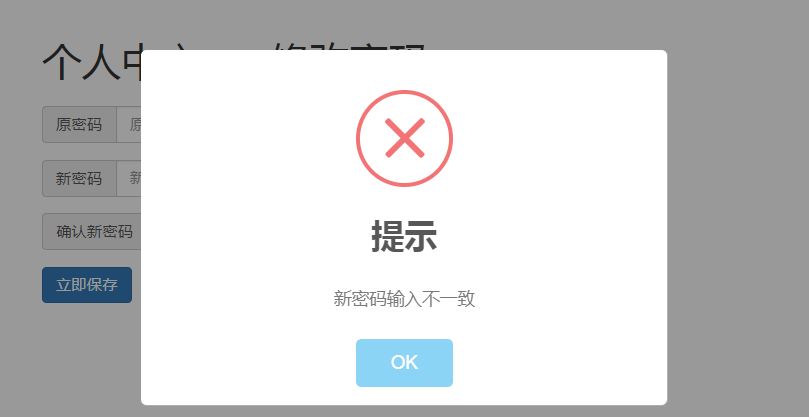
这节我们继续优化,接收到返回值,我们在前端做一些处理,如:密码修改成功,弹出一个成功的提示框。这个提示框我们采用sweetalert
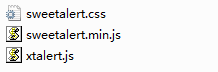
其中xtalert.js是对上面两个文件的一个封装,使得我们用sweetalert变得更简单,需要素材的同学点击右侧的二维码打赏10元,截图发送到邮箱463951510@qq.com吧,之前打赏过本论坛实战的就不用再打赏了哈!
<!DOCTYPE html>

<html lang="en">

    <head>

        <meta charset="utf-8">

        <link rel="stylesheet" href="sweetalert/sweetalert.css">

        <script src="sweetalert/sweetalert.min.js"></script>

        <script src="sweetalert/xtalert.js"></script>

        <style>

            button{

                display: block;

                margin-bottom: 10px;

            }

        </style>

    </head>

    <body>

        <button onclick="xtalert.alertError('不能删除文章!')">错误提示</button>

        <button onclick="xtalert.alertInfo('您没有权限,请联系管理员!')">信息提示</button>

        <button onclick="xtalert.alertSuccess('恭喜您!操作成功!')">成功提示</button>

        <button id='confirm-btn'>确认提示</button>

        <script>

            var confirmBtn = document.getElementById('confirm-btn');

            confirmBtn.onclick = function(event){

                xtalert.alertConfirm({

                    'msg': '恭喜!文章发表成功!是否再发一篇?',

                    'confirmText': '再发一篇',

                    'cancelText': '回到首页',

                    'confirmCallback': function(){

                        alert('点击了确认按钮');

                    },

                    'cancelCallback': function(){

                        alert('点击了取消按钮');

                    }

                });

            }

        </script>

        <button id='input-btn'>输入框提示</button>

        <script>

            var inputBtn = document.getElementById('input-btn');

            inputBtn.onclick = function(event){

                xtalert.alertOneInput({

                    'text': '请输入板块名称',

                    'confirmCallback': function(text){

                        alert(text);

                        xtalert.close();

                    }

                });

            }

        </script>

        <button onclick="xtalert.alertNetworkError()">网络错误</button>

        <button onclick="xtalert.alertInfoToast('权限受限,请联系管理员!')">信息toast</button>

        <button onclick="xtalert.alertErrorToast('权限受限,请联系管理员!')">错误toast</button>

        <button onclick="xtalert.alertSuccessToast('恭喜!操作成功!')">成功toast</button>

    </body>

</html>
sweetalert提示框使用demo
在 static/common/下创建目录sweetalert,并把以上3个文件放进去,因为不仅仅修改密码会用到提示框,项目其他地方也会用到,所以把它放到common里面。
在父模板cms_base.html引入此3个文件
<head>

...

    <link href="{{ url_for('static', filename='common/sweetalert/sweetalert.css')}}" rel="stylesheet">

    <script src="{{ url_for('static', filename='common/sweetalert/sweetalert.min.js') }}"></script>

    <script src="{{ url_for('static', filename='common/sweetalert/xtalert.js') }}"></script>

</head>
现在就可以修改resetpwd.js,对返回值做处理了
/**

 * Created by user on 2018/8/7.

 */

$(function () {

    $('#submit').click(function (event) {

        //阻止按钮默认的提交表单行为

        event.preventDefault();

        var oldpwdE = $('input[name=oldpwd]');

        var newpwdE = $('input[name=newpwd]');

        var newpwd2E = $('input[name=newpwd2]');

        var oldpwd = oldpwdE.val();

        var newpwd = newpwdE.val();

        var newpwd2 = newpwd2E.val();

        //这里使用我们自己封装好的bbsajax,它具有了csrf

        bbsajax.post({

            'url': '/cms/resetpwd/',

            'data': {

                'oldpwd': oldpwd,

                'newpwd': newpwd,

                'newpwd2': newpwd2

            },

            'success': function (data) {

                //根据状态码判断

                if (data['code'] === 200){

                    //弹出成功的提示框,提示语是从后台传过来的message

                    xtalert.alertSuccessToast(data['message']);

                    oldpwdE.val('');   //完成请求后把表单输入的值清空

                    newpwdE.val('');

                    newpwd2E.val('');

                }else{

                    xtalert.alertError(data['message']);

                    oldpwdE.val('');

                    newpwdE.val('');

                    newpwd2E.val('');

                }

            },

            'fail': function (error) {

                xtalert.alertNetworkError('网络错误');

            }

        });

    });

})
33、Flask实战第33天:sweetalert提示框的更多相关文章
- sweetalert提示框
文档 sweetalert Api:http://t4t5.github.io/sweetalert/ 开源项目源码:https://github.com/t4t5/sweetalert 在文件中首先 ...
- 「小程序JAVA实战」小程序 loading 提示框与页面跳转(37)
转自:https://idig8.com/2018/09/02/xiaochengxujavashizhanxiaochengxu-loading-tishikuangyuyemiantiaozhua ...
- 一百零二:CMS系统之sweetalert提示框和使用
实现效果 css body.stop-scrolling { height: 100%; overflow: hidden; } .sweet-overlay { background-color: ...
- 一百零三:CMS系统之使用sweetalert提示框优化返回结果
在base模板中引用 在修改密码的js中使用 $(function () { $('#submit').click(function (evnet) { evnet.preventDefault(); ...
- 提示框插件SweetAlert
SweetAlert可以替代Javascript原生的alert和confirm等函数呈现的弹出提示框, 它将提示框进行了美化,并且允许自定义, 支持设置提示框标题.提示类型.内容展示图片.确认取消按 ...
- The authenticity of host '172.16.33.53 (172.16.33.53)' can't be established的问题(日志六)
用ssh登录一个机器(换过ip地址)会出现如下错误 weiguohui@weiguohui1-virtual-machine:~/.ssh$ ssh 172.16.33.53The authentic ...
- 漂亮的提示框SweetAlert使用教程
一.简介 所使用过的弹出框插件,SweetAlert是最好用的.发展至今,已经有两个版本,一个是原版 t4t5/sweetalert , 一个是分支版 limonte/sweetalert2 ,更新相 ...
- Flask实战-留言板-安装虚拟环境、使用包组织代码
Flask实战 留言板 创建项目目录messageboard,从GreyLi的代码中把Pipfile和Pipfile.lock文件拷贝过来,这两个文件中定义了虚拟环境中需要安装的包的信息和位置,进入m ...
- JS组件Bootstrap实现弹出框和提示框效果代码
这篇文章主要介绍了JS组件Bootstrap实现弹出框和提示框效果代码,对弹出框和提示框感兴趣的小伙伴们可以参考一下 前言:对于Web开发人员,弹出框和提示框的使用肯定不会陌生,比如常见的表格新增和编 ...
随机推荐
- windows修改文件的修改或者创建时间
https://www.online-tech-tips.com/computer-tips/how-to-change-the-last-modified-date-creation-date-an ...
- 五分钟学习Java8的流编程
1.概述 Java8中在Collection中增加了一个stream()方法,该方法返回一个Stream类型.我们就是用该Stream来进行流编程的: 流与集合不同,流是只有在按需计算的,而集合是已经 ...
- cnn 卷积神经网络 人脸识别
卷积网络博大精深,不同的网络模型,跑出来的结果是不一样,在不知道使用什么网络的情况下跑自己的数据集时,我建议最好去参考基于cnn的手写数字识别网络构建,在其基础上进行改进,对于一般测试数据集有很大的帮 ...
- 如何彻底关闭退出vmware虚拟机
如何彻底关闭退出vmware虚拟机 每次使用虚拟机之后退出时,它都会在系统托盘区留下一个虚拟机图标,该如何彻底关闭退出vmware虚拟机呢? 首先我们需要运行一下虚拟机程序 1:我们如果要对虚拟机进行 ...
- ACdream 1157 Segments CDQ分治
题目链接:https://vjudge.net/problem/ACdream-1157 题意: Problem Description 由3钟类型操作: 1)D L R(1 <= L < ...
- android 与JS之间的交互
在页面布局很复杂并且是动态的时候,android本身的控件就变得不是那么地灵活了,只有借助于网页的强大布局能力才能实现,但是在操作html页面的同时也需要与android其它的组件存在交互,比如说 在 ...
- cacti (可以利用yum安装cacti的配置)
[root@localhost ~]# yum install -y epel-release[root@localhost ~]# [root@localhost ~]# yum install - ...
- Linux设备驱动--内存管理
MMU具有物理地址和虚拟地址转换,内存访问权限保护等功能.这使得Linux操作系统能单独为每个用户进程分配独立的内存空间并且保证用户空间不能访问内核空间的地址,为操作系统虚拟内存管理模块 ...
- DNS解析原理与Bind部署DNS服务
DNS是什么? DNS(Domain Name System,域名系统)是互联网上最核心的带层级的分布式系统,它负责把域名转换为IP地址.反查IP到域名的反向解析以及宣告邮件路由等信息,使得基于域名提 ...
- www.verycd.com
#encoding=utf-8 import urllib import urllib2 postdate = urllib.urlencode({'continueURL':'http://www. ...