
time/datetime/random/string/os/sys/shutil/zipfile/tarfile - 总结
time 模块:
time.time()                             #时间戳

time.localtime()                        #当前时间对象元组

time.localtime(123123)                  #根据时间戳的时间对象

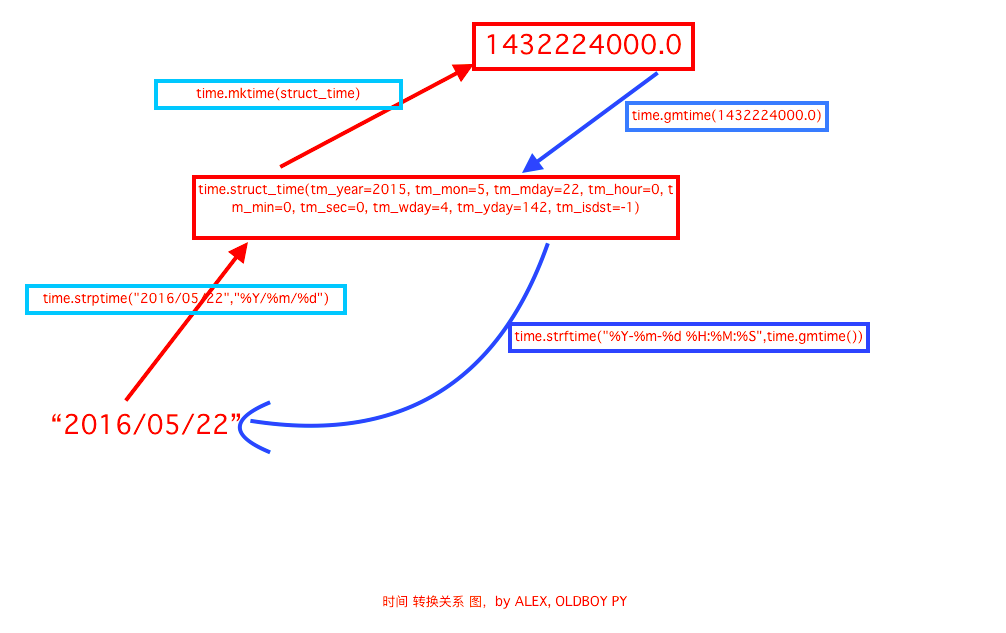
time.mktime(time.localtime())           #把时间对象转成时间戳

time.gmtime()                           #0时区,我们是东8区,比我们晚8h的时间对象元组

time.sleep(2)                           #单位s 睡一会

time.asctime()                          #美国表示时间字符串  'Sat Feb 24 13:23:36 2018'

time.ctime()                            #美国表示时间字符串

time.ctime(213123)                      #美国表示时间字符串

time.strftime('%Y-%m-%d %H:%M:%S',time.localtime())     #时间对象转化成字符串'2018-02-24 13:41:42'

time.strftime('%Y-%m-%d %H:%M:%S %A',time.localtime())  # %a %A %b %B %p %U %w %z %Z 表示不同的含义

time.strptime('2018-2-24','%Y-%m-%d')   #将字符串转化成时间对象

time.mktime(time.strptime('2018-2-24','%Y-%m-%d'))    #字符串->时间对象->时间戳
datetime 模块
datetime.datetime.now()                                    #年月日时分秒对象

datetime.datetime.now().year

datetime.datetime.now().timetuple() == time.localtime()    #时间对象

datetime.date.fromtimestamp(time.time())                   #根据时间戳快速的拿到年月日

datetime.date.fromtimestamp(time.time()).timetuple()       #时间对象的时分秒会丢

时间运算:

datetime.datetime.now()-datetime.timedelta(days=3)         # - + days hours minutes seconds 没有年,月

时间替换:

datetime.datetime.now().replace(year=2016,month=12,day=12,hour=12)   # 年月日时 没有,分 秒
random 模块
random.randint(1,3)                   #[1-3]的随机数

random.randrange(1,3)                 #[1-3)的随机数

random.random()                       #[0-1)的浮点数

random.choice('abcdefg1234!@#$')      #字符串中的随机一个

random.sample('abcdefg12345!@#$%',5)  #随机产生5

d=list(range(10)) random.shuffle(d)   #洗牌,将列表打乱

''.join(random.sample(string.ascii_lowercase+string.digits+string.punctuation,6))  #随机数
string 模块
string.digits                     #[0-9]的字符串

string.ascii_letters              #[a-z][A-Z]的字符串

string.ascii_lowercase            #[a-z]

string.ascii_uppercase            #[A-Z]

string.punctuation                #特殊字符
os 模块
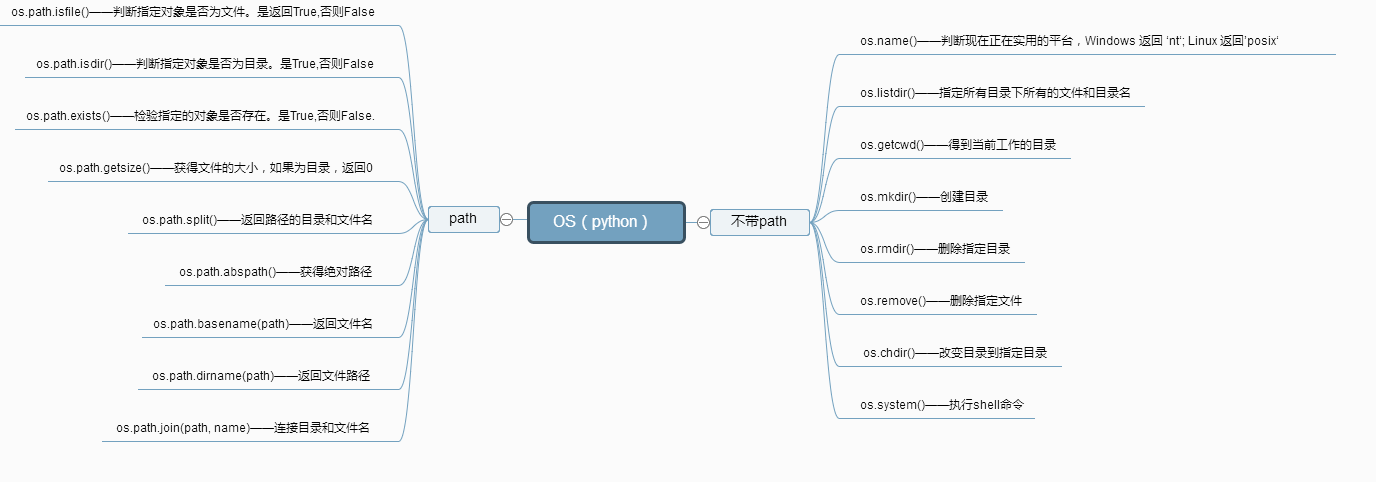
os.getcwd()                  #获取当前工作目录

os.listdir()                 #当前工作目录下的文件和目录名

os.remove('')                #当前目录下删除一个文件

os.removedirs('')            #删除空目录

os.system('ls')              #运行shell命令

os.environ                   #操作系统所在的环境变量

os.getenv('USERNAME')        #读取操作系统环境变量USERNAME的值

os.environ.setdefault('HOME','/home/alex') #设置环境变量的值仅程序运行时有效

os.linesep                   #当前平台使用的终止符 windows:\r\n  linux mac:\n

os.name                      #当前使用的平台  windows:nt  linux mac:posix

os.rename(old, new)        #重命名

os.makedirs('./test1/test2') #创建多级目录

os.mkdir('test')             #创建单个目录

os.stat(file)               #获取文件属性 http://www.runoob.com/python/os-stat.html

os.chmod('test_new.txt',stat.S_IREAD) #修改文件权限http://www.runoob.com/python/os-chmod.html

os.chdir(dirname)            #改变工作目录到dirname

os.get_terminal_size()       #获取当前终端大小

os.kill(10884,signal.SIGILL) #杀死进程

os.path.isfile()             #判断是否是文件

os.path.isdir()              #判断是否是目录

os.path.isabs()              #判断是否是绝对路径

os.path.exists()             #判断路劲文件是否真的存在

os.path.split()              #当前目录下分割

os.path.splitext()           #将文件的后缀名给分隔开

os.path.dirname()            #获取目录名

os.path.abspath()            #获取绝对路径

os.path.basename()           #获取文件名

os.path.getsize(filename)   #获取文件大小

os.path.join(dir,filename)   #结合目录名和文件名
sys 模块
sys.argv                    #命令行参数List,第一个元素是程序本身路径   print(sys.argv)   python exec.py luffy == ['exec.py', 'luffy']
sys.exit(n)=exit()          #退出程序,正常退出时exit(0)

sys.version                 #获取python解释程序的版本信息

sys.maxsize                 #最大的Int值

sys.path                    #python所在环境变量 模块搜索时的搜索路径

sys.platform                #返回操作系统的平台

sys.stdout.write('ab')      #标准输出

sys.stdin.readline()[:-1]   #标准输入

sys.getrecursionlimit()     #获取最大递归层次 1000

sys.setrecursionlimit(1000) #设置最大递归层次

sys.getdefaultencoding()    #获取python解释器默认编码 utf-8

sys.getfilesystemencoding() #获取内存数据存到文件里的默认编码 utf-8
shutil 模块
shutil.copyfileobj(open('ok.txt','r'),open('ok1.txt','w'))   #将文件内容拷贝到另一个文件中,目标文件可以不存在

shutil.copyfile('ok.txt','ok3.txt')  #拷贝文件内容,目标文件可以不存在

shutil.copymode('ok.txt','ok2.txt')  #仅拷贝权限,目标文件必须存在 mode   os.chmod('ok.txt',stat.S_IREAD)

shutil.copystat('ok.txt','ok2.txt')  #仅拷贝文件状态信息,目标文件必须存在  mode atime, mtime, flags   os.stat('ok.txt')

shutil.copy('ok.txt','ok5.txt')      #拷贝文件内容和权限,目标文件可以不存在

shutil.copy2('ok.txt','ok6.txt')     #拷贝文件内存和权限和状态信息,目标文件可以不存在

shutil.copytree('test1','test3',ignore=shutil.ignore_patterns('*.rar','*.py'))

                                     #递归的去拷贝文件夹,文件,目标目录不能存在,ignore 可忽略拷贝哪些文件,拷贝了文件的内容,权限,状态信息

shutil.rmtree('test4')               #递归的去删除文件

shutil.move('test2','test22')        #递归的去移动文件 其实就是重命名 shutil.move('./test5/test2','./test5/test22')

shutil.make_archive('bao','zip')                             #创建当前目录下的压缩包 返回路径

shutil.make_archive('bao1','zip',root_dir='./test5')         #创建root_dir下的压缩包

shutil.make_archive('./test6/bao2','tar',root_dir='./test5') #创建root_dir下的压缩包 存放在./test6下面

shutil 对压缩包的处理是调用 ZipFile 和 TarFile 两个模块来进行的,详细:
zipfile 模块 压缩&解压缩
# 压缩

z = zipfile.ZipFile('laxi.zip', 'w')

z.write('a.log')

z.write('data.data')

z.close()

# 解压

z = zipfile.ZipFile('laxi.zip', 'r')

z.extractall(path='.')

z.close()
tarfile 模块 压缩&解压缩
import tarfile

# 压缩

>>> t=tarfile.open('/tmp/egon.tar','w')

>>> t.add('/test1/a.py',arcname='a.bak')

>>> t.add('/test1/b.py',arcname='b.bak')

>>> t.close()

# 解压

>>> t=tarfile.open('/tmp/egon.tar','r')

>>> t.extractall('/egon')

>>> t.close()
time/datetime/random/string/os/sys/shutil/zipfile/tarfile - 总结的更多相关文章
- 模块 - random/string/os/sys/shutil/zipfile/tarfile
random 模块 方法: >>> random.randint(1,3) #会包含 1 2 3 3 >>> random.randrange(1,3) #会包含 ...
- (常用)time,datetime,random,shutil(zipfile,tarfile),sys模块
a.time模块import time 时间分为三种形式1.时间戳 (时间秒数的表达形式, 从1970年开始)print(time.time())start_time=time.time()time. ...
- 模块、包及常用模块(time/random/os/sys/shutil)
一.模块 模块的本质就是一个.py 文件. 导入和调用模块: import module from module import xx from module.xx.xx import xx as re ...
- Python常用模块os & sys & shutil模块
OS模块 import os ''' os.getcwd() 获取当前工作目录,即当前python脚本工作的目录路径 os.chdir("dirname") 改变当前脚本工作目录: ...
- day19:os模块&shutil模块&tarfile模块
os模块:对系统进行操作(6+3) system popen listdir getcwd chdir environ / name sep linesep import os #### ...
- 模块简介:(random)(xml,json,pickle,shelve)(time,datetime)(os,sys)(shutil)(pyYamal,configparser)(hashlib)
Random模块: #!/usr/bin/env python #_*_encoding: utf-8_*_ import random print (random.random()) #0.6445 ...
- Python常用模块(logging&re&时间&random&os&sys&shutil&序列化&configparser&&hashlib)
一. logging(日志模块) 二 .re模块 三. 时间模块 四. random模块 五. os模块 六. sys模块 七. shutil模块 八. 序列化模块(json&pickle&a ...
- python 关于操作文件的相关模块(os,sys,shutil,subprocess,configparser)
一:os模块 os模块提供了许多允许你程序与操作系统直接交互的功能 os.getcwd() 获取当前工作目录,即当前python脚本工作的目录路径 os.chdir("dirname&quo ...
- python模块之os sys shutil
os模块 os模块是与操作系统交互的一个接口 #当前执行这个python文件的工作目录相关的工作路径 os.getcwd() 获取当前工作目录,即当前python脚本工作的目录路径 os.chdir( ...
随机推荐
- Centos下运行定时任务Crontab命令介绍
1.Cron的启动与关闭 因为Cron是Linux的内置服务.能够用下面的方法启动.关闭这个服务: /sbin/service crond start //启动服务 /sbin/s ...
- Atiti。流量提升软件设计大纲规划 v1 q45
Atiti.流量提升软件设计大纲规划 v1 q45 1. 通用数据管理1 2. 网页Url管理模块1 3. 网站domain管理1 4. ad广告管理2 5. Task任务管理2 6. 任务执行功能: ...
- [转]Windows 10 安装SVN 不显示状态图标--解决方法
原文链接:https://www.cnblogs.com/lzpong/p/6187366.html --- auth:lzpong 升级win10以后,什么都正常,就是svn版本库图标不见了,图标的 ...
- Java Servlet/JSP容器配置 session id
http://www.eclipse.org/jetty/documentation/current/session-management.html#setting-session-character ...
- mysql 一些常用指令
登陆: mysql -u root -p //登陆,输入root密码 退出登陆 mysql>exit; mysql 为所有ip授权 mysql> GRANT ALL PRIVILEGES ...
- SQLi-Labs学习笔记
结构化查询语言,也叫做SQL,从根本上说是一种处理数据库的编程语言.对于初学者,数据库仅仅是在客户端和服务端进行数据存储.SQL通过结构化查询,关系,面向对象编程等等来管理数据库.编程极客们总是搞出许 ...
- 加密web.config中的邮件配置mailSettings
加密: 在命令提示符下键入: aspnet_regiis -pef connectionStrings 要加密的web.config完整路经 演示样例:C:\Program Files (x86)\M ...
- Python中如何将字符串作为变量名
应用场景描述: 通过配置文件获取服务器上配置的服务名及运行端口号,编写python脚本检测服务上服务是否在运行? #!/usr/bin/env python # -*- coding:utf-8 -* ...
- 支付宝API接口开发相关文档以及实例
支付宝实物即时到账接口,在下载该接口之前,请确定你已经签约了即时到账的服务协议,并且账号已经开通了即时到账的权限. 口常见错误问题搜集:http://union.alipay.com/alipay/z ...
- IntelliJ IDEA怎么安装
IDEA 全称 IntelliJ IDEA,是java语言开发的集成环境,IntelliJ在业界被公认为最好的java开发工具之一,尤其在智能代码助手.代码自动提示.重构. J2EE支持.各类版本工具 ...