
grpc-gateway:grpc转换为http协议对外提供服务
我所在公司的项目是采用基于Restful的微服务架构,随着微服务之间的沟通越来越频繁,就希望可以做成用rpc来做内部的通讯,对外依然用Restful。于是就想到了google的grpc。
使用grpc的优点很多,二进制的数据可以加快传输速度,基于http2的多路复用可以减少服务之间的连接次数,和函数一样的调用方式也有效的提升了开发效率。
不过使用grpc也会面临一个问题,我们的微服务对外一定是要提供Restful接口的,如果内部调用使用grpc,在某些情况下要同时提供一个功能的两套API接口,这样就不仅降低了开发效率,也增加了调试的复杂度。于是就想着有没有一个转换机制,让Restful和gprc可以相互转化。
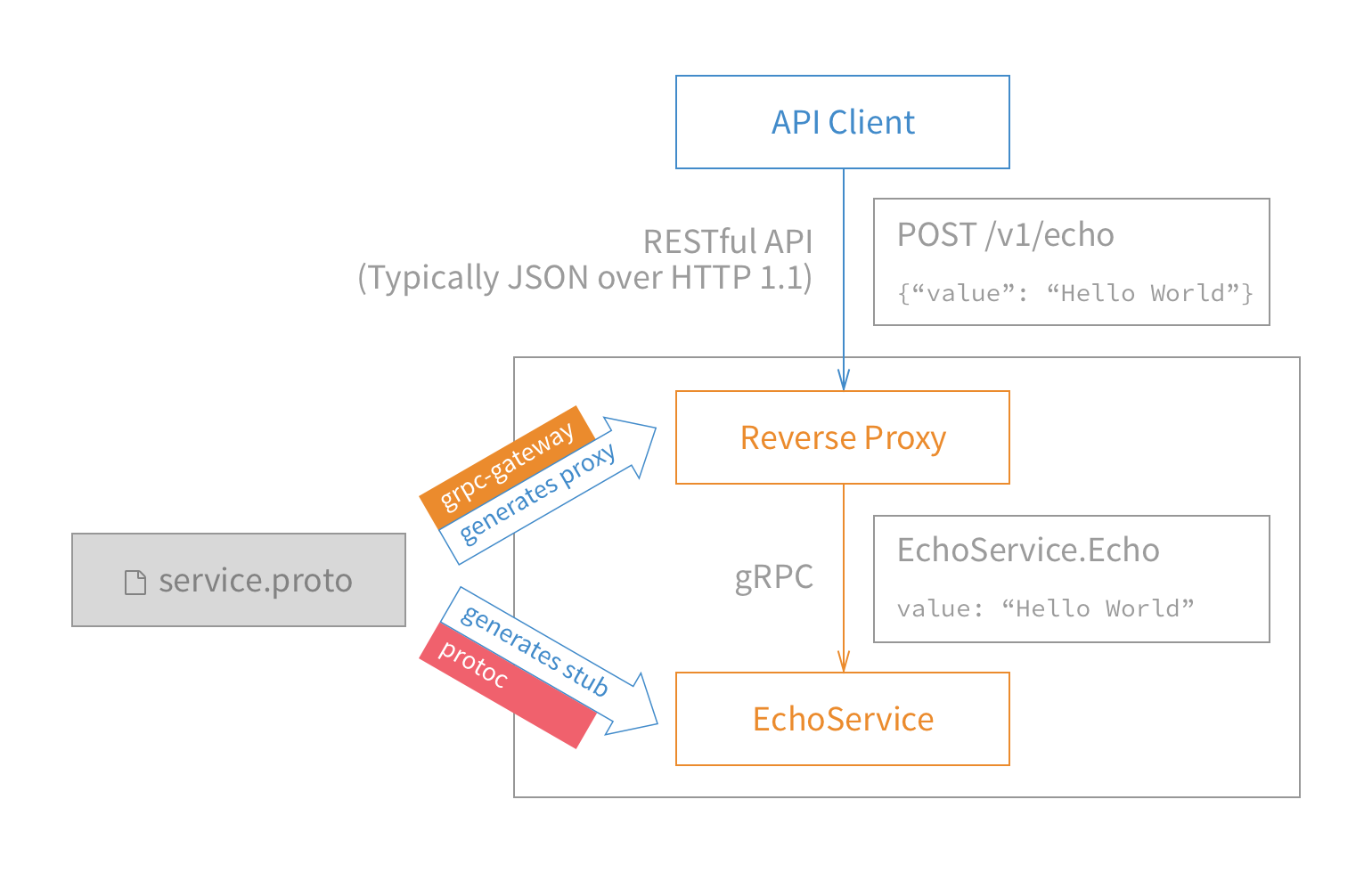
在网上看到一个解决方案,https://github.com/grpc-ecosystem/grpc-gateway,简单的说就是有一个网关服务器负责转化和代理转发。
如下图:
安装
首先要安装ProtocolBuffers 3.0及以上版本。
mkdir tmp

cd tmp

git clone https://github.com/google/protobuf

cd protobuf

./autogen.sh

./configure

make

make check

sudo make install
然后使用go get获取grpc-gateway。
go get -u github.com/grpc-ecosystem/grpc-gateway/protoc-gen-grpc-gateway

go get -u github.com/grpc-ecosystem/grpc-gateway/protoc-gen-swagger

go get -u github.com/golang/protobuf/protoc-gen-go
这里最好把编译生成的二进制文件的目录放在$PATH中,可以把$GOPATH/bin放入$PATH中。
示例
本示例是基于我的上一篇博客《google的grpc在glang中的使用》中的示例,如果有必要请先了解上一篇博客。
示例代码获取地址:https://github.com/andyidea/go-example。
代码文件结构如下
└── src

    └── grpc-helloworld-gateway

        ├── gateway

        │   └── main.go

        ├── greeter_server

        │   └── main.go

        └── helloworld

            ├── helloworld.pb.go

            ├── helloworld.pb.gw.go

            └── helloworld.proto
我们还是先看一下协议文件。helloworld.proto有一些变动,引入了google官方的api相关的扩展,为grpc的http转换提供了支持。
具体改动如下:
syntax = "proto3";

option java_multiple_files = true;

option java_package = "io.grpc.examples.helloworld";

option java_outer_classname = "HelloWorldProto";

package helloworld;

import "google/api/annotations.proto";

// The greeting service definition.

service Greeter {

  // Sends a greeting

  rpc SayHello (HelloRequest) returns (HelloReply) {

        option (google.api.http) = {

        post: "/v1/example/echo"

        body: "*"

    };

  }

}

// The request message containing the user's name.

message HelloRequest {

  string name = 1;

}

// The response message containing the greetings

message HelloReply {

  string message = 1;

}
和之前的proto文件比较,新的文件增了
import "google/api/annotations.proto";
和
option (google.api.http) = {

        post: "/v1/example/echo"

        body: "*"
这里增加了对http的扩展配置。
然后编译proto文件,生成对应的go文件
cd src/grpc-helloworld-gateway

protoc -I/usr/local/include -I. \

-I$GOPATH/src \

-I$GOPATH/src/github.com/grpc-ecosystem/grpc-gateway/third_party/googleapis \

--go_out=Mgoogle/api/annotations.proto=github.com/grpc-ecosystem/grpc-gateway/third_party/googleapis/google/api,plugins=grpc:. \

helloworld/helloworld.proto
这里生成了helloworld/helloworld.pb.go文件。
helloworld.pb.go是server服务需要的,下一步我们需要使用protoc生成gateway需要的go文件。
cd src/grpc-helloworld-gateway

protoc -I/usr/local/include -I. \

-I$GOPATH/src  -I$GOPATH/src/github.com/grpc-ecosystem/grpc-gateway/third_party/googleapis \

--swagger_out=logtostderr=true:. \

helloworld/helloworld.proto
这里生成了helloworld/helloworld.pb.gw.go文件。这个文件就是gateway用来的协议文件,用来做grpc和http的协议转换。
协议文件处理完毕,就需要写gateway代码了。
gateway代码如下:
package main

import (

	"flag"

	"net/http"

	"github.com/golang/glog"

	"github.com/grpc-ecosystem/grpc-gateway/runtime"

	"golang.org/x/net/context"

	"google.golang.org/grpc"

	gw "grpc-helloworld-gateway/helloworld"

)

var (

	echoEndpoint = flag.String("echo_endpoint", "localhost:50051", "endpoint of YourService")

)

func run() error {

	ctx := context.Background()

	ctx, cancel := context.WithCancel(ctx)

	defer cancel()

	mux := runtime.NewServeMux()

	opts := []grpc.DialOption{grpc.WithInsecure()}

	err := gw.RegisterGreeterHandlerFromEndpoint(ctx, mux, *echoEndpoint, opts)

	if err != nil {

		return err

	}

	return http.ListenAndServe(":8080", mux)

}

func main() {

	flag.Parse()

	defer glog.Flush()

	if err := run(); err != nil {

		glog.Fatal(err)

	}

}
首先echoEndpoint存储了需要连接的server信息,然后将这些信息和新建的server用gw.go中的RegisterGreeterHandlerFromEndpoint进行一个注册和绑定,这时低层就会连接echoEndpoint提供的远程server地址,这样gateway就作为客户端和远程server建立了连接,之后用http启动新建的server,gateway就作为服务器端对外提供http的服务了。
代码到此就完成了,我们测试一下。
先启动greeter_server服务,再启动gateway,这时gatway连接上greeter_server后,对外建立http的监听。
然后我们用curl发送http请求
curl -X POST -k http://localhost:8080/v1/example/echo -d '{"name": " world"}'

{"message":"Hello  world"}
流程如下:curl用post向gateway发送请求,gateway作为proxy将请求转化一下通过grpc转发给greeter_server,greeter_server通过grpc返回结果,gateway收到结果后,转化成json返回给前端。
这样,就通过grpc-gateway完成了从http json到内部grpc的转化过程。
grpc-gateway:grpc转换为http协议对外提供服务的更多相关文章
- grpc gateway 使用以及docker compose 集成
1. grpc gateway 安装 参考,比较简单,有需要的依赖可以参考相资料 mkdir tmp cd tmp git clone https://github.com/google/protob ...
- gRPC+gRPC Gateway+swagger小记
前言 本文记录了grpc-gateway的简单使用. 定义proto 先来看看最常规的 syntax = "proto3"; package protos; service Gre ...
- Go gRPC进阶-gRPC转换HTTP(十)
前言 我们通常把RPC用作内部通信,而使用Restful Api进行外部通信.为了避免写两套应用,我们使用grpc-gateway把gRPC转成HTTP.服务接收到HTTP请求后,grpc-gatew ...
- 带入gRPC:gRPC Streaming, Client and Server
带入gRPC:gRPC Streaming, Client and Server 原文地址:带入gRPC:gRPC Streaming, Client and Server 前言 本章节将介绍 gRP ...
- 带入gRPC:gRPC Deadlines
带入gRPC:gRPC Deadlines 原文地址:带入gRPC:gRPC Deadlines项目地址:https://github.com/EDDYCJY/go... 前言 在前面的章节中,已经介 ...
- gRPC Motivation and Design Principles | gRPC https://grpc.io/blog/principles/
gRPC Motivation and Design Principles | gRPC https://grpc.io/blog/principles/
- gRPC官方文档(通讯协议)
文章来自gRPC 官方文档中文版 HTTP2 协议上的 gRPC 本文档作为 gRPC 在 HTTP2 草案17框架上的实现的详细描述,假设你已经熟悉 HTTP2 的规范.产品规则采用的是ABNF 语 ...
- grpc(二)记一次grpc debug--io.grpc.StatusRuntimeException: UNKNOWN
1.起初是dingding一直报错: instance:服务器名 err:GrpcClient#placeOrder: io.grpc.StatusRuntimeException: UNKNOWN ...
- grpc:gRPC Concepts
本文介绍一些主要的gRPC概念. 服务定义 gRPC支持4种方法: 1.Unary RPCs where the client sends a single request to the server ...
随机推荐
- 【搜索】POJ-3050 基础DFS
一.题目 Description The cows play the child's game of hopscotch in a non-traditional way. Instead of a ...
- PMS---团队展示
点我查看作业原题 [队名] PMS(一群pm) [拟做的团队项目描述] 基于监控场景的视频摘要与人车检测跟踪系统 A system, under monitor scene, for video su ...
- 如何提高cxgrid的刷新速度
如果View的类型是cxGridDBTableView: 1.cxGrid.DisableControls;cxGrid.EnableControls; 如仍觉得慢,可以把 cxGrid1DBTabl ...
- golang build 的简单用法.(菜鸟初学)
1. golang 里面的 go build 可以编译代码. go build helloworld.go 2. 这里面有一个注意事项事项. 如果引用非go语言的 内置package的话 需要在环境变 ...
- (转)web性能优化
前端是庞大的,包括 HTML. CSS. Javascript.Image .Flash等等各种各样的资源.前端优化是复杂的,针对方方面面的资源都有不同的方式.那么,前端优化的目的是什么 ? 1. 从 ...
- 错误“AxImp.exe”已退出,代码为 -1163019603【转载及个人看法】
http://blog.csdn.net/duguduchong/article/details/17166123 最近使用vs2010 在重新生成解决方案的时候出现 “AxImp.exe”已退出, ...
- 数据库事务的四大特性以及4种事务的隔离级别-以及对应的5种JDBC事务隔离级别
本篇讲诉数据库中事务的四大特性(ACID),并且将会详细地说明事务的隔离级别. 如果一个数据库声称支持事务的操作,那么该数据库必须要具备以下四个特性: ⑴ 原子性(Atomicity) 原子性是指事务 ...
- 深入理解JAVA虚拟机阅读笔记4——虚拟机类加载机制
虚拟机把描述类的Class文件加载到内存,并对数据进行校验.转换解析和初始化,最终形成可以被虚拟机直接使用的Java类型,这就是虚拟机的类加载机制. 在Java语言中,类型的加载.连接和初始化过程都是 ...
- Java中split的对象被特殊字符(.或|)分隔
在Java中,一个String对象被一些特殊字符分隔时,可以使用split()方法,生成一个String[],然后进行其他的操作,就像下面这样: String str = "a1_b1_c1 ...
- Window系统 安装TFLearn
1. 确保成功安装了tensorflow 2. 查看当前tensorflow下的库文件,判断是否已经安装了h5py,scipy:conda list 3. 若没有安装,安装h5py,scipy.我的电 ...