
IOS第三方之MBProgressHUD
//
//  ViewController.m
//  MBProgressHUD
//
//  Created by City--Online on 15/6/15.
//  Copyright (c) 2015年 City--Online. All rights reserved.
//

#import "ViewController.h"
#import "MBProgressHUD.h"

@interface ViewController ()<MBProgressHUDDelegate,NSURLConnectionDataDelegate>
@property(nonatomic,strong) MBProgressHUD *hud;
@property(nonatomic,assign) long long expectedLength;
@property(nonatomic,assign) long long currentLength;
@end

@implementation ViewController

- (void)viewDidLoad {
    [super viewDidLoad];
    //普通提示框
    UIButton *simpleBtn=[UIButton buttonWithType:UIButtonTypeSystem];
    [simpleBtn setTitle:@"普通" forState:UIControlStateNormal];
    [simpleBtn addTarget:self action:@selector(btnClick:) forControlEvents:UIControlEventTouchUpInside];
    simpleBtn.frame=CGRectMake(, , , );
    simpleBtn.backgroundColor=[UIColor redColor];
    simpleBtn.tag=;
    [self.view addSubview:simpleBtn];

    //显示进度
    UIButton *progressBtn=[UIButton buttonWithType:UIButtonTypeSystem];
    [progressBtn setTitle:@"进度" forState:UIControlStateNormal];
    [progressBtn addTarget:self action:@selector(btnClick:) forControlEvents:UIControlEventTouchUpInside];
    progressBtn.frame=CGRectMake(, , , );
    progressBtn.backgroundColor=[UIColor redColor];
    progressBtn.tag=;
    [self.view addSubview:progressBtn];

    //自定义视图
    UIButton *customBtn=[UIButton buttonWithType:UIButtonTypeSystem];
    [customBtn setTitle:@"自定义" forState:UIControlStateNormal];
    [customBtn addTarget:self action:@selector(customClick:) forControlEvents:UIControlEventTouchUpInside];
    customBtn.frame=CGRectMake(, , , );
    customBtn.backgroundColor=[UIColor redColor];
    customBtn.tag=;
    [self.view addSubview:customBtn];
    //Window视图
    UIButton *windowBtn=[UIButton buttonWithType:UIButtonTypeSystem];
    [windowBtn setTitle:@"Window" forState:UIControlStateNormal];
    [windowBtn addTarget:self action:@selector(windowClick:) forControlEvents:UIControlEventTouchUpInside];
    windowBtn.frame=CGRectMake(, , , );
    windowBtn.backgroundColor=[UIColor redColor];
    windowBtn.tag=;
    [self.view addSubview:windowBtn];

    //多提示框
    UIButton *mixBtn=[UIButton buttonWithType:UIButtonTypeSystem];
    [mixBtn setTitle:@"多提示框" forState:UIControlStateNormal];
    [mixBtn addTarget:self action:@selector(mixClick:) forControlEvents:UIControlEventTouchUpInside];
    mixBtn.frame=CGRectMake(, , , );
    mixBtn.backgroundColor=[UIColor redColor];
    mixBtn.tag=;
    [self.view addSubview:mixBtn];

    //多提示框
    UIButton *connectionBtn=[UIButton buttonWithType:UIButtonTypeSystem];
    [connectionBtn setTitle:@"Connection" forState:UIControlStateNormal];
    [connectionBtn addTarget:self action:@selector(connectionClick:) forControlEvents:UIControlEventTouchUpInside];
    connectionBtn.frame=CGRectMake(, , , );
    connectionBtn.backgroundColor=[UIColor redColor];
    connectionBtn.tag=;
    [self.view addSubview:connectionBtn];

}
//普通
-(void)btnClick:(id)sender
{
    UIButton *btn=(UIButton *)sender;

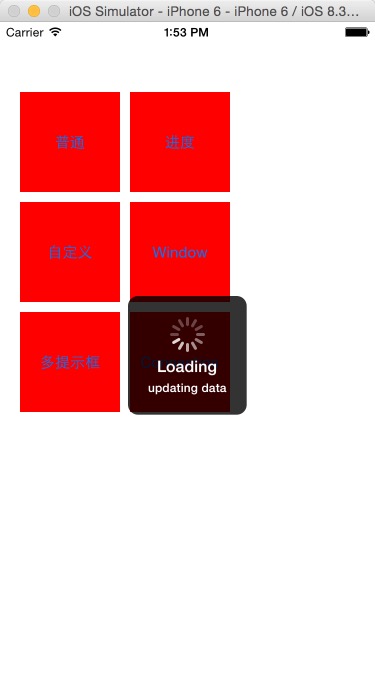
    _hud=[[MBProgressHUD alloc]initWithView:self.view];
    _hud.delegate=self;
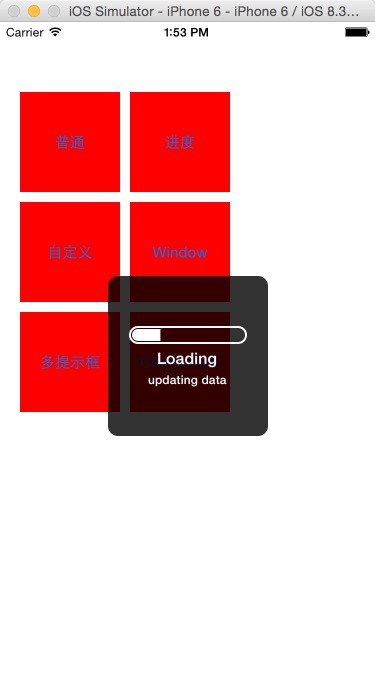
    _hud.labelText=@"Loading";
    _hud.detailsLabelText=@"updating data";
    _hud.square=YES;
    //默认
    _hud.mode=MBProgressHUDModeIndeterminate;
    ) {
        _hud.mode=MBProgressHUDModeDeterminateHorizontalBar;
    }
    [self.view addSubview:_hud];

    [_hud showAnimated:YES whileExecutingBlock:^{
        ) {
             sleep();
        }
        )
        {
            [self myProgressTask];
        }

    } completionBlock:^{
        [_hud removeFromSuperview];
    }];

}
//自定义视图
-(void)customClick:(id)sender
{
    _hud = [[MBProgressHUD alloc] initWithView:self.view];
    [self.view addSubview:_hud];
    // Make the customViews 37 by 37 pixels for best results (those are the bounds of the build-in progress indicators)
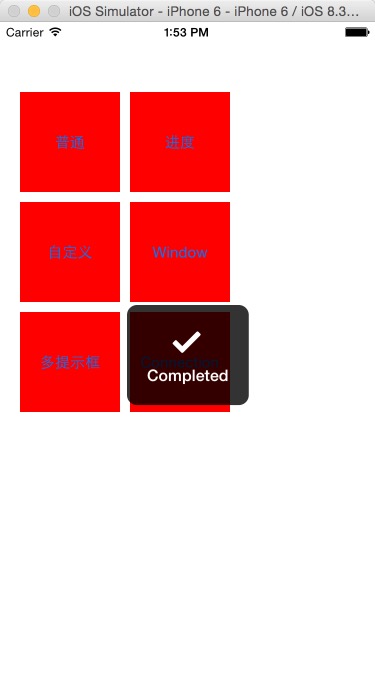
    _hud.customView = [[UIImageView alloc] initWithImage:[UIImage imageNamed:@"37x-Checkmark.png"]];

    // Set custom view mode
    _hud.mode = MBProgressHUDModeCustomView;

    _hud.delegate = self;
    _hud.labelText=@"Loading";
    _hud.detailsLabelText=@"updating data";
    _hud.square=YES;

    [_hud show:YES];
    [_hud hide:YES afterDelay:];

}

//window视图
-(void)windowClick:(id)sender
{
    _hud=[[MBProgressHUD alloc]initWithWindow:self.view.window];
    [self.view.window addSubview:_hud];
    _hud.delegate=self;
    _hud.labelText=@"Loading";
    [_hud showWhileExecuting:@selector(task) onTarget:self withObject:nil animated:YES];
}
//多提示框
-(void)mixClick:(id)sender
{
    _hud = [[MBProgressHUD alloc] initWithView:self.view];
    [self.view addSubview:_hud];

    _hud.delegate = self;
    _hud.labelText = @"Connecting";
//    _hud.minSize = CGSizeMake(135.f, 135.f);

    [_hud showWhileExecuting:@selector(mixedTask) onTarget:self withObject:nil animated:YES];

}
-(void)connectionClick:(id)sender
{
    NSURL *url=[NSURL URLWithString:@"http://a1408.g.akamai.net/5/1408/1388/2005110403/1a1a1ad948be278cff2d96046ad90768d848b41947aa1986/sample_iPod.m4v.zip"];
    NSURLRequest *request=[NSURLRequest requestWithURL:url];
    NSURLConnection *connection=[[NSURLConnection alloc]initWithRequest:request delegate:self];
    [connection start];
    _hud=[MBProgressHUD showHUDAddedTo:self.view animated:YES];
    _hud.delegate=self;
     _hud.mode=MBProgressHUDModeDeterminate;

}

-(void)connection:(NSURLConnection *)connection didReceiveResponse:(NSURLResponse *)response
{

    _expectedLength=MAX(response.expectedContentLength, );
    _currentLength=;

}
-(void)connection:(NSURLConnection *)connection didReceiveData:(NSData *)data
{
    _currentLength+=[data length];
    _hud.progress=_currentLength/(float)_expectedLength;

}
-(void)connectionDidFinishLoading:(NSURLConnection *)connection
{
    _hud.customView=[[UIImageView alloc] initWithImage:[UIImage imageNamed:@"37x-Checkmark.png"]];
    _hud.mode=MBProgressHUDModeCustomView;
    [_hud hide:YES afterDelay:];
}
-(void)connection:(NSURLConnection *)connection didFailWithError:(NSError *)error
{
    [_hud hide:YES];
}
//显示进度
- (void)myProgressTask {
    // This just increases the progress indicator in a loop
    float progress = 0.0f;
    while (progress < 1.0f) {
        progress += 0.01f;
        _hud.progress = progress;
        usleep();
    }

}
-(void)task
{
    sleep();
}
-(void)mixedTask
{
    _hud.mode=MBProgressHUDModeIndeterminate;
    _hud.labelText=@"Progressing";
    float progress=0.0f;
    while (progress<1.0f) {
        progress+=0.1f;
        _hud.progress=progress;
        usleep();
    }
    // Back to indeterminate mode
    _hud.mode = MBProgressHUDModeIndeterminate;
    _hud.labelText = @"Cleaning up";
    sleep();
    // UIImageView is a UIKit class, we have to initialize it on the main thread
    __block UIImageView *imageView;
    dispatch_sync(dispatch_get_main_queue(), ^{
        UIImage *image = [UIImage imageNamed:@"37x-Checkmark.png"];
        imageView = [[UIImageView alloc] initWithImage:image];
    });
    _hud.customView =imageView;
    _hud.mode = MBProgressHUDModeCustomView;
    _hud.labelText = @"Completed";
    sleep();
}
- (void)hudWasHidden:(MBProgressHUD *)hud {
    // Remove HUD from screen when the HUD was hidded
    [_hud removeFromSuperview];
    _hud=nil;
}
- (void)didReceiveMemoryWarning {
    [super didReceiveMemoryWarning];
    // Dispose of any resources that can be recreated.
}

@end



IOS第三方之MBProgressHUD的更多相关文章
- iOS 第三方框架-MBProgressHUD
MBProgressHUD提示框官网地址:https://github.com/jdg/MBProgressHUD 官网里已经提供了足够多的例子供我们使用,但在实现开发中,我们用到的只是其中的一小部分 ...
- iOS 第三方库、插件、知名博客总结
iOS 第三方库.插件.知名博客总结 用到的组件 1.通过CocoaPods安装 项目名称 项目信息 AFNetworking 网络请求组件 FMDB 本地数据库组件 SDWebImage 多个缩略图 ...
- 超全!整理常用的iOS第三方资源(转)
超全!整理常用的iOS第三方资源 一:第三方插件 1:基于响应式编程思想的oc 地址:https://github.com/ReactiveCocoa/ReactiveCocoa 2:hud提示框 地 ...
- iOS第三方库管理工具
作者:彷徨iOS 原文地址1:http://iostree.sinaapp.com/?p=78 原文地址2:http://blog.csdn.net/wzzvictory/article/detail ...
- fir.im Weekly - 热门 iOS 第三方库大盘点
本期 fir.im Weekly 收集的热度资源,大部分关于Android.iOS 开发工具.源码和脑洞大开的 UI 动画,希望给你带来更多的工作创意与灵感. 盘点国内程序员不常用的热门iOS第三方库 ...
- ios 第三方登录
ios 第三方登录通常的做法是, 1.登录后,获得第三方的uid,调用服务器登录接口,如服务器返回无此用户,转2,有此用户,转3. 2.服务器返回无此用户,需完善用户资料,如果完成,则在服务器创建与第 ...
- 你一定能用的上的iOS第三方库
点国内程序员不常用的热门iOS第三方库:看完,还敢自称"精通iOS开发"吗? 综合github上各个项目的关注度与具体使用情况,涵盖功能,UI,数据库,自动化测试,编程工具等类型, ...
- iOS第三方库
热门iOS第三方库:看完,还敢自称”精通iOS开发”吗? 综合github上各个项目的关注度与具体使用情况,涵盖功能,UI,数据库,自动化测试,编程工具等类型,看完,还敢自称”精通iOS开发”吗? h ...
- IOS第三方之SVProgressHUD
这个第三方和MBProgressHUD差不多,也挺简单的. // // ViewController.m // ProgressHUD // // Created by City--Online on ...
随机推荐
- <mvc:annotation-driven />到底帮我们做了啥
一句 <mvc:annotation-driven />实际做了以下工作:(不包括添加自己定义的拦截器) 我们了解这些之后,对Spring3 MVC的控制力就更强大了,想改哪就改哪里. s ...
- C# 图片反色处理 图片夜间模式
项目属性-->生成-->允许不安全代码勾上. 代码: /// <summary> /// 反色处理 /// </summary> private Bitmap In ...
- php不用递归完成无限分类,从表设计入手完整演示过程
无限分类是什么就不废话了,可以用递归实现,但是递归从数据库取东西用递归效率偏低,如果从表设计入手,就很容易做到网站导航的实现,下面是某论坛导航,如下图 网上无限分类大多不全面,今天我会从设计表开始, ...
- SharePoint列表数据清除
--获取站点对象 $spWeb =get-spweb http://123.sinochem.com --获取具体列表对象 $spList =$spWeb.GetListFromUrl("h ...
- 《Real Time Rendering》第四章 图形变换
图形变换是一个将例如点.向量或者颜色等实体进行某种转换的操作.对于计算机图形学的先驱者,掌握图形变换是极为重要的.有了他们,你就可以对象.光源以及摄像机进行定位,变形以及动画添加.你也可以确认所有的计 ...
- 如何做好iOS应用安全?这有一把行之有效的“三板斧”
本文由 网易云发布. iOS应用面临很多破解问题,常见的有IAP内购破解.山寨版本.破解版本等:大众应用上,微信抢红包.微信多开等:而在iOS游戏上,越来越泛滥的外挂问题也不断困扰着游戏厂商. 网易 ...
- MYsql 之单标查询.
http://www.cnblogs.com/wangfengming/articles/8064956.html .数据操作 .增 INSERT into t2(name,age) VALUES() ...
- [USACO06DEC] 牛奶模式Milk Patterns
题目链接:戳我 我们知道后缀数组的h数组记录的是后缀i和后缀i-1的最长公共前缀长度,后缀的前缀其实就是子串. 因为是可以重复出现的子串,所以我们只要计算哪些h数组的长度大于等于x即可.这一步操作我们 ...
- PhoneGap - 解决用nmp无法安装PhoneGap问题!
PhoneGap从2.9.0开始,只采用node安装方式,安装命令如下: npm install -g phonegap 今天我使用此命令安装PhoneGap时候,始终无法安装,在网上搜索一下,最终解 ...
- mysql-mmm
查看mmm集群状态: mmm_control show 给主机设置ip: mmm_control set_ip ip host 改变状态: mmm_control set_passive|active ...