
非定制UIImagePickerController的使用
非定制UIImagePickerController的使用

效果:
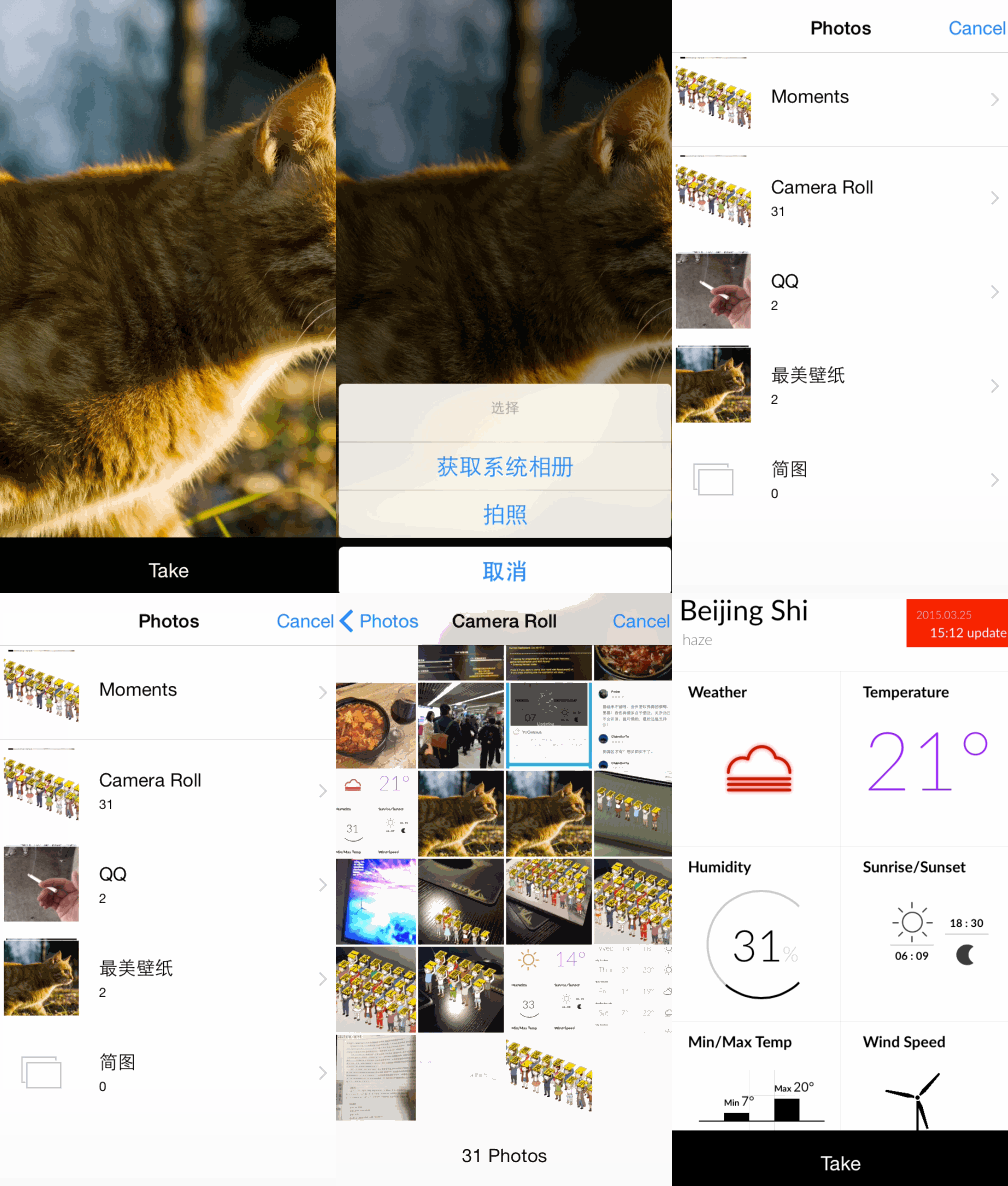
源码:
//

//  ViewController.m

//  ImagePic

//

//  Created by XianMingYou on 15/3/26.

//  Copyright (c) 2015年 XianMingYou. All rights reserved.

//

#import "ViewController.h"

typedef enum : NSUInteger {

    TAKE_IMAGE,

    TAKE_PHOTO,

} EChooseFlag;

@interface ViewController ()<UIActionSheetDelegate, UIImagePickerControllerDelegate, UINavigationControllerDelegate>

@property (nonatomic, strong) UIButton    *button;

@property (nonatomic, strong) UIImageView *showImageView;

@end

@implementation ViewController

- (void)viewDidLoad {

    [super viewDidLoad];

    [self.view addSubview:self.showImageView];

    [self.view addSubview:self.button];

}

// 照片

@synthesize showImageView = _showImageView;

- (UIImageView *)showImageView {

    if (_showImageView == nil) {

        _showImageView                     = [[UIImageView alloc] initWithFrame:self.view.bounds];

        _showImageView.layer.masksToBounds = YES;

        _showImageView.contentMode         = UIViewContentModeScaleAspectFill;

    }

    return _showImageView;

}

// 按钮

@synthesize button = _button;

- (UIButton *)button {

    if (_button == nil) {

        CGRect  rect   = self.view.bounds;

        CGFloat height = rect.size.height;

        CGFloat width  = rect.size.width;

        _button = [[UIButton alloc] initWithFrame:CGRectMake(, height - , width, )];

        [_button addTarget:self action:@selector(buttonEvent:) forControlEvents:UIControlEventTouchUpInside];

        [_button setTitle:@"Take" forState:UIControlStateNormal];

        [_button setTitleColor:[UIColor whiteColor] forState:UIControlStateNormal];

        _button.backgroundColor = [UIColor blackColor];

    }

    return _button;

}

- (void)buttonEvent:(id)sender {

    [self initActionSheet];

}

// ActionSheet

- (void)initActionSheet {

    UIActionSheet *pickerActionSheet = \

    [[UIActionSheet alloc] initWithTitle:@"选择"

                                delegate:self

                       cancelButtonTitle:@"取消"

                  destructiveButtonTitle:nil

                       otherButtonTitles:@"获取系统相册", @"拍照", nil];

    [pickerActionSheet showInView:self.view];

}

- (void)actionSheet:(UIActionSheet *)actionSheet clickedButtonAtIndex:(NSInteger)buttonIndex {

    if (buttonIndex == TAKE_IMAGE) {

        [self takeImage];

    } else if (buttonIndex == TAKE_PHOTO) {

        [self takePhoto];

    } else {

    }

}

// 获取图片控制器

- (void)takeImage {

    UIImagePickerController *imagePicker = [[UIImagePickerController alloc] init];

    imagePicker.view.backgroundColor     = [UIColor whiteColor];

    imagePicker.delegate                 = self;

    imagePicker.sourceType               = UIImagePickerControllerSourceTypePhotoLibrary;

    /*

        UIImagePickerControllerSourceTypePhotoLibrary       文件夹管理形式

        UIImagePickerControllerSourceTypeSavedPhotosAlbum   显示所有文件形式

    */

    [self presentController:imagePicker];

}

// 获取图片控制器

- (void)takePhoto {

    UIImagePickerController *imagePicker = [[UIImagePickerController alloc] init];

    imagePicker.view.backgroundColor     = [UIColor whiteColor];

    imagePicker.delegate                 = self;

    imagePicker.sourceType               = UIImagePickerControllerSourceTypeCamera;

    [self presentController:imagePicker];

}

// 图片控制器代理

- (void)imagePickerController:(UIImagePickerController *)picker didFinishPickingMediaWithInfo:(NSDictionary *)info {

    UIImage *image = info[UIImagePickerControllerOriginalImage];

    if (image) {

        self.showImageView.image = image;

        [self dismissController:picker];

    }

}

- (void)imagePickerControllerDidCancel:(UIImagePickerController *)picker {

    [self dismissController:picker];

}

- (void)dismissController:(UIViewController *)controller {

    [controller dismissViewControllerAnimated:YES completion:^{}];

}

- (void)presentController:(UIViewController *)controller {

    [self presentViewController:controller animated:YES completion:^{}];

}

@end
一些小细节:
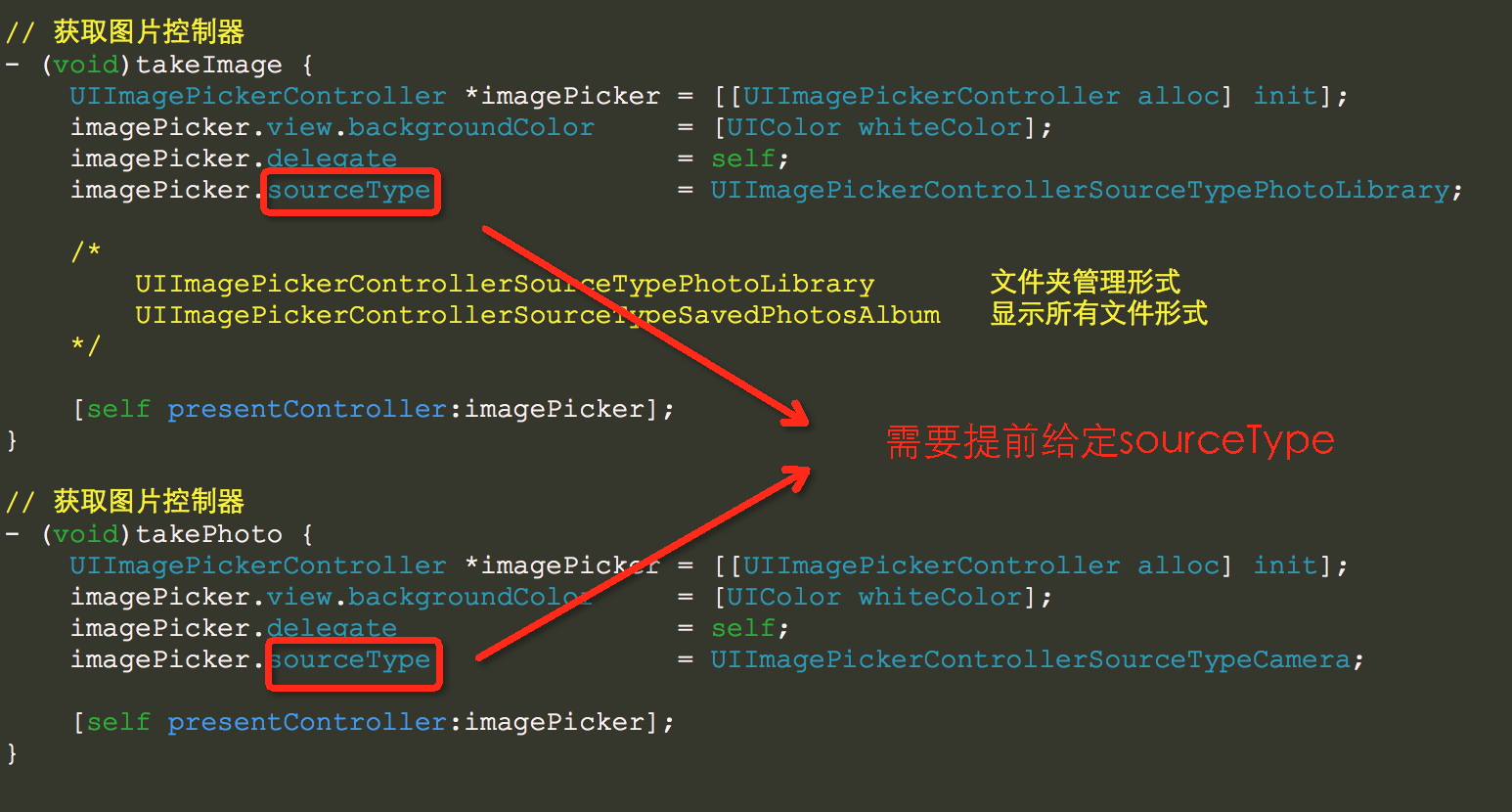
实现两个代理方法:

非定制UIImagePickerController的使用的更多相关文章
- poscms用法总结(非定制开发,不涉及后台代码)
这些天几个企业站仿下来,对poscms的用法多少有些了解了,在这个记录一下,好记性不如烂笔头嘛. 1.静态文件目录和模板文件目录 这两个目录分别放置css/js/image等静态文件和html模板文件 ...
- Apple、Google、Microsoft的用户体验设计原则
轻巧的Apple 注重设计过程: 在设计过程中引入用户交互的5个目标: 了解您的目标客户 分析用户的工作流 构造原型系统 观察用户测试 制定观察用户准则 做出设计决定 避免功能泛滥 80% 方案 优秀 ...
- 【资源】HTML5工具篇:10个营销人也能轻松使用的在线编辑平台
一 3, 2015 in 资源 作者:Teeya 2014年,HTML5 页面作为营销界新宠儿,“多快好省”的杰出代表,其灵活性高.开发成本低且制作周期短的种种特性使其在移动营销领域大放异彩. 此前, ...
- Sharepoint学习笔记—习题系列--70-576习题解析 -(Q75-Q77)
Question 75You are designing a feature for a SharePoint 2010 solution that will be activated by defa ...
- BI项目需求分析书-模板
目录 目录 .............................................................................................. ...
- 怎样做出优秀的扁平化设计风格 PPT 或 Keynote 幻灯片演示文稿?(装)
不知道你有没有想过,为什么很人多的扁平化 PPT 是这个样子: 或者是这样: 然而,还有一小撮人的扁平化 PPT 却拥有那么高颜值: 为什么会产生这么大的差距呢?丑逼 PPT 应该如何逆袭成为帅逼呢? ...
- Android app security安全问题总结
数据泄漏 本地文件敏感数据不能明文保存,不能伪加密(Base64,自定义算法等) android:allowbackup=false. 防止 adb backup 导出数据 Activity inte ...
- hp MSA50 5盘RAID5重建为4盘RAID5怎么恢复数据
[用户单位] XX省电视台[数据恢复故障描述] 一台HP 服务器,挂接一台HP MSA50磁盘阵列,内接5块1TB硬盘,原先结构为RAID5. 使用一段时间后,其中一块硬盘掉线,因RAID5支持一块硬 ...
- 6块300G SCSI RAID5,两块硬盘损坏的数据恢复总结
[用户单位]XXXX网站[数据恢复故障描述]DELL POWEREDGE 2850服务器,内置6块300G SCSI硬盘 ,组成RAID5,安装LINUX REDHAT 4操作系统,存储大量照片,文件 ...
随机推荐
- elasticsearch 导入基础数据并索引之 geo_shape
我们看到的图形, 实际是由点来完成的, 有2种类型的格子模型可用于地理星座, 默认使用的是geoHash, 还有一种4叉树(quad trees), 也可用于 判断形状与索引的形状关系 1), int ...
- Java处理正则表达式特殊字符转义 转
正则需要转义字符:'$', '(', ')', '*', '+', '.', '[', ']', '?', '\\', '^', '{', '}', '|' 异常现象: java.util.reg ...
- vue router的浏览器跳转行为
最近做的项目中,涉及vue router 路由操作,其操作方法不同,产生的行为亦不同.本文通过对比实验,对其行为进行实验对比及总结,避免混淆. vue router的单页跳转的history模式,类似 ...
- windows 系统安装 IIS 以及配置 web
Win7系统或win8自带了IIS和framework,不需要单独去下载,只需要开启后就可以运行asp.net程序 由于时间关系,先分享两个关于这个的链接: win7安装iis及web配置教程 htt ...
- [BZOJ 5072]小A的树
Description 题库链接 给你 \(n\) 个节点的一棵树,点分黑白. \(q\) 组询问,每次询问类似于"是否存在树中 \(x\) 个点的连通块恰有 \(y\) 个黑点" ...
- 从数据库表中随机获取N条记录的SQL语句
Oracle: select * from (select * from tableName order by dbms_random.value) where rownum < N MS SQ ...
- MQ疑难杂症小记
为什么使用消息队列? 什么业务场景,这个业务场景有个什么技术挑战,如果不用MQ可能会很麻烦,但是你现在用了MQ之后带给了你很多的好处.消息队列的常见使用场景,其实场景有很多,但是比较核心的有3个:解耦 ...
- Struts框架的执行流程或原理
Struts2的执行流程如下: 1.浏览器发送请求,经过一系列的过滤器,到达StrutsPreapareAndExecteFilter 2.StrutsPrepareAndExectueFilter通 ...
- HTML列表(组标签)+div(布局标签)与span
一.列表 HTML中常见的列表有三种,分别是: 1.无序列表,是一组描述列表语义的组标签,列表中每个项之间没有先后顺序:如图: 1)组标签:组标签就是由多个标签组成的一个整体,它们之间共同存在:例如 ...
- SpringMVC整合Shiro安全框架(一)
一. 准备工作 1. 本文参考自张开涛的 <跟我学Shiro> 二. 简介 1. Apache Shiro是Java的一个安全框架.可以帮助我们完成:认证.授权.加密.会话管理.与Web集 ...