
固定UIScrollView滑动的方向
固定UIScrollView滑动的方向
一般而言,我们通过这两个参数CGRectMake以及contentSize就可以自动的让UIScrollView只往一个方向滚动.但我遇到过非常奇葩的情况,那就是即使设置的CGRectMake以及contentSize没有一点点问题,这个UIScrollView也能够上下左右滚动-_-!!.
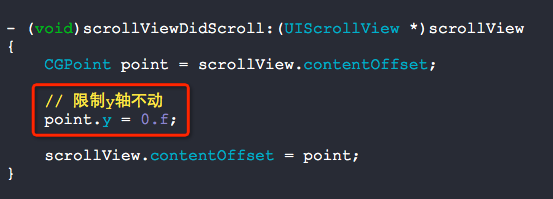
为了不依赖于CGRectMake以及contentSize,我们可以通过在代理方法scrollViewDidScroll:中进行限制即可.
没有限制之前的效果:

源码:
//

//  RootViewController.m

//  BUG

//

//  Copyright (c) 2014年 Y.X. All rights reserved.

//

#import "RootViewController.h"

@interface RootViewController ()<UIScrollViewDelegate>

{

    UIScrollView    *_showView;

}

@end

@implementation RootViewController

- (void)viewDidLoad

{

    [super viewDidLoad];

    UIImageView *showImageView = \

        [[UIImageView alloc] initWithImage:[UIImage imageNamed:@"长图.jpg"]];

    _showView = [[UIScrollView alloc] initWithFrame:CGRectMake(, , , )];

    _showView.delegate = self;

    [_showView addSubview:showImageView];

    _showView.contentSize = showImageView.frame.size;

    [self.view addSubview:_showView];

}

- (void)scrollViewDidScroll:(UIScrollView *)scrollView

{

    CGPoint point = scrollView.contentOffset;

//    point.y = 0.f;

    scrollView.contentOffset = point;

}

@end
限制后效果:

//

//  RootViewController.m

//  BUG

//

//  Copyright (c) 2014年 Y.X. All rights reserved.

//

#import "RootViewController.h"

@interface RootViewController ()<UIScrollViewDelegate>

{

    UIScrollView    *_showView;

}

@end

@implementation RootViewController

- (void)viewDidLoad

{

    [super viewDidLoad];

    UIImageView *showImageView = \

        [[UIImageView alloc] initWithImage:[UIImage imageNamed:@"长图.jpg"]];

    _showView = [[UIScrollView alloc] initWithFrame:CGRectMake(, , , )];

    _showView.delegate = self;

    [_showView addSubview:showImageView];

    _showView.contentSize = showImageView.frame.size;

    [self.view addSubview:_showView];

}

- (void)scrollViewDidScroll:(UIScrollView *)scrollView

{

    CGPoint point = scrollView.contentOffset;

    // 限制y轴不动

    point.y = .f;

    scrollView.contentOffset = point;

}

@end
核心代码:
固定UIScrollView滑动的方向的更多相关文章
- 移动应用滑动屏幕方向判断解决方案,JS判断手势方向
问题分类 滑动屏幕打开相应功能操作. 问题描述 1.用户手动滑动屏幕,根据滑动的方向,打开相应的功能(如:向上滑摇钱树经验明细,向下滑打开任务明细,向左滑打开聚宝盆物品查看等功能),滑动事件捕获问题. ...
- UIScrollView 滑动复位
需求 在每次打开界面滑动列表都是复位状态(未滑动). 分析 在制作滑动列表时常常会结合UIPanel和UIScrollView 要让滑动列表回到未滑动时的位置,那么就需要改变Panel的Clippin ...
- 头部固定下面滑动&&获取手机屏高
height(){ //获取屏高 let phone_height = document.documentElement.clientHeight; let group = this.refs.sea ...
- UIScrollView 滑动试图
UIScrollView --->UIView //创建UIScrollView testScrollView=[[UIScrollView alloc]init]; testScrollVie ...
- iOS判断UIScrollView的滚动方向
- (void) scrollViewDidScroll:(UIScrollView *)scrollView { CGFloat newY = scrollView.contentOffset.y; ...
- 判断tableVIew滑动的方向
首先设置一个旧的偏移量为0; self.oldContent = 0; - (void)scrollViewDidScroll:(UIScrollView *)scrollView { if (scr ...
- UIPanGestureRecognizer判断滑动的方向
.h文件 CGFloat const gestureMinimumTranslation = 20.0 ; typedef enum : NSInteger { kCameraMoveDirectio ...
- iOS中如何使定时器NSTimer不受UIScrollView滑动所影响
以下是使用 scheduledTimerWithTimeInterval 方法来实现定时器 - (void)addTimer { NSTimer scheduledTimerWithTimeInter ...
- 用HTML和javascript(JS)计算触屏手机手指滑动方向的演示
移动终端的流行,程序员希望通过HTML+JS完成触屏动作的识别.下面给出具体实现的例子,供大家参考. 将下面的代码复制并保存,用手机访问,现在的手机浏览器一般都支持触屏,针对本演示来讲就是支持三个js ...
随机推荐
- 使用Pelican在Github(国外线路访问)和Coding(国内线路访问)同步托管博客
本文原文地址:使用Pelican在Github(国外线路访问)和Coding(国内线路访问)同步托管博客 介绍: Github Pages 禁用了百度爬虫,因此百度搜索引擎经常抓取不到在Github上 ...
- 爬虫实战(二) 51job移动端数据采集
在上一篇51job职位信息的爬取中,对岗位信息div下各式各样杂乱的标签,简单的Xpath效果不佳,加上string()函数后,也不尽如人意.因此这次我们跳过桌面web端,选择移动端进行爬取. ...
- java主线程结束和子线程结束之间的关系
(一)Main线程是个非守护线程,不能设置成守护线程. 这是因为,main线程是由java虚拟机在启动的时候创建的.main方法开始执行的时候,主线程已经创建好并在运行了.对于运行中的线程,调用Thr ...
- Nodejs学习笔记(二)—事件模块
一.简介及资料 http://nodejs.org/api/events.html http://www.infoq.com/cn/articles/tyq-nodejs-event events ...
- SharePoint 2013 EventHanlder工具
之前在07的时候使用SharePoint Event Receiver Manager (2007 & 2010)来管理SharePoint的Event Handler,但是2013后作者没有 ...
- HtmlUnit: A Simple Example: Check Yahoo Email---转载
1. src http://www.muneebahmad.com/index.php/archives/81 package com.examples.htmlunit; import java.i ...
- HDU 1863 畅通工程(Prim算法求解MST)
题目: 省政府“畅通工程”的目标是使全省任何两个村庄间都可以实现公路交通(但不一定有直接的公路相连,只要能间接通过公路可达即可).经过调查评估,得到的统计表中列出了有可能建设公路的若干条道路的成本.现 ...
- Vertica使用Database Designer创建完整的设计
Vertica Database Designer 分析逻辑架构,示例数据库可以分析实力查询. 创建可自动部署或手动部署的物理架构设计(一组投射) 任何不具备数据库专业知识的人员均可使用 可以随时运行 ...
- Eclipse中让Scala缩进变为4
Windows->preference->Scala->Editor->Formatter->Spaces to indent
- tcpcopy架构
tcpCopy 1.0 的最新架构分为三个角色: Online Server(OS):上面要部署 TCPCopy,从数据链路层(pcap 接口)抓请求数据包,发包是从IP层发出去: Test Serv ...