
固定UIScrollView滑动的方向
固定UIScrollView滑动的方向
一般而言,我们通过这两个参数CGRectMake以及contentSize就可以自动的让UIScrollView只往一个方向滚动.但我遇到过非常奇葩的情况,那就是即使设置的CGRectMake以及contentSize没有一点点问题,这个UIScrollView也能够上下左右滚动-_-!!.
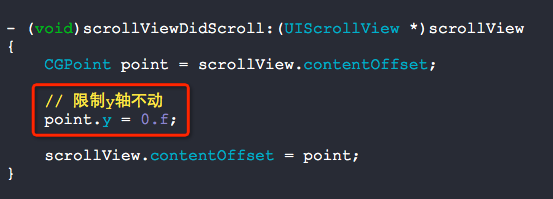
为了不依赖于CGRectMake以及contentSize,我们可以通过在代理方法scrollViewDidScroll:中进行限制即可.
没有限制之前的效果:

源码:
//

//  RootViewController.m

//  BUG

//

//  Copyright (c) 2014年 Y.X. All rights reserved.

//

#import "RootViewController.h"

@interface RootViewController ()<UIScrollViewDelegate>

{

    UIScrollView    *_showView;

}

@end

@implementation RootViewController

- (void)viewDidLoad

{

    [super viewDidLoad];

    UIImageView *showImageView = \

        [[UIImageView alloc] initWithImage:[UIImage imageNamed:@"长图.jpg"]];

    _showView = [[UIScrollView alloc] initWithFrame:CGRectMake(, , , )];

    _showView.delegate = self;

    [_showView addSubview:showImageView];

    _showView.contentSize = showImageView.frame.size;

    [self.view addSubview:_showView];

}

- (void)scrollViewDidScroll:(UIScrollView *)scrollView

{

    CGPoint point = scrollView.contentOffset;

//    point.y = 0.f;

    scrollView.contentOffset = point;

}

@end
限制后效果:

//

//  RootViewController.m

//  BUG

//

//  Copyright (c) 2014年 Y.X. All rights reserved.

//

#import "RootViewController.h"

@interface RootViewController ()<UIScrollViewDelegate>

{

    UIScrollView    *_showView;

}

@end

@implementation RootViewController

- (void)viewDidLoad

{

    [super viewDidLoad];

    UIImageView *showImageView = \

        [[UIImageView alloc] initWithImage:[UIImage imageNamed:@"长图.jpg"]];

    _showView = [[UIScrollView alloc] initWithFrame:CGRectMake(, , , )];

    _showView.delegate = self;

    [_showView addSubview:showImageView];

    _showView.contentSize = showImageView.frame.size;

    [self.view addSubview:_showView];

}

- (void)scrollViewDidScroll:(UIScrollView *)scrollView

{

    CGPoint point = scrollView.contentOffset;

    // 限制y轴不动

    point.y = .f;

    scrollView.contentOffset = point;

}

@end
核心代码:
固定UIScrollView滑动的方向的更多相关文章
- 移动应用滑动屏幕方向判断解决方案,JS判断手势方向
问题分类 滑动屏幕打开相应功能操作. 问题描述 1.用户手动滑动屏幕,根据滑动的方向,打开相应的功能(如:向上滑摇钱树经验明细,向下滑打开任务明细,向左滑打开聚宝盆物品查看等功能),滑动事件捕获问题. ...
- UIScrollView 滑动复位
需求 在每次打开界面滑动列表都是复位状态(未滑动). 分析 在制作滑动列表时常常会结合UIPanel和UIScrollView 要让滑动列表回到未滑动时的位置,那么就需要改变Panel的Clippin ...
- 头部固定下面滑动&&获取手机屏高
height(){ //获取屏高 let phone_height = document.documentElement.clientHeight; let group = this.refs.sea ...
- UIScrollView 滑动试图
UIScrollView --->UIView //创建UIScrollView testScrollView=[[UIScrollView alloc]init]; testScrollVie ...
- iOS判断UIScrollView的滚动方向
- (void) scrollViewDidScroll:(UIScrollView *)scrollView { CGFloat newY = scrollView.contentOffset.y; ...
- 判断tableVIew滑动的方向
首先设置一个旧的偏移量为0; self.oldContent = 0; - (void)scrollViewDidScroll:(UIScrollView *)scrollView { if (scr ...
- UIPanGestureRecognizer判断滑动的方向
.h文件 CGFloat const gestureMinimumTranslation = 20.0 ; typedef enum : NSInteger { kCameraMoveDirectio ...
- iOS中如何使定时器NSTimer不受UIScrollView滑动所影响
以下是使用 scheduledTimerWithTimeInterval 方法来实现定时器 - (void)addTimer { NSTimer scheduledTimerWithTimeInter ...
- 用HTML和javascript(JS)计算触屏手机手指滑动方向的演示
移动终端的流行,程序员希望通过HTML+JS完成触屏动作的识别.下面给出具体实现的例子,供大家参考. 将下面的代码复制并保存,用手机访问,现在的手机浏览器一般都支持触屏,针对本演示来讲就是支持三个js ...
随机推荐
- GBDT多分类示例
相当于每次都是用2分类,然后不停的训练,最后把所有的弱分类器来进行汇总 样本编号 花萼长度(cm) 花萼宽度(cm) 花瓣长度(cm) 花瓣宽度 花的种类 1 5.1 3.5 1.4 0.2 山鸢尾 ...
- springboot-18-springboot的参数封装
springboot的参数封装, 和springmvc相识 简单参数的封装 1.直接把表单的参数写在Controller相应的方法的形参中,适用于get方式提交,不适用于post方式提交. /** * ...
- ibatis中的cdata和xml中cdata的含义
ibatis的cdata用于sqlmap文件中,二sqlmap本身就是xml文件,即解析cdata的方法与xml文件的cdata相同. 简单来说:cdata就是用来表明纯文本的,如果没有这个的话 &l ...
- redis实战笔记(10)-第10章 扩展Redis
本章主要内容 扩展读性能 扩展写性能以及内存容量 扩展复杂的查询 随着Redis的使用越来越多, 只使用一台Redis服务器没办法存储所有数据或者没办法处理所有读写请求的问题迟早都会出现, 这 ...
- 百度地图VUE-REACT
针对目前火热的前端开发框架React和VUE,为了方便使用这两种框架开发的同学们能更好的使用百度地图JSAPI,我们分别开源了基于百度地图JSAPI的React组件库和VUE组件库.VUE:https ...
- ajax读取图片后排列问题(先加载完图片再排列)
网上找了个瀑布流的图片排列插件.从数据库读取图片路径后显示时出现了位置重叠问题. $.ajax({ type: "POST", url: "index.aspx" ...
- 基于Ionic的移动框架搭建
- SQL中利用ROW_NUMBER()进行分页查询
SELECT ContractName ,ContractNO, State,CreateDate FROM (SELECT ContractName ,ContractNO,CreateDate, ...
- SQL——Sql_Server中如何判断表中某字段、判断表、判断存储过程以及判断函数是否存在
一.比如说要判断表A中的字段C是否存在两个方法: (1) 直接查表——有点笨,有点常规 IF EXISTS ( SELECT 1 FROM SYSOBJECTS T1 INNER JOIN SYSCO ...
- 一个简单的DLL生成和测试
DLL文件内容: SKLDll.h #ifndef _SKLDLL_H_#define _SKLDLL_H_ #ifndef DLL_API #define DLL_API extern " ...